With Sage Business Cloud Accounting modules in Boost.space Integrator, you can watch, create, update, search, retrieve, and delete:
sales quotes
sales invoices
purchase invoices
customers
contact payments
products
services
stock items
To get started with Sage Business Cloud Accounting, create an account at sage.com.
Connect Sage Business Cloud Accounting to Boost.space Integrator
To connect Sage Business Cloud Accounting app:
Suppose you have several businesses in different countries. In that case, you won’t be able to create connections with different country parameters one by one immediately due to the browser caсhing login or password data.
If you need to create a different region connection, you must wait approximately one day or more, use Incognito mode, or delete Sage caсhe in browser settings.
Log in to your Boost.space Integrator account, insert a Sage Business Cloud Accounting module in your scenario, and click Create a Connection.
Optional: In the Connection name field, enter a name for the connection.
In the Country field, select the applicable country for your Sage account.
Optional: In the Language field, select the applicable language.
If creating a custom app, add the redirect URI as https:www.integromat.com/oauth/cb/sage-accounting.
Click Save.
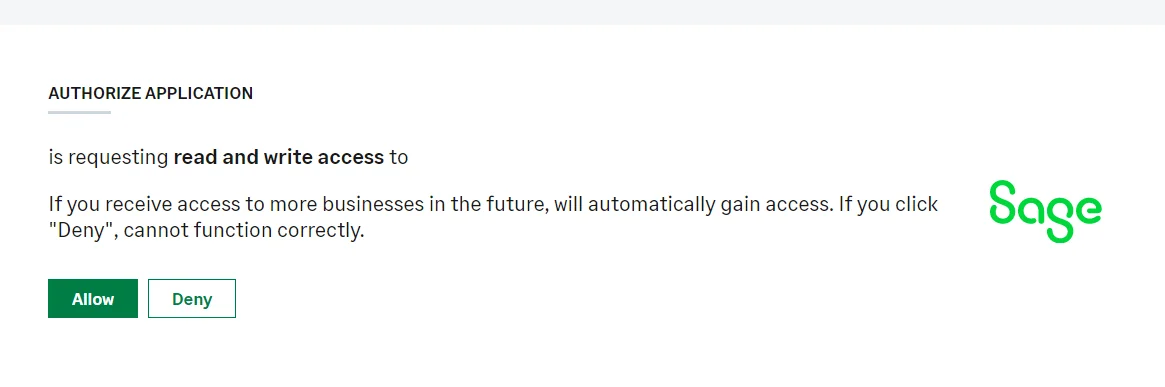
Confirm the access by clicking Allow.
You have successfully connected the Sage Business Cloud Accounting app and can now build scenarios.
Sales Quotes
You can watch, create, update, search, retrieve, and delete sales quotes using the following modules.
Watch Sales Quotes
Watches for new or updated sales quotes.
Connection
Establish a connection to your Sales Business Cloud Accounting account.
Current Business ID
Select the Current Business ID whose sales quotes you want to watch.
Watch
Select the sales quotes to watch:
Created Sales Quotes
Updated Sales Quotes
Limit
Set the maximum number of sales quotes Boost.space Integrator will return during one execution cycle.
Create a Sales Quote
Creates a new sales quote.
Connection
Establish a connection to your Sales Business Cloud Accounting account.
For field descriptions, see the Sales Business Cloud Accounting API reference.
Update a Sales Quote
Updates a sales quote.
Connection
Establish a connection to your Sales Business Cloud Accounting account.
Current Business ID
Select or map the Current Business ID whose sales quote you want to update.
For field descriptions, see the Sales Business Cloud Accounting API reference.
Get a Sales Quote
Retrieves a specific sales quote.
Connection
Establish a connection to your Sales Business Cloud Accounting account.
Current Business ID
Select or map the Current Business ID whose sales quote you want to retrieve.
For field descriptions, see the Sales Business Cloud Accounting API reference.
Search Sales Quotes
Searches for sales quotes or lists them all.
Connection
Establish a connection to your Sales Business Cloud Accounting account.
Limit
Set the maximum number of sales quotes Boost.space Integrator will return during one execution cycle.
See Sage Business Cloud Accounting Sales Quotes API reference for entering the field values to search for the sales quotes that match the specified value.
Delete a Sales Quote
Deletes a sales quote.
Connection
Establish a connection to your Sales Business Cloud Accounting account.
Current Business ID
Select the Current Business ID whose sales quotes you want to delete.
Sales Quote ID
Select or map the Sales Quote ID you want to delete.
Sales Invoices
You can watch, create, update, search, retrieve, and delete sales invoices using the following modules.
Watch Sales Invoice
Watches for new or updated sales invoices.
Connection
Establish a connection to your Sales Business Cloud Accounting account.
Current Business ID
Select the Current Business ID whose sales invoices you want to watch.
Watch
Select the sales invoices to watch:
Created Sales invoices
Updated Sales invoices
Limit
Set the maximum number of sales invoices Boost.space Integrator will return during one execution cycle.
Create a Sales Invoice
Create a new sales invoice.
Connection
Establish a connection to your Sales Business Cloud Accounting account.
For field descriptions, see the Sales Business Cloud Accounting API reference.
Update a Sales Invoice
Updates a sales invoice.
Connection
Establish a connection to your Sales Business Cloud Accounting account.
Sales Invoice ID
Select or map the Sales Invoice ID whose details you want to update.
For field descriptions, see the Sales Business Cloud Accounting API reference.
Get a Sales Invoice
Retrieves a specific sales invoice.
Connection
Establish a connection to your Sales Business Cloud Accounting account.
Sales Invoice ID
Select or map the Sales Invoice ID whose details you want to retrieve.
For field descriptions, see the Sales Business Cloud Accounting API reference.
Search Sales Invoice
Searches for sales invoices or lists them all.
Connection
Establish a connection to your Sales Business Cloud Accounting account.
Limit
Set the maximum number of sales invoices Boost.space Integrator will return during one execution cycle.
See Sales Business Cloud Accounting Sales Invoice API reference for entering the field values to search the sales invoices that match the specified value.
Void a Sales Invoice
Voids a sales invoice.
Connection
Establish a connection to your Sales Business Cloud Accounting account.
Current Business ID
Select or map the Current Business ID whose sales invoice you want to delete.
Sales Invoice ID
Select or map the Invoice ID you want to delete.
Void Reason
Enter the reason for voiding the Sales Invoice.
Purchase Invoices
You can watch, create, update, search, retrieve, and delete purchase invoices using the following modules.
Watch Purchase Invoices
Watches for new or updated purchase invoices.
Connection
Establish a connection to your Sales Business Cloud Accounting account.
Current Business ID
Select the Current Business ID whose purchase invoices you want to watch.
Watch
Select the purchase invoices to watch:
Created Purchase Invoices
Updated Purchase Invoices
Limit
Set the maximum number of purchase invoices Boost.space Integrator will return during one execution cycle.
Create a Purchase Invoice
Creates a new purchase invoice.
Connection
Establish a connection to your Sales Business Cloud Accounting account.
For field descriptions, see the Sales Business Cloud Accounting API reference.
Update a Purchase Invoice
Updates a purchase invoice.
Connection
Establish a connection to your Sales Business Cloud Accounting account.
Current Business ID
Select or map the Current Business ID whose details you want to update.
For field descriptions, see the Sales Business Cloud Accounting API reference.
Get a Purchase Invoice
Retrieves a specific purchase invoice.
Connection
Establish a connection to your Sales Business Cloud Accounting account.
Purchase Invoice ID
Select or map the Purchase Invoice ID whose details you want to retrieve.
For field descriptions, see the Sales Business Cloud Accounting API reference.
Search Purchase Invoices
Searches for purchase invoices or lists them all.
Connection
Establish a connection to your Sales Business Cloud Accounting account.
Limit
Set the maximum number of purchase invoices Boost.space Integrator will return during one execution cycle.
See Sales Business Cloud Accounting Sales Purchase API reference for entering the field values to search the purchase invoices that match the specified value.
Delete a Purchase Invoice
Deletes a Purchase Invoice.
Connection
Establish a connection to your Sales Business Cloud Accounting account.
Current Business ID
Select or map the Current Business ID whose details you want to delete.
Purchase Invoice ID
Select or map the Purchase Invoice ID you want to delete.
Customers
You can watch, create, update, search, retrieve, and delete the customers using the following modules.
Watch Customers
Watches for new customers.
Connection
Establish a connection to your Sales Business Cloud Accounting account.
Current Business ID
Select the Current Business ID whose customers you want to watch.
Watch
Select the customers to watch:
Created customers
Updated customers
Limit
Set the maximum number of customers Boost.space Integrator will return during one execution cycle.
Create a Customer
Creates a new customer contact.
Connection
Establish a connection to your Sales Business Cloud Accounting account.
For field descriptions, see the Sales Business Cloud Accounting API reference.
Update a Customer
Updates a customer contact.
Connection
Establish a connection to your Sales Business Cloud Accounting account.
Customer ID
Select or map the Customer ID whose details you want to update.
For field descriptions, see the Sales Business Cloud Accounting API reference.
Get a Customer
Retrieves a specific customer contact.
Connection
Establish a connection to your Sales Business Cloud Accounting account.
Customer ID
Select or map the Customer ID whose details you want to retrieve.
For field descriptions, see the Sales Business Cloud Accounting API reference.
Search Customers
Searches for customers or lists them all.
Connection
Establish a connection to your Sales Business Cloud Accounting account.
Limit
Set the maximum number of customers Boost.space Integrator will return during one execution cycle.
See Sales Business Cloud Accounting Customer API reference for entering the field values to search the customers that match the specified value.
Delete a Customer
Deletes a customer.
Connection
Establish a connection to your Sales Business Cloud Accounting account.
Current Business ID
Select or map the Current Business ID whose customers you want to delete.
Customer ID
Select or map the Customer ID you want to delete.
Contact Payments
You can watch, create, update, search, retrieve, and delete contact payments using the following modules.
Watch Contact Payments
Watches for new or updated contact payments.
Connection
Establish a connection to your Sales Business Cloud Accounting account.
Current Business ID
Select the Current Business ID whose contact payments you want to watch.
Watch
Select the contact payments to watch:
Created Contact Payments
Updated Contact Payments
Limit
Set the maximum number of contact payments invoices Boost.space Integrator will return during one execution cycle.
Create a Contact Payment
Creates a contact payment.
Connection
Establish a connection to your Sales Business Cloud Accounting account.
For field descriptions, see the Sales Business Cloud Accounting Contact Payment API reference.
Update a Contact Payment
Updates a contact payment.
Connection
Establish a connection to your Sales Business Cloud Accounting account.
Current Business ID
Select or map the Current Business ID whose details you want to update.
Contact Payment ID
Select or map the Contact Payment ID whose details you want to update.
For field descriptions, see the Sales Business Cloud Accounting Contact Payment API reference.
Get a Contact Payment
Retrieves a specific contact payment.
Connection
Establish a connection to your Sales Business Cloud Accounting account.
Contact Payment ID
Select or map the Contact Payment ID whose details you want to retrieve.
For field descriptions, see the Sales Business Cloud Accounting Contact Payment API reference.
Search Contact Payments
Searches for contact payments or lists them all.
Connection
Establish a connection to your Sales Business Cloud Accounting account.
Limit
Set the maximum number of contact payments contact payments Boost.space Integrator will return during one execution cycle.
See Sales Business Cloud Accounting Contact Payments API reference for entering the field values to search the contacts that match the specified value.
Delete a Contact Payment
Deletes a contact payment.
Connection
Establish a connection to your Sales Business Cloud Accounting account.
Current Business ID
Select or map the Current Business ID whose contact payments you want to delete.
Contact Payment ID
Select or map the Contact Payment ID you want to delete.
Products
You can watch, create, update, search, retrieve, and delete the products using the following modules.
Watch Products
Watches for new or updated products.
Connection
Establish a connection to your Sales Business Cloud Accounting account.
Current Business ID
Select the Current Business ID whose products you want to watch.
Watch
Select the products to watch:
Created Products
Updated Products
Limit
Set the maximum number of products Boost.space Integrator will return during one execution cycle.
Create a Product
Creates a new product.
Connection
Establish a connection to your Sales Business Cloud Accounting account.
For field descriptions, see the Sales Business Cloud Accounting Product API reference.
Update a Product
Updates a product.
Connection
Establish a connection to your Sales Business Cloud Accounting account.
Current Business ID
Select or map the Current Business ID whose products you want to update.
Product ID
Select or map the Product ID whose details you want to update.
For field descriptions, see the Sales Business Cloud Accounting Product API reference.
Get a Product
Retrieves a specific product.
Connection
Establish a connection to your Sales Business Cloud Accounting account.
Product ID
Select or map the Product ID whose details you want to retrieve.
For field descriptions, see the Sales Business Cloud Accounting Product API reference.
Search Products
Searches for products or lists them all.
Connection
Establish a connection to your Sales Business Cloud Accounting account.
Limit
Set the maximum number of products Boost.space Integrator will return during one execution cycle.
See Sales Business Cloud Accounting Product API reference for entering the field values to search for the products that match the specified value.
Delete a Product
Deletes a product.
Connection
Establish a connection to your Sales Business Cloud Accounting account.
Current Business ID
Select or map the Current Business ID whose products you want to delete.
Product ID
Select or map the Product ID you want to delete.
Services
You can watch, create, update, search, retrieve, and delete services using the following modules.
Watch Services
Watches for new or updated services.
Connection
Establish a connection to your Sales Business Cloud Accounting account.
Current Business ID
Select the Current Business ID whose services you want to watch.
Watch
Select the services to watch:
Created Services
Updated Services
Limit
Set the maximum number of services Boost.space Integrator will return during one execution cycle.
Create a Service
Creates a new service.
Connection
Establish a connection to your Sales Business Cloud Accounting account.
For field descriptions, see the Sales Business Cloud Accounting Services API reference.
Update a Service
Updates a service.
Connection
Establish a connection to your Sales Business Cloud Accounting account.
Current Business ID
Select or map the Current Business ID whose details you want to update.
Service ID
Select or map the Service ID whose details you want to update.
For field descriptions, see the Sales Business Cloud Accounting Services API reference.
Get a Service
Retrieves a specific service.
Connection
Establish a connection to your Sales Business Cloud Accounting account.
Service ID
Select or map the Service ID whose details you want to retrieve.
For field descriptions, see the Sales Business Cloud Accounting Services API reference.
Search Services
Searches for services or lists them all.
Connection
Establish a connection to your Sales Business Cloud Accounting account.
Limit
Set the maximum number of services Boost.space Integrator will return during one execution cycle.
See Sales Business Cloud Accounting Services API reference for entering the field values to search the services that match the specified value.
Delete a Service
Deletes a service.
Connection
Establish a connection to your Sales Business Cloud Accounting account.
Current Business ID
Select or map the Current Business ID whose services you want to delete.
Service ID
Select or map the Service ID you want to delete.
Stock Items
You can watch, create, update, search, retrieve, and delete stock items using the following modules.
Watch Stock Items
Watches for new or updated stock items.
Connection
Establish a connection to your Sales Business Cloud Accounting account.
Current Business ID
Select the Current Business ID whose stock items you want to watch.
Watch
Select the stock items to watch:
Created Stock Items
Updated Stock Items
Limit
Set the maximum number of stock items Boost.space Integrator will return during one execution cycle.
Create a Stock Item
Creates a new stock item.
Connection
Establish a connection to your Sales Business Cloud Accounting account.
For field descriptions, see the Sales Business Cloud Accounting Stock Items API reference.
Update a Stock Item
Updates a stock item.
Connection
Establish a connection to your Sales Business Cloud Accounting account.
Current Business ID
Select or map the Current Business ID whose stock items you want to update.
Stock Item ID
Select or map the Stock Items ID whose details you want to update.
For field descriptions, see the Sales Business Cloud Accounting Stock Items API reference.
Get a Stock Item
Retrieves a specific stock item.
Connection
Establish a connection to your Sales Business Cloud Accounting account.
Stock Item ID
Select or map the Stock Item ID whose details you want to retrieve.
For field descriptions, see the Sales Business Cloud Accounting Stock Items API reference.
Search Stock Items
Searches for stock items or lists them all.
Connection
Establish a connection to your Sales Business Cloud Accounting account.
Limit
Set the maximum number of stock items Boost.space Integrator will return during one execution cycle.
See Sales Business Cloud Accounting Stock Items API reference for entering the field values to search the services that match the specified value.
Delete a Stock Item
Deletes a stock item.
Connection
Establish a connection to your Sales Business Cloud Accounting account.
Current Business ID
Select or map the Current Business ID whose stock items you want to delete.
Stock Item ID
Select or map the Stock Item ID you want to delete.