Copper
With Copper modules in Boost.space Integrator, you can
-
create, list, retrieve, and remove activities, and listen for activity events
-
list and retrieve users
-
create, convert, update, retrieve, list, and remove leads, listen for lead events, and list lead’s activities
-
create, update, retrieve, and list people, listen for person events, list a person’s activities, view opportunities related to a person, view records related to a person, relate items, remove opportunities from a person and remove persons
-
listen for company events, create, update, retrieve, and list companies, list company’s activities, and remove a company
-
listen for opportunity events, create, update, retrieve, list, and remove opportunities
-
listen for project events, create, update, retrieve, list, and remove projects
-
listen for tasks events, create, update, retrieve, list, and remove tasks
-
create connections, remove webhook subscriptions, and relate items
To get started with Copper, create an account at www.copper.com.
Connect Copper to Boost.space Integrator
To connect Copper app, you need to obtain the API key and Email from your Copper account and insert them in the Copper module scenario.
-
Log in to your Copper account.
-
Click Settings > Integrations > API Keys > Generate API KEY.
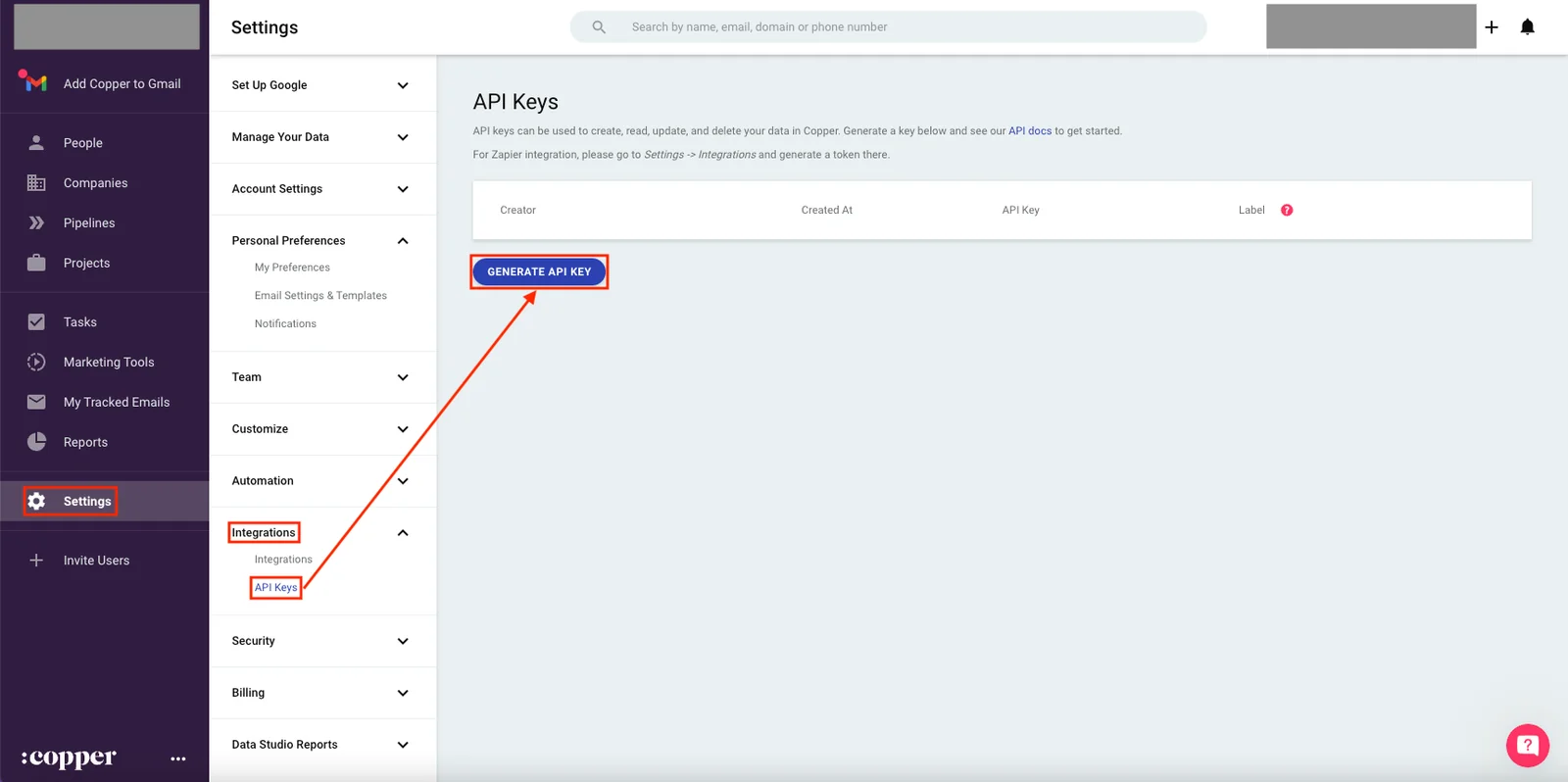
-
Copy the email address and API key to a safe place.

-
In your Boost.space Integrator account, insert any Copper module in to scenario and click the Add button next to the Connection field.
-
Optional: In the Connection name field, enter a name for the connection.
-
In the API Key and E-mail Address fields, enter the details copied in step 3 and click Save.
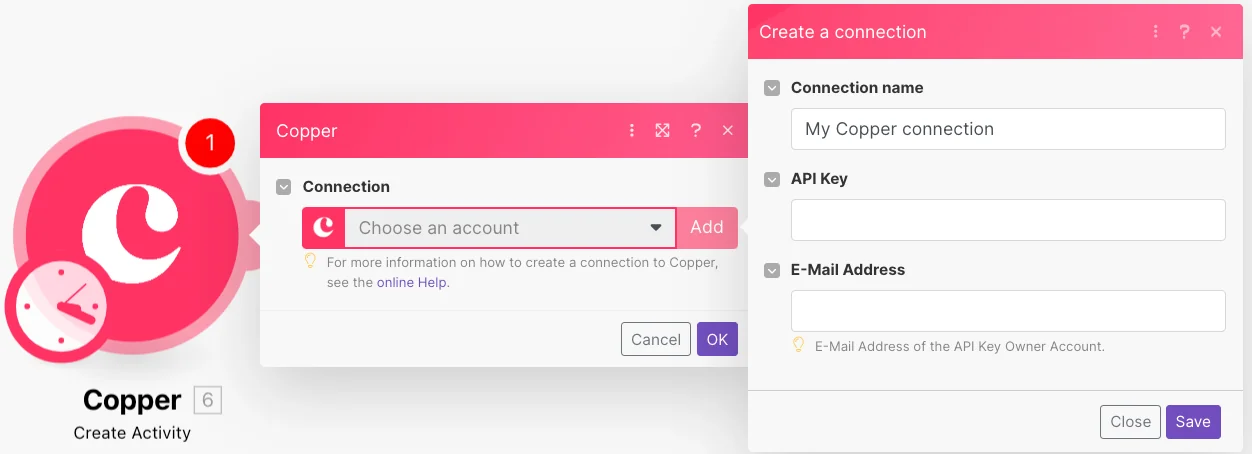
You have successfully established the connection. You can now begin editing your scenario and adding more Copper modules. If your connection needs reauthorization at any point, follow the connection renewal steps here.
Activities
You can create, list, retrieve, and remove activities, and listen for activity events using the following modules.
Listen for Activity Events
Receives notifications about activity creation/deletion/update.
Boost.space Integrator automatically creates a webhook in Copper once you add an instant trigger to your scenario.
Webhook name
Enter a name for the webhook.
Connection
Establish a connection to your Copper account.
Event
Select an activity event to listen to. For example, new.
Create Activity
Creates a new activity.
Connection
Establish a connection to your Copper account.
Parent Type
Select the parent type and its parent value. For example, person.
Activity Type
Select the activity type. For example, meeting.
Description
Enter the activity details.
Get Activity
Gets details for a selected activity ID.
Connection
Establish a connection to your Copper account.
Activity ID
Select or map the Activity ID whose details you want to retrieve.
List Activities
Lists all activities related to a connected account.
Connection
Establish a connection to your Copper account.
Activity Types
Select the activity types whose activities you want to list. For example, meeting.
Limit
Set the maximum number of activities Boost.space Integrator will return during one execution cycle. The default value is 10.
Remove Activity
Removes the activity with a given ID.
Connection
Establish a connection to your Copper account.
Activity ID
Select or map the Activity ID you want to delete.
Users
You can list and retrieve users using the following modules.
Get User
Gets details for a selected user ID.
Connection
Establish a connection to your Copper account.
User ID
Select or map the User ID whose details you want to retrieve.
List Users
Lists all users related to a connected account.
Connection
Establish a connection to your Copper account.
Limit
Set the maximum number of users Boost.space Integrator will return during one execution cycle. The default value is 10.
Leads
You can create, convert, update, retrieve, list, and remove leads, listen for lead events, and list lead activities using the following modules.
Listen for Lead Events
Receives notifications about lead creation/deletion/update.
Boost.space Integrator automatically creates a webhook in Copper once you add an instant trigger to your scenario.
Webhook name
Enter a name for the webhook.
Connection
Establish a connection to your Copper account.
Event
Select the lead event to listen to. For example, new.
Create Lead
Creates a new lead.
Connection
Establish a connection to your Copper account.
For field descriptions, see the Copper Lead API reference.
Convert Lead
Converts a selected lead to a person in the system (optionally assigns company and opportunity).
Connection
Establish a connection to your Copper account.
Lead ID
Select or map the Lead ID you want to convert.
For field descriptions, see the Copper Lead API reference.
Update Lead
Updates a selected lead.
Connection
Establish a connection to your Copper account.
Lead ID
Select or map the Lead ID whose details you want to update.
For field descriptions, see the Copper Lead API reference.
Get Lead
Gets details for a selected lead ID.
Connection
Establish a connection to your Copper account.
Lead ID
Select or map the Lead ID whose details you want to retrieve.
List Leads
Lists all leads related to a connected account.
Connection
Establish a connection to your Copper account.
Limit
Set the maximum number of leads Boost.space Integrator will return during one execution cycle. The default value is 10.
For field descriptions, see the Copper Lead API reference.
List Lead’s Activities
Lists all activities related to a connected account.
Connection
Establish a connection to your Copper account.
Lead ID
Select or map the Lead ID whose activities you want to list.
Limit
Set the maximum number of activities Boost.space Integrator will return during one execution cycle. The default value is 10.
Remove Lead
Removes the lead with a given ID.
Connection
Establish a connection to your Copper account.
Lead ID
Select or map the Lead ID you want to remove.
People
You can create, update, retrieve, and list people, listen for person events, list a person’s activities, view opportunities related to a person, view records related to a person, relate items, remove opportunities from a person and remove a person using the following modules.
Listen for Person Events
Receives notifications about person/creation/deletion/update.
Webhook name
Enter a name for the webhook.
Connection
Establish a connection to your Copper account.
Create Person
Creates a new person.
Connection
Establish a connection to your Copper account.
For field descriptions, see the Copper People API reference.
Update Person
Updates a selected person.
Connection
Establish a connection to your Copper account.
Person ID
Select or map the Person ID whose details you want to update.
For field descriptions, see the Copper People API reference.
Get Person
Gets details for a selected person ID.
Connection
Establish a connection to your Copper account.
Person ID
Select or map the Person ID whose details you want to retrieve.
List People
List all people related to a connected account.
Connection
Establish a connection to your Copper account.
Limit
Set the maximum number of people Boost.space Integrator will return during one execution cycle. The default value is 10.
See the Copper People API reference for entering the field values to list the people that match the specified value.
List Person’s Activities
Lists all activities of a selected person.
Boost.space Integrator automatically creates a webhook in Copper once you add an instant trigger to your scenario.
Connection
Establish a connection to your Copper account.
Person ID
Select or map the Person ID whose activities you want to list.
Limit
Set the maximum number of person’s activities Boost.space Integrator will return during one execution cycle. The default value is 10.
View Opportunities Related to Person
Shows all records related to the person with a selected ID.
Connection
Establish a connection to your Copper account.
Person ID
Select or map the Person ID whose opportunities you want to view.
Limit
Set the maximum number of opportunities Boost.space Integrator will return during one execution cycle. The default value is 10.
Relate Items
Relates people and opportunities from a person.
Connection
Establish a connection to your Copper account.
Person ID
Select or map the Person ID to whose opportunities you want to relate.
Opportunity ID
Select or map the Opportunity ID to relate.
Remove Opportunity from Person
Removes a related opportunity from a person.
Connection
Establish a connection to your Copper account.
Person ID
Select or map the Person ID whose opportunities you want to remove.
Opportunity ID
Select or map the Opportunity ID to remove.
Remove Person
Removes the person with a selected ID.
Connection
Establish a connection to your Copper account.
Person ID
Select or map the Person ID you want to remove.
Companies
You can listen for company events, create, update, retrieve, and list companies, list companies’ activities, and remove a company using the following modules.
Listen for Company Events
Receives notifications about company creation/deletion/update.
Boost.space Integrator automatically creates a webhook in Copper once you add an instant trigger to your scenario.
Webhook name
Enter a name for the webhook.
Connection
Establish a connection to your Copper account.
Event
Select the event you want to listen to. For example, new.
Create Company
Creates a new company.
Connection
Establish a connection to your Copper account.
For field descriptions, see the Copper Companies API reference.
Update Company
Updates a selected company.
Connection
Establish a connection to your Copper account.
Company ID
Select or map the Company ID whose details you want to update.
For field descriptions, see the Copper Companies API reference.
Get Company
Gets details for a selected company ID.
Connection
Establish a connection to your Copper account.
Company ID
Select or map the Company ID whose details you want to retrieve.
List Companies
List all companies related to a connected account.
Connection
Establish a connection to your Copper account.
Limit
Set the maximum number of companies Boost.space Integrator will return during one execution cycle. The default value is 10.
See the Copper Companies API reference for entering the field values to list the companies that match the specified value.
List Company’s Activities
Lists all activities for a selected company.
Connection
Establish a connection to your Copper account.
Company ID
Select or map the Company ID whose activities you want to list.
Limit
Set the maximum number of activities Boost.space Integrator will return during one execution cycle. The default value is 10.
Remove Company
Removes the company with a given ID.
Connection
Establish a connection to your Copper account.
Company ID
Select or map the Company ID you want to delete.
Opportunities
You can listen for opportunity events, and create, update, retrieve, list, and remove opportunities using the following modules.
Listen for Opportunity Events
Receives notifications about opportunity creation/deletion/update.
Boost.space Integrator automatically creates a webhook in Copper once you add an instant trigger to your scenario.
Webhook name
Enter a name for the webhook.
Connection
Establish a connection to your Copper account.
Event
Select the event to listen to. For example, new.
Create Opportunity
Creates a new opportunity.
Connection
Establish a connection to your Copper account.
For field descriptions, see the Copper Opportunity API reference.
Update Opportunity
Updates a selected opportunity.
Connection
Establish a connection to your Copper account.
Opportunity ID
Select or map the Opportunity ID whose details you want to update.
For field descriptions, see the Copper Opportunity API reference.
Get Opportunity
Gets details for a selected opportunity ID.
Connection
Establish a connection to your Copper account.
Opportunity ID
Select or map the Opportunity ID whose details you want to retrieve.
List Opportunities
Lists all opportunities related to a connected account.
Connection
Establish a connection to your Copper account.
Limit
Set the maximum number of opportunities Boost.space Integrator will return during one execution cycle. The default value is 10.
See the Copper Opportunities API reference for entering the field values to list the opportunities that match the specified value.
Remove Opportunity
Removes the opportunity with a given ID.
Connection
Establish a connection to your Copper account.
Opportunity ID
Select or map the Opportunity ID you want to delete.
Projects
You can listen for project events, and create, update, retrieve, list, and remove projects using the following modules.
Listen for Project Events
Receives notifications about project creation/deletion/update.
Webhook name
Enter a name for the webhook.
Connection
Establish a connection to your Copper account.
Event
Select the event to listen to. For example, new.
Create Project
Creates a new project.
Connection
Establish a connection to your Copper account.
For field descriptions, see the Copper Project API reference.
Update Project
Updates a selected project.
Connection
Establish a connection to your Copper account.
Project ID
Select or map the Project ID whose details you want to update.
For field descriptions, see the Copper Project API reference.
Get Project
Gets details for a selected project ID.
Connection
Establish a connection to your Copper account.
Project ID
Select or map the Project ID whose details you want to retrieve.
List Projects
Lists all projects related to a connected account.
Connection
Establish a connection to your Copper account.
Limit
Set the maximum number of projects Boost.space Integrator will return during one execution cycle. The default value is 10.
See the Copper Project API reference for entering the field values to list the people that match the specified value.
Remove project
Removes the project with a selected ID.
Connection
Establish a connection to your Copper account.
Project ID
Select or map the Project ID you want to remove.
Tasks
You can listen for task events, and create, update, retrieve, list, and remove tasks using the following modules.
Listen for Task Events
Receives notification about task creation/deletion/update.
Boost.space Integrator automatically creates a webhook in Copper once you add an instant trigger to your scenario.
Webhook name
Enter a name for the webhook.
Connection
Establish a connection to your Copper account.
Event
Select the event to listen to. For example, new.
Create Task
Creates a new task.
Connection
Establish a connection to your Copper account.
For field descriptions, see the Copper Task API reference.
Update Task
Updates a selected task.
Connection
Establish a connection to your Copper account.
Task ID
Select or map the Task ID whose details you want to update.
For field descriptions, see the Copper Task API reference.
Get Task
Gets details for a selected task ID.
Connection
Establish a connection to your Copper account.
Task ID
Select or map the Task ID whose details you want to retrieve.
List Tasks
Lists all tasks related to a connected account.
Connection
Establish a connection to your Copper account.
Limit
Set the maximum number of tasks Boost.space Integrator will return during one execution cycle. The default value is 10.
See the Copper Task API reference for entering the field values to list the task that matches the specified value.
Remove Task
Removes the task with a selected ID.
Connection
Establish a connection to your Copper account.
Task ID
Select or map the Task ID you want to remove.
Other
You can create connections, remove webhook subscriptions, and relate items using the following modules.
Create Connection
Use connect fields to create custom relationships between records. Common examples include keeping track of the relationship between parent/child companies, people-to-people referrals, assignments, managers, investors, and more.
Connection
Establish a connection to your Copper account.
For field descriptions, see the Copper API reference.
Remove Webhook Subscription
Removes the webhook subscription with a selected ID.
Connection
Establish a connection to your Copper account.
Webhook Subscription
Select or map the webhook subscription you want to remove.
Relate Items (Advanced)
Relates Leads, People, Companies, Opportunities, Projects, and Tasks to each other.
Connection
Establish a connection to your Copper account.
Related
Select the related item:
-
Person
-
Project
-
Opportunity
Person ID
Select or map the Person ID to relate to the opportunity.
To
Select the related item to relate to the person.
Opportunity ID
Select or map the Opportunity ID to relate it to the person.
Legacy article, imported from the original Boost.space knowledge base (/knowledge-base/applications/crm-and-sales-tools/prosperworks/).

