Scenario detail
The Scenario detail page lets you access the Scenario editor and find information about a scenario such as execution history and incomplete executions.
Finding the Scenarios detail page :
- In the left sidebar, click Scenarios.
- Click on the scenario whose detail page you want to see.
The Scenario detail page loads for the scenario you chose.
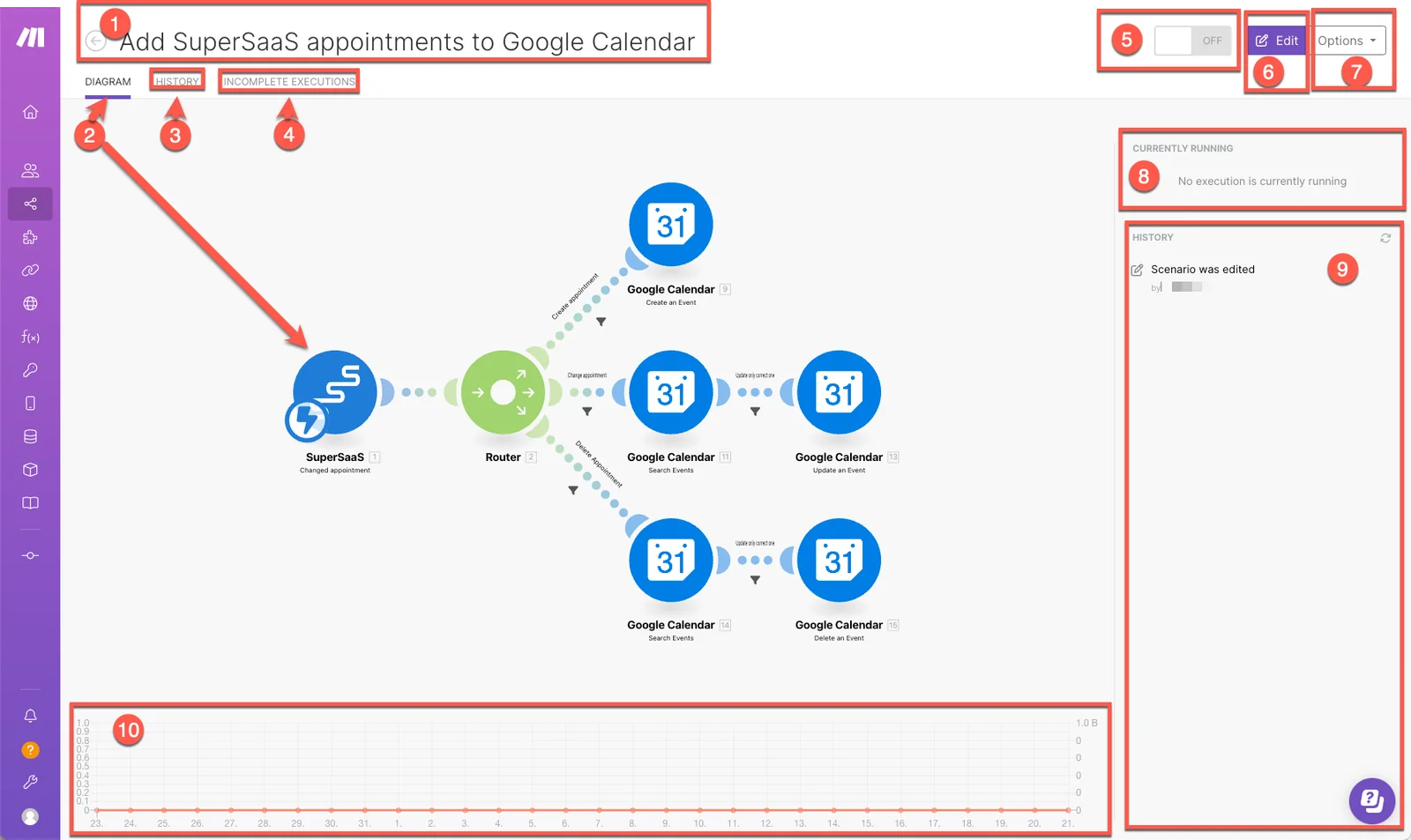
-
Scenario name: a customizable name for your scenario. Double click the name to edit it.
-
Diagram: a visual representation of the scenario. The Diagram is the same as you see in the scenario editor.
-
History: click to see an overview of the history of the scenario, including any changes to the scenario and scenario execution history, which includes the following:
- Status of each run (success or error)
- Run duration
- Number of operations
- Size of data transfer
- Link to detailed information
-
Incomplete executions: links to information about any incomplete executions of the scenario. It includes the following information for each incomplete run:
- Date created
- Size of data transfer
- Retry
- Resolved
- Number of attempts
-
Activate scenario: after you create your scenario, you can activate the scenario to make it to run according to its schedule. By clicking the ON/OFF button you can turn the scenario ON to activate or OFF to deactivate. Once it is turned on, the scenario runs according to its schedule.
-
Edit: The Edit button will open up the scenario editor, where you can edit your scenario.
-
Options: The Options button provides you with extra options without having to open up the scenario editor. These include:
- Scheduling
- Rename
- Clone
- Delete
-
Currently running: displays information on any current executions of your scenario.
-
History summary: a clickable overview that includes any edits to the scenario and a concise scenario execution history which includes:
- Date and time of the scenario run
- Number of operations consumed
- Duration of the scenario run
- Amount of data transferred
Click any run to see its details.
-
Operations and data transfer stats: a line graph that displays the amount of operations and data transfer used by the scenario.

