Infor M3
Any references to third-party products or services do not constitute Boost.space Product Documentation nor do they create any contractual obligations. This material is for informational purposes only and is subject to change without notice.
Boost.space does not warrant the availability, accuracy, reliability, completeness, or usefulness of any information regarding the subject of third-party services or systems.

The Infor M3 modules allow you to create, update, retrieve, and list the supplier invoices in your Infor M3 account.
Getting Started with Infor M3
Prerequisites
- An Infor M3 account – create an account at infor.com/resources/infor-m3-cloud.
The module dialog fields that are displayed in bold (in the Boost.space Integrator scenario, not in this documentation article) are mandatory!
Connecting Infor M3 to Boost.space Integrator
To connect your Infor M3, you need Host URL, Username, and Password for your Infor M3 Cloud account and insert it in the Create a connection dialog in the Boost.space Integrator module. Please reach out to your system administrator for the details.
-
Log in to your Boost.space Integrator account, add a module from the Infor M3 app into an Boost.space Integrator scenario.
-
Click Add next to the Connection field.
-
In the Connection name field, enter a name for the connection.
-
In the Username and Password fields, enter your Infor M3 account credentials, and click Continue.
The connection has been established.
Supplier Invoice
List Supplier Invoices by Payee
Retrieves a list of supplier invoices by the payee.
Connection
Establish a connection to your Infor M3 account.
DIVI: Division
Enter (map) the division whose supplier invoices you want to list. The value should be a minimum of three characters in length.
SPYN: Payee
Enter (map) the payee whose supplier invoice you want to list. The value should be a minimum of 10 characters in length.
SUNO: Supplier
Enter (map) the supplier whose invoices you want to list. The value should be a minimum of 10 characters in length.
IBTP: Invoice Batch Type
Enter (map) the invoice batch type to list the invoices that match the specified type.
SUPA: Invoice Status
Enter (map) the invoice status to list the invoices that match the specified status.
Limit
Set the maximum number of invoices Boost.space Integrator should return during one execution cycle.
List Supplier Invoice Line Items
Retrieves a list of supplier invoice line items by the invoice batch number.
Connection
Establish a connection to your Infor M3 account.
DIVI: Division
Enter (map) the division whose supplier invoices line items you want to list. The value should be a minimum of three characters in length.
INBN: Invoice Batch Number
Enter (map) the invoice batch number whose line items you want to list.
Limit
Set the maximum number of line items Boost.space Integrator should return during one execution cycle.
Create a Supplier Invoice
Creates a new supplier invoice.
Connection
Establish a connection to your Infor M3 account.
DIVI: Division
Enter (map) the division whose supplier invoices line items you want to list. The value should be a minimum of three characters in length.
IVDT: Invoice Date
Enter (map) the date on the invoice.
SINO: Supplier Invoice Number
Enter (map) the supplier’s invoice number. The value must be at most 24 characters long.
SUNO: Supplier
Enter (map) the supplier name. The value must be at most 10 characters long.
CUCD: Currency Code
Enter (map) the applicable currency code for the supplier invoice. For example, USD.
TEPY: Payment Terms
Enter (map) the payment terms. The value must be at most three characters long.
PYME: Payment Method – Accounts Payable
Enter (map) the details of the payment method. The value must be at most three characters long.
BKID: Bank Account Identity
Enter (map) the supplier’s bank account identity information. The value must be at most five characters long.
TDCD: Trade Code
Enter (map) the supplier’s trade code. The value must be at most four characters long.
CRTP: Exchange Rate Type
Enter (map) the supplier’s applicable exchange rate type. The value must be at most 24 characters long.
DEDA: Delivery Date
Enter (map) the when the invoice delivery date. The value must be at most 24 characters long.
IBTP: Invoice Batch Type
Enter (map) the invoice batch type. The value must be at most two characters long.
SPYN: Payee
Enter (map) the payee’s name. The value must be at most 10 characters long.
ARAT: Exchange Rate
Enter (map) the exchange rate applicable to the invoice.
CUAM: Foreign Currency Amount
Enter (map) the invoice amount in the supplier’s applicable foreign currency.
VTAM: VAT
Enter (map) the applicable VAT amount on the invoice.
ACDT: Accounting Date
Enter (map) the accounting date of the invoice.
APCD: Authorized User
Enter (map) the authorized user details of the invoice.
IMCD: Invoice Matching
Select whether the invoice matching the details.
SERS: Service Code
Enter (map) the service code applicable to the invoice.
DUDT: Due Date
Enter (map) the date on which the invoice is due.
FECN: Future Rate Agreement Number
Enter (map) the future rate agreement number.
FTCO: From/To Country
Enter (map) the country name from which the invoice is billed or delivered to.
BSCD: Base Country
Enter (map) supplier’s base country details.
PUNO: Purchase Order Number
Enter (map) the purchase order number in the invoice.
PUDT: Order Date
Enter (map) the order date of the invoice.
TECD: Cash Discount Term
Enter (map) the cash discount term applicable to the invoice.
CDT1: Cash Discount Date 1
Enter (map) the date on which the cash discount is applicable.
CDP1: Cash Discount Percentage 1
Enter (map) the cash discount in percentage.
CDC1: Cash Discount Amount 1
Enter (map) the cash discount amount.
CDT2: Cash Discount Date 2
Enter (map) the date on which the cash discount is applicable.
CDP2: Cash Discount Percentage
Enter (map) the cash discount in percentage.
CDC2: Cash Discount Amount 2
Enter (map) the cash discount amount.
CDT3: Cash Discount Date 3
Enter (map) the date on which the cash discount is applicable.
CDP3: Cash Discount Percentage 3
Enter (map) the cash discount in percentage.
CDC3: Cash Discount Amount 3
Enter (map) the cash discount amount.
TTXA: Total Taxable Amount
Enter (map) the total tax applicable to the invoice.
TASD: Cash Discount Base
Enter (map) the cash discount base details.
PRPA: Prepaid Amount
Enter (map) the prepaid amount paid for the invoice.
VRNO: VAT Registration Number
Enter (map) the invoice VAT registration number.
TXAP: Tax Applicable
Enter (map) the tax applicable to the invoice.
DNCO: Document Code
Enter (map) the document code
SDAP: AP Standard Document
Enter (map) the invoice applicable AP standard document number.
DNRE: Debit Note Reason
Enter (map) the amount debit note reason.
PYAD: Our Invoicing Address
Enter (map) your invoice address.
SDA1: Text line 1
Enter (map) the information about the invoice.
SDA2: Text line 2
Enter (map) the information about the invoice.
SDA3: Text line 3
Enter (map) the information about the invoice.
EALP: EAN Location Code Payee
Enter (map) the payee’s EAN location code.
EALR: EAN Location Code Consignee
Enter (map) the consignee’s EAN location code details.
EALS: EAN Location Code Supplier
Enter (map) the EAN Location Code of the supplier.
GPDF: Get Payee Defaults
Select whether you want to retrieve the supplier’s payee default details.
GEOC: Geographical Code
Enter (map) the geographical code applicable to the invoice.
TXIN: Tax Included
Select whether the tax is included in the
DNOI: Original Invoice Number
Enter (map) the original invoice number.
OYEA: Original Year
Enter (map) the invoice year.
PPYR: Reference Number
Enter (map) the invoice reference number.
PPYN: Payment Request Number
Enter (map) the invoice payment request number.
YEA4: Year
Enter (map) the year applicable to the invoice.
PVLD: Partial Validation
Select whether the partial validation is applicable on
VONO: Voucher Number
Enter (map) the voucher number applicable to the invoice.
CORI: Correlation ID
Enter (map) the invoice Correlation ID.
ECAR: State Code
Enter (map) the state code applicable to the invoice.
Add a Supplier Invoice Line Item
Creates a new line item and attaches it to an existing supplier invoice.
Connection
Establish a connection to your Infor M3 account.
INBN: Invoice Batch Number
Enter (map) the invoice batch number whose line items you want to add.
DIVI: Division
Enter (map) the division whose supplier invoices line items you want to list. The value should be a minimum of three characters in length.
RDTP: Line type
Enter (map) the invoice line item type.
ITNO: Item Number
Enter (map) the item number which you want to add.
PUUN: Purchase Order U/M
Enter (map) the purchase order number of the item.
PPUN: Purchase Price U/M
Enter (map) the purchase price of the item.
SERS: Service Code
Enter (map) the item’s service code.
NLAM: Net Amount – Line
Enter (map) the total net amount of the line item.
VTA1: VAT Amount 1
Enter (map) the VAT amount applicable to the line item.
VTA2: VAT Amount 2
Enter (map) the VAT amount applicable to the line item.
VTCD: VAT Code
Enter (map) the VAT code applicable to the line item.
PUNO: Purchase Order Number
Enter (map) the purchase order number of the line.
PNLI: Purchase Order Line
Enter (map) the purchase order line sub number of the line item.
PNLS: Purchase Order Line Subnumber
Enter (map) the purchase order number in the invoice.
IVQA: Invoiced Quantity – Alternate U/M
Enter (map) the number of invoiced line items.
GRPR: Gross Price
Enter (map) the gross amount of the line item.
NEPR: Net Price
Enter (map) the net price of the line items.
PUCD: Purchase Price Quantity
Enter (map) the total purchase price of the present quantity of the items.
GLAM: Gross Amount – Line
Enter (map) the total gross amount of the line item.
DIPC: Discount
Enter (map) the discount provided on the line item.
DIAM: Discount Amount
Enter (map) the discount amount provided on the line item.
IVCW: Invoiced Catch Weight
Enter (map) the line item’s weight listed in the invoice.
POPN: Alias Number
Enter (map) the invoice alias number.
SBAN: Self-billing Agreement Number
Enter (map) the invoice self-billing agreement number.
CDSE: Sequence Number – Costing Element
Enter (map) the sequence number of the line item.
CEID: Costing Element
Enter (map) the line item costing element.
REPN: Receiving Number
Enter (map) the line item receiving number.
RELP: Receipt Type
Enter (map) the line item receipt type.
SUDO: Delivery Note Number
Enter (map) the delivery note number of the line item.
DNDT: Delivery Note Date
Enter (map) the date on which the delivery note was provided.
CLAN: Claim Number
Enter (map) the claim number.
CLLN: Claim Order Line
Enter (map) the claim order line number.
TRNO: Transaction Number
Enter (map) the line item transaction number.
VTP1: VAT Rate 1
Enter (map) the VAT rate of the line item.
VTP2: VAT Rate 2
Enter (map) the VAT rate of the line item.
CHGT: Charge Text
Enter (map) the item’s charge text.
PVLD: Partial Validation
Select whether the partial validation is applicable on the invoice line item.
Get a Supplier Invoice
Retrieves the details of a supplier invoice by its ID.
Connection
Establish a connection to your Infor M3 account.
DIVI: Division
Enter (map) the division whose supplier invoices line items you want to list. The value should be a minimum of three characters in length.
INBN: Invoice Batch Number
Enter (map) the invoice batch number whose details you want to retrieve.
Get a Supplier Invoice Line Item
Retrieves the details of a supplier invoice line item by its ID.
Connection
Establish a connection to your Infor M3 account.
DIVI: Division
Enter (map) the division whose supplier invoices line items you want to list. The value should be a minimum of three characters in length.
INBN: Invoice Batch Number
Enter (map) the invoice batch number whose line items you want to retrieve.
TRNO: Transaction Number
Enter (map) the transaction number of the supplier invoice line item whose details you want to retrieve.
Update a Supplier Invoice
Updates an existing supplier invoice by its ID.
Connection
Establish a connection to your Infor M3 account.
DIVI: Division
Enter (map) the division whose supplier invoices line items you want to list. The value should be a minimum of three characters in length.
IVDT: Invoice Date
Enter (map) the date on the invoice.
SINO: Supplier Invoice Number
Enter (map) the supplier’s invoice number. The value must be at most 24 characters long.
SUNO: Supplier
Enter (map) the supplier name. The value must be at most 10 characters long.
CUCD: Currency Code
Enter (map) the applicable currency code for the supplier invoice. For example, USD.
TEPY: Payment Terms
Enter (map) the payment terms. The value must be at most three characters long.
PYME: Payment Method – Accounts Payable
Enter (map) the details of the payment method. The value must be at most three characters long.
BKID: Bank Account Identity
Enter (map) the supplier’s bank account identity information. The value must be at most five characters long.
TDCD: Trade Code
Enter (map) the supplier’s trade code. The value must be at most four characters long.
CRTP: Exchange Rate Type
Enter (map) the supplier’s applicable exchange rate type. The value must be at most 24 characters long.
DEDA: Delivery Date
Enter (map) the when the invoice delivery date. The value must be at most 24 characters long.
IBTP: Invoice Batch Type
Enter (map) the invoice batch type. The value must be at most two characters long.
SPYN: Payee
Enter (map) the payee’s name. The value must be at most 10 characters long.
ARAT: Exchange Rate
Enter (map) the exchange rate applicable to the invoice.
CUAM: Foreign Currency Amount
Enter (map) the invoice amount in the supplier’s applicable foreign currency.
VTAM: VAT
Enter (map) the applicable VAT amount on the invoice.
ACDT: Accounting Date
Enter (map) the accounting date of the invoice.
APCD: Authorized User
Enter (map) the authorized user details of the invoice.
IMCD: Invoice Matching
Select whether the invoice matching the details.
SERS: Service Code
Enter (map) the service code applicable to the invoice.
DUDT: Due Date
Enter (map) the date on which the invoice is due.
FECN: Future Rate Agreement Number
Enter (map) the future rate agreement number.
FTCO: From/To Country
Enter (map) the country name from which the invoice is billed or delivered to.
BSCD: Base Country
Enter (map) supplier’s base country details.
PUNO: Purchase Order Number
Enter (map) the purchase order number in the invoice.
PUDT: Order Date
Enter (map) the order date of the invoice.
TECD: Cash Discount Term
Enter (map) the cash discount term applicable to the invoice.
CDT1: Cash Discount Date 1
Enter (map) the date on which the cash discount is applicable.
CDP1: Cash Discount Percentage 1
Enter (map) the cash discount in percentage.
CDC1: Cash Discount Amount 1
Enter (map) the cash discount amount.
CDT2: Cash Discount Date 2
Enter (map) the date on which the cash discount is applicable.
CDP2: Cash Discount Percentage 2
Enter (map) the cash discount in percentage.
CDC2: Cash Discount Amount 2
Enter (map) the cash discount amount.
CDT3: Cash Discount Date 3
Enter (map) the date on which the cash discount is applicable.
CDP3: Cash Discount Percentage 3
Enter (map) the cash discount in percentage.
CDC3: Cash Discount Amount 3
Enter (map) the cash discount amount.
TTXA: Total Taxable Amount
Enter (map) the total tax applicable to the invoice.
TASD: Cash Discount Base
Enter (map) the cash discount base details.
PRPA: Prepaid Amount
Enter (map) the prepaid amount paid for the invoice.
VRNO: VAT Registration Number
Enter (map) the invoice VAT registration number.
TXAP: Tax Applicable
Enter (map) the tax applicable to the invoice.
DNCO: Document Code
Enter (map) the document code
SDAP: AP Standard Document
Enter (map) the invoice applicable AP standard document number.
DNRE: Debit Note Reason
Enter (map) the amount debit note reason.
PYAD: Our Invoicing Address
Enter (map) your invoice address.
SDA1: Text line 1
Enter (map) the information about the invoice.
SDA2: Text line 2
Enter (map) the information about the invoice.
SDA3: Text line 3
Enter (map) the information about the invoice.
EALP: EAN Location Code Payee
Enter (map) the payee’s EAN location code.
EALR: EAN Location Code Consignee
Enter (map) the consignee’s EAN location code details.
EALS: EAN Location Code Supplier
Enter (map) the EAN Location Code of the supplier.
GPDF: Get Payee Defaults
Select whether you want to retrieve the supplier’s payee default details.
GEOC: Geographical Code
Enter (map) the geographical code applicable to the invoice.
TXIN: Tax Included
Select whether the tax is included in the
DNOI: Original Invoice Number
Enter (map) the original invoice number.
OYEA: Original Year
Enter (map) the invoice year.
PPYR: Reference Number
Enter (map) the invoice reference number.
PPYN: Payment Request Number
Enter (map) the invoice payment request number.
YEA4: Year
Enter (map) the year applicable to the invoice.
PVLD: Partial Validation
Select whether the partial validation is applicable on
VONO: Voucher Number
Enter (map) the voucher number applicable to the invoice.
CORI: Correlation ID
Enter (map) the invoice Correlation ID.
ECAR: State Code
Enter (map) the state code applicable to the invoice.
Other
Make an API Call
Performs an arbitrary authorized API call.
Connection
Establish a connection to your Infor M3 account.
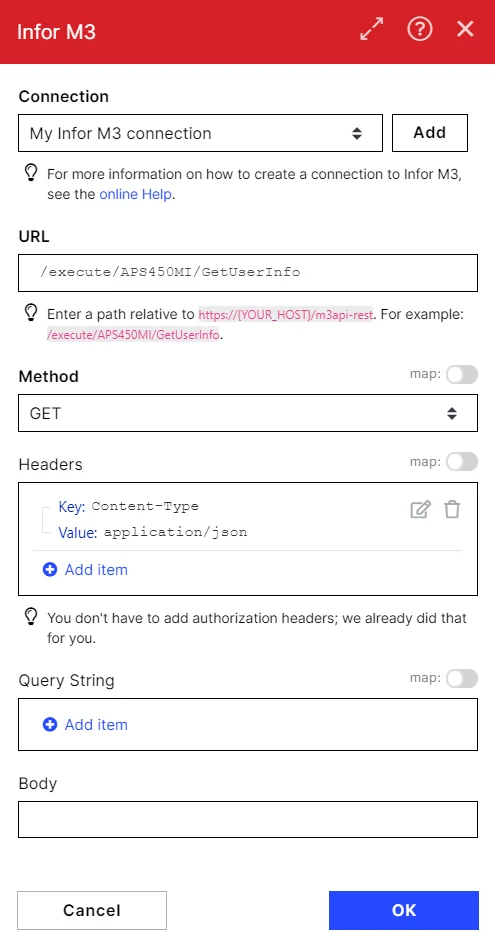
URL
Enter a path relative to https://{YOUR_HOST}/m3api-res. For example: /execute/<Your_Account>/GetUserInfo
Method
Select the HTTP method you want to use:
GET to retrieve information for an entry.
POST to create a new entry.
PUT to update/replace an existing entry.
PATCH to make a partial entry update.
DELETE to delete an entry.
Headers
Enter the desired request headers. You don’t have to add authorization headers; we already did that for you.
Query String
Enter the request query string.
Body
Enter the body content for your API call.
Example of Use – Get Users
The following API call returns all the conversations from your Infor M3 account:
URL: /execute/<Account_Host>/GetUserInfo
Method: GET
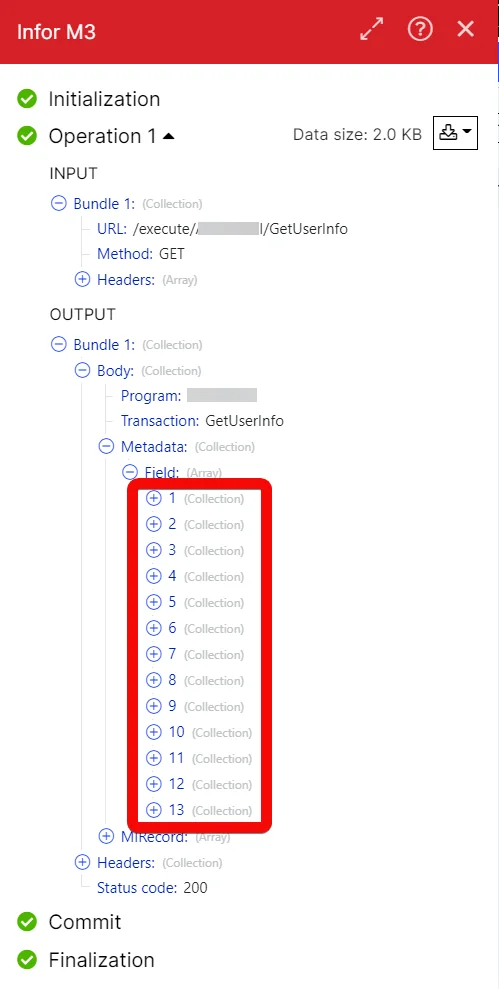
Matches of the search can be found in the module’s Output under Bundle > Body > Metadata. In our example, 13 users were returned:
Legacy article, imported from the original Boost.space knowledge base (/knowledge-base/applications/business-operations-and-erps/infor-m3/).

