Toggl Plan
With Toggl Plan modules in Boost.space Integrator, you can:
-
create, update, retrieve, list, and remove the teams and team members
-
watch, create, update, list, retrieve, send invitations, and remove members
-
create, update, list, retrieve, and remove projects
-
create, update, retrieve, list, and remove teams
-
watch, create, update, search, retrieve, and remove tasks
-
watch, create, update, search, retrieve, and remove milestones
To get started with Toggl Plan, create an account at toggl.com.
Connecting Toggl Plan to Boost.space Integrator
You can connect to Toggl Plan in two ways:
Connect using basic authentication
To connect to the Toggl Plan app.:
-
Log in to your Boost.space Integrator and open the Toggl Plan module scenario.
-
Click Add next to the Connection field.

-
In the Connection name field, enter a name for the connection and click Save.
-
If prompted, log in using your Toggl Plan credentials, and confirm the access by clicking GRANT ACCESS.
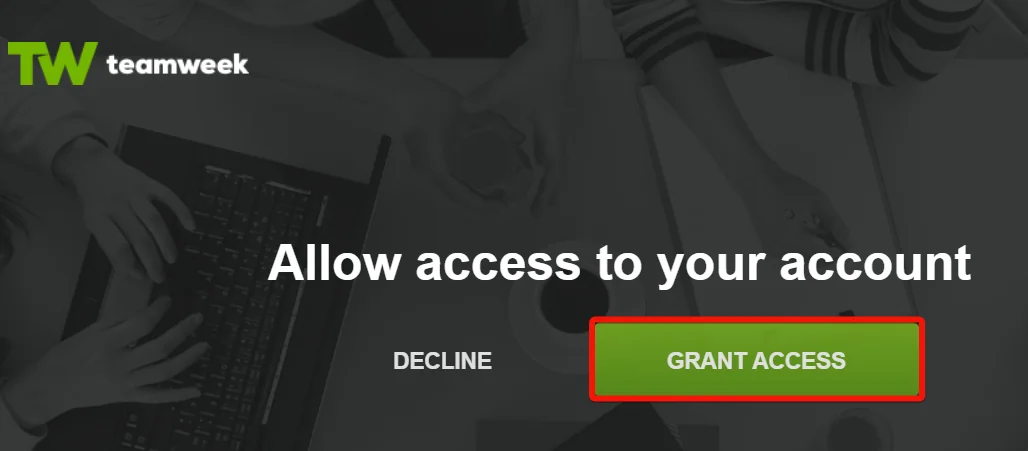
You have successfully connected the Toggl Plan and can now build scenarios.
Connect using OAuth credentials
To connect Toggl Plan app, you need to obtain the client credentials from your Toggl Plan developer account.
-
Log in to your Toggl Plan Developer account.
-
Click Register your application.
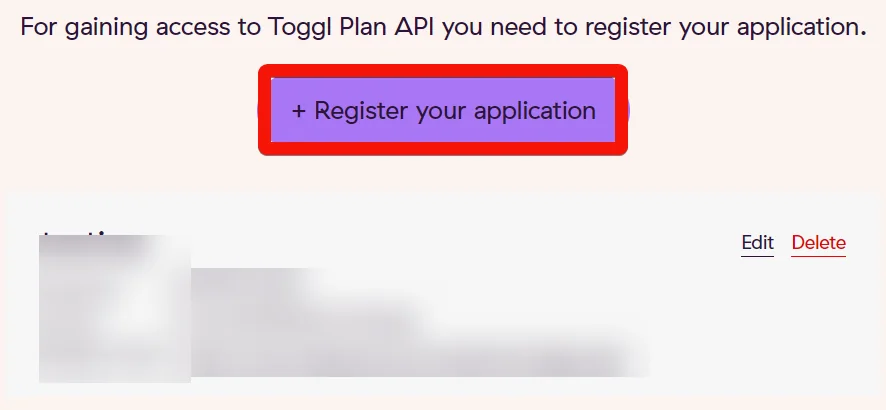
-
Enter the following details and click Register.
-
Name: Enter the application name.
-
Redirect URI:
https://integrator.boost.space/oauth/cb/toggl-plan
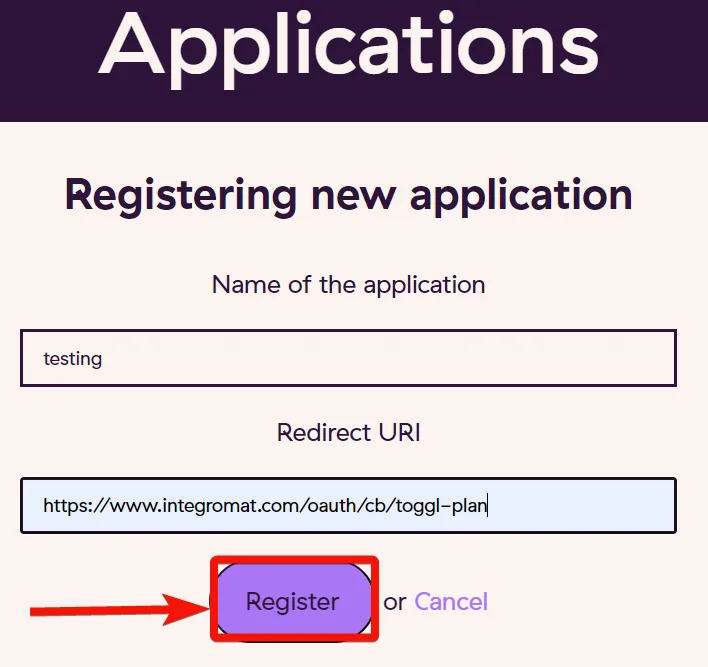
-
-
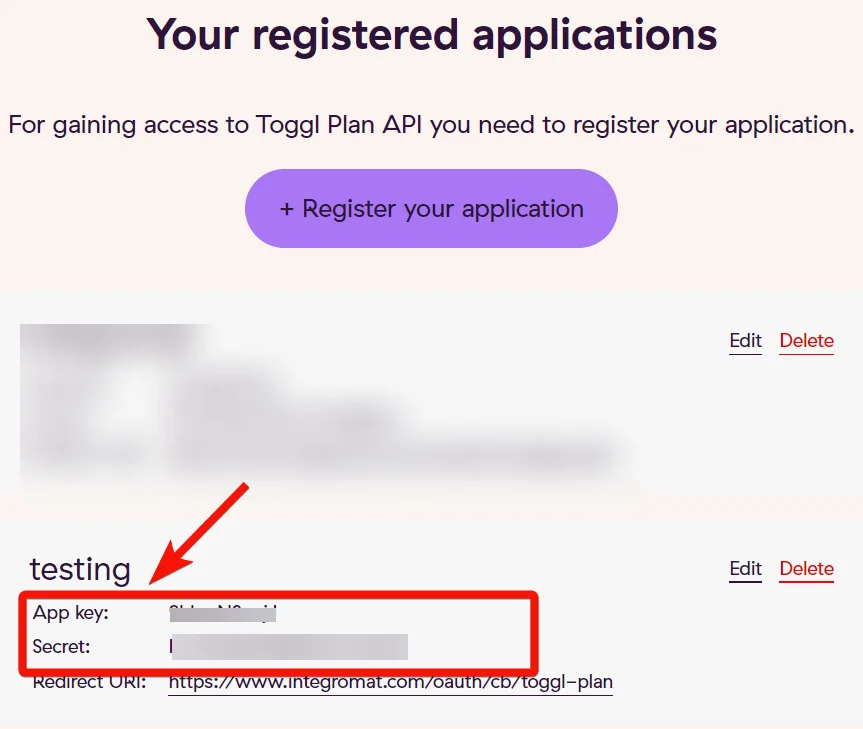
Copy the App key and Secret values to a safe place. Toggl Plan uses App key as a Client ID and Secret value as Client Secret.
-

Log in to your Boost.space Integrator account and open the Toggl Plan app’s module into a scenario.
-
In the Connection name field, enter a name for the connection.
-
In the Client ID and Client Secret fields, enter the App key and Secret values copied in step 4 and click Save.
-
If prompted authenticate your account by logging in using your credentials and confirm the access by clicking GRANT ACCESS.
You have successfully connected Toggl Plan app and can now build scenarios.
Member
You can watch, create, update, list, retrieve, send invitations, and remove members using the following modules.
Watch Members
Triggers when a new member has been created.
Connection
Establish a connection to your Toggl Plan account.
Workspace
Select or map the workspace whose members you want to watch.
Limit
Set the maximum number of members Boost.space Integrator will return during one execution cycle.
Create a Member
Adds a new member to a specific workspace.
Connection
Establish a connection to your Toggl Plan account.
Workspace
Select or map the workspace in which you want to create the member.
Name
Enter the member’s name.
Role
Select or map the role of the member.
Enter the member’s email address.
Send an email invitation
Select whether you want to send an email invitation when the member is created.
If you select, No, a ghost member is created.
Send an Invitation
Sends an invitation to a specified email address.
Connection
Establish a connection to your Toggl Plan account.
Workspace
Select or map the workspace to whose members you want to send an invitation.
Ghost Member ID
Select or map the Ghost Member ID to whom you want to send an email invitation.
Custom Email
Enter the email address of the ghost member if you want to replace the email address with this one or if there is no email defined for the member.
List Members
Returns a list of members for a specific workspace.
Connection
Establish a connection to your Toggl Plan account.
Workspace
Select or map the workspace whose members you want to list.
Limit
Set the maximum number of members Boost.space Integrator will return during one execution cycle.
Get a Member
Returns information about a specific member.
Connection
Establish a connection to your Toggl Plan account.
Workspace
Select or map the workspace whose member’s details you want to retrieve.
Member ID
Select or map the Member ID whose details you want to retrieve.
Update a Ghost Member
Updates info of a ghost member.
Connection
Establish a connection to your Toggl Plan account.
Workspace
Select or map the workspace whose ghost member’s details you want to update.
Ghost Member ID
Select or map the Ghost Member ID whose details you want to update.
Name
Enter the ghost member’s name. For example, John.
Initials
Enter the ghost member’s initials. For example, jn.
Pretended Email
Enter the ghost member’s email address.
Update a Member
Updates info of a specific member.
Connection
Establish a connection to your Toggl Plan account.
Workspace
Select or map the workspace whose member details you want to update.
Member ID
Select or map the Member ID whose details you want to update.
Role
Select or map the member’s role. For example, admin.
Active
Select whether the member is active.
Holidays
Select or map the holidays applicable to the member.
Working Hours
Enter the working hours of the member in HH
Remove a Member
Removes a specific member from a specific workspace.
Connection
Establish a connection to your Toggl Plan account.
Workspace
Select or map the workspace whose member you want to remove.
Member ID
Select or map the Member ID you want to remove.
Project
You can create, update, list, retrieve, and remove projects using the following modules.
Create a Project
Creates a new project (plan) in a selected workspace.
Connection
Establish a connection to your Toggl Plan account.
Workspace
Select or map the workspace in which you want to create the project.
Name
Enter the project’s name.
Boards
Select whether the project has a board.
Timeline
Select whether there is a timeline for the project.
Color
Enter the color applied to the project. For example, #5a85d6.
List Projects
Returns a list of projects (plans) for a specific workspace.
Connection
Establish a connection to your Toggl Plan account.
Workspace
Select or map the workspace whose projects you want to list.
Limit
Set the maximum number of projects Boost.space Integrator will return during one execution cycle.
Get a Project
Returns information about a specific project (plan).
Connection
Establish a connection to your Toggl Plan account.
Workspace
Select or map the workspace whose project details you want to retrieve.
Project ID
Select or map the Project ID whose details you want to retrieve.
Update a Project
Updates info of a specific project (plan).
Connection
Establish a connection to your Toggl Plan account.
Workspace
Select or map the workspace whose project details you want to update.
Project ID
Select or map the Project ID whose details you want to update.
Name
Enter a new name for the project.
Boards
Select whether the project has a board.
Timeline
Select whether there is a timeline for this project.
Archived
Select whether this project is archived.
Color
Enter a color value applicable to this project in hex format. For example, #5a85d6.
Remove a Project
Removes a project (plan) from a specific workspace.
Connection
Establish a connection to your Toggl Plan account.
Workspace
Select or map the workspace whose projects you want to remove.
Project ID
Select or map the Project ID you want to remove.
Team
You can create, update, retrieve, list, and remove teams and team members.
Create a Team
Creates a new team inside a selected workspace.
Connection
Establish a connection to your Toggl Plan account.
Workspace
Select or map the workspace in which you want to create the team.
Name
Enter a name for the team.
List Teams
Returns a list of teams for a specified workspace.
Connection
Establish a connection to your Toggl Plan account.
Workspace
Select or map the workspace whose teams you want to list.
Limit
Set the maximum number of teams Boost.space Integrator will return during one execution cycle.
Get a Team
Returns information about a specific team.
Connection
Establish a connection to your Toggl Plan account.
Workspace
Select or map the workspace whose team details you want to retrieve.
Team ID
Select or map the Team ID whose details you want to retrieve.
Update a Team
Updates info of a specific team.
Connection
Establish a connection to your Toggl Plan account.
Workspace
Select or map the workspace whose team details you want to update.
Team ID
Select or map the Team ID whose details you want to update.
Name
Enter a new name for the team.
Remove a Team
Removes a team from a specific workspace.
Connection
Establish a connection to your Toggl Plan account.
Workspace
Select or map the workspace whose team you want to remove.
Team ID
Select or map the Team ID you want to remove.
Add a Team Member
Adds a member to an existing team.
Connection
Establish a connection to your Toggl Plan account.
Workspace
Select or map the workspace to whose team you want to add a member
Team ID
Select or map the Team ID to which you want to add a member.
Add Member
Select or map the member to add to the team.
List Team Members
Returns a list of members from a selected team.
Connection
Establish a connection to your Toggl Plan account.
Workspace
Select or map the workspace whose team members you want to list.
Team ID
Select or map the Team ID whose members you want to list.
Limit
Set the maximum number of team members Boost.space Integrator will return during one execution cycle.
Remove a Team Member
Removes a member from a specific team.
Connection
Establish a connection to your Toggl Plan account.
Workspace
Select or map the workspace whose members you want to remove.
Team ID
Select or map the Team ID from which you want to remove a member.
Remove Member
Enter the Membership ID of the member you want to remove.
Tasks
You can watch, create, update, search, retrieve, and remove tasks using the following modules.
Watch Tasks
Triggers when a new task has been created.
Connection
Establish a connection to your Toggl Plan account.
Workspace
Select or map the workspace whose tasks you want to watch.
Limit
Set the maximum number of tasks Boost.space Integrator will return during one execution cycle.
Create a Task
Creates a new task inside a selected project (plan).
Connection
Establish a connection to your Toggl Plan account.
Workspace
Select or map the workspace in which you want to create a task.
Project ID
Select or map the Project ID in which you want to create a task.
Name
Enter the task name.
Status
Select or map the task status. For example, In progress.
Start Date
Enter the date on which the work on this task begins. See the list of supported date and time formats.
End Date
Enter the date on which the work on this task ends. See the list of supported date and time formats.
Assignee
Add the assignees for this task. You can add multiple users as assignees.
Start Time
Enter the start time of this task. See the list of supported date and time formats.
End Time
Enter the end time of the task. See the list of supported date and time formats.
Description
Enter the task details.
Color ID
Enter the Color ID applied to this task.
Segment ID
Select or map the Segment ID applicable to the task.
Tags
Add the tags for this task.
Select Type (Time Estimate)
Select or map the option to estimate the time for this task.
Define Time (Time Estimate)
Enter the total time for this task in HH
Skip Weekends (Time Estimate)
Select whether you want to skip weekends from calculating the time for this task.
Search Tasks
Returns a list of tasks, which have a start date.
Connection
Establish a connection to your Toggl Plan account.
Workspace
Select or map the workspace to search tasks related to the specified project.
Project ID
Select or map the Project ID to search tasks related to the specified project.
Team ID
Select or map the team to search tasks related to the specified team.
Assigned to
Select or map the assignee to search tasks that match the specified user.
Since Date
Enter the date to filter the tasks created or updated from the specified date. See the list of supported date and time formats.
Until Date
Enter the date to filter the tasks created or updated until the specified date. See the list of supported date and time formats.
Limit
Set the maximum number of tasks Boost.space Integrator will return during one execution cycle.
Filter
Select or map the option to filter the tasks. For example, timeline.
Update a Task
Updates a specific task.
Connection
Establish a connection to your Toggl Plan account.
Workspace
Select or map the workspace whose project’s task details you want to update.
Task ID
Select or map the Task ID whose details you want to update.
For field descriptions, see Create a Task.
Remove a Task
Removes a task from a specific workspace.
Connection
Establish a connection to your Toggl Plan account.
Workspace
Select or map the workspace whose task you want to delete.
Task ID
Select or map the Task ID you want to delete.
Milestone
You can watch, create, update, search, retrieve, and remove milestones using the following modules.
Watch Milestones
Triggers when a new user has been created.
Connection
Establish a connection to your Toggl Plan account.
Workspace
Select or map the workspace whose milestones you want to watch.
Limit
Set the maximum number of milestones Boost.space Integrator will return during one execution cycle.
Create a Milestone
Creates a milestone in a selected workspace.
Connection
Establish a connection to your Toggl Plan account.
Workspace
Select or map a workspace in which you want to create the milestone.
Name
Enter the milestone name.
Date
Enter the date set for the milestone. See the list of supported date and time formats.
Project ID
Select to map the Project ID to which the milestone belongs.
Team ID
Select or map the Team ID to which the milestone belongs.
Mark as Done
Select whether you want to mark the milestone as done.
Turn into Holiday
Select whether you want to change the milestone date as a holiday.
Color ID
Enter the color value defined in your Toggl Plan account.
Search Milestones
Returns a list of milestones for a specific workspace.
Connection
Establish a connection to your Toggl Plan account.
Workspace
Select or map the workspace whose milestones you want to search.
Since Date
Enter the date to search the milestones set on or after the specified date. See the list of supported date and time formats.
Until Date
Enter the date to search the milestones set on or before the specified date. See the list of supported date and time formats.
Limit
Set the maximum number of milestones Boost.space Integrator will return during one execution cycle.
Get a Milestone
Returns information about a specific milestone.
Connection
Establish a connection to your Toggl Plan account.
Workspace
Select or map the workspace whose milestone details you want to retrieve.
Milestone ID
Select or map a Milestone ID whose details you want to retrieve.
Update a Milestone
Updates a specific milestone.
Connection
Establish a connection to your Toggl Plan account.
Workspace
Select or map the workspace whose milestone details you want to update.
Milestone ID
Enter the Milestone ID whose details you want to update.
For field descriptions, see the Toggl Plan Milestone API reference.
Remove a Milestone
Removes a milestone from a specific workspace.
Connection
Establish a connection to your Toggl Plan account.
Workspace
Select or map the workspace whose milestone you want to delete.
Milestone ID
Enter (map) the Milestone ID you want to delete.
Other
You can call APIs using the following module.
Make an API Call
Performs an arbitrary authorized API call.
For the list of available endpoints, refer to the Toggl Plan API documentation.
Example of use – Search Tasks
The following API call returns all the tasks from the selected workspace.
URL: /v5/<workspace_id>/tasks
Method: GET
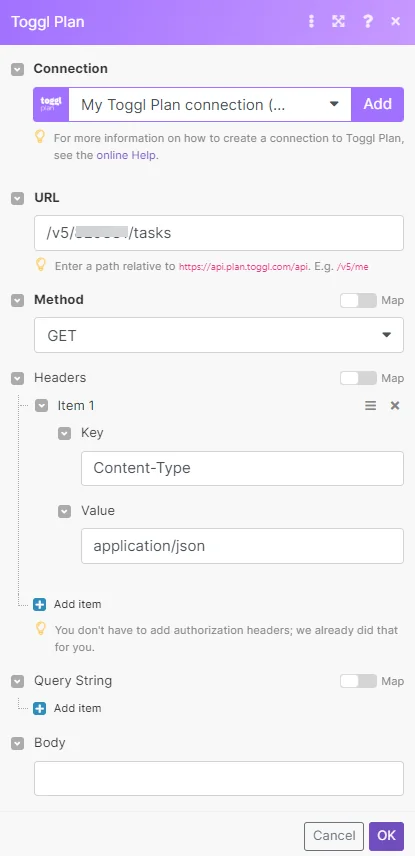
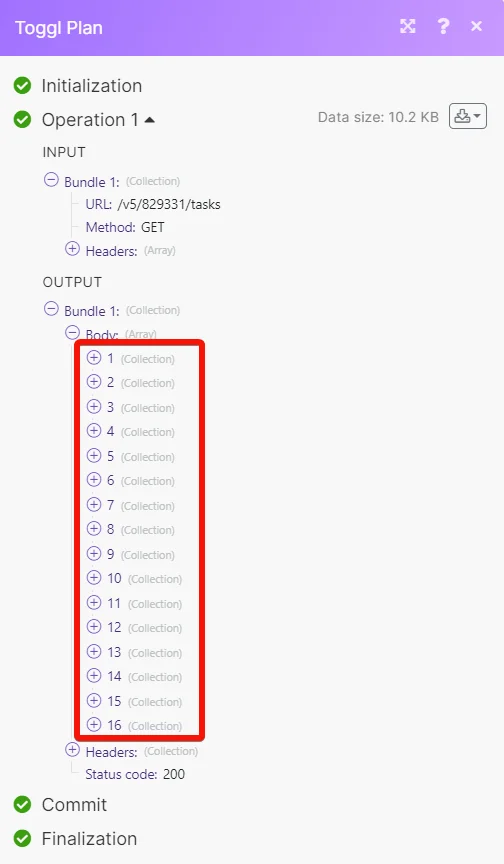
Matches of the search can be found in the module’s Output under Bundle > Body.
Our example returned 16 tasks:
Legacy article, imported from the original Boost.space knowledge base (/knowledge-base/applications/business-operations-and-erps/toggl-plan/).

