Memberstack
The Memberstack modules allow you to watch, create, update, retrieve, and delete the members in your Memberstack account.
Getting Started with Memberstack
Prerequisites
- A Memberstack account
To use Memberstack with Boost.space Integrator, it is necessary to have a Memberstack account. If you do not have one, you can create a Memberstack account at app.memberstack.io/signup.
Connecting Memberstack to Boost.space Integrator
To connect your Memberstack account to Boost.space Integrator you need to obtain the API Key from your Memberstack account and insert it in the Create a connection dialog in the Boost.space Integrator module.
1. Login to your Memberstack account.
2. Click Power-ups > Integrations > Custom Integrations > _New API Ke_y. Enter a name for the API key and click Create.
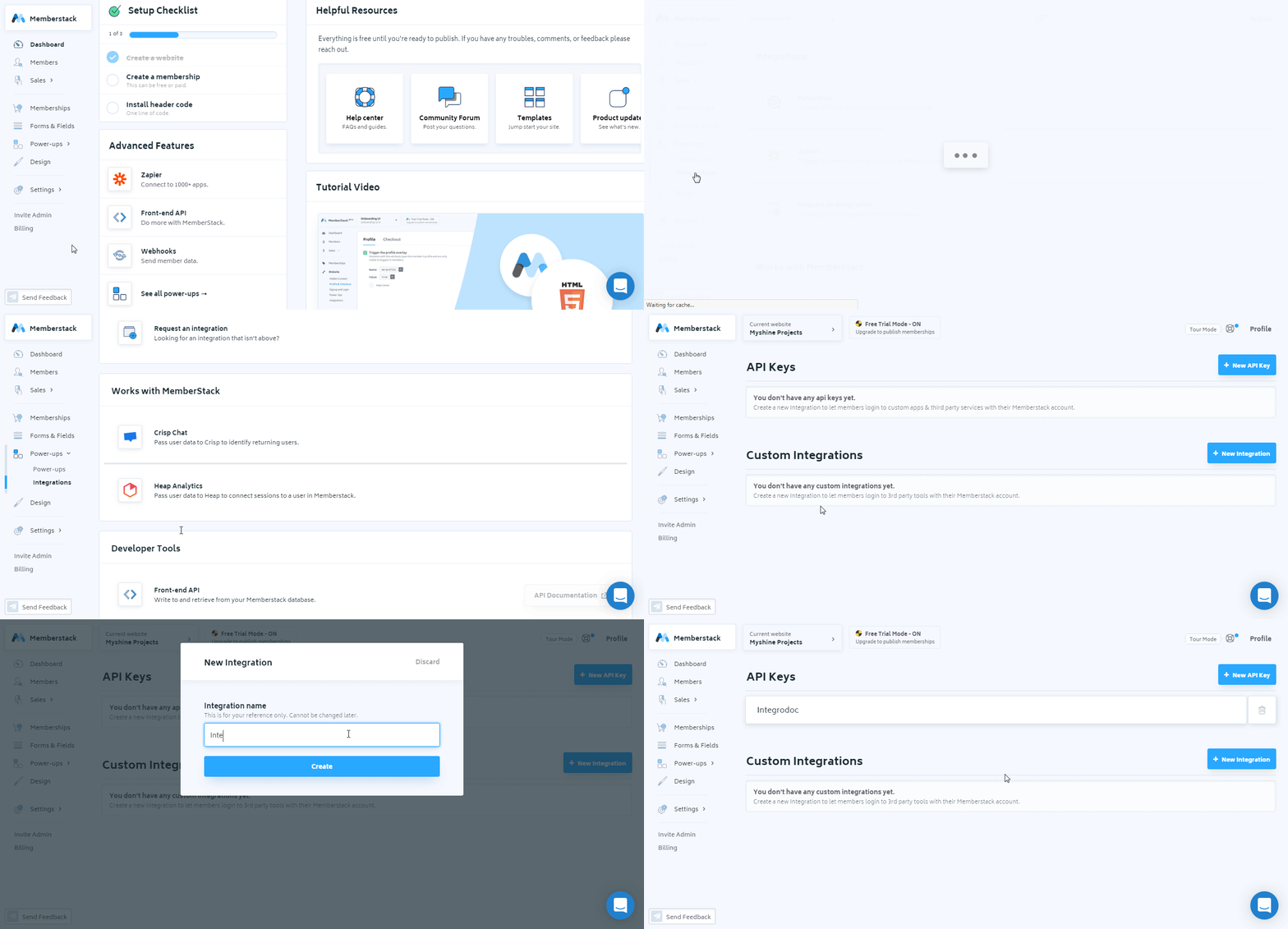
3. Click the API Key name and copy the key to your clipboard.

4. Go to Boost.space Integrator and open the Memberstack module’s _Create a connectio_n dialog.

5. In the Connection name field, enter a name for the connection.
6. In the API Key field, enter the API key copied in step 3 and click Continue.
The connection has been established.
Member
Watch Members
Triggers when an event occurs on the member.
Webhook Name
Enter a name for the webhook.
Connection
Establish a connection to your Memberstack account.

See Setting Up Webhooks to receive Memberstack webhooks and trigger the Watch Members module in your scenario.
List Members
Lists all members that have a subscription to your website.
Connection
Establish a connection to your Lexoffice account.
Limit
Set the maximum number of members Boost.space Integrator should return during one scenario execution cycle.
Get a Member
Gets metadata of a specified member.
Connection
Establish a connection to your Lexoffice account.
Member ID
Select the Member ID whose details you want to retrieve.
Create a Member
Creates a new member.
Connection
Establish a connection to your Lexoffice account.
Enter the email address of the member.
Password
Enter the password for the member to login to Memberstack.
Plan ID
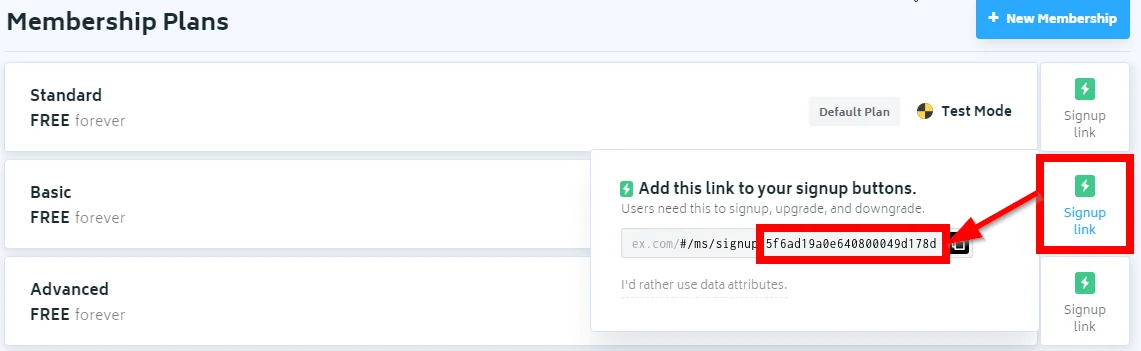
Enter the Plan ID of the membership that the member is subscribed to. You can find the Plan ID details in the membership page by clicking the Signup Link against the plan.
Custom Fields
Add the custom fields. You can also add the custom fields in your account > Form & Fields.
Meta Data
Enter the key-value metadata for the member.
Member Page
Enter the URL address of the member website page.
Update a Member
Updates an existing member.
Connection
Establish a connection to your Lexoffice account.
Member ID
Select the Member ID whose details you want to update.
Enter the email address of the member.
Password
Enter the password for the member to login to Memberstack.
Plan ID
Enter the Plan ID of the membership that the member is subscribed to. You can find the Plan ID details in the membership page by clicking the Signup Link against the plan.
Custom Fields
Add the custom fields. You can also add the custom fields in your account > Form & Fields.
Meta Data
Enter the key-value metadata for the member.
Member Page
Enter the URL address of the member website page.
Delete a Member
Deletes a member.
Connection
Establish a connection to your Lexoffice account.
Member ID
Select the Member ID you want to delete.
Membership
Watch Memberships
Triggers when an event occurs on membership from a member.
Webhook Name
Enter a name for the webhook.
Connection
Establish a connection to your Lexoffice account.
See Setting Up Webhooks to receive Memberstack webhooks and trigger the Watch Membership module in your scenario.
Other
Make an API Call
Performs an arbitrary authorized API call.
Connection
Establish a connection to your Lexoffice account.
URL
Enter a path relative to https://api.memberstack.com/. For example: /v1/members
For the list of available endpoints, refer to the Memberstack API Documentation.
Method
Select the HTTP method you want to use:
-
GET – to retrieve information for an entry.
-
POST – to create a new entry.
-
PUT – to update/replace an existing entry.
-
PATCH – to make a partial entry update.
-
DELETE – to delete an entry.
Headers
Enter the desired request headers. You don’t have to add authorization headers; we already did that for you.
Query String
Enter the request query string.
Body
Enter the body content for your API call.
Example of Use – List Members
The following API call returns all the members from your Memberstack account:
URL:
/v1/members
Method:
GET
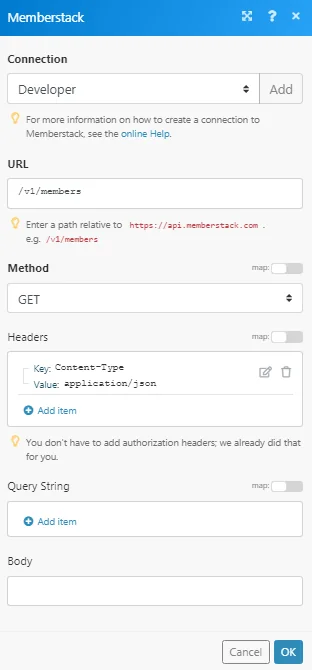
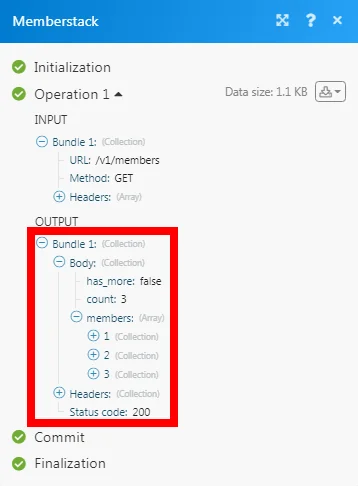
Matches of the search can be found in the module’s Output under Bundle > Body > members.
In our example, 3 members were returned:
Setting Up Webhooks
1. Open any trigger module (Watch Members, Watch Membership), establish a connection as mentioned in the module description above and copy the URL address to your clipboard.
2. Login to your Memberstack account. From the Dashboard, click Webhooks > New Webhook. In the Endpoint field, enter the URL address copied in step 1, select the triggers and click Save.
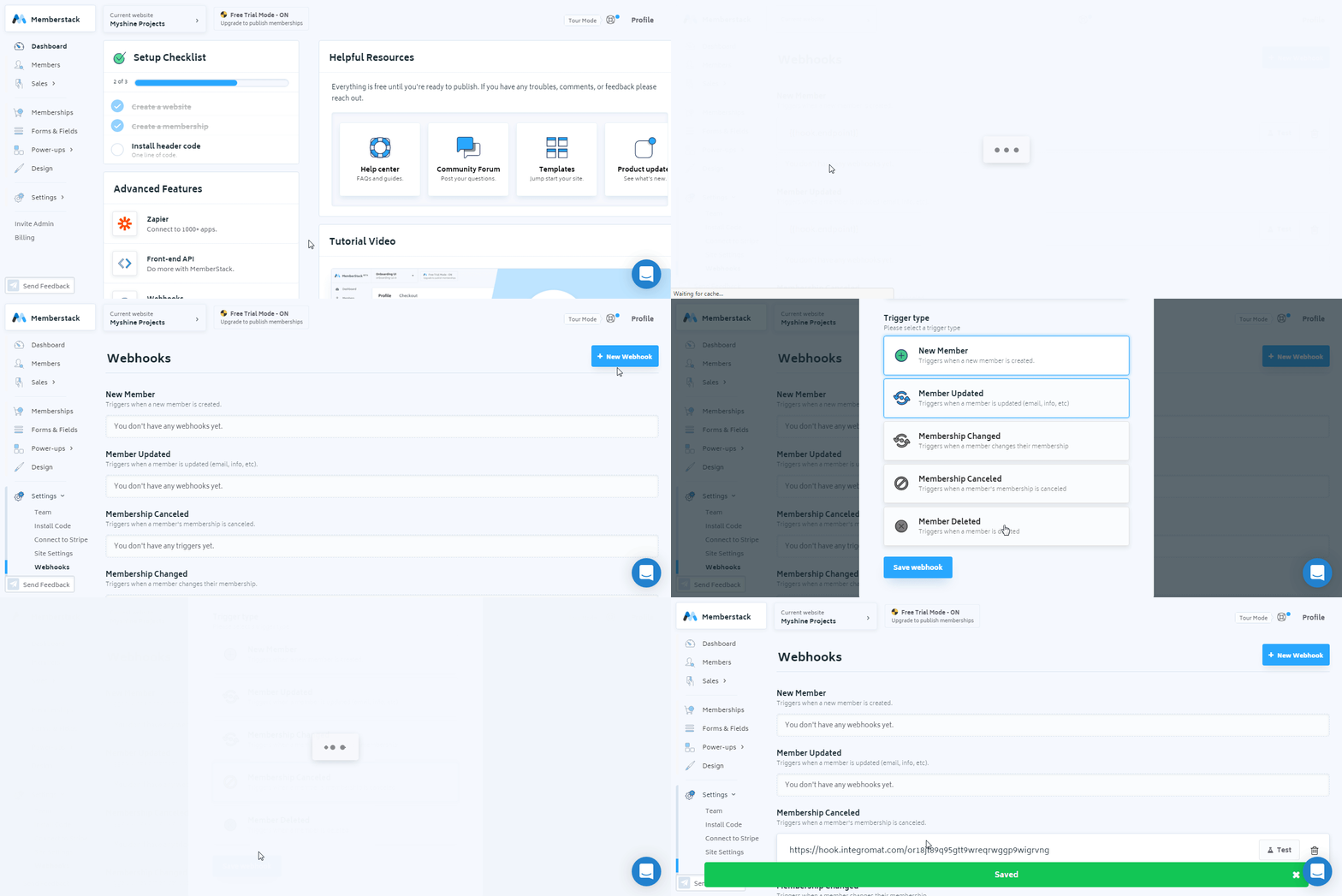
You have successfully added the webhook.
Legacy article, imported from the original Boost.space knowledge base (/knowledge-base/applications/commerce/memberstack/).

