Plug&Paid

The Plug&Paid modules allow you to monitor the customers, invoices paid, sales, subscriptions, orders created, updated, and deleted, products created, updated, and deleted in your Plug&Paid account.
Getting Started with Plug&Paid
Prerequisites
- A Plug&Paid account – create an account at plugnpaid.com/login.
The module dialog fields that are displayed in bold (in the Boost.space Integrator scenario, not in this documentation article) are mandatory!
Setting up Plug&Paid webhooks
1. Go to the Boost.space Integrator and open the Plug&Paid module’s Create a connection dialog, enter a name for the webhook, and copy the URL address to your clipboard.
2. Click OK and save the trigger.
3. Log in to your Plug&Paid account.
4. Click Settings > Webhooks > Add a Webhook URL.
5. Enter the following details:
Endpoint URL
Enter the URL address copied in step 1.
Subscribe to Events
Select or map the events you want to watch.
Plugs
Select or map the shopping carts you want to watch.
Select data to include
Select or map the data you want to receive in the output.
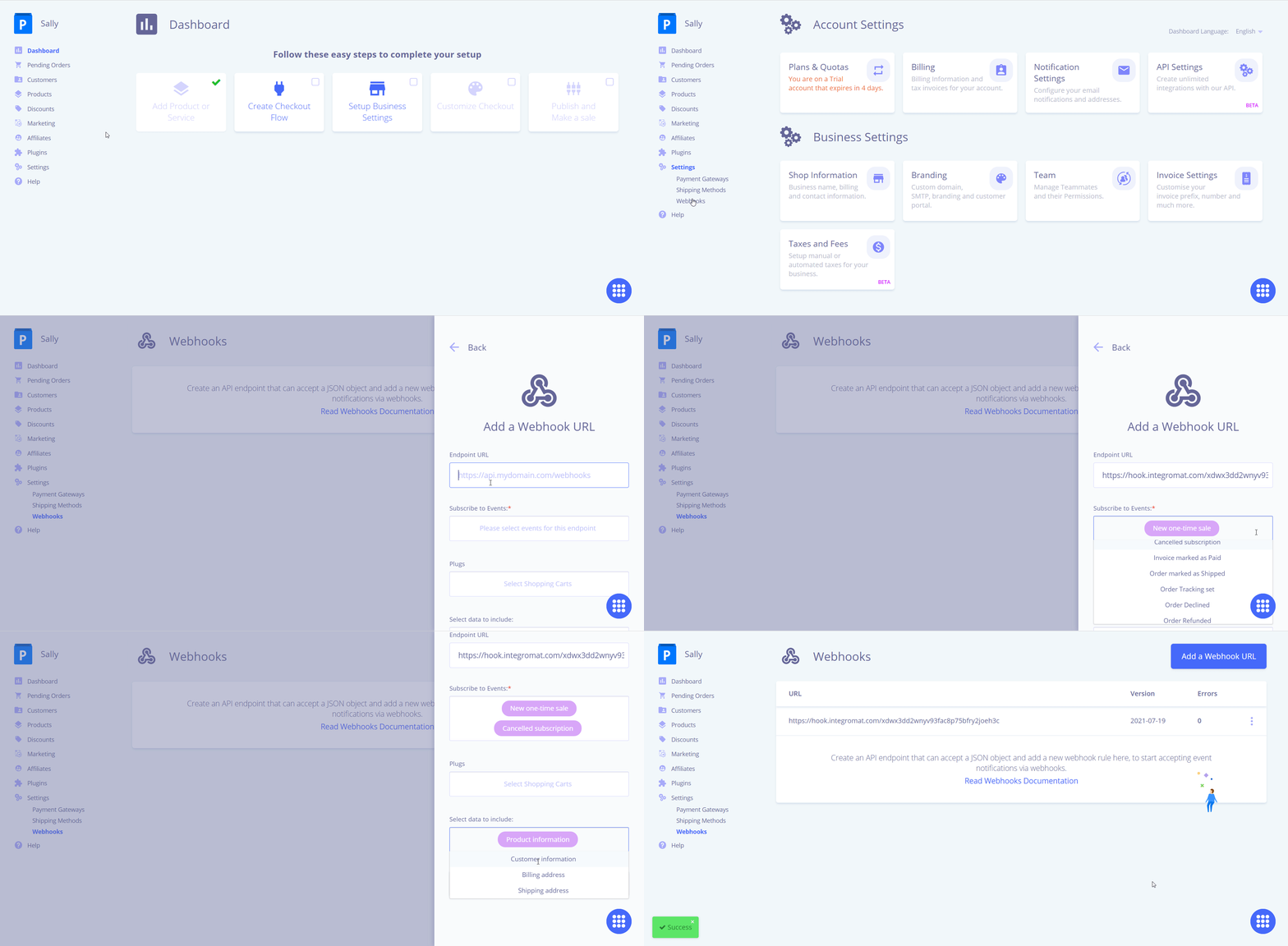
6. Click Save.
The webhook is added successfully. Go to Boost.space Integrator and run the trigger to receive alerts when the specified event occurs.
Webhooks
See the Setting up of webhooks to add webhooks to your Plug&Paid account.Setting up Plug&Paid webhooks
Watch One Time Sale
Triggers when the one-time sale has been made.
Webhook Name
Enter a name for the webhook.
Watch Product Created
Triggers when a new product has been created.
Webhook Name
Enter a name for the webhook.
Watch Product Updated
Triggers when a new product has been updated.
Webhook Name
Enter a name for the webhook.
Watch Product Deleted
Triggers when a new product has been deleted.
Webhook Name
Enter a name for the webhook.
Watch Customers
Triggers when a customer makes an order.
Webhook Name
Enter a name for the webhook.
Watch Order Refunded
Triggers when an order has been refunded.
Webhook Name
Enter a name for the webhook.
Watch Order Declined
Triggers when an order has been declined.
Webhook Name
Enter a name for the webhook.
Watch Order Shipped
Triggers when an order has been shipped.
Webhook Name
Enter a name for the webhook.
Watch Order Tracking Number
Triggers when an order tracking number has been set.
Webhook Name
Enter a name for the webhook.
Watch Invoice Paid
Triggers when an invoice has been paid.
Webhook Name
Enter a name for the webhook.
Watch Abandoned Cart
Triggers when a customer abandons the cart.
Webhook Name
Enter a name for the webhook.
Watch Recurring Subscription Created
Triggers when a new recurring subscription has been sold.
Webhook Name
Enter a name for the webhook.
Watch Recurring Failed
Triggers when a recurring subscription has been failed.
Webhook Name
Enter a name for the webhook.
Watch Recurring Subscription Canceled
Triggers when a recurring subscription has been canceled.
Webhook Name
Enter a name for the webhook.
Legacy article, imported from the original Boost.space knowledge base (/knowledge-base/applications/commerce/plug-paid/).

