Amazon SES
The Amazon SES modules allow you to monitor, create, update, send, retrieve, list, and delete the messages, email templates, contact lists, contacts, and configuration sets in your Amazon SES account.
Getting Started with Amazon SES
Prerequisites
- An Amazon SES account – create an account at aws.amazon.com/ses/
The module dialog fields that are displayed in bold (in the Boost.space Integrator scenario, not in this documentation article) are mandatory!
Connecting Amazon SES to Boost.space Integrator
To connect your Amazon SES account to Boost.space Integrator you need to obtain the AWS Key, and AWS Secret Key from your Amazon SES account and insert them in the Create a connection dialog in the Boost.space Integrator module.
-
Log in to your Amazon SES account.
-
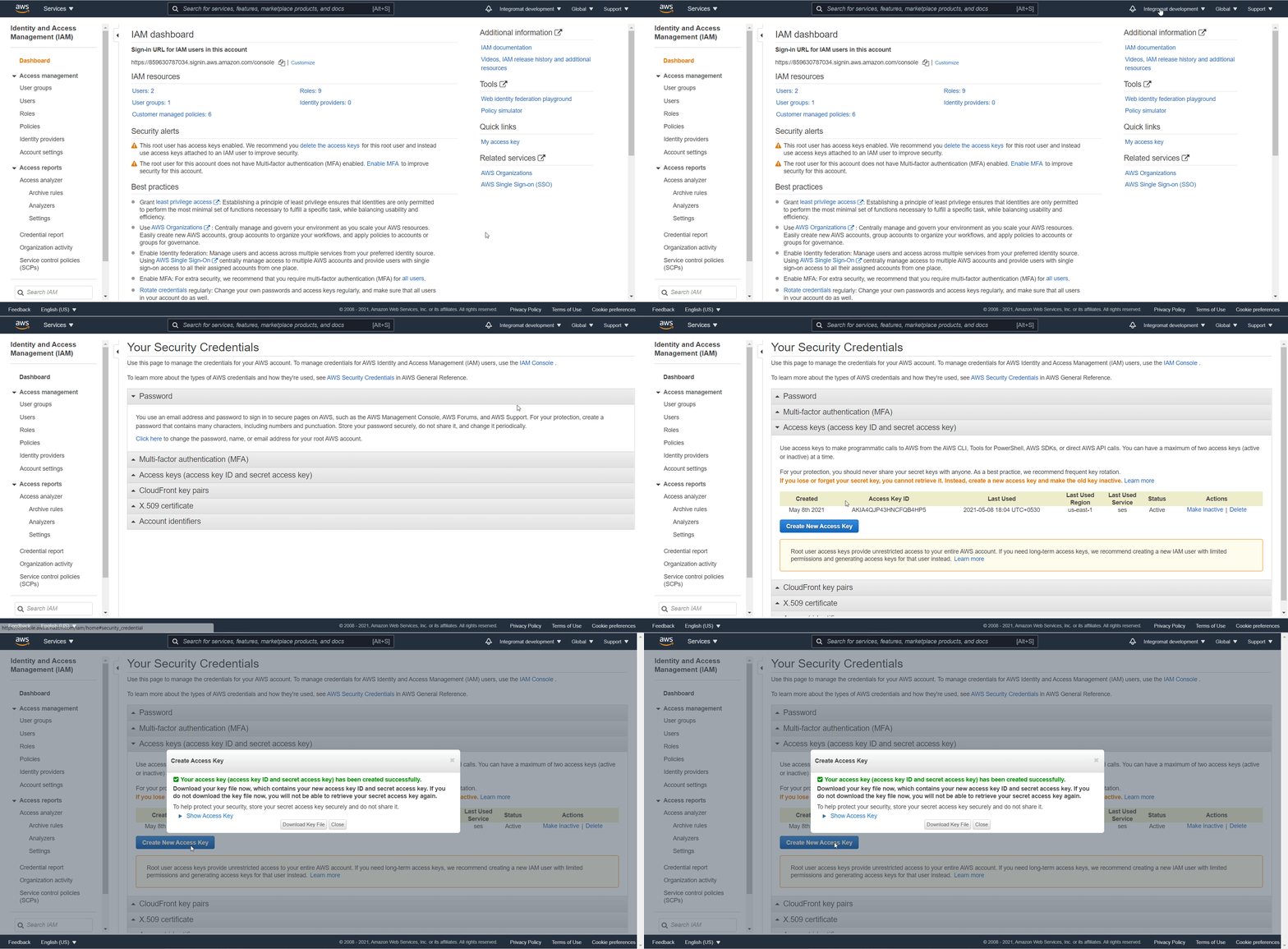
Click your Account Name > My Security Credentials > Access keys (access key ID and secret access key) > Create New Access Key.
-
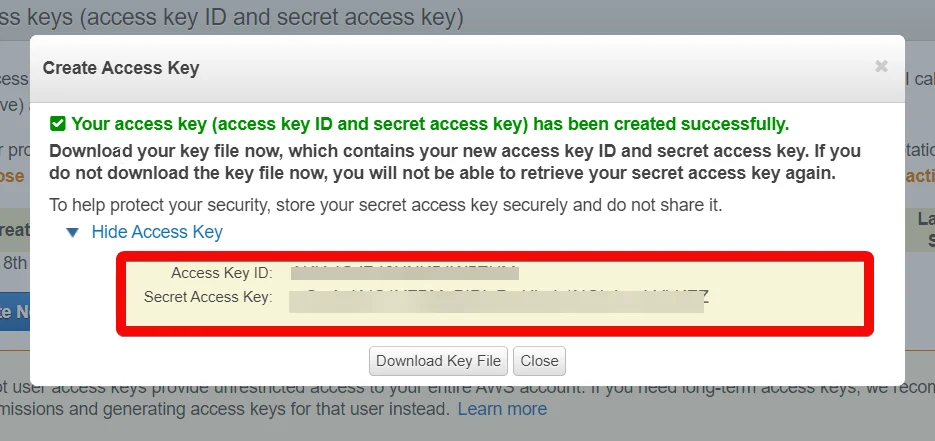
Click _Show Access Key_to display the Access Key ID and Secret Access Key. Copy and save the provided keys in a safe place.
-

Go to Boost.space Integrator and open the Amazon SES module’s Create a connection dialog.
-
In the Connection name field, enter a name for the connection.
-
In the AWS Key and AWS Secret Key fields, enter the Access Key and Secret Access Key values provided in step 3 above.
-
In the Region field, select your region and click Continue.
The connection has been established.
Message
Send a Message
Sends an email message.
Connection
Establish a connection to your Amazon SES account.
Select a Message Content Type
Select or map the message content-type:
-
HTML
-
Plain Text
-
Template
-
Raw
Subject
Enter (map) the subject line of the message.
HTML Content
Enter (map) the message text in HTML format.
Text Content
Enter (map) the message text in plain text format.
From
Enter (map) the email address from which you want to send the message.
To
Enter (map) the email address to which you want to send the message.
Reply To
Enter (map) the email address to which the recipient can send the reply.
CC
Enter (map) the email addresses to add in the CC (carbon copy) recipients for the email.
Configuration Set Name
Enter (map) the name of the configuration set to use when sending the email.
Contact List Name
Enter (map) the contact list name associated with the contacts in the message.
Topic Name
Enter (map) the topic name associated with the message.
Feedback Forwarding Email Address
Enter (map) the email address that you want to bounce and complaint notifications to be sent to.
Feedback Forwarding Email Address Identity ARN
This field is used only for sending authorization. Enter (map) the email address used to send authorization and associated with the ARN of the identity.
Email Tags
Add the email tags:
Name
Enter (map) the name of the message tag. The message tag value has to meet the following criteria:
-
It can only contain ASCII letters (a–z, A–Z), numbers (0–9), underscores (_), or dashes (-).
-
It can contain no more than 256 characters.
Value
Enter (map) the value of the message tag. The message tag value has to meet the following criteria:
-
It can only contain ASCII letters (a–z, A–Z), numbers (0–9), underscores (_), or dashes (-).
-
It can contain no more than 256 characters.
Email Template
Watch Email Templates
Triggers when an email template is created.
Connection
Establish a connection to your Amazon SES account.
Limit
Set the maximum number of email templates Boost.space Integrator should return during one execution cycle.
List Email Templates
Retrieves a list of email templates.
Connection
Establish a connection to your Amazon SES account.
Limit
Set the maximum number of email templates Boost.space Integrator should return during one execution cycle.
Create an Email Template
Creates a new email template.
Connection
Establish a connection to your Amazon SES account.
Template Name
Enter (map) a name for the email template without spaces. Only special characters allowed are alphanumeric and ASCII characters, (_) and (-).
Subject
Enter (map) the subject of the email template.
HTML Body
Enter (map) the body text of the email template in HTML format.
Text
Enter (map) the body text of the email template in plain text format.
Get an Email Template
Retrieves a specified email template.
Connection
Establish a connection to your Amazon SES account.
Email Template Name
Select or map the email template name whose details you want to retrieve.
Update an Email Template
Updates an existing email template.
Connection
Establish a connection to your Amazon SES account.
Email Template Name
Select or map the email template name whose details you want to update.
Subject
Enter (map) the subject of the email template.
HTML Body
Enter (map) the body text of the email template in HTML format.
Text
Enter (map) the body text of the email template in plain text format.
Delete an Email Template
Deletes an email template.
Connection
Establish a connection to your Amazon SES account.
Email Template Name
Select or map the email template name you want to delete.
Contact List
List Contact Lists
Retrieves a list of contacts in a contact list.
Connection
Establish a connection to your Amazon SES account.
Limit
Set the maximum number of contact lists Boost.space Integrator should return during one execution cycle.
Create a Contact List
Creates a new contact list.
Please Note: Only one contact list for a free account.
Connection
Establish a connection to your Amazon SES account.
Contact List Name
Enter (map) the name of the contact list.
Description
Enter (map) the details of the contact list.
Tags
Add the tags for the contact list.
Topics
Add the topics to the list.
Topic Name
Enter (map) the topic name.
Display Name
Enter (map) the name that displays in the contact list.
Default Subscription Status
Select or map the subscription status of the contact list for the topic:
-
Opt-in
-
Opt-out
Description
Enter (map) the details of the topic.
Get a Contact List
Retrieves a specified contact list.
Connection
Establish a connection to your Amazon SES account.
Contact List Name
Select or map the contact list whose details you want to retrieve.
Update a Contact List
Updates an existing contact list.
Connection
Establish a connection to your Amazon SES account.
Contact List Name
Select or map the contact list name whose details you want to update.
Description
Enter (map) the details of the contact list.
Topics
Add the topics for the contact list:
Topic Name
Enter (map) the topic name.
Display Name
Enter (map) the name that displays in the contact list.
Default Subscription Status
Select or map the subscription status of the contact list for the topic:
-
Opt-in
-
Opt-out
Description
Enter (map) the details of the topic.
Delete a Contact List
Deletes a contact list.
Connection
Establish a connection to your Amazon SES account.
Email Template Name
Select or map the email template name you want to delete.
Contact
Watch Contacts
Triggers when a contact is created and updated in a specified contact list.
Connection
Establish a connection to your Amazon SES account.
Contact List Name
Select or map the contact list name whose contacts you want to watch.
Limit
Set the maximum number of contact Boost.space Integrator should return during one execution cycle.
List Contacts
Retrieves a list of contacts in a specified contact list.
Connection
Establish a connection to your Amazon SES account.
Contact List Name
Select or map the contact list name whose contacts you want to watch.
Limit
Set the maximum number of contacts Boost.space Integrator should return during one execution cycle.
Create a Contact
Creates a new contact.
Connection
Establish a connection to your Amazon SES account.
Contact List Name
Select or map the contact list in which you want to create the contact.
Email Address
Enter (map) the contact’s email address.
Attributes Data
Add the contact’s data in a valid JSON format. The maximum character allowed is 1000.
Topic Preferences
Add the topics and subscription status for the contact:
Topic Name
Enter (map) the topic name.
Subscription Status
Select the subscription status for the topic:
-
Opt-in
-
Opt-out
Unsubscribe All
Select whether you want to unsubscribe the contact from all lists.
Get a Contact
Retrieves a specified contact.
Connection
Establish a connection to your Amazon SES account.
Contact List Name
Enter (map) the contact list whose contact details you want to retrieve.
Contact ID
Select or map the Contact ID whose details you want to update.
Update a Contact
Updates an existing contact.
Connection
Establish a connection to your Amazon SES account.
Contact List Name
Select or map the contact list in which you want to create the contact.
Contact’s Email Address
Enter (map) the contact’s email address whose details you want to update.
Attributes Data
Add the contact’s data in a valid JSON format. The maximum character allowed is 1000.
Topic Preferences
Add the topics and subscription status for the contact:
Topic Name
Enter (map) the topic name.
Subscription Status
Select the subscription status for the topic:
-
Opt-in
-
Opt-out
Unsubscribe All
Select whether you want to unsubscribe the contact from all lists.
Delete a Contact
Deletes a contact.
Connection
Establish a connection to your Amazon SES account.
Contact List Name
Select or map the contact list whose contact you want to delete.
Contact’s Email Address
Select or map the contact’s email address you want to delete.
Configuration Set
List Configuration Sets
Retrieves a list of configuration sets.
Connection
Establish a connection to your Amazon SES account.
Limit
Set the maximum number of configuration sets Boost.space Integrator should return during one execution cycle.
Get a Configuration Set
Retrieves a specified configuration set.
Connection
Establish a connection to your Amazon SES account.
Configuration Set Name
Select or map the configuration set whose details you want to retrieve.
Create a Configuration Set
Creates a new configuration set.
Connection
Establish a connection to your Amazon SES account.
Configuration Set Name
Enter (map) the configuration set name.
Delivery Options
Add the delivery options that define the dedicated IP pool used to send emails using the configuration set:
Sending Pool Name
Enter (map) the pool name to associate with the configuration set.
TLS Policy
Select whether the messages that use the configuration set are required to use Transport Layer Security (TLS)
Reputation Options
Select whether reputation metrics are enabled for the configuration set.
Sending Options
Select whether or not Amazon SES can send the email that you send using the configuration set.
Suppressed Reasons
Select the suppressed reasons for the configuration set:
-
Complaint – Amazon SES adds an email address to the suppression list for your account when a message sent to that address results in a complaint.
-
Bounce – Amazon SES adds an email address to the suppression list for your account when a message sent to that address results in a hard bounce.
Tags
Add the tags for the configuration set.
Custom Redirect Domain
Enter (map) the domain to use for tracking open and click events.
Create a Configuration Set Event Destination
Creates a new configuration event destination.
Connection
Establish a connection to your Amazon SES account.
Configuration Set Name
Enter (map) the configuration set name for which you want to create the event destination.
Event Destination Name
Enter (map) the name that identifies the event destination within the configuration set.
Event Destination
Select or map the event destination type, enter the details, and select whether the destination is enabled.
Matching Event Types
Select or map the event types for which you want to create the configuration set event destination. For example, send, reject.
Delete a Configuration Set
Deletes a configuration set.
Connection
Establish a connection to your Amazon SES account.
Configuration Set Name
Enter (map) the configuration set name you want to delete.
Other
Make an API Call
Performs an arbitrary authorized API call.
Connection
Establish a connection to your Amazon SES account.
URL
Enter a path relative to https://email.{region}.amazonaws.comFor example:/v2/email/contact-lists
For the list of available endpoints, refer to the Amazon SES API Documentation.
Method
Select the HTTP method you want to use:
GET
to retrieve information for an entry.
POST
to create a new entry.
PUT
to update/replace an existing entry.
PATCH
to make a partial entry update.
DELETE
to delete an entry.
Headers
Enter the desired request headers. You don’t have to add authorization headers; we already did that for you.
Query String
Enter the request query string.
Body
Enter the body content for your API call.
Example of Use – List Contacts
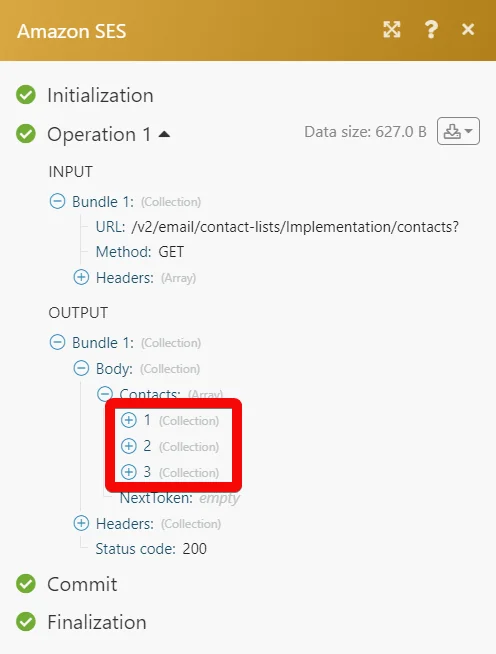
The following API call returns all contacts from your Amazon SES account:
URL:
/v2/email/contact-lists/<contact_list_name>/contacts?
Method:
GET
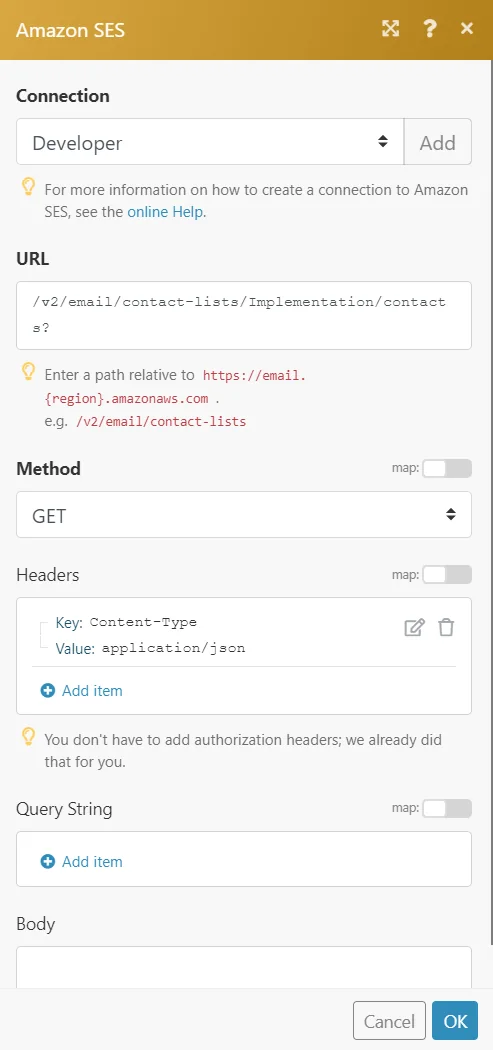
Matches of the search can be found in the module’s Output under Bundle > Body > Contacts.
In our example, 3 contacts were returned:
Legacy article, imported from the original Boost.space knowledge base (/knowledge-base/applications/communication/amazon-ses/).

