TikTok
TikTok allows you to watch, create, update, list, and retrieve the ads, and video posts in your TikTok account.
Getting Started with TikTok
Prerequisites
- A TikTok account – create an account at tiktok.com.
The module dialog fields that are displayed in bold (in the Boost.space Integrator scenario, not in this documentation article) are mandatory!
Connecting TikTok to Boost.space Integrator
1. Log in to your Boost.space Integrator account, add a module from the TikTok app into an Boost.space Integrator scenario.
2. Click Add next to the Connection field.

3. Authenticate your TikTok account.
The connection has been established.
TikTok Ad
Watch Ads
Triggers when an ad is created or updated.
Connection
Establish a connection to your TikTok account.
Watch Ads
Select or map the option to watch the ads:
-
By Created Time
-
By Updated Time
Advertiser IDs
Select or map the Advertiser ID you want to watch.
Filter
Select or map the options to filter the ads based on the specified matches.
Campaign ID
Select or map the Campaign ID whose ads you want to watch.
Ad Group IDs
Select or map the Ad Group IDs whose ads you want to watch.
Limit
Set the maximum number of ads Boost.space Integrator should return during one execution cycle. The default value is 2.
Search Ads
Searches for Ads.
Connection
Establish a connection to your TikTok account.
Advertiser ID
Select or map the Advertiser ID whose details you want to search.
Filter
Select or map the options to filter the ads based on the specified match.
Campaign IDs
Select or map the Campaign ID whose ads you want to search.
Ad Group IDs
Select or map the Ad Group IDs whose ads you want to search.
Limit
Set the maximum number of ads Boost.space Integrator should return during one execution cycle. The default value is 10.
List Ad Reports
Retrieves a list of TikTok ad reports.
Connection
Establish a connection to your TikTok account.
Advertiser ID
Select or map the Advertiser ID whose ad reports you want to list.
Service Type
Select or map the service type to list the specific service ad reports.
Report Type
Select or map the report type whose ad reports you want to list. For example, Basic Report.
Data Level
Select or map the data level for the reports you want to list. For example, Auction Ad.
Dimensions
Select or map the dimensions to include in the report. For example, Campaign ID.
Metrics
Select or map the attribute metrics to generate the report. For example, campaign name.
Lifetime
Select whether you want to list the lifetime ad reports.
Limit
Set the maximum number of ad reports Boost.space Integrator should return during one execution cycle. The default value is 10.
Get an Ad
Gets a specified ad.
Connection
Establish a connection to your TikTok account.
Advertiser ID
Select or map the Advertiser ID whose ad details you want to retrieve.
Ad ID
Select or map the Ad ID whose details you want to retrieve.
Update an Ad’s Status
Updates an existing ad’s status.
Connection
Establish a connection to your TikTok account.
Advertiser ID
Select or map the Advertiser ID whose ad status you want to update.
Ad ID
Select or map the Ad ID whose status you want to update.
Opt Status
Select or map the status of the ad:
-
Enable
-
Disable
-
Delete
TikTok
Watch TikTok Video Posts
Triggers when you upload a new TikTok video post.
Required Permissions: video.list
Connection
Establish a connection to your TikTok account.
Limit
Set the maximum number of video posts Boost.space Integrator should return during one execution cycle. The default value is 5.
List TikTok Video Posts
Retrieves a list of your public TikTok video posts.
Required Permissions: video.list
Connection
Establish a connection to your TikTok account.
Limit
Set the maximum number of video posts Boost.space Integrator should return during one execution cycle. The default value is 10.
Get an Embedded Video
Returns the embed code and information about the video.
Video URL
Enter (map) the video URL address you want to embed.
Upload a Sound
Uploads an original sound into TikTok.
Required Permissions: share.sound.create
Connection
Establish a connection to your TikTok account.
Source File
Add the sound details to upload to the video:
File Name
Enter (map) the audio file including the extension. For example, invoice.mp3. The supported file types are mp3, wav, flac.
The size of the uploaded music file must be less than 50 MB and the duration of the music file must be greater than 10 seconds and less than 300 seconds.
Data
Enter (map) the data of the file.
Other
Make an API Call
Performs an arbitrary authorized API call.
Connection
Establish a connection to your TikTok account.
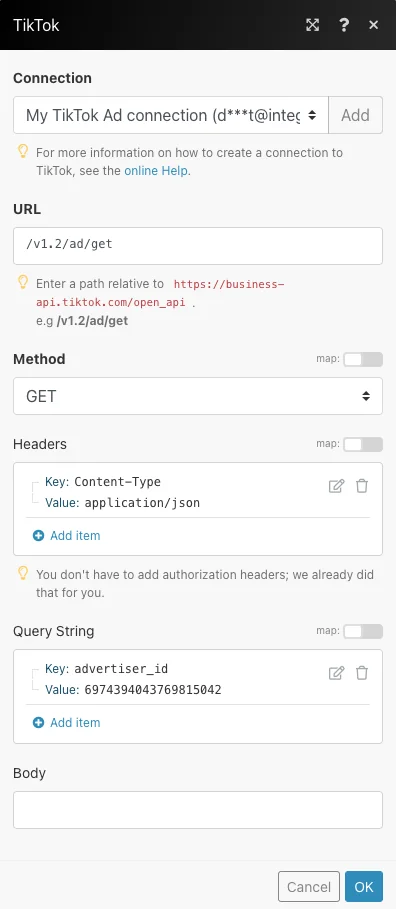
URL
Enter a path relative to https://business-api.tiktok.com/open_api For example: /v1.2/ad/get
For the list of available endpoints, refer to the TikTok Developer Documentation.
Method
Select the HTTP method you want to use:
GET
to retrieve information for an entry.
POST
to create a new entry.
PUT
to update/replace an existing entry.
PATCH
to make a partial entry update.
DELETE
to delete an entry.
Headers
Enter the desired request headers. You don’t have to add authorization headers; we already did that for you.
Query String
Enter the request query string.
Body
Enter the body content for your API call.
Example of Use – List Ads
The following API call returns all the ads from your TikTok account:
URL:
/v1.2/ad/get
Method:
GET
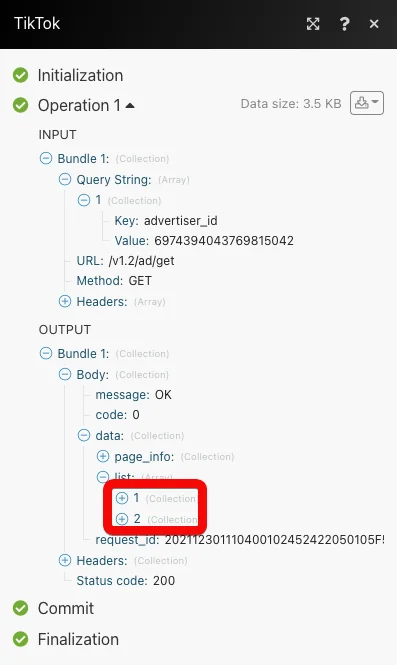
Matches of the search can be found in the module’s Output under Bundle > Body > data > list. In our example, 2 ads were returned:
Legacy article, imported from the original Boost.space knowledge base (/knowledge-base/applications/communication/tiktok/).

