Twist
The Twist modules allow you to watch, create, upload, and/or list comments, channels, threads, messages, and groups in your Twist account.
Prerequisites
- A Twist account
In order to use Twist with Boost.space Integrator, it is necessary to have a Twist account. If you do not have one, you can create a Twist account at https://twist.com/signup.
The module dialog fields that are displayed in bold (in the Boost.space Integrator scenario, not in this documentation article) are mandatory!
Connecting Twist to Boost.space Integrator
To connect your Twist account to Boost.space Integrator:
1. Go to Boost.space Integrator and open the Twist module’s Create a connection dialog.

2. Confirm the dialog by clicking the Confirm button.
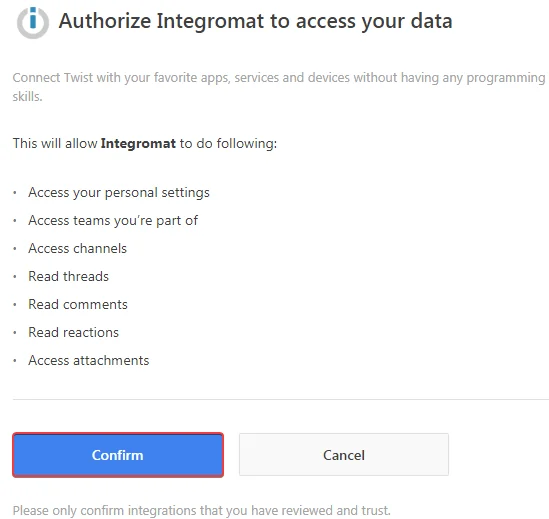
The connection has been established.
Triggers
Watch Comments
Triggers when comment related events occur.
Required Permissions: channels
Webhook Name
Enter a name for the webhook you want to create.
Connection
Establish a connection to your Twist account.
Team
Select the team whose channel comments you want to watch.
Channel
Select the channel whose comments you want to watch.
Thread
Select the channel thread whose comments you want to watch.
Event
Select the events you want to watch:
-
Comment added
-
Comment updated
-
Comment deleted
Watch Teams
Triggers when team related events occur.
Required Permissions: channels
Webhook Name
Enter a name for the webhook you want to create.
Connection
Establish a connection to your Twist account.
Event
Select the team whose group events you want to watch:
-
Team added
-
Team updated
-
Team deleted
-
Team user added
-
Team user updated
-
Team user deleted
Watch Groups
Triggers when group related events occur.
Webhook Name
Enter a name for the webhook you want to create.
Connection
Establish a connection to your Twist account.
Team
Select the team whose group events you want to watch.
Events
Select the group whose group events you want to watch:
-
Group added
-
Group updated
-
Group deleted
-
Group user added
-
Group user updated
-
Group user deleted
Watch Channels
Triggers when channel related events occur.
Required Permissions: channels
Webhook Name
Enter a name for the webhook you want to create.
Connection
Establish a connection to your Twist account.
Team
Select the team whose channel events you want to watch.
Event
Select the channel event you want to watch:
-
Channel added
-
Channel updated
-
Channel deleted
-
Channel user added
-
Channel user updated
-
Channel user deleted
Watch Messages
Triggers when message related events occur.
Required Permissions: messages
Webhook Name
Enter a name for the webhook you want to create.
Connection
Establish a connection to your Twist account.
Team
Select the team whose messages you want to watch.
Conversation
Select the conversation whose messages you want to watch.
Event
Select the event you want to watch:
-
Messages added
-
Messages updated
-
Messages deleted
Watch Threads
Triggers when thread related events occur.
Required Permissions: channels
Webhook Name
Enter a name for the webhook you want to create.
Connection
Establish a connection to your Twist account.
Team
Select the team whose channel thread events you want to watch.
Channel
Select the channel whose thread related events you want to watch.
Event
Select the event type you want to watch:
-
Thread added
-
Thread updated
-
Thread deleted
Actions
Create a Comment
Posts a new comment to a specific thread.
**Required Permissions:**channels
Webhook Name
Enter a name for the webhook you want to create.
Connection
Establish a connection to your Twist account.
Team
Select the team whose channel comments you want to watch.
Channel
Select the channel to whose thread you want to post a comment.
Thread
Select the channel thread where you want to post a comment.
Content
Enter the comment text to post.
Creates a Message
Posts a new message to a specific conversation.
Required Permissions: messages
Webhook Name
Enter a name for the webhook you want to create.
Connection
Establish a connection to your Twist account.
Team
Select the team to whose channel conversations you want to post a message.
Conversation ID
Select the Conversation ID where you want to post the message.
Content
Enter the message text to the conversation.
Create a Thread
Creates a new thread in a specific channel.
Required Permissions: channels
Webhook Name
Enter a name for the webhook you want to create.
Connection
Establish a connection to your Twist account.
Team
Select the team whose channel you want to create a thread for.
Channel
Select the channel whose thread you want to create.
Title
Enter the name of the thread.
Content
Enter the message content.
Upload an Attachment
Uploads a file.
Required Permissions: attachments
Connection
Establish a connection to your Twist account.
Name
Enter the name of the file you want to upload as an attachment.
Data
Enter the file URL or the file location to upload.
Searches
List All Threads
List all threads in a channel.
Required Permissions: channels
Webhook Name
Enter a name for the webhook you want to create.
Connection
Establish a connection to your Twist account.
Team
Select the team whose channel threads you want to list.
Channel
Select the channel whose threads you want to list.
Filter By
Select the option to filter the channel threads you want to list:
-
Attached to me
-
Everyone
-
Is started
Newer than
Enter the date and time from when you want to list the channel threads.
Older than
Enter the date and time before which you want to list the channel threads.
Limit
The maximum number of threads Boost.space Integrator should return during one scenario execution cycle.
Legacy article, imported from the original Boost.space knowledge base (/knowledge-base/applications/communication/twist/).

