Agile CRM
The Agile CRM modules allow you to watch, create, update, list, and delete the contacts, companies, deals, tickets, and tasks in your Agile CRM account.
Getting Started with Agile CRM
Prerequisites
- An Agile CRM account
In order to use Agile CRM with Boost.space Integrator, it is necessary to have an Agile CRM account. You can use your Google account or create an Agile CRM account at my.agilecrm.com/register.
The module dialog fields that are displayed in bold (in the Boost.space Integrator scenario, not in this documentation article) are mandatory!
Connecting Agile CRM to Boost.space Integrator
To connect your Agile CRM account to Boost.space Integrator you need to obtain the API Key from your Agile CRM account and insert it in the Create a connection dialog in the Boost.space Integrator module.

1. Log in to your Agile CRM account and open your Dashboard.
2. Click your Profile Icon > Admin Settings > Developers & API.
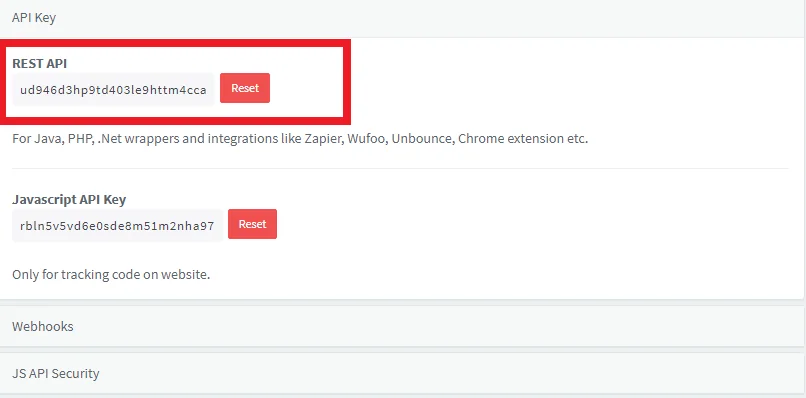
3. Copy the REST API Key to your clipboard.

4. Go to Boost.space Integrator and open the Agile CRM module’s Create a connection dialog.
5. In the Connection name field, enter a name for the connection.
6. In the Domain field, enter your domain name. For example, if your web browser URL address is https://xyz.agilecrm.com/ then your domain is xyz.
7. In the Agile CRM Email Address field, enter your registered email address.
8. In the API Key field, enter the API key copied in step 3 and click Continue.
The connection has been established.
Contact
Watch Contacts
Triggers when a contact is created, updated or viewed.
Connection
Establish a connection to your Agile CRM account.
Watch Records
Select the option to watch the contacts:
-
By Created Time
-
By Updated Time
-
By Viewed Time
Limit
Enter the maximum number of contacts Boost.space Integrator should return during one scenario execution cycle.
Watch Contact’s Tags
Triggers when a new tag is added to the selected contact.
Connection
Establish a connection to your Agile CRM account.
Contact IDs
Select the Contact ID whose tags you want to watch.
Limit
Enter the maximum number of contacts Boost.space Integrator should return during one scenario execution cycle.
List Contacts
Retrieves a list of all contacts.
Connection
Establish a connection to your Agile CRM account.
Limit
Enter the maximum number of contacts Boost.space Integrator should return during one scenario execution cycle.
Get a Contact
Gets the details of a contact.
Connection
Establish a connection to your Agile CRM account.
Contact ID
Select the Contact ID whose details you want to retrieve.
Create a Contact
Creates a new contact.
Connection
Establish a connection to your Agile CRM account.
First Name
Enter the first name of the contact.
Last Name
Enter the last name of the contact.
Enter the email address of the contact.
Company
Enter the company name to which the contact belongs to.
Address Line
Enter the street address of the contact.
City
Enter the city name.
State
Enter the state name.
Zip
Enter the zip code of the area.
Country
Enter the country name.
Phone Number (Work)
Enter the work phone number of the contact.
Phone Number (Home)
Enter the home phone number of the contact.
Tags
Add the keywords as tags to filter the contact when searching.
Star Value
Enter the lead score or star value of the contact.
Lead Score
Enter the lead score of the contact.
Profile Image
Enter the URL address to the contact’s profile image.
Website
Enter the URL address of the contact’s or the contact’s company website.
Website (Youtube)
Enter the URL address of the contact’s or contact’s Youtube website.
Website (LinkedIn)
Enter the URL address of the contact’s or contact’s LinkedIn website.
Website (Twitter)
Enter the URL address of the contact’s or the contact’s Twitter website.
Custom Fields
Add the custom fields:
Key
Enter the field name
Value
Enter the field value.
Update a Contact
Updates an existing contact.
Connection
Establish a connection to your Agile CRM account.
Contact ID
Select the Contact ID whose details you want to update.
First Name
Enter the first name of the contact.
Last Name
Enter the last name of the contact.
Enter the email address of the contact.
Company
Enter the company name to which the contact belongs to.
Address Line
Enter the street address of the contact.
City
Enter the city name.
State
Enter the state name.
Zip
Enter the zip code of the area.
Country
Enter the country name.
Phone Number (Work)
Enter the work phone number of the contact.
Phone Number (Home)
Enter the home phone number of the contact.
Tags
Add the keywords as tags to filter the contact when searching.
Star Value
Enter the lead score or star value of the contact.
Lead Score
Enter the lead score of the contact.
Profile Image
Enter the URL address to the contact’s profile image.
Website
Enter the URL address of the contact’s or contact’s company website.
Website (Youtube)
Enter the URL address of the contact’s or contact’s Youtube website.
Website (LinkedIn)
Enter the URL address of the contact’s or contact’s LinkedIn website.
Website (Twitter)
Enter the URL address of the contact’s or contact’s Twitter website.
Custom Fields
Add the custom fields:
Key
Enter the field name
Value
Enter the field value.
Delete a Contact
Deletes a contact.
Connection
Establish a connection to your Agile CRM account.
Contact ID
Select the Contact ID you want to delete.
Add a Contact to a Campaign
Adds a contact by email to a selected campaign.
Connection
Establish a connection to your Agile CRM account.
Campaign ID
Select the Campaign ID to which you want to add the campaign.
Contact’s Email
Select the contact’s email address you want to add to the campaign.
Company
Watch Companies
Triggers when a company is created, updated, or viewed.
Connection
Establish a connection to your Agile CRM account.
Watch Companies
Select the option to watch the companies:
-
By Created Time
-
By Updated Time
-
By Viewed Time
Limit
Enter the maximum number of the companies Boost.space Integrator should return during one scenario execution cycle.
List Companies
Retrieves a list of all the companies.
Connection
Establish a connection to your Agile CRM account.
Limit
Enter the maximum number of the companies Boost.space Integrator should return during one scenario execution cycle.
Get a Company
Gets the details of the company.
Connection
Establish a connection to your Agile CRM account.
Company ID
Select the Company ID whose details you want to retrieve.
Create a Company
Creates a new company.
Connection
Establish a connection to your Agile CRM account.
Company Name
Enter the name of the company.
Company Emails
Add the company email addresses:
Type
Select the email address type:
-
Primary
-
Alternative
Email address
Enter the email address.
Phone
Enter the company’s phone number.
Address Line
Enter the street address where the company is located.
City
Enter the city name.
State
Enter the state name.
Zip
Enter the zip code of the area.
Country
Enter the country name.
Company Website
Add the company websites:
Type
Select the website type:
-
Blog
-
Facebook
-
GitHub
-
URL
-
LinkedIn
-
Skype
-
Twitter
-
URL
-
Xing
-
URL
-
Youtube
Website
Enter the company’s website address.
Tags
Add the keywords as tags to filter the company when searching.
Star Value
Enter the star value of the company.
Lead Score
Enter the lead score of the company.
Custom Fields
Add the custom fields:
Key
Enter the field name.
Value
Enter the field value.
Update a Company
Updates an existing company.
Connection
Establish a connection to your Agile CRM account.
Company ID
Select the Company ID you want to update.
Company Name
Enter the name of the company.
Company Emails
Add the company email addresses:
Type
Select the email address type:
-
Primary
-
Alternative
Email address
Enter the email address.
Phone
Enter the company’s phone number.
Address Line
Enter the street address where the company is located.
City
Enter the city name.
State
Enter the state name.
Zip
Enter the zip code of the area.
Country
Enter the country name.
Company Website
Add the company websites:
Type
Select the website type:
-
Blog
-
Facebook
-
GitHub
-
URL
-
LinkedIn
-
Skype
-
Twitter
-
URL
-
Xing
-
URL
-
Youtube
Website
Enter the company’s website address.
Tags
Add the keywords as tags to filter the company when searching.
Star Value
Enter the star value of the company.
Lead Score
Enter the lead score of the company.
Custom Fields
Add the custom fields:
Key
Enter the field name.
Value
Enter the field value.
Delete a Company
Deletes a company.
Connection
Establish a connection to your Agile CRM account.
Company ID
Select the Company ID you want to delete.
Deal
Watch Deals
Triggers when a new deal is created, or updated.
Connection
Establish a connection to your Agile CRM account.
Watch Deals
Select the option to watch the deals:
-
By Created Time
-
By Updated Time
-
By Milestone Changed Time
-
By Note Created Time
-
By Won Date
-
By Closed Date
Limit
Enter the maximum number of the deals Boost.space Integrator should return during one scenario execution cycle.
List Deals
Retrieves a list of all the deals.
Connection
Establish a connection to your Agile CRM account.
Limit
Enter the maximum number of the deals Boost.space Integrator should return during one scenario execution cycle.
Get a Deal
Gets the details of a deal.
Connection
Establish a connection to your Agile CRM account.
Deal ID
Select the Company ID whose details you want to retrieve.
Create a Deal
Creates a deal.
Connection
Establish a connection to your Agile CRM account.
Deal Name
Enter the name of the deal.
Expected Value
Enter the revenue expected from the deal.
Probability (%)
Enter the probability of winning the deal.
Close Date
Enter the date when the deal closes.
Track
Select the option to track the deal progress.
Milestone
Select the milestone of the deal:
-
New
-
Prospect
-
Proposal
-
Won
-
Lost
Deal Source ID
Enter the Deal Source ID from where you got the deal.
Contact ID
Select the Contact IDs for the deal.
Description
Enter the details of the deal.
Custom Data
Add the custom data:
Name
Enter the name of the data.
Value
Enter the value.
Update a Deal
Updates an existing deal.
Connection
Establish a connection to your Agile CRM account.
Deal ID
Select the Deal ID you want to update.
Deal Name
Enter the name of the deal.
Expected Value
Enter the revenue expected from the deal.
Probability (%)
Enter the probability of winning the deal.
Close Date
Enter the date when the deal closes.
Track
Select the option to track the deal progress.
Milestone
Select the milestone of the deal:
-
New
-
Prospect
-
Proposal
-
Won
-
Lost
Deal Source ID
Enter the Deal Source ID from where you got the deal.
Contact ID
Select the Contact IDs for the deal.
Description
Enter the details of the deal.
Custom Data
Add the custom data:
Name
Enter the name of the data.
Value
Enter the value.
Delete a Deal
Deletes a deal.
Connection
Establish a connection to your Agile CRM account.
Deal ID
Select the Company ID you want to delete.
Task
Watch Tasks
Triggers when a task is created, due, started, or completed.
Connection
Establish a connection to your Agile CRM account.
Watch Tasks
Select the option to watch the tasks:
-
By Created Time
-
By Due Time
-
By Task Start Time
-
By Task End Time
Criteria
Select the criteria of the tasks you want to watch:
-
Category
-
Status
-
Priority
Is Pending
Select whether you want to watch the pending tasks:
-
Yes
-
No
-
Not defined
Owner ID
Enter the Owner ID whose tasks you want to watch.
Limit
Enter the maximum number of the tasks Boost.space Integrator should return during one scenario execution cycle.
List Tasks
Retrieves a list of the tasks by given filter parameters.
Connection
Establish a connection to your Agile CRM account.
Limit
Enter the maximum number of the tasks Boost.space Integrator should return during one scenario execution cycle.
Get a Task
Gets the details of a task.
Connection
Establish a connection to your Agile CRM account.
Task ID
Select the Task ID whose details you want to retrieve.
Create a Task
Creates a new task.
Connection
Establish a connection to your Agile CRM account.
Subject
Enter the task details.
Type
Select the task type:
-
Call
-
Email
-
Followup
-
Meeting
-
Milestone
-
Send
-
Tweet
-
Others
Priority
Select the priority of the task:
-
High
-
Normal
-
Low
Status
Select the status of the task:
-
In Progress
-
Yet to start
-
Completed
Task Due Date
Enter the date by which the task must be completed.
Task Due Time
Enter the time remaining for completing the task.
Owner ID
Select the Owner ID who owns the task.
Task Description
Enter the details of the task.
Contact IDs
Select the Contact IDs for the task.
Deal IDs
Select the Deal IDs associated with the task.
Update a Task
Updates an existing task.
Connection
Establish a connection to your Agile CRM account.
Task ID
Select the Task ID you want to update.
Subject
Enter the task details.
Type
Select the task type:
-
Call
-
Email
-
Followup
-
Meeting
-
Milestone
-
Send
-
Tweet
-
Others
Priority
Select the priority of the task:
-
High
-
Normal
-
Low
Status
Select the status of the task:
-
In Progress
-
Yet to start
-
Completed
Task Due Date
Enter the date by which the task must be completed.
Task Due Time
Enter the time remaining for completing the task.
Owner ID
Select the Owner ID who owns the task.
Task Description
Enter the details of the task.
Contact IDs
Select the Contact IDs for the task.
Deal IDs
Select the Deal IDs associated with the task.
Delete a Task
Deletes a task.
Connection
Establish a connection to your Agile CRM account.
Task ID
Select the Task ID you want to delete.
Event
Watch Events
Triggers when a calendar event occurs.
List Event
Retrieves a list of all the events.
Connection
Establish a connection to your Agile CRM account.
Limit
Enter the maximum number of the events Boost.space Integrator should return during one scenario execution cycle.
Get an Event
Gets the details of an event.
Connection
Establish a connection to your Agile CRM account.
Event ID
Select the Event ID whose details you want to retrieve.
Add an Event
Adds a new event on the calendar.
Connection
Establish a connection to your Agile CRM account.
Title
Enter a name for the event.
Color
Select the event priority:
-
Red (High)
-
Yellow (Normal)
-
Green (Low)
Start
Enter the event start date and time.
End
Enter the date and time when the event ends.
Description
Enter the details of the event.
Owner ID
Enter the Owner ID who owns the event.
Contact IDs
Select the Contact IDs for the event.
Deal IDs
Select the Deal ID associated with the event.
Update an Event
Updates an existing event.
Connection
Establish a connection to your Agile CRM account.
Event ID
Select the Event ID whose details you want to update.
Title
Enter a name for the event.
Color
Select the event priority:
-
Red (High)
-
Yellow (Normal)
-
Green (Low)
Start
Enter the event start date and time.
End
Enter the date and time when the event ends.
Description
Enter the details of the event.
Owner ID
Enter the Owner ID who owns the event.
Contact IDs
Select the Contact IDs for the event.
Deal IDs
Select the Deal ID associated with the event.
Delete an Event
Deletes an event.
Connection
Establish a connection to your Agile CRM account.
Event ID
Select the Event ID you want to delete.
Ticket
Watch Tickets
Triggers when a ticket is created or updated.
Connection
Establish a connection to your Agile CRM account.
Watch Tickets
Select the option to watch the tickets:
-
By Created Time
-
By Updated Time
-
By last customer replied time
Filter ID
Select the option to filter the tickets you want to watch:
-
New and open tickets
-
All Tickets
-
New Tickets
Limit
Enter the maximum number of the tickets Boost.space Integrator should return during one scenario execution cycle.
List Tickets
Retrieves a list of all the tickets.
Connection
Establish a connection to your Agile CRM account.
Limit
Enter the maximum number of the tickets Boost.space Integrator should return during one scenario execution cycle.
Get a Ticket
Gets the details of a ticket.
Connection
Establish a connection to your Agile CRM account.
Ticket ID
Select the Ticket ID whose details you want to retrieve.
Create a Ticket
Creates a new ticket.
Connection
Establish a connection to your Agile CRM account.
Requester Mail
Select the email address of the person who is requesting the information.
Subject
Enter the subject line of the ticket.
Assignee
Select the user to whom the ticket is assigned.
Priority
Select the priority of the task:
-
Low
-
High
-
Medium
Type
Select the ticket type:
-
Incident
-
Problem
-
Question
-
Task
Status
Select the ticket status:
-
Open
-
Pending
-
Closed
CC Emails
Enter the email address who should be informed about the ticket.
Messages
Enter any additional information about the ticket for the assignees.
Delete a Ticket
Deletes a ticket.
Connection
Establish a connection to your Agile CRM account.
Ticket ID
Select the Ticket ID you want to delete.
Get All Messages in a Ticket
Retrieves all messages within a specified ticket.
Connection
Establish a connection to your Agile CRM account.
Enter a Ticket ID
Select the option for the ticket:
-
Enter Manually
-
Select from the list
Filter ID
Select the option to retrieve the messages in a ticket:
-
New and open tickets
-
All Tickets
-
New Tickets
Ticket ID
Select the Ticket ID whose messages you want to retrieve.
Limit
Enter the maximum number of the tickets Boost.space Integrator should return during one scenario execution cycle.
Others
Add a Note
Adds a new note to a ticket contact or deal.
Connection
Establish a connection to your Agile CRM account.
Add a note
Select the option to add the note:
-
To Ticket
-
To Contacts
-
To Deals
Enter a Ticket ID
Select the option for the ticket:
-
Enter Manually
-
Select from the list
Ticekt ID
Select the Ticket ID to which you want to add the note.
Contact IDs
Select the Contact IDs to which you want to add the note.
Deal IDs
Select the Deal IDs to which you want to add the note.
Note
Enter the note text.
Note Type
Select the note type:
-
Private
-
Public
Subject
Enter the subject line of the note.
Description
Enter the note text.
Make an API Call
Performs an arbitrary authorized API call.
Connection
Establish a connection to your Agile CRM account.
URL
Enter a path relative to https://{your_domain}.agilecrm.com/dev/api. For example: /contacts
For the list of available endpoints, refer to the Agile CRM API Documentation.
Method
Select the HTTP method you want to use:
GETto retrieve information for an entry**.**
POSTto create a new entry.
PUTto update/replace an existing entry.
PATCHto make a partial entry update.
DELETEto delete an entry.
Headers
Enter the desired request headers. You don’t have to add authorization headers; we already did that for you.
Query String
Enter the request query string.
Body
Enter the body content for your API call.
Example of Use – List Current User Deals
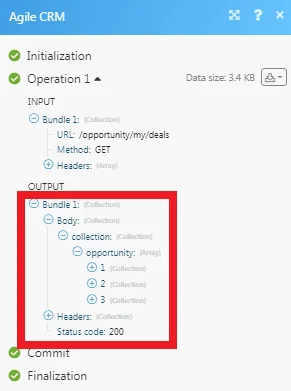
The following API call returns all the deals of the current user from their Agile CRM account:
URL:/opportunity/my/deals
Method:GET
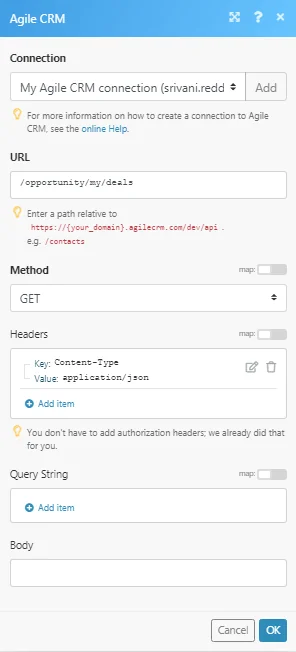
Matches of the search can be found in the module’s Output under Bundle > _Body > collection > opportunity._In our example, 3 deals were returned:
Legacy article, imported from the original Boost.space knowledge base (/knowledge-base/applications/crm-and-sales-tools/agile-crm/).

