Canny
With the Canny modules in Boost.space Integrator, you can:
-
Watch, create, retrieve, and search posts, add, and remove post tags, and change the post status
-
Watch, create, retrieve, search, and delete the comments
-
Watch, create, retrieve, search, and delete the votes
-
Watch, and list the status changes
-
Create, retrieve, and list the tags
-
Create, update retrieve, list, and delete a user.
-
Retrieve and list the boards
To get started with the Canny, create an account at canny.io.
Canny in Boost.space Integrator now supports custom fields and statuses.
Connect Canny to Boost.space Integrator
Instant triggers are connected via webhooks. Actions and Searches are connected using the API Key.ActionsSearches
To connect the Canny app with the Boost.space Integrator:
-
Log in to your Canny account.
-
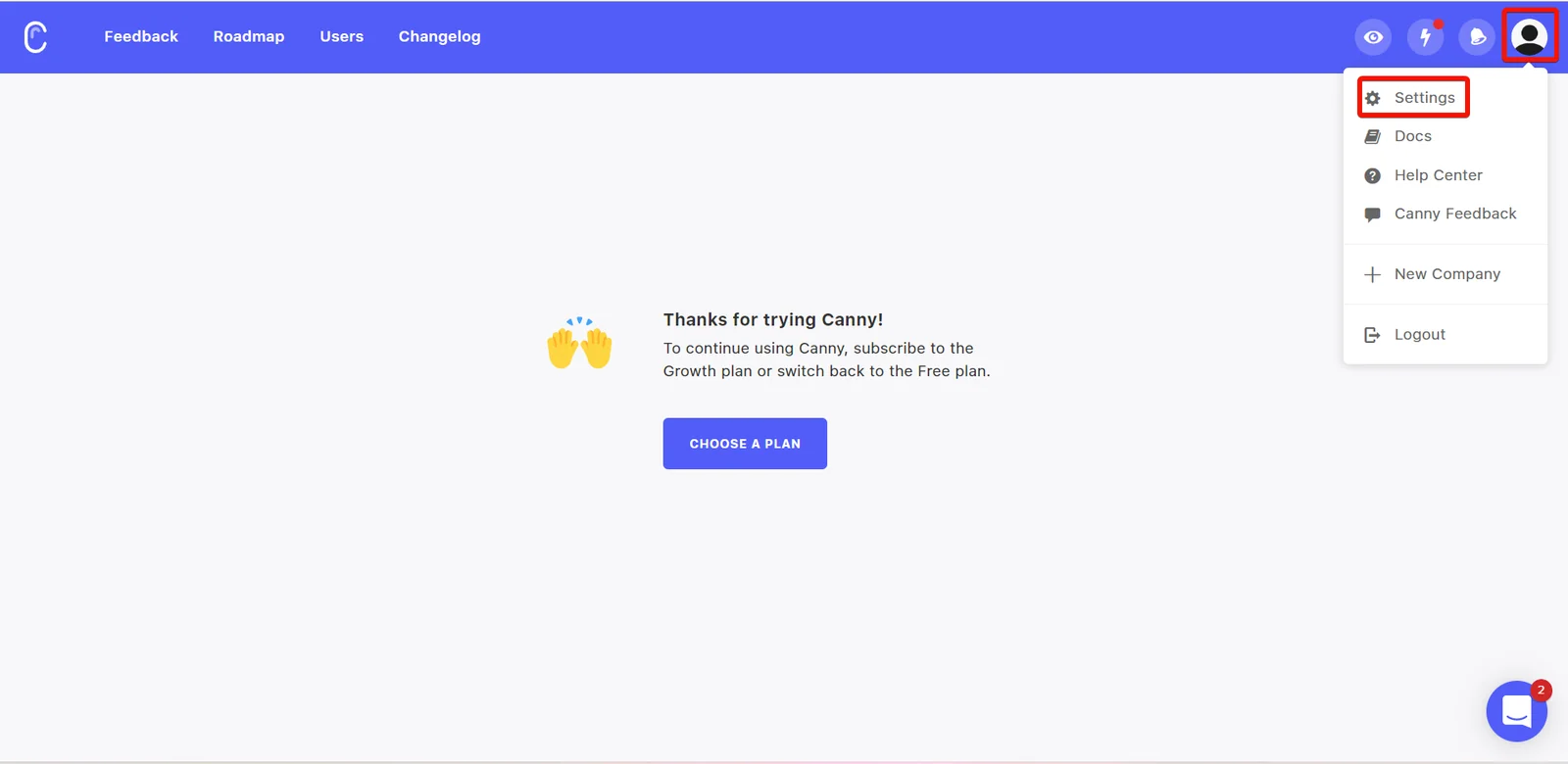
Click Profile > Settings.
-
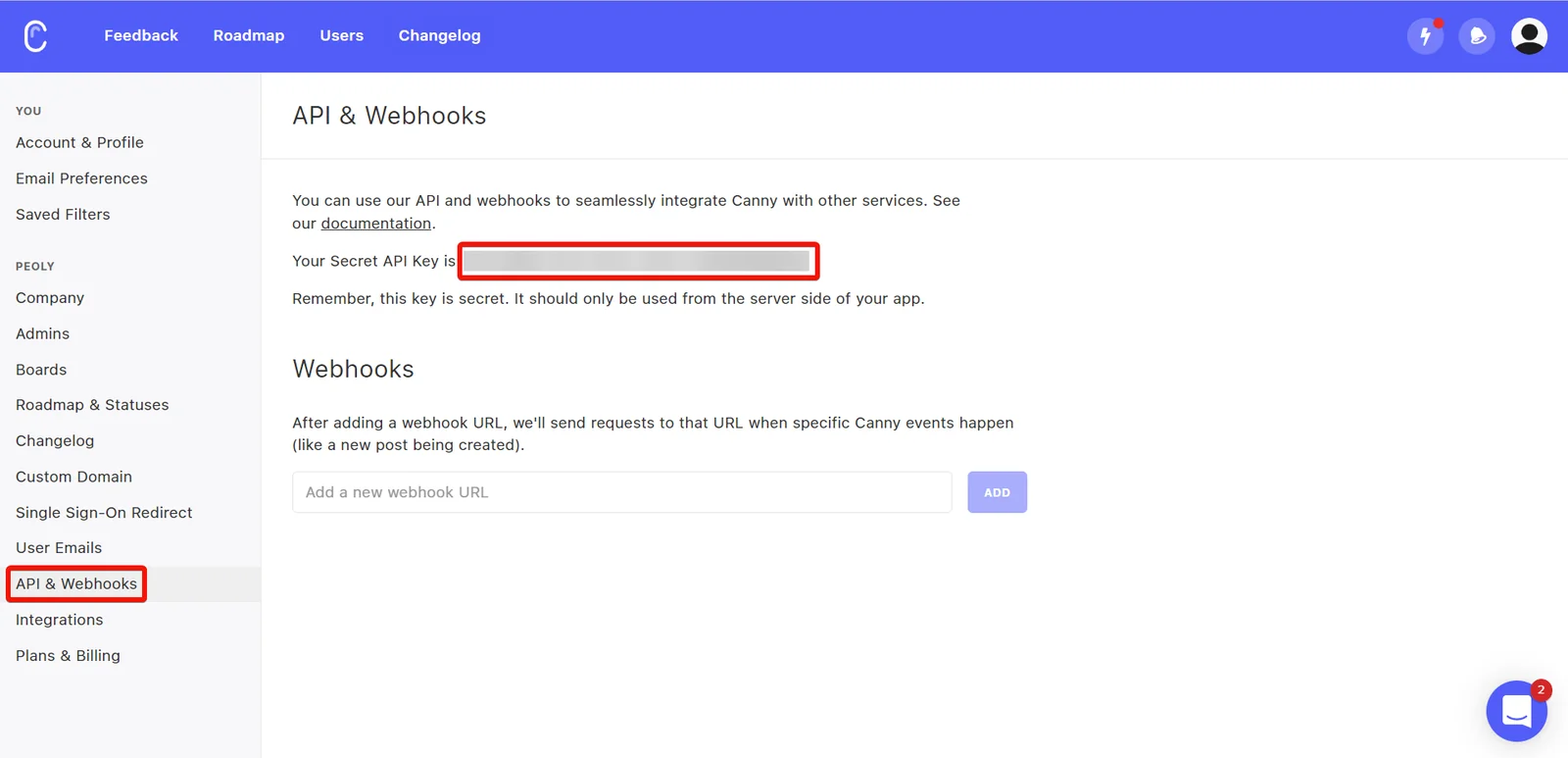
Click API & Webhooks. Copy the API Key to a safe place.
-
Log in to your Boost.space Integrator and add a module from the Canny into a Boost.space Integrator scenario.
-

Click Add next to the Connection field.
-
In the Connection name field, enter a name for the connection.
-
In the API Key field, enter the details copied in step 3, and click Save.
You have successfully connected the Canny app with Boost.space Integrator and can now build scenarios.
Connecting Instant Triggers via Webhooks
-

Create a webhook using the Canny instant trigger module dialog. Select the events for Canny for which you want to trigger the module and click Save. Copy the webhook URL to your clipboard.
-
Log in to your Canny account.
-
Open the Settings > API & Webhooks.
-
In the Webhooks section, add the URL address created in step 1.
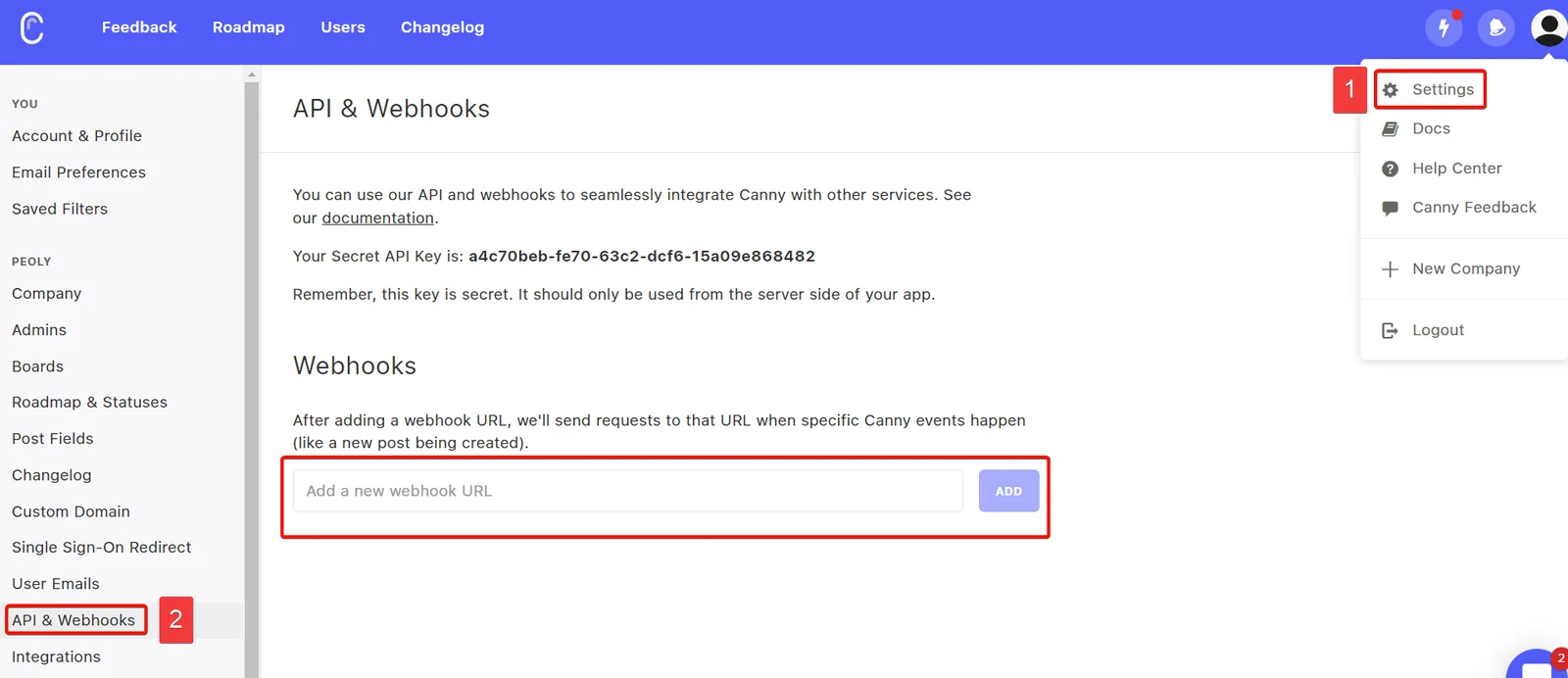
You have successfully added the webhooks, and will receive triggers when the specified Canny events occur.
Posts
You can watch, create, update, retrieve, search, list, and delete the posts using the following modules.
Watch Posts
Triggers when a new post is created, modified, or deleted.
Webhook name
Enter (map) a name for the webhook.
Event types
Select event types whose posts you want to watch.
To add webhooks, see Connecting Instant Triggers via Webhooks.
Create a Post
Creates a post.
Connection
Establish a connection to your Canny account.
Board ID
Enter (map) the Board ID, the unique identifier of the post’s board.
Author ID
Enter (map) the Author ID who is creating the post. Alternatively, you can enter the author’s email on whose behalf the post should be created.
Post Title
Enter (map) the post name.
Post Content
Enter (map) the text for the post.
Post’s Category
Enter (map) the post category. For example, releases.
Image URLs
Enter (map) the URL address of the image to display with the post.
Admin ID
Enter (map) the Admin ID for the post. Alternatively, you can enter the admin’s email on whose behalf the post should be created.
Get a Post
Retrieves the details of an existing post, specified by its ID.
Connection
Establish a connection to your Canny account.
Post ID
Enter (map) the Post ID whose details you want to retrieve.
Search Posts
Returns a list of posts.
Connection
Establish a connection to your Canny account.
Board ID
Enter (map) the Board ID of a board whose posts you want to fetch.
Author ID
Enter (map) the Author ID to search the posts related to the specified author. Alternatively, you can enter the author’s email to search the Author ID.
Select Mode
Select or map the mode choose the post status and lists:
-
Setlist of statuses (custom included)
-
Select from a list.
Status
Enter (map) a comma-separated list of statuses of the post you want to search. Only posts with these statuses will be fetched.
Search
Enter (map) a keyword or a phrase to search the post that matches the specified query.
Tag IDs
Select or map the tags to search the posts that match the specified tags.
Sort
Select or map the order to sort the search results:
-
Newest
-
Oldest
-
Score
-
Trending
Limit
Set the maximum number of posts Boost.space Integrator will return during one execution cycle.
Add Post Tag
Adds a tag to a post.
Connection
Establish a connection to your Canny account.
Post ID
Enter (map) the Post ID to which you want to add the tag. Alternatively, you search for the Post ID.
Tag ID
Enter (map) the Tag ID you want to add to the post.
Remove Post Tag
Removes a tag from a post.
Connection
Establish a connection to your Canny account.
Post ID
Enter (map) the Post ID whose tag you want to remove.
Tag ID
Enter (map) the Tag ID you want to remove.
Change Post Status
Changes status of a post.
Connection
Establish a connection to your Canny account.
Changer ID
Enter (map) a Changer ID to change a post status. Alternatively, you can search the Changer ID by entering the Admin email.
Post ID
Enter (map) the Post ID whose status you want to change.
Should notify voters
Select whether you want to notify non-admin voters about the status change.
Select Mode
Select or map the option to choose the mode:
-
Set a status (custom included)
-
Select from a list
Status
Select or map the post status:
-
Open
-
Under review
-
Planned
-
In progress
-
Complete
Comments
You can watch, create, retrieve, search, and delete the comments using the following modules.
Watch Comments
Triggers when a new comment is created or deleted.
Webhook name
Enter (map) a name for the webhook.
Event types
Select the event types whose comments you want to watch.
To add webhooks to your Canny account, see Connecting Instant Triggers via Webhooks.
Create a Comment
Creates a comment.
Connection
Establish a connection to your Canny account.
Author ID
Enter (map) the Author ID who is adding the comment.
Board ID
Enter (map) a Board ID for whose post you want to create a comment.
Post ID
Enter (map) the Post ID to which you want to add the comment.
Comment ID
Enter (map) the Parent Comment ID if this comment is a reply.
Comment
Enter (map) a comment text.
Image URLs
Enter (map) the image URL address to add to the comment.
Internal
Select whether you want to keep this comment is internal only.
Notify Voters
Select whether you want to notify the voters when this comment is added and trigger email notifications. By default this is false.
Get a Comment
Retrieves a comment.
Connection
Establish a connection to your Canny account.
Comment ID
Enter (map) a Comment ID whose details you want to retrieve. Alternatively, you can search for Comment ID.
Board ID
Enter (map) a Board ID of a board whose comments you want to watch.
Post ID
Select or map a Post ID of a post to retrieve the comment.
Search Comments
Returns a list of comments.
Connection
Establish a connection to your Canny account.
Post ID
Enter (map) the Post ID whose comments you want to search. Alternatively, you can search for the Post ID.
Board ID
Select or map a Board ID of a board to search the posts.
Board ID
Enter (map) the Board ID whose post comments you want to search.
Author ID
Enter (map) the Author ID whose comments you want to fetch. Alternatively, you can enter the author’s email on whose comments should be retrieved.
Limit
Set the maximum number of comments Boost.space Integrator will return during one execution cycle. The default value is 100.
Delete a Comment
Deletes a comment.
Connection
Establish a connection to your Canny account.
Comment ID
Enter (map) a Comment ID you want to delete. Alternatively, you can search for Comment ID.
Board ID
Enter (map) a Board ID of a comment.
Post ID
Select or map the Post ID of the comment:
-
Third Post
-
Second Post
-
Short title
Votes
You can watch, create, retrieve, search, and delete the votes using the following modules.
Watch Votes
Triggers when a new vote is created.
Webhook name
Enter (map) a name for the webhook.
Event types
Select the events to watch the votes.
To add webhooks in your Canny account, see Connecting Instant Triggers via Webhooks.
Create a Vote
Add a vote to a post on someone’s behalf.
Connection
Establish a connection to your Canny account.
Post ID
Enter (map) the Post ID for which you want to create the vote. Alternatively, you can search for the Post ID.
Voter ID
Enter (map) the Voter ID of the user to create a vote. Alternatively, you can enter the voter’s email on whose behalf the vote should be created.
Get a Vote
Retrieves a vote.
Connection
Establish a connection to your Canny account.
Vote ID
Enter (map) a Vote ID whose details you want to retrieve. Alternatively, you can search for Votes.
Board ID
Enter (map) a Board ID whose post details you want to retrieve.
Post ID
Select or map a Post ID whose details you want to retrieve.
Search Votes
Returns a list of votes.
Connection
Establish a connection to your Canny account.
Board ID
Select or map a Board ID to search for the votes.
Post ID
Select or map a Post ID whose votes to search. Alternatively, you can search for the Post ID.
User ID
Select or map a User ID whose votes you want to search. Alternatively, you can enter the user’s email to search for the votes.
Limit
Set the maximum number of votes Boost.space Integrator will return during one execution cycle. The default value is 100.
Delete a Vote
Deletes a vote.
Connection
Establish a connection to your Canny account.
Board ID
Select or map a Board ID whose post’s votes you want to delete.
Post ID
Enter (map) a Post ID whose votes you want to delete.
Voter ID
Enter (map) a Vote ID you want to delete.
Status Changes
You can watch, and list the status changes using the following modules.
Watch Status Changes
Watches staus changes.
Connection
Establish a connection to your Canny account.
Board ID
Enter (map) a Board ID whose status changes you want to watch.
Limit
Set the maximum number of status changes Boost.space Integrator will return during one execution cycle. The default value is 2.
List Status Changes
Retrieves a list of status changes. Sorted by newest.
Connection
Establish a connection to your Canny account.
Board ID
Enter (map) a Board ID whose status changes you want to list.
Limit
Set the maximum number of status changes Boost.space Integrator will return during one execution cycle.
Tags
You can create, retrieve, and list the tags using the following modules.
Create a Tag
Creates a tag.
Connection
Establish a connection to your Canny account.
Board ID
Enter (map) a Board ID whose tags you want to create.
Name
Enter (map) a name for the tag.
Get a Tag
Retrieves a tag.
Connection
Establish a connection to your Canny account.
Tag ID
Enter (map) a Tag ID whose details you want to retrieve. Alternatively, you can search tags.
List Tags
Retrieves a list of tags.
Connection
Establish a connection to your Canny account.
Board ID
Enter (map) a Board ID whose tags you want to list.
Limit
Set the maximum number of tags Boost.space Integrator will return during one execution cycle.
Users
You can create, update, retrieve, list, and delete the users using the following modules.
Create or Update a User
Creates a new user or updates an already existing user.
Connection
Establish a connection to your Canny account.
Companies
Enter (map) a list of companies the user is associated with.
Company ID
Enter (map) the Company ID of a company
Company Name
Enter (map) the company name.
Date Created
Enter (map) a date the company was created in your system.
Monthly Spend
Enter (map) the monthly turnover of the company.
User Created
Enter (map) the date the user was created in your system.
Custom Fields
Enter (map) any custom fields associated with the user:
Name
Enter (map) the field name. For example, user address.
Value
Enter (map) the field value. For example, address details.
Users’s Email
Enter (map) the user’s email address.
User’s Name
Enter (map) the user’s name.
User’s ID
Enter (map) the user’s unique identifier in your application.
Avatar URL
Enter (map) the user’s profile image URL address.
Get a User
Retrieves the details of an existing user by Canny ID, User ID, or Email.
Connection
Establish a connection to your Canny account.
Enter (map) the user’s email address whose details you want to retrieve.
ID
Enter (map) the user’s unique identifier from Canny whose details you want to retrieve.
User ID
Enter (map) the User ID whose details you want to retrieve.
List Users
Lists users.
Connection
Establish a connection to your Canny account.
Limit
Set the maximum number of users Boost.space Integrator will return during one execution cycle. The default value is 100.
Delete a User
Deletes a user.
Connection
Establish a connection to your Canny account.
ID
Enter (map) the User ID you want to delete. Alternatively, click Search and enter the user’s email address which should be deleted.
Boards
You can retrieve and list the boards using the following modules.
Get a Board
Retrieves a board.
Connection
Establish a connection to your Canny account.
Board ID
Select or map a Board ID whose details you want to retrieve.
List All Boards
Returns a list of all boards associated with your company, in no particular order.
Connection
Establish a connection to your Canny account.
Limit
Set the maximum number of boards Boost.space Integrator will return during one execution cycle.
Other
You can call APIs and list the changelog using the following modules.
List Changelog Entries
Retrieves a list of changelog entries, Sorted by newest.
Connection
Establish a connection to your Canny account.
Sort
Select a parameter to sort:
-
Created
-
Last Saved
-
Non Published First
-
Published At
If no parameter selected, defaults to Non Published First.
Type
Select the type of entries to fetch:
-
New
-
Improved
-
Fixed
Limit
Set the maximum number of changelog entries Boost.space Integrator will return during one execution cycle.
List Opportunities
List opportunities.
Connection
Establish a connection to your Canny account.
Limit
Set the maximum number of opportunities Boost.space Integrator will return during one execution cycle.
Delete a Company
Deletes a company
Connection
Establish a connection to your Canny account.
Company ID
Enter (map) the Company ID you want to delete.
Legacy article, imported from the original Boost.space knowledge base (/knowledge-base/applications/customer-support/canny/).

