GIPHY
The GIPHY modules enable you to search, upload, list, translate to word, or get a random Gif/Sticker in your GIPHY account.
Getting Started with GIPHY
Prerequisites
- A GIPHY account
In order to use GIPHY with Boost.space Integrator, it is necessary to have a GIPHY account. If you do not have one, you can create a GIPHY account at giphy.com/join.
The module dialog fields that are displayed in bold (in the Boost.space Integrator scenario, not in this documentation article) are mandatory!
Connect GIPHY to Boost.space Integrator
To connect your GIPHY account to Boost.space Integrator you need to retrieve an API Key by creating an app in the GIPHY Developers portal.
-
Log in to your GIPHY Developers account.
-
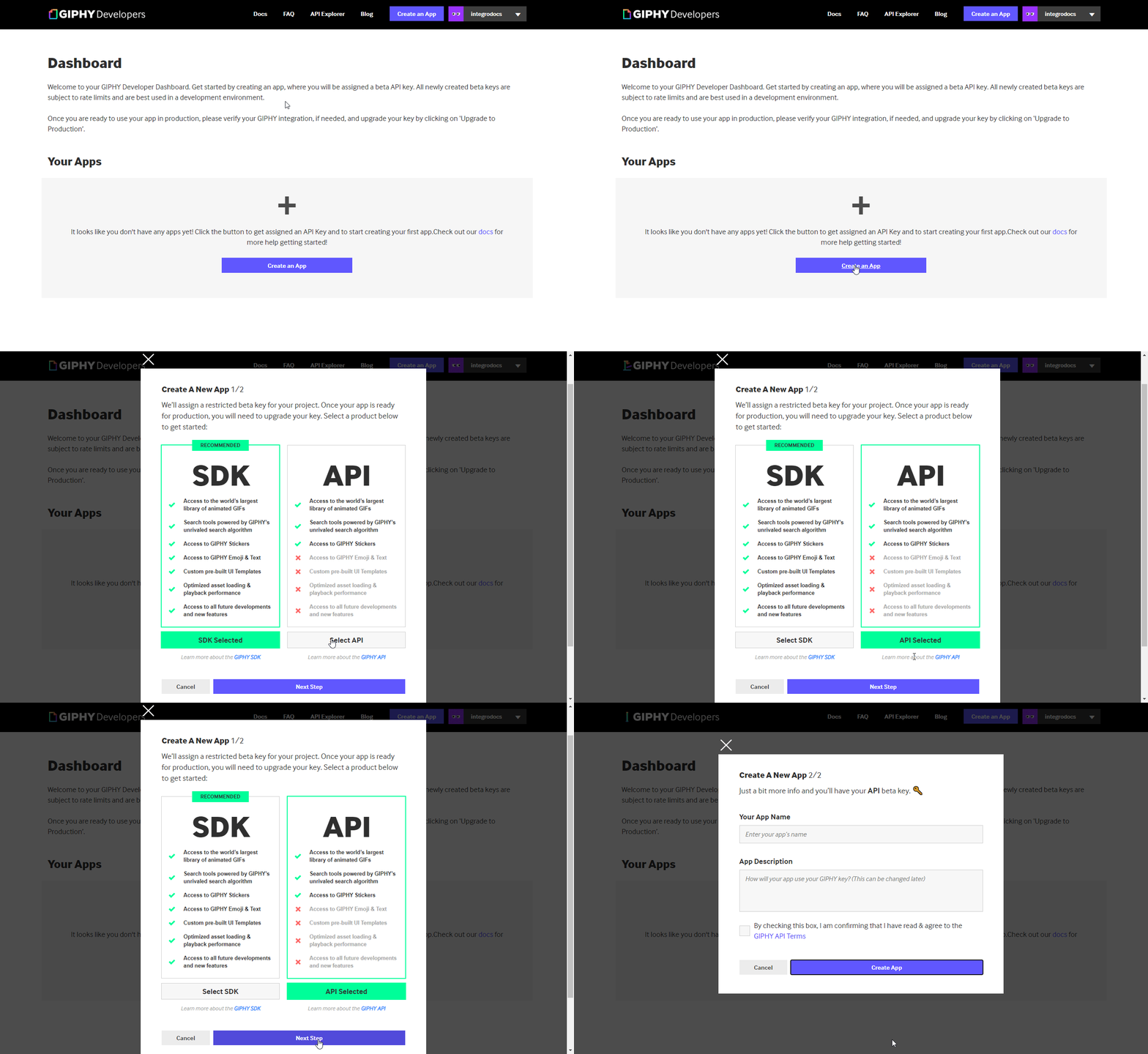
Click the Create an App button and the Select API option. Confirm your selection by clicking the Next Step button.
-
Enter the name of the app, e.g. Boost.space Integrator and description. Confirm GIPHY API terms and click the Create App button.
-
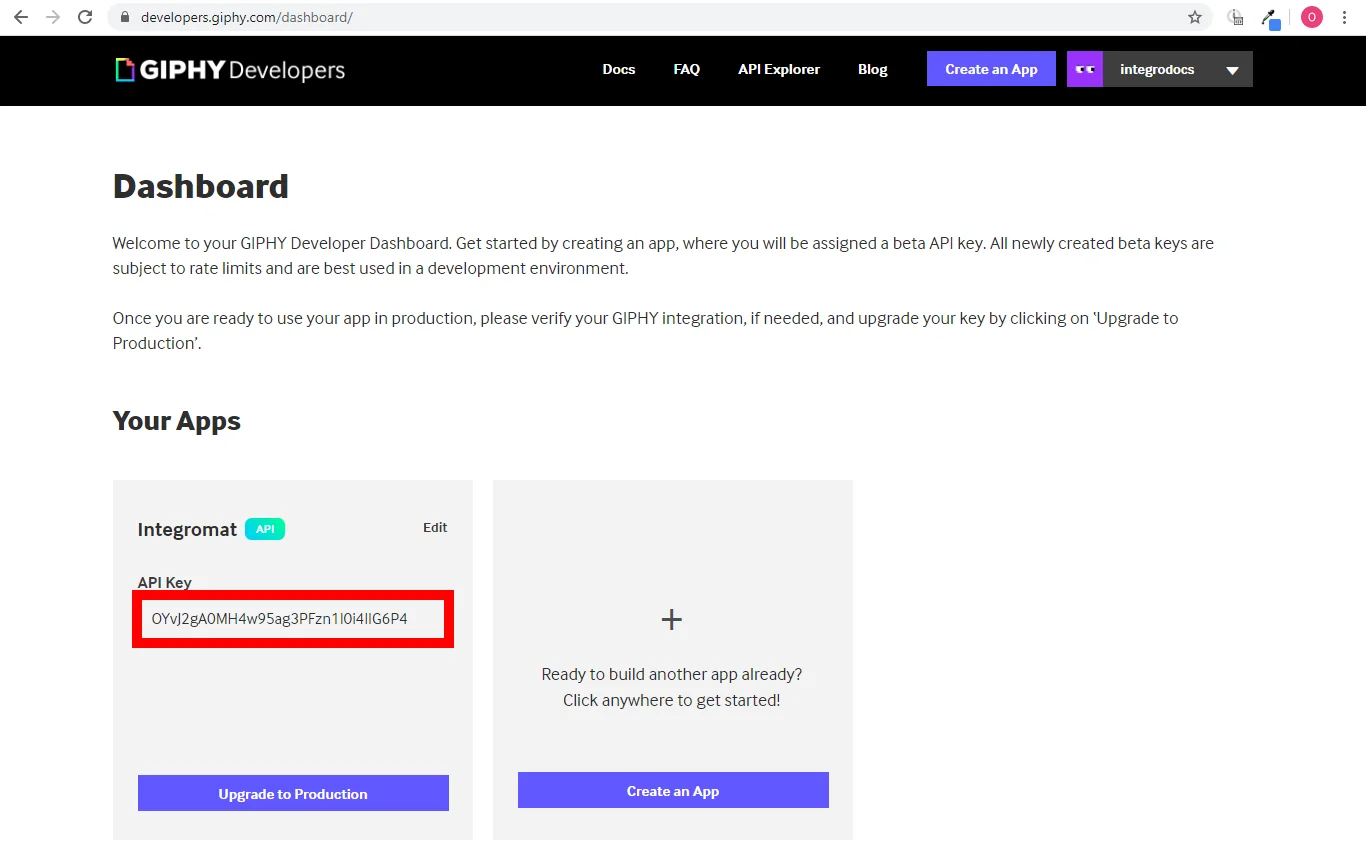
Copy the provided API Key.
-
Go to Boost.space Integrator and open the GIPHY module’s Create a connection dialog.
-
Enter the API Key you have copied in step 4 to the respective field and click the Continue button to establish the connection.
The connection has been established. You can proceed with setting up the module.
GIF/Sticker
Search Gifs/Stickers
Searches through all Gifs and Stickers for a specified term.
Connection
Establish a connection to your GIPHY account.
Select
Select whether you want to search in GIFs or Stickers.
Search
Enter the search query term or phrase.
Rating
Select the content rating. If you do not specify a rating, you will receive results from all possible ratings.
-
G: Content that is appropriate for all ages and people.
-
PG: Content that is generally safe for everyone, but may require parental preview before children can watch.
-
PG-13: Mild sexual innuendos, mild substance use, mild profanity, or threatening images. May include images of semi-naked people, but DOES NOT show real human genitalia or nudity.
-
R: Strong language, strong sexual innuendo, violence, and illegal drug use; not suitable for teens or younger. NO NUDITY.
Language
Select the language to filter result by the unique regional content.
Limit
Set the maximum number of GIFs or Stickers Boost.space Integrator will return during one execution cycle.
List Trending Gifs/Stickers
Retrieves a list of the most relevant and engaging content each and every day.
Connection
Establish a connection to your GIPHY account.
Select
Select whether you want to retrieve GIFs or Stickers.
Language
Select the language to filter result by the unique regional content.
Limit
Set the maximum number of GIFs or Stickers Boost.space Integrator will return during one execution cycle.
Translate a Word to a Gif/Sticker
Converts words and phrases to the perfect GIF or Sticker using GIPHY’s special sauce algorithm.
Connection
Establish a connection to your GIPHY account.
Select
Select whether you want to convert a word to the GIF or Sticker.
Search Term
Enter the word or phrase you want to convert to the gif/Sticker.
Weirdness
Enter the weirdness value from 0 to 10. The higher the value, the weirder the result.
Get a Random Gif/Sticker
Returns a single random GIF or Sticker related to the word or phrase entered. If no tag is specified, the GIF or Sticker returned is completely random.
Connection
Establish a connection to your GIPHY account.
Select
Select whether you want to return the GIF or Sticker.
Tag
Enter the tag to filter results by a specified tag.
Rating
Select the content rating. If you do not specify a rating, you will receive results from all possible ratings.
-
G: Content that is appropriate for all ages and people.
-
PG: Content that is generally safe for everyone, but may require parental preview before children can watch.
-
PG-13: Mild sexual innuendos, mild substance use, mild profanity, or threatening images. May include images of semi-naked people, but DOES NOT show real human genitalia or nudity.
-
R: Strong language, strong sexual innuendo, violence, and illegal drug use; not suitable for teens or younger. NO NUDITY.
Get a Gif
Retrieves GIF details by specified ID.
Connection
Establish a connection to your GIPHY account.
Gif ID
Enter or map the ID of the gif you want to retrieve details about.
Upload a Gif
Uploads animated GIFs or video files.
Connection
Establish a connection to your GIPHY account.
Upload a Gif
Select whether you want to upload a file from the URL or provide a file using a previous module (or manually entered data). GIPHY accepts animated GIFs or video files up to 100MB.
Source Image URL
Enter the URL of the file you want to upload.
Source File
Map the file you want to upload from the previous module (e.g. HTTP > Get a File or Google Drive> Get a file), or enter the file name and file data manually.
Username
Enter your assigned username (required for approved apps only).
Tags
Add tags to be applied to the uploaded file.
Other
Make an API Call
Allows you to perform a custom API call.
Connection
Establish a connection to your GIPHY account.
URL
Enter a path relative to https://api.giphy.com. E.g./v1/gifs/search.
For the list of available endpoints, refer to the GIPHY API Documentation.
Method
Select the HTTP method you want to use:
GET
to retrieve information for an entry.
POST
to create a new entry.
PUT
to update/replace an existing entry.
PATCH
to make a partial entry update.
DELETE
to delete an entry.
Headers
Enter the desired request headers. You don’t have to add authorization headers; we already did that for you.
Query String
Enter the request query string.
Body
Enter the body content for your API call.
Example of Use – List From the Folder
The following API call returns the first 10 trending GIFs:
URL:
/v1/gifs/trending
Query String:
Key
limit
Value
10
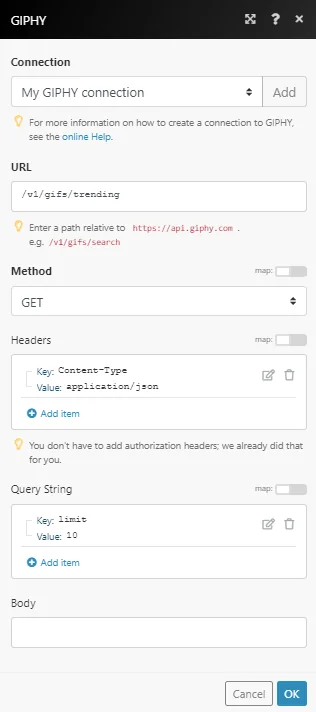
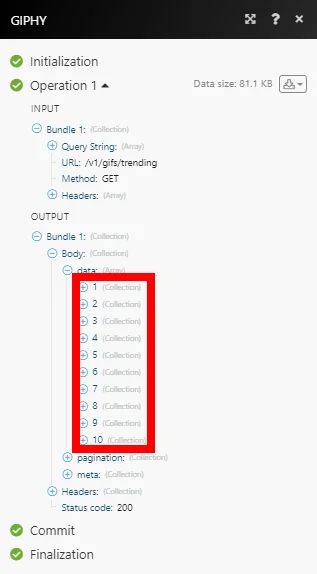
Find the result in the module’s Output under Bundle > Body > data.
In our example, 10 GIFs were returned:
Legacy article, imported from the original Boost.space knowledge base (/knowledge-base/applications/file-and-document-management/giphy/).

