Spotify
With the Spotify modules in Boost.space Integrator you can:
- create, update, retrieve, and list playlists, and playlist items, upload a playlist cover image, add an item to a playlist
- watch playlist tracks, saved tracks, recently played tracks, and retrieve a track, track audio features, and current track, list artist’s top tracks, search tracks, save and remove a track
- start/resume and pause the user’s playback
- list episodes, retrieve an episode, and list episode information
- list shows’ metadata, subscribe and unsubscribe from a list of shows, retrieve, check, and list shows
- watch and list artist’s albums, and list user’s followed artists
- list devices
- retrieve a player’s status
- retrieve items
To get started with Spotify, create an account at spotify.com.
The module dialog fields that are displayed in bold (in the Boost.space Integrator scenario, not in this documentation article) are mandatory!
Connect Spotify with Boost.space Integrator
To connect your Spotify account with Boost.space Integrator:
-
Log in to your Spotify account.
-
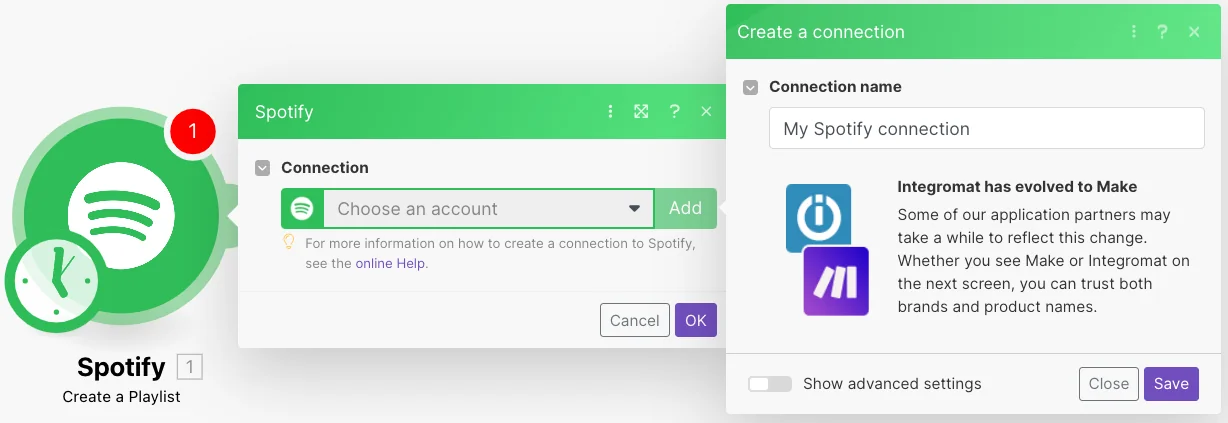
In your Boost.space Integrator, insert Add a Spotify module in your scenario and click Add next to the Connection field.
-
In the Connection field, enter a name for the connection and click Save.
-
Confirm the access by clicking AGREE.
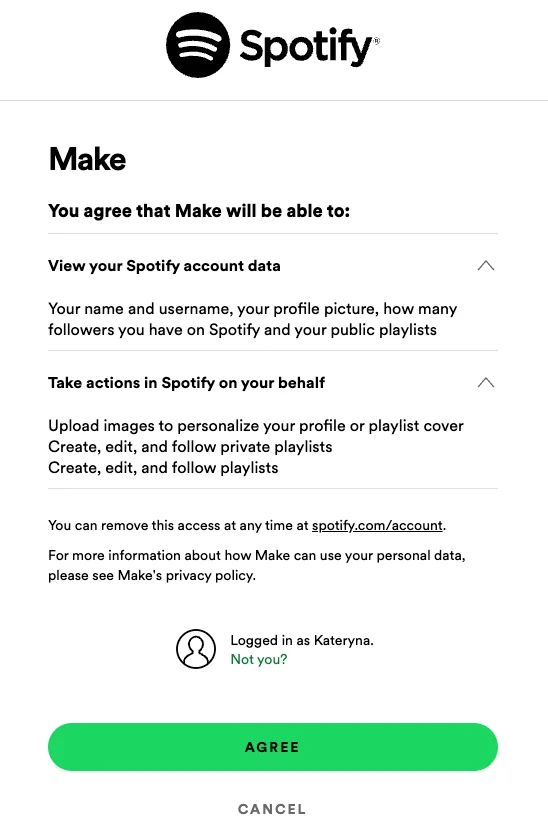
You have successfully established the connection. You can now begin editing your scenario and adding more Spotify modules. If your connection needs reauthorization at any point, follow the connection renewal steps here.
Playlists
You can create, update, retrieve, and list playlists, and playlist’s items, upload a playlist cover image, add an item to a playlist using the following modules.
Create a Playlist
Creates a new playlist.
Connection
Establish a connection to your Spotify account.
For field descriptions, see the Spotify Playlists API reference.
Update a Playlist
Updates an existing playlist.
Connection
Establish a connection to your Spotify account.
Playlist ID
Select or map the Playlist ID whose details you want to update.
For field descriptions, see the Spotify Playlists API reference.
Get a Playlist
Retrieves an existing playlist.
Connection
Establish a connection to your Spotify account.
Playlist ID
Select or map the Playlist ID whose details you want to retrieve.
For field descriptions, see the Spotify Playlists API reference.
List Playlists
Retrieves a list of existing playlists.
Connection
Establish a connection to your Spotify account.
Limit
Set the maximum number of playlists Boost.space Integrator will return during one execution cycle. The default value is 10.
List Playlist’s Items
Retrieves full details of the items of a playlist.
Connection
Establish a connection to your Spotify account.
Limit
Set the maximum number of playlists Boost.space Integrator will return during one execution cycle. The default value is 10.
For field descriptions, see the Spotify Playlists API reference.
Upload a Playlist Cover Image
Uploads a new playlist cover image.
Connection
Establish a connection to your Spotify account.
Playlist ID
Select or map the Playlist ID whose cover image you want to add.
File
Enter the file details:
Cover Image Name
Enter the name of the cover image
Cover Image Data
Enter the cover image’s height and width in pixels.
Add an Item to a Playlist
Adds an item to a playlist.
Connection
Establish a connection to your Spotify account.
Playlist ID
Select or map the Playlist ID whose items you want to add.
For field descriptions, see the Spotify Playlists API reference.
Tracks
You can watch playlist tracks, saved tracks, recently played tracks, retrieve a track, track audio features, and current tracks, list artists’ top tracks, and search tracks, save, and remove a track using the following modules.
Watch Playlist Tracks
Triggers when a new track is added to a playlist.
Connection
Establish a connection to your Spotify account.
Playlist ID
Select or map the Playlist ID whose playlist tracks you want to watch.
Limit
Set the maximum number of playlist tracks Boost.space Integrator will return during one execution cycle. The default value is 2.
Watch Saved Tracks
Triggers when a new track is saved.
Connection
Establish a connection to your Spotify account.
Limit
Set the maximum number of saved tracks Boost.space Integrator will return during one execution cycle. The default value is 2.
Watch Recently Played Tracks
Triggers when a track is played.
Connection
Establish a connection to your Spotify account.
Limit
Set the maximum number of played tracks Boost.space Integrator will return during one execution cycle. The default value is 2.
Get a Track
Retrieves an existing track.
Connection
Establish a connection to your Spotify account.
Track ID
Enter the Track ID you want to retrieve. For example, 4iV5W9uYEdYUVa79Axb7Rh.
Market
Select or map the market whose track you want to retrieve.
Get a Track Audio Feature
Retrieves audio feature information for a single track.
Connection
Establish a connection to your Spotify account.
Track ID
Enter the Track ID you want to retrieve. For example, 4iV5W9uYEdYUVa79Axb7Rh.
Get a Current Track
Retrieves the object currently being played on the user’s Spotify account.
Connection
Establish a connection to your Spotify account.
Market
Select or map the market whose current track you want to retrieve. You can provide this parameter if you apply track relinking.
Additional Types
Select the additional types that your client supports.
This parameter was introduced to allow existing clients to maintain their current behavior and might be deprecated in the future. In addition to providing this parameter, make sure that your client properly handles cases of new types in the future by checking against the type field of each object.
List Artist’s Top Tracks
Retrieves artist’s top tracks.
Connection
Establish a connection to your Spotify account.
Artist ID
Enter the Artist ID whose top tracks you want to list.
Market
Select the market to return the content available in it.
Limit
Set the maximum number of artists’ top tracks Boost.space Integrator will return during one execution cycle. The default value is 10.
Search Tracks
Searches for information about tracks that match a keyword string.
Connection
Establish a connection to your Spotify account.
Query
Enter the query keywords and optional field filters and operators.
Market
Select the market to return the content playable in that market.
Include External
Select whether to include any relevant audio content that is hosted externally.
Limit
Set the maximum number of tracks Boost.space Integrator will return during one execution cycle. The default value is 10.
Save a Track
Saves a track to the current user’s library.
Connection
Establish a connection to your Spotify account.
Track ID
Enter the Track ID you want to save. For example, 4iV5W9uYEdYUVa79Axb7Rh.
Remove a Track
Removes an existing track for the current user.
Connection
Establish a connection to your Spotify account.
Track ID
Enter the Track ID you want to remove. For example, 4iV5W9uYEdYUVa79Axb7Rh.
Playback
You can start/resume and pause the user’s playback using the following modules.
Start/Resume a User’s Playback
Starts or resumes a user’s playback.
Connection
Establish a connection to your Spotify account.
For field descriptions, see the Spotify Playback API reference.
Pause a User’s Playback
Pauses a user’s playback.
Connection
Establish a connection to your Spotify account.
Device ID
Select the Device ID whose playback you want to pause. If not selected the user’s current device will be paused.
Episodes
You can list episodes, retrieve an episode, and list episode information using the following modules.
Get an Episode
Retrieves an existing episode.
Connection
Establish a connection to your Spotify account.
Show ID
Select or map the Show ID whose episodes you want to retrieve.
Episode ID
Select or map the Episode ID you want to retrieve.
Market
Select the market to return the episodes available in that market.
List Episodes
Retrieves a list of existing show episodes.
Connection
Establish a connection to your Spotify account.
Show ID
Select or map the Show ID whose episodes you want to list.
Limit
Set the maximum number of episodes Boost.space Integrator will return during one execution cycle. The default value is 10.
List Episodes Information
Retrieves information about a list of episodes.
Connection
Establish a connection to your Spotify account.
Episode IDs
Enter the Episode IDs whose information you want to list.
Market
Select the market to return the episodes available in that market.
Limit
Set the maximum number of episodes Boost.space Integrator will return during one execution cycle. The default value is 10.
Shows
You can list shows’ metadata, subscribe and unsubscribe from a list of shows, retrieve, check, and list shows using the following modules.
List Shows’ Metadata
Retrieves a list of shows metadata.
Connection
Establish a connection to your Spotify account.
Show IDs
Enter the Show IDs whose metadata you want to list.
Market
Select the market to return the content available in it.
Limit
Set the maximum number of shows metada Boost.space Integrator will return during one execution cycle. The default value is 10.
Subscribe to a List of Shows
Add one or more shows to the current user’s library.
Connection
Establish a connection to your Spotify account.
Show IDs
Enter the Show IDs you want to subscribe.
Get a Show
Retrieves an existing show.
Connection
Establish a connection to your Spotify account.
Show ID
Select or map the Show ID whose details you want to retrieve.
Market
Select the market to return the content available in it.
Check a Show
Check if the show is already saved in the current user’s library.
Connection
Establish a connection to your Spotify account.
Show ID
Select or map the Show ID whose details you want to check.
List Shows
Retrieves a list of existing shows.
Connection
Establish a connection to your Spotify account.
Limit
Set the maximum number of shows Boost.space Integrator will return during one execution cycle. The default value is 10.
Unsubscribe from a List of Shows
Deletes one or more shows from the current user’s library.
Connection
Establish a connection to your Spotify account.
Show IDs
Select or map the Show IDs you want to unsubscribe.
Market
Select the market to return the content available in it.
Artists
You can watch and list artists’ albums and list users’ followed artists using the following modules.
Watch Artist’s Albums
Triggers when an artist posts a new album.
Connection
Establish a connection to your Spotify account.
Artist ID
Enter the Artist ID whose albums you want to watch.
Limit
Set the maximum number of artists’ albums Boost.space Integrator will return during one execution cycle. The default value is 2.
List Artist’s Albums
Retrieves a list of artists’ albums.
Connection
Establish a connection to your Spotify account.
Artist ID
Enter the Artist ID whose albums you want to watch.
Include Groups
Select the groups to filter the response. If not selected, the response will contain all the album types.
Market
Select the market to limit response to one particular geographical market.
Limit
Set the maximum number of artists’ albums Boost.space Integrator will return during one execution cycle. The default value is 10.
List User’s Followed Artists
Retrieves a list of current user’s followed artists.
Connection
Establish a connection to your Spotify account.
Limit
Set the maximum number of artist’s albulms Boost.space Integrator will return during one execution cycle. The default value is 10.
Devices
You can list devices using the following modules.
List Devices
Retrieves a list of user’s devices.
Connection
Establish a connection to your Spotify account.
Limit
Set the maximum number of devices Boost.space Integrator will return during one execution cycle. The default value is 10.
Players
You can retrieve a player’s status using the following modules.
Get a Player’s Status
Retrieves information about the user’s current playback state, including track or episode, progress, and active device.
Connection
Establish a connection to your Spotify account.
Market
Select the market if you want to apply track relinking.
Additional Types
Select the additional types that your client supports.
This parameter was introduced to allow existing clients to maintain their current behaviour and might be deprecated in the future. In addition to providing this parameter, make sure that your client properly handles cases of new types in the future by checking against the type field of each object.
Items
You can retrieve items using the following modules.
Get Items
Retrieves a collection of objects of described item types.
Connection
Establish a connection to your Spotify account.
Query
Enter the search keywords and optional field filters and operators.
Type
Select the item types you want to search.
Market
Select the market to return the content playable in that market.
Include External
Select the parameter to include any relevant audio in the response.
Other
You can call APIs using the following module.
Make an API Call
Performs an arbitrary authorized API call.
For the list of available endpoints, refer to the Spotify API documentation.
Connection
Establish a connection to your Spotify account.
URL
Enter a path relative to https://api.spotify.com.x For example: /v1/me.
Method
GET
to retrieve information for an entry.
POST
to create a new entry.
PUT
to update/replace an existing entry.
PATCH
to make a partial entry update.
DELETE
to delete an entry.
Headers
Enter the desired request headers. You don’t have to add authorization headers; we already did that for you.
Query String
Enter the request query string.
Body
Enter the body content for your API call.
Example of use – Get Current User’s Playlists
The following API call returns all user’s playlists from your account.
URL: /v1/me/playlists
Method: GET
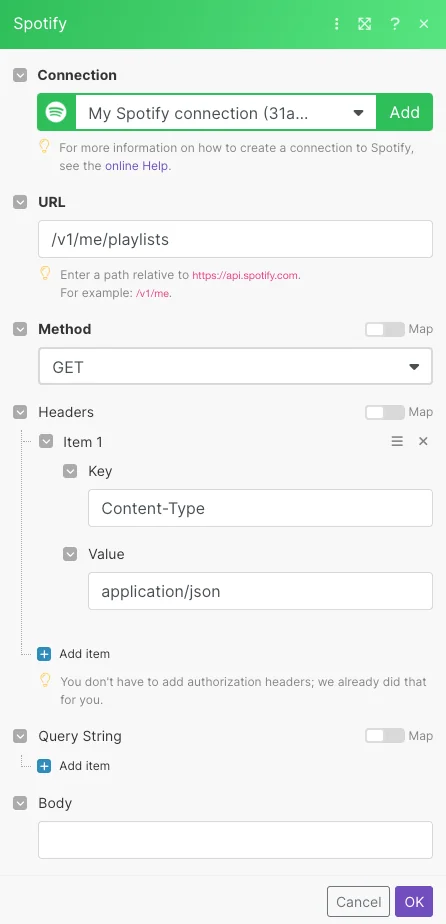
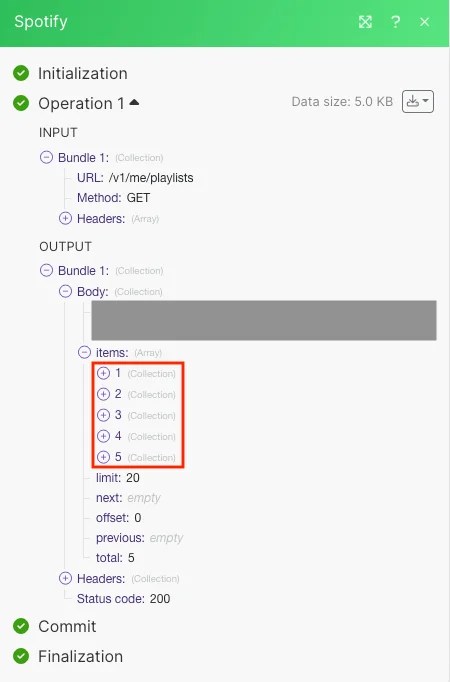
Matches of the search can be found in the module’s Output under Bundle > Body > items.
In our example 5 playlists were returned:
Legacy article, imported from the original Boost.space knowledge base (/knowledge-base/applications/file-and-document-management/spotify/).

