Trakt

The Trakt modules allow you to list the movies, shows, DVDs premieres, trending lists, and popular lists in your Trakt account.
Getting Started with Trakt
Prerequisites
- A Trakt account
In order to use Trakt with Boost.space Integrator, it is necessary to have a Trakt account. If you do not have one, you can create a Trakt account at trakt.tv.
Connect Trakt to Boost.space Integrator
-
Go to Boost.space Integrator and open the Trakt module’s Create a connection dialog.
-
Enter a name for the connection and click Continue.
-
Confirm the access by clicking Yes.
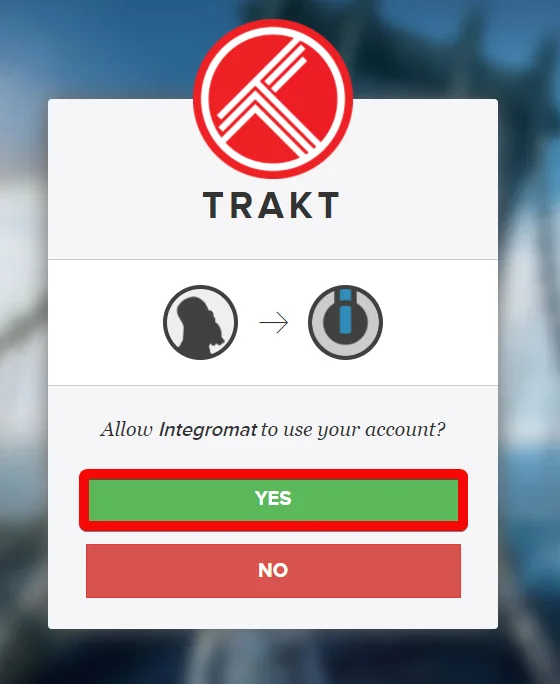
The connection has been established.
Calendars
List Shows
Returns all shows airing during the time period specified.
Connection
Establish a connection to your Trakt account.
Filter Results
Select or map the type of shows you want to list:
-
My Shows
-
All Shows
Start Date
Enter the date to list the shows that started from the specified date. See the list of supported date and time formats.
Number of Days to Display
Enter (map) the number of days the show details for the specified days. Enter a value between 1 and 31.
Request extended info?
Select the checkbox to request complete details of the show.
Number of results to return
Enter the maximum number shows Boost.space Integrator should return during one scenario execution cycle.
Search Query
Enter a word or phrase to list the shows that match the specified query. For example, show title, descriptions.
Years
Enter (map) the four-digit year or year range to list the shows that were released in the specified years. For example, 2019-2020.
Genres
Select or map the genres to list the shows from the specified genre. For example, Animation, Thrillers.
Languages
Select or map the languages of the shows you want to list. For example, English, Arabic.
Countries
Select or map the countries to list the shows that are accessible in the specified countries. For example, Australia, Germany.
Runtimes
Enter (map) show runtime which you want to list. For example, 30-90.
Ratings
Enter (map) the rating range (0-100) of the shows you want to list. For example, 75-100.
Certifications
Select or map the certifications to list the shows that match the specified certifications. For example, TV-G All Ages, Not Rated.
Networks
Select or map the networks to list the shows that match the specified networks. For example, ABC Kids, ABC News.
Status
Select or map the status to list the shows that match the specified status. For example, canceled, planned.
List New Shows
Returns all the new show premieres (Season 1, Episode 1) airing during the time period specified.
Connection
Establish a connection to your Trakt account.
Filter Results
Select or map the type of new shows you want to list:
-
My Shows
-
All Shows
Start Date
Enter the date to list the new shows that started from the specified date. See the list of supported date and time formats.
Number of Days to Display
Enter (map) the number of days the new show details for the specified days. Enter a value between 1 and 31.
Request extended info?
Select the checkbox to request complete details of the new shows.
Number of results to return
Enter the maximum number new shows Boost.space Integrator should return during one scenario execution cycle.
Search Query
Enter a word or phrase to list the new shows that match the specified query. For example, show title, descriptions.
Years
Enter (map) the four-digit year or year range to list the new shows that were released in the specified years. For example, 2019-2020.
Genres
Select or map the genres to list the new shows from the specified genre. For example, Animation, Thrillers.
Languages
Select or map the languages of the new shows you want to list. For example, English, Arabic.
Countries
Select or map the countries to list the new shows that are accessible in the specified countries. For example, Australia, Germany.
Runtimes
Enter (map) the new show runtime which you want to list. For example, 30-90.
Ratings
Enter (map) the rating range (0-100) of the new shows you want to list. For example, 75-100.
Certifications
Select or map the certifications to list the new shows that match the specified certifications. For example, TV-G All Ages, Not Rated.
Networks
Select or map the networks to list the new shows that match the specified networks. For example, ABC Kids, ABC News.
Status
Select or map the status to list the new shows that match the specified status. For example, canceled, planned.
List Season Premieres
Returns all show premieres (any season, episode 1) airing during the time period specified.
Connection
Establish a connection to your Trakt account.
Filter Results
Select or map the type of season premieres you want to list:
-
My Shows
-
All Shows
Start Date
Enter the date to list the season premieres that started from the specified date. See the list of supported date and time formats.
Number of Days to Display
Enter (map) the number of days the season premieres details for the specified days. Enter a value between 1 and 31.
Request extended info?
Select the checkbox to request complete details of the season premieres.
Number of results to return
Enter the maximum number of season premieres Boost.space Integrator should return during one scenario execution cycle.
Search Query
Enter a word or phrase to list the season premieres that match the specified query. For example, title, descriptions.
Years
Enter (map) the four-digit year or year range to list the season premieres that were released in the specified years. For example, 2019-2020.
Genres
Select or map the genres to list the season premieres from the specified genre. For example, Animation, Thrillers.
Languages
Select or map the languages of the season premieres you want to list. For example, English, Arabic.
Countries
Select or map the countries to list the season premieres that are accessible in the specified countries. For example, Australia, Germany.
Runtimes
Enter (map) the season premieres runtime which you want to list. For example, 30-90.
Ratings
Enter (map) the rating range (0-100) of the season premieres you want to list. For example, 75-100.
Certifications
Select or map the certifications to list the season premieres that match the specified certifications. For example, TV-G All Ages, Not Rated.
Networks
Select or map the networks to list the season premieres that match the specified networks. For example, ABC Kids, ABC News.
Status
Select or map the status to list the season premieres that match the specified status. For example, canceled, planned.
List Movies
Returns all movies with a release date during the time period specified.
Connection
Establish a connection to your Trakt account.
Filter Results
Select or map the type of movies you want to list:
-
My Movies
-
All Movies
Start Date
Enter the date to list the movies that started from the specified date. See the list of supported date and time formats.
Number of Days to Display
Enter (map) the number of days the movie details for the specified days. Enter a value between 1 and 31.
Request extended info?
Select the checkbox to request complete details of the movies.
Number of results to return
Enter the maximum number of movies Boost.space Integrator should return during one scenario execution cycle.
Search Query
Enter a word or phrase to list the movies that match the specified query. For example, movie title, descriptions.
Years
Enter (map) the years to list the movies that were released in the specified years. For example, 2019-2020.
Genres
Select or map the genres to list the movies from teh specified genre. For example, Animation, Thrillers.
Languages
Select or map the languages of the movies you want to list. For example, English, Arabic.
Countries
Select or map the countries to list the movies that are accessible in the specified countries. For example, Australia, Germany.
Runtimes
Enter (map) the movie runtime which you want to list. For example, 30-90.
Ratings
Enter (map) the rating range (0-100) of the movies you want to list. For example, 75-100.
Certifications
Select or map the US content certifications to list the movies that matches the specified certifications. For example, TV-G All Ages, Not Rated.
Networks
Select or map the networks to list the movies that matches the specified networks. For example, ABC Kids, ABC News.
Status
Select or map the status to list the movies that matches the specified status. For example, canceled, planned.
List DVDs
Returns all movies with a DVD release date during the time period specified.
Connection
Establish a connection to your Trakt account.
Filter Results
Select or map the type of DVDs you want to list:
-
My Movies
-
All Movies
Start Date
Enter the date to list the DVDs that started from the specified date. See the list of supported date and time formats.
Number of Days to Display
Enter (map) the number of days the DVDs details for the specified days. Enter a value between 1 and 31.
Request extended info?
Select the checkbox to request complete details of the DVDs.
Number of results to return
Enter the maximum number of DVDs Boost.space Integrator should return during one scenario execution cycle.
Search Query
Enter a word or phrase to list the DVDs that match the specified query. For example, movie title, descriptions.
Years
Enter (map) the years to list the DVDs that were released in the specified years. For example, 2019-2020.
Genres
Select or map the genres to list the DVDs from teh specified genre. For example, Animation, Thrillers.
Languages
Select or map the languages of the DVDs you want to list. For example, English, Arabic.
Countries
Select or map the countries to list the DVDs that are accessible in the specified countries. For example, Australia, Germany.
Runtimes
Enter (map) the DVDs runtime which you want to list. For example, 30-90 mins.
Ratings
Enter (map) the rating range (0-100) of the DVDs you want to list. For eample, 75-100.
Certifications
Select or map the US content certifications to list the DVDs that matches the specified certifications. For example, TV-G All Ages, Not Rated.
Networks
Select or map the networks to list the DVDs that matches the specified networks. For example, ABC Kids, ABC News.
Status
Select or map the status to list the DVDs that matches the specified status. For example, canceled, planned.
Lists
List Trending Lists
Return all lists with the most likes and comments over the last 7 days.
Connection
Establish a connection to your Trakt account.
Number of results to return
Enter (map) the maximum number of trending lists Boost.space Integrator should return during one execution cycle.
List Popular Lists
Returns the most popular lists. Popularity is calculated using the total number of likes and comments.
Connection
Establish a connection to your Trakt account.
Number of results to return
Enter (map) the maximum number of popular lists Boost.space Integrator should return during one execution cycle.
Other
Make an API Call
Performs an arbitrary API call to the service’s API.
Connection
Establish a connection to your Trakt account.
URL
Enter a path relative to https://api.trakt.tv/ For example: /users/settings
For the list of available endpoints, refer to the Trakt API Documentation.
Method
Select the HTTP method you want to use:
GET
to retrieve information for an entry.
POST
to create a new entry.
PUT
to update/replace an existing entry.
PATCH
to make a partial entry update.
DELETE
to delete an entry.
Headers
Enter the desired request headers. You don’t have to add authorization headers; we already did that for you.
Query String
Enter the request query string.
Body
Enter the body content for your API call.
Example of Use – List Trending Lists
The following API call returns all the trending lists from your Trakt account:
Method:
GET
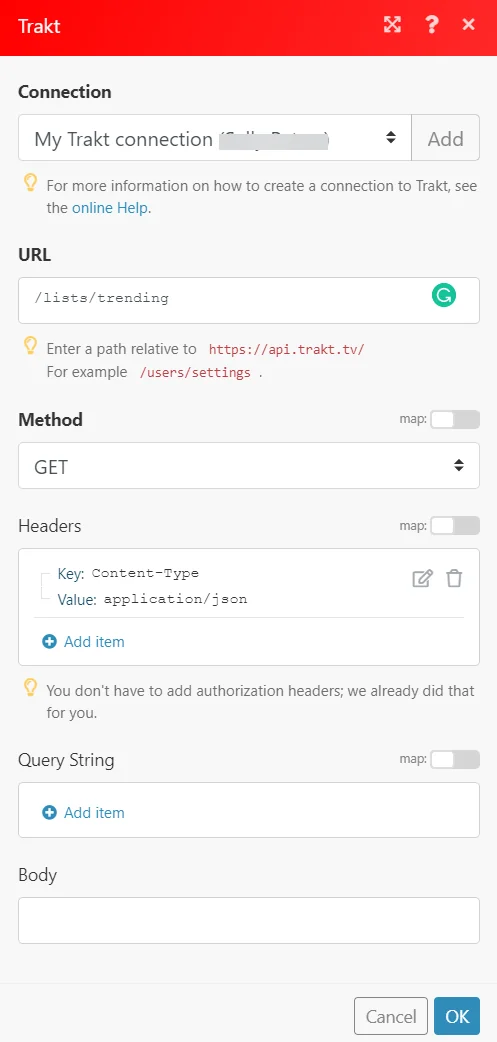
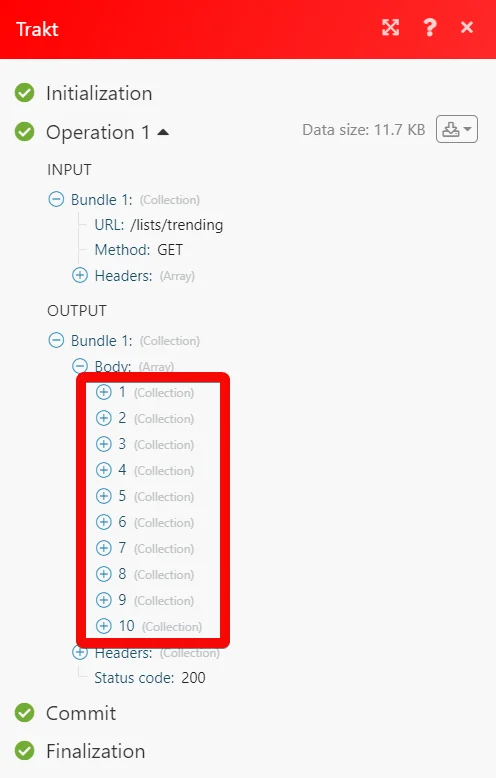
Matches of the search can be found in the module’s Output under Bundle > Body.
In our example, 10 trending lists were returned:
Legacy article, imported from the original Boost.space knowledge base (/knowledge-base/applications/file-and-document-management/trakt-tv/).

