Unsplash
The Unsplash modules allow you to create, update, list, and delete the collections and photos in your Unsplash account.
Getting Started with Unsplash
Prerequisites
- An Unsplash account
In order to use Unsplash with Boost.space Integrator, it is necessary to have an Unsplash account. You can use your Facebook account or create an Unsplash account at unsplash.com/join.
The module dialog fields that are displayed in bold (in the Boost.space Integrator scenario, not in this documentation article) are mandatory!
Connecting Unsplash to Boost.space Integrator
To connect your Unsplash account to Boost.space Integrator you need to obtain the Client ID (Access Key) and Client Secret (Secret Key) from your Unsplash account and insert it in the Create a connection dialog in the Boost.space Integrator module.
-
Login to your Unsplash account.
-
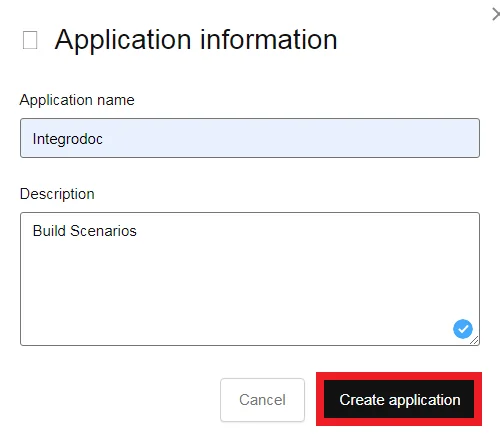
Create a new application if you have not already created one, accept the terms and conditions, and enter the details of the application. Click Create Application.
-
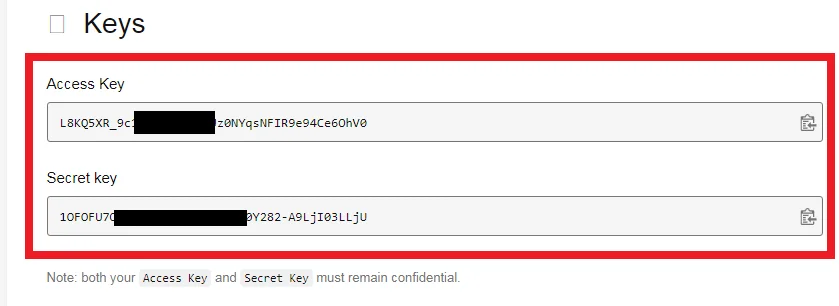
Click the Application Name and copy the Access Key and Secret Key to your clipboard.
In the Redirect URI field, enter the URI as
https://integrator.boost.space/oauth/cb/unsplash, select all the scopes, and click Authorize. -

Go to Boost.space Integrator and open the Unsplash module’s Create a connection dialog.
-
In the Connection name field, enter a name for the connection.
-
In the Client ID and Client Secret fields, enter the client ID and client secret copied in step 3. Click Continue.
-
Confirm the dialog by clicking Continue as <your_username>.
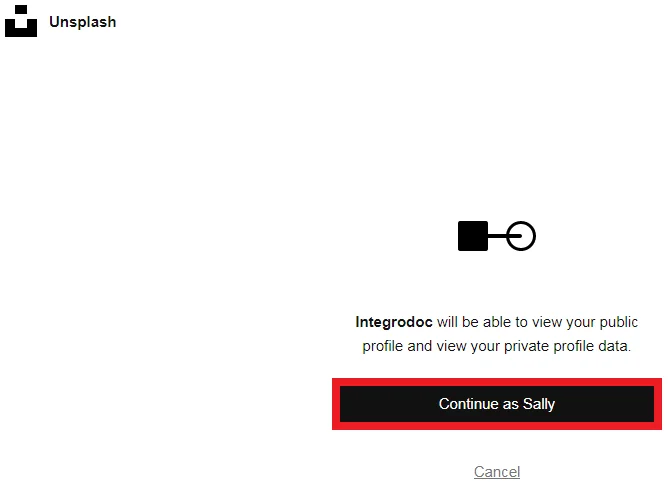
The connection has been established.
Users
Get a User’s Profile
Gets a user’s public profile.
Required Permissions: public
Connection
Establish a connection to your Unsplash account.
Username
Enter the username of the user whose public profile details you want to retrieve.
Get a User’s Portfolio Link
Gets a user’s portfolio link.
Required Permissions: public
Connection
Establish a connection to your Unsplash account.
Username
Enter the username of the user whose portfolio link you want to retrieve.
List a User’s Photos
List a user’s photos.
Required Permissions: public
Connection
Establish a connection to your Unsplash account.
Username
Enter the username of the user whose photos you want to list.
Quantity
Enter the number of user’s photos to the list. The maximum number of photos you can list is 30.
Resolution
Select the resolution of the photos:
- Days
Stats
Select whether to show the stats of each photo:
-
Yes
-
No
-
Not defined
Orientation
Select the orientation of the photo:
-
Landscape
-
Portrait
-
Squarish
Order By
Select the order in which you want to list the photos:
-
Latest
-
Oldest
-
Popular
List a User’s Liked Photos
Lists a user’s liked photos.
Required Permissions: public
Connection
Establish a connection to your Unsplash account.
Username
Enter the username of the user who’s liked photos you want to list.
Orientation
Select the orientation of the photos you want to list:
-
Landscape
-
Portrait
-
Squarish
Order By
Select the order in which you want to list the photos:
-
Latest
-
Oldest
-
Popular
Limit
Enter the maximum number of photos Boost.space Integrator should return during one scenario execution cycle.
List a User’s Collections
Lists a user’s collections.
Required Permissions: public
Connection
Establish a connection to your Unsplash account.
Username
Enter the username of the user whose collections you want to list.
Limit
Enter the maximum number of collections Boost.space Integrator should return during one scenario execution cycle.
Get a User’s Statistics
Gets a user’s statistics.
Required Permissions: public
Connection
Establish a connection to your Unsplash account.
Username
Enter the username of the user whose photos statistics you want to lretrieve.
Quantity
Enter the number of user’s statistics to retrieve. The maximum number of statistics you can retrieve is 30.
Resolution
Select the frequency of the stats:
- Days
Photos
List Photos
List all photos.
**Required Permissions:**public
Connection
Establish a connection to your Unsplash account.
Order By
Select the order in which you want to list the photos:
-
Latest
-
Oldest
-
Popular
Limit
Enter the maximum number of photos Boost.space Integrator should return during one scenario execution cycle.
Get a Photo
Gets a photo.
Required Permissions: public
Connection
Establish a connection to your Unsplash account.
Photo ID
Enter the Photo ID whose details you want to retrieve.
Search Random Photos
Searches random photos.
Required Permissions: public
Connection
Establish a connection to your Unsplash account.
Collection IDs
Enter the Collection IDs separated by comma whose photos you want to search.
Featured
Select whether you want to search only the featured photos:
-
Yes
-
No
-
Not defined
Username
Enter the username whose photos you are searching for.
Query
Enter the query, a word, or phrase to search photos based on the specified query.
Orientation
Select the orientation of the photos you want to search:
-
Landscape
-
Portrait
-
Squarish
Content Filter
Select the content option to filter the photos you are searching:
-
High
-
Low
Count
Enter the maximum number of photos Boost.space Integrator should return during one scenario execution cycle.The maximum number of photos you can limit is 30.
Get a Photo’s Statistics
Gets a photo’s statistics.
Required Permissions: public
Connection
Establish a connection to your Unsplash account.
Photo ID
Enter the Photo ID whose statistics you want to retrieve.
Quantity
Enter the number of statistics of a photo you want to retrieve. The maximum number of statistics is 30.
Resolution
Select the resolution of the photos:
- Days
Track a Photo Download
Tracks a photo download.
**Required Permissions:**public
Connection
Establish a connection to your Unsplash account.
Photo ID
Enter the Photo ID whose download you want to track.
Like a Photo
Likes a photo.
Required Permissions: write_likes
Connection
Establish a connection to your Unsplash account.
Photo ID
Enter the Photo ID you want to like.
Unlike a Photo
Unlikes a photo.
Required Permissions: write_likes
Connection
Establish a connection to your Unsplash account.
Photo ID
Enter the Photo ID you want to unlike.
Update a Photo
Updates a photo.
Required Permissions: write_photos
Connection
Establish a connection to your Unsplash account.
Photo ID
Enter the Photo ID you want to update.
Description
Enter the details of the photos.
Show on Profile
Select whether the photo is visible to the public:
-
Yes
-
No
-
Not defined
Name
Enter the name of the photo.
City
Enter the photo’s location’s city name.
Country
Enter the photo’s location’s country name.
Latitude
Enter the photo’s location’s latitude details.
Longitude
Enter the photo’s location’s longitude details.
Make
Enter the camera’s brand name with which the photo is taken.
Model
Enter the camera model details.
Exposure Time
Enter the camera’s exposure time.
Aperture Value
Enter the camera’s lens aperture time.
Focal Length
Enter the camera’s focal length.
ISO Speed Ratings
Enter the camera’s ISO speed time.
Tags
Enter the keywords as tags to filter the photos when searching.
Search
Search Photos
Searches photos.
Required Permissions: public
Connection
Establish a connection to your Unsplash account.
Query
Enter the keyword or phrases as a query to search the photos based on the specified query.
Order By
Select the order in which you want to search the photos:
-
Latest
-
Oldest
-
Popular
Collection IDs
Enter the Collection IDs separated by a comma to search only the photos of those collection IDs.
Orientation
Select the orientation of the photo:
-
Landscape
-
Portrait
-
Squarish
Content Filter
Select the content option to filter the photos you are searching for:
-
High
-
Low
Color
Select the color of the photos you want to search for.
Limit
Enter the maximum number of photos Boost.space Integrator should return during one scenario execution cycle.
Search Collections
Searches collections.
Required Permissions: public
Connection
Establish a connection to your Unsplash account.
Query
Enter the keyword or phrases as a query to search the collections based on the specified query.
Limit
Enter the maximum number of collections Boost.space Integrator should return during one scenario execution cycle.
Search Users
Searches users.
Required Permissions: public
Connection
Establish a connection to your Unsplash account.
Query
Enter the keyword or phrases as a query to search the users based on the specified query.
Limit
Enter the maximum number of users Boost.space Integrator should return during one scenario execution cycle.
Collections
List Collections
Lists all collections.
Required Permissions: public
Connection
Establish a connection to your Unsplash account.
Limit
Enter the maximum number of collections Boost.space Integrator should return during one scenario execution cycle.
List Featured Collections
Lists featured collections.
Required Permissions: public
Connection
Establish a connection to your Unsplash account.
Limit
Enter the maximum number of featured collections Boost.space Integrator should return during one scenario execution cycle.
Get a Collection
Gets a collection.
Required Permissions: public
Connection
Establish a connection to your Unsplash account.
Collection ID
Enter the Collection ID whose details you want to retrieve.
List a Collection’s Photos
Lists a collection’s photos.
Required Permissions: public
Connection
Establish a connection to your Unsplash account.
Collection ID
Enter the Collection ID whose photos you want to list.
Order By
Select the order in which you want to list the photos:
-
Latest
-
Oldest
-
Popular
Limit
Enter the maximum number of photos Boost.space Integrator should return during one scenario execution cycle.
List a Collection’s Related Collections
Lists a collection’s related collections.
Required Permissions: public
Connection
Establish a connection to your Unsplash account.
Collection ID
Enter the Collection ID whose related collections you want to list.
Create a Collection
Creates a new collection.
Required Permissions: write_collections
Connection
Establish a connection to your Unsplash account.
Title
Enter a name for the new collection
Description
Enter the details of the collection.
Private
Select whether the collection is private:
-
Yes
-
No
-
Not defined
Update a Collection
Updates an existing collection.
Required Permissions: write_collections
Connection
Establish a connection to your Unsplash account.
Collection ID
Select the Collection ID you want to update.
Title
Enter a name for the new collection
Description
Enter the details of the collection.
Private
Select whether the collection is private:
-
Yes
-
No
-
Not defined
Delete a Collection
Deletes an existing collection.
Required Permissions: write_collections
Connection
Establish a connection to your Unsplash account.
Collection ID
Select the Collection ID you want to update.
Add a Photo to a Collection
Adds a photo to a collection.
Required Permissions: write_collections
Connection
Establish a connection to your Unsplash account.
Collection ID
Select the Collection ID to which you want to add a photo.
Photo ID
Select the Photo ID which you want to add to the collection.
Remove a Photo from a Collection
Removes a photo from a collection.
Required Permissions: write_collections
Connection
Establish a connection to your Unsplash account.
Collection ID
Select the Collection ID from which you want to remove a photo.
Photo ID
Select the Photo ID which you want to remove from the collection.
Other
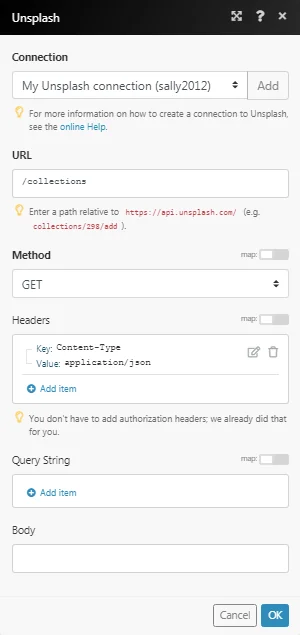
Make an API Call
Performs an arbitrary authorized API call.
Connection
Establish a connection to your Unsplash account.
URL
Enter a path relative to https://api.unsplash.com/. For example: collections/298/add
For the list of available endpoints, refer to the Unsplash API Documentation.
Method
Select the HTTP method you want to use:
GET
to retrieve information for an entry**.**
POST
to create a new entry.
PUT
to update/replace an existing entry.
PATCH
to make a partial entry update.
DELETE
to delete an entry.
Headers
Enter the desired request headers. You don’t have to add authorization headers; we already did that for you.
Query String
Enter the request query string.
Body
Enter the body content for your API call.
Example of Use – List Collections
The following API call returns all the collections from your Unsplash account:
URL:
/collections
Method:
GET
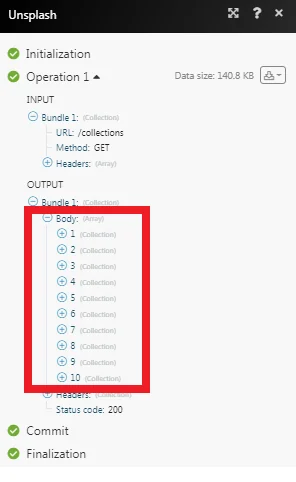
Matches of the search can be found in the module’s Output under Bundle > Body.
In our example, 10 collections were returned:
Get Stats
Gets a month or total stats.
Connection
Establish a connection to your Unsplash account.
Period
Select the period to retrieve the stats of an account:
-
Month
-
Total
Legacy article, imported from the original Boost.space knowledge base (/knowledge-base/applications/file-and-document-management/unsplash/).

