Toggl Hire
With Toggl Hire modules in Boost.space Integrator, you can list job openings, search candidates, and manage tags and categories in your Toggl Hire account.
To get started with Toggl Hire, create an account at toggl.com.
Connecting Toggl Hire to Boost.space Integrator
You must have a premium plan to use Toggl Hire with Boost.space Integrator.
To make a connection you need to generate an API key in your Toggl Hire account.
-
Log in to your Toggl Hire account.
-
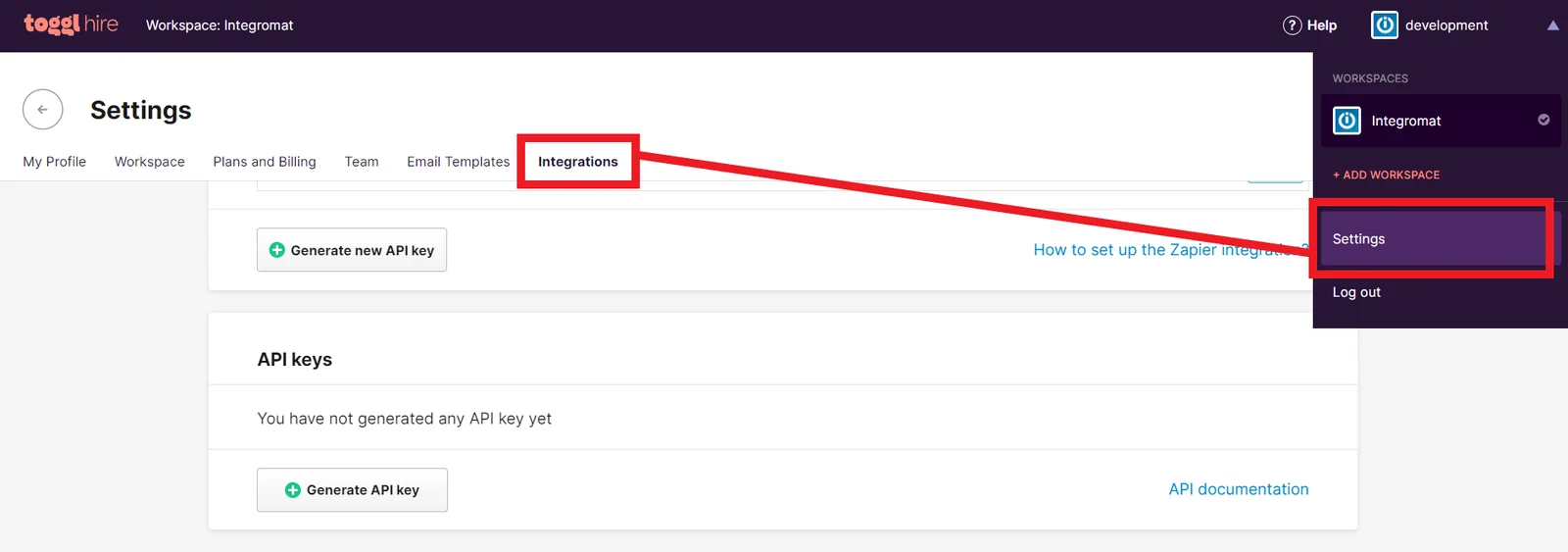
Click your username in the top-right corner, then click Settings.
-
Click Integrations.
-
Scroll down and under API keys, click Generate API key.
-
Click your new API key, give it a name, then copy the key to your clipboard.
-
Go to your Boost.space Integrator scenario and select the Toggl Hire module you want to use.
-
Under Connection, click Add.
-
Give your new connection a name.
-
Paste the API key in the field below.
-
Click Save.
You have successfully established the connection.
Openings
List Job Openings
Retrieves all job openings.
Connection
Establish a connection to your Toggl Hire account.
Limit
Enter the maximum number of job openings Boost.space Integrator returns during one scenario execution cycle.
Get a Job Opening
Returns detailed information about a job opening.
Connection
Establish a connection to your Toggl Hire account.
ID
Enter or select the ID of the job opening you want to retrieve.
Candidates
Search Candidates
Retrieves all job openings.
Connection
Establish a connection to your Toggl Hire account.
Opening ID
Enter or select the ID of the job opening to retrieve candidates from.
Category ID
Enter or select the ID of the category to retrieve candidates from.
Tag ID
Enter or select the ID of the tags to retrieve candidates from.
Hire State
Enter the hire state. For example: possible-hire
Enter the email address.
Filter
Select how you want to filter the results.
Rating
Rating corresponds to the stars in the application, so 1 star = rating value 1, 3 stars = rating value 3.
Order of Started Time
Select how you want to order the results.
Limit
Enter the maximum number of job openings Boost.space Integrator returns during one scenario execution cycle.
Get a Candidate
Returns detailed information about a job opening.
Connection
Establish a connection to your Toggl Hire account.
Candidate ID
Enter or select the ID of the candidate you want to retrieve.
Export Candidate as a PDF
Exports specific candidate as a PDF.
Connection
Establish a connection to your Toggl Hire account.
Candidate ID
Enter or select the ID of the candidate you want to export.
Other
List Tags
Retrieves all tags.
Connection
Establish a connection to your Toggl Hire account.
Limit
Enter the maximum number of tags Boost.space Integrator returns during one scenario execution cycle.
Search Categories
Searches for gategories or lists them all.
Connection
Establish a connection to your Toggl Hire account.
Job Opening ID
Enter or select the ID of the job opening. Returns only categories from the specified job opening.
Limit
Enter the maximum number of tags Boost.space Integrator returns during one scenario execution cycle.
Make an API Call
Performs an arbitrary authorized API call.
For the list of available endpoints, refer to the Toggl Hire API documentation.
Example of use – List candidates
The following API call returns a list of candidates in your Toggl Hire account.
URL: /v2/candidates
Method: GET
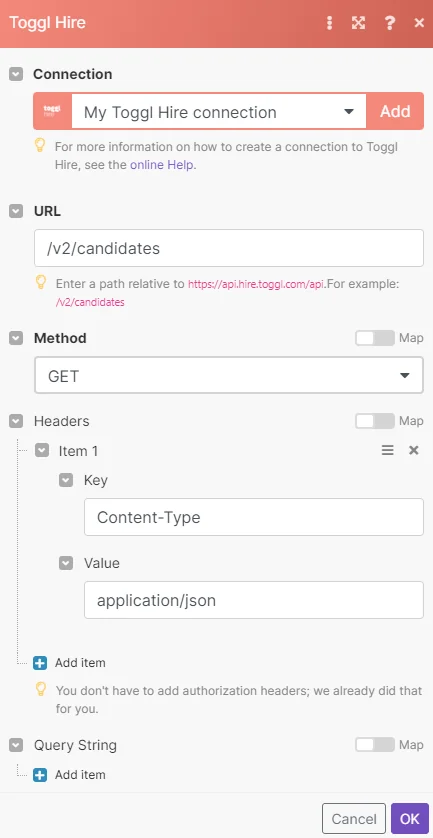
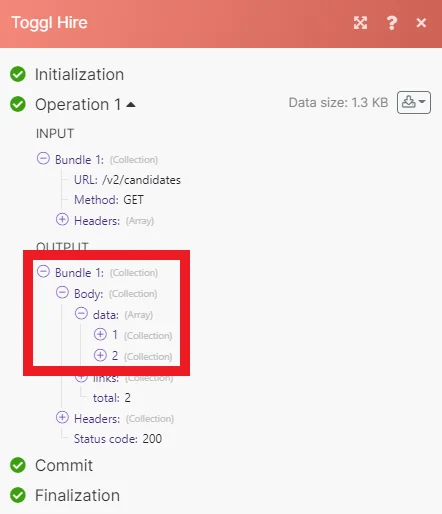
Matches of the search can be found in the module’s Output under Bundle > Body > data. Our example returned 2 candidates:
Legacy article, imported from the original Boost.space knowledge base (/knowledge-base/applications/hr-management/toggl-hire/).

