Book Like a Boss
With the Book Like a Boss modules in Boost.space Integrator, you can watch bookings created, updated, and rescheduled.
To get started with Book Like a Boss, create an account at booklikeaboss.com.
Setting up Boss Like a Boss webhooks
This app makes use of webhooks to instantly trigger a scenario when an event occurs.
To set up a webhook:
-

Log in to your Boost.space Integrator, add any Boss Like a Boss module, click Add, copy the URL address to your clipboard, click OK, and save the scenario.
-
Log in to your Book Like a Boss account.
-
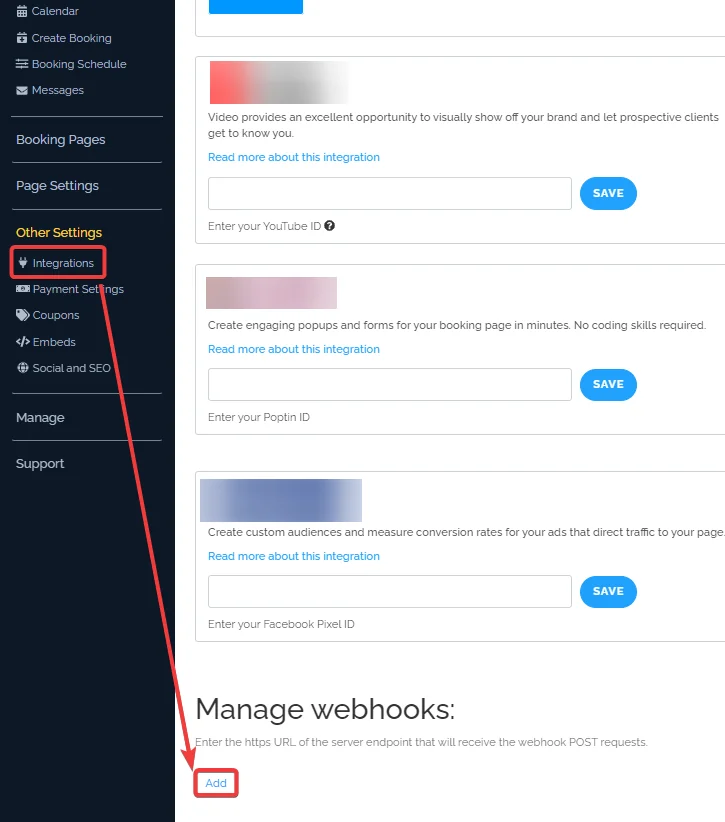
Click Other Settings > Integrations and in the Manage Webhooks section, click Add.
-
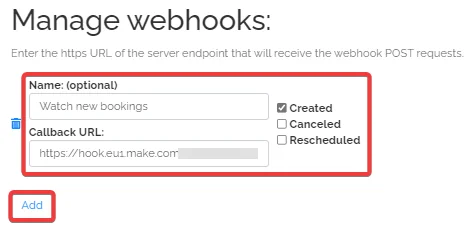
Add the details, and click Add.
-
Optional: In the Name field, enter a name for the webhook.
-
In the Callback URL field, enter the URL address copied in step 1
-
Select the event you want to watch. For example, Created, Canceled, and Rescheduled.
-
You have successfully added webhooks to your account.
For information on webhooks, see Boss Like a Boss API documentation.
Legacy article, imported from the original Boost.space knowledge base (/knowledge-base/applications/it-and-development/book-like-a-boss/).

