GitLab
The GitLab modules enable you to monitor and manage projects, issues, issue notes, commits, merge requests, merge request notes, repositories, branches, pipelines, jobs, tags, to-do items, labels, milestones, variables, snippets, groups, and more in your GitLab account.
Getting Started With GitLab
Prerequisites
- A GitLab account
In order to use GitLab with Boost.space Integrator, it is necessary to have a GitLab account. If you do not have one, you can create a GitLab account at gitlab.com.
The module dialog fields that are displayed in bold (in the Boost.space Integrator scenario, not in this documentation article) are mandatory!
Connect GitLab to Boost.space Integrator
Select the connection type:
Connection Type: GitLab (gitlab.com)
-

Go to Boost.space Integrator, and open the GitLab module’s Create a connection dialog.
-
Enter the name of the connection to the Connection name field, and click Continue.
After you click the Continue button, Boost.space Integrator will redirect you to the GitLab website, where you will be prompted to sign in and grant Boost.space Integrator access to your account.
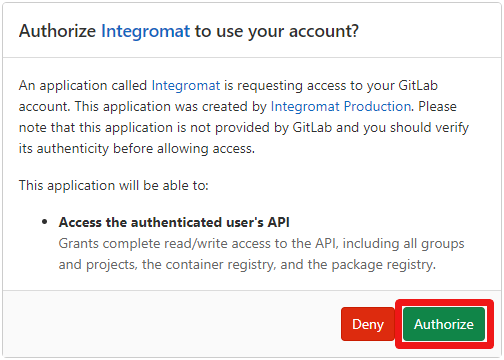
Confirm the dialog by clicking the Authorize button.
The connection has been established. You can proceed with setting up the module.
Connection Type: GitLab (private server)
-
Fill in the Create a connection dialog as follows:
Connection name
Enter the name of the connection.
Domain
Enter your GitLab server domain, e.g., gitlab.com (default), or gitlab.{yourServer}.com.
Private token
Enter your private token. For more details about creating a token please refer to the Personal Access Tokens documentation.
-
Click Continue to establish a connection to your private GitLab server.
The connection has been established. You can proceed with setting up the module.
Projects
Watch Projects
Retrieves project details when a new project is created.
Required Permissions: api
Please find field descriptions in the GitLab Developer Documentation – List All Projects.
Search Projects
Retrieves all projects in your account by the specified filter settings.
Required Permissions: api
Please find field descriptions in the GitLab Developer Documentation – List All Projects.
List Owned Projects
Retrieves projects where the authenticated user is set as owner.
Required Permissions: api
Please find field descriptions in the GitLab Developer Documentation – List User Projects.
List a Project’s Users
Retrieves the users of the project.
Required Permissions: api
Please find field descriptions in the GitLab Developer Documentation – Get Project Users.
Get a Project
Retrieves project details.
Required Permissions: api
Please find field descriptions in the GitLab Developer Documentation – Get Single Project.
Users
Get a User
Returns a single user.
Connection
Establish a connection to your GitLab account.
User ID
Select or map the User ID whose details you want to retrieve.
Search Users
Searches for users or lists them all.
Connection
Establish a connection to your GitLab account.
Please find field descriptions in the GitLab Developer Documentation – Search Users.
Issues
Watch Issues
Triggers when a new issue is created or an existing issue is updated/closed/reopened.
Required Permissions: api
Webhook name
Enter the name of the webhook.
Connection
Establish a connection to your GitLab account.
Project
Select the project in which you want to watch issues.
Get an Issue
Retrieves issue details.
Required Permissions: api
Connection
Establish a connection to your GitLab account.
Project
Select the project that contains the issue you want to retrieve details about.
Issue IID
Enter (map) the ID of the issue you want to retrieve details about.
Search Issues
Returns all issues by the specified filter settings.
Required Permissions: api
Please find field descriptions in the GitLab Developer Documentation – List Issues.
List Project Issues
Returns all issues in a specified project.
Required Permissions: api
Please find field descriptions in the GitLab Developer Documentation – List Project Issues.
List Milestone Issues
Retrieves all issues assigned to a single project milestone.
Required Permissions: api
Please find field descriptions in the GitLab Developer Documentation – Get All Issues Assigned to a Single Milestone.
List Issues That Close on Merge
Retrieves all the issues that would be closed by merging the provided merge request.
Required Permissions: api
Please find field descriptions in the GitLab Developer Documentation – List Issues That Will Close on Merge.
Create an Issue
Creates a new project issue.
Required Permissions: api
Please find field descriptions in the GitLab Developer Documentation – New Issue.
Update an Issue
Updates an existing project issue. This call is also used to mark an issue as closed.
Required Permissions: api
Please find field descriptions in the GitLab Developer Documentation – Edit Issue.
Delete an Issue
Deletes an issue.
Required Permissions: api
Please find field descriptions in the GitLab Developer Documentation – Delete an Issue.
Issue Notes
Watch Issue Notes
Triggered when a new comment is made on commits, merge requests, issues, and code snippets.
Required Permissions: api
Webhook name
Enter the name of the webhook.
Connection
Establish a connection to your GitLab account.
Project
Select the project you want to watch issue notes for.
List Issue Notes
Retrieves a list of all notes for a single issue.
Required Permissions: api
Please find field descriptions in the GitLab Developer Documentation – List Project Issue Notes.
Get an Issue Note
Retrieves a single note for a specific project issue.
Required Permissions: api
Please find field descriptions in the GitLab Developer Documentation – Get Single Issue Note.
Create an Issue Note
Creates a new note to a single project issue.
Required Permissions: api
Please find field descriptions in the GitLab Developer Documentation – Create New Issue Note.
Update an Issue Note
Modifies an existing note of an issue.
Required Permissions: api
Please find field descriptions in the GitLab Developer Documentation – Modify Existing Issue Note.
Pushes
Watch Push Event
Triggers when you push to the repository, except when pushing tags.
Required Permissions: api
Webhook name
Enter the name of the webhook.
Connection
Establish a connection to your GitLab account.
Project
Select the project you want to watch pushes for.
Commits
List Commit Comments
Retrieves comments of a commit in a project.
Required Permissions: api
Please find field descriptions in the GitLab Developer Documentation – Modify Existing Issue Note.
Search Repository Commits
Retrieves a list of repository commits in a project.
**Required Permissions:**api
Please find field descriptions in the GitLab Developer Documentation – List Repository Commits.
Get a Commit
Retrieves a specific commit identified by the commit hash or name of a branch or tag.
Required Permissions: api
Please find field descriptions in the GitLab Developer Documentation – Get a Single Commit
Get a Diff of a Commit
Gets the diff of a commit in a project.
Required Permissions: api
Please find field descriptions in the GitLab Developer Documentation – Get the Diff of a Commit.
Post a Comment to Commit
Adds a comment to a commit.
Required Permissions: api
Please find field descriptions in the GitLab Developer Documentation – Post Comment to Commit.
Cherry Pick a Commit
Cherry picks a commit to a given branch.
Required Permissions: api
Please find field descriptions in the GitLab Developer Documentation – Cherry Pick a Commit.
Merge Requests
Watch Merge Requests
Triggers when a new merge request is created, an existing merge request was updated/merged/closed, or a commit is added in the source branch.
Required Permissions: api
Webhook name
Enter the name of the webhook.
Connection
Establish a connection to your GitLab account.
Project
Select the project you want to watch merge requests for.
Search Merge Requests
Retrieves all merge requests by the filter settings.
Required Permissions: api
Please find field descriptions in the GitLab Developer Documentation – List Merge Requests.
List Merge Request Changes
Retrieves information about the merge request including its files and changes.
Required Permissions: api
Please find field descriptions in the GitLab Developer Documentation – Get Single MR Changes.
List Merge Requests Closing an Issue
Retrieves all the issues that will be closed by merging the provided merge request.
Required Permissions: api
Please find field descriptions in the GitLab Developer Documentation – List Issues That Will Close on Merge.
Get a Merge Request
Retrieves information about a single merge request.
Required Permissions: api
Please find field descriptions in the GitLab Developer Documentation – Get Single MR.
Get Merge Request Commits
Retrieves a list of merge request commits.
Required Permissions: api
Please find field descriptions in the GitLab Developer Documentation – Get Single MR Commits.
Create a Merge Request
Creates a new merge request.
Required Permissions: api
Please find field descriptions in the GitLab Developer Documentation – Create MR.
Update a Merge Request
Updates an existing merge request. You can change the target branch, title, or even close the MR.
Required Permissions: api
Please find field descriptions in the GitLab Developer Documentation – Update MR.
Create a To-do Item on a Merge Request
Manually creates a to-do item for the current user on a merge request.
**Required Permissions:**api
Please find field descriptions in the GitLab Developer Documentation – Create a Todo.
Accept a Merge Request
Merges changes submitted with merge request.
Required Permissions: api
Please find field descriptions in the GitLab Developer Documentation – Accept MR.
Delete a Merge Request
Only for admins and project owners. Deletes the merge request in question.
Required Permissions: api
Please find field descriptions in the GitLab Developer Documentation – Delete a Merge Request.
Cancel Merge When Pipeline Succeeds
Cancels a merge request when the pipeline succeeds.
Required Permissions: api
Please find field descriptions in the GitLab Developer Documentation – Cancel Merge When Pipeline Succeeds.
Merge Request Notes
List Merge Request Notes
Retrieves a list of all notes for a single merge request.
Required Permissions: api
Please find field descriptions in the GitLab Developer Documentation – List All Merge Request Notes.
Get a Merge Request Note
Returns a single note for a given merge request.
Required Permissions: api
Please find field descriptions in the GitLab Developer Documentation – Get Single Merge Request Note.
Create a Merge Request Note
Creates a new note for a single merge request.
Required Permissions: api
Please find field descriptions in the GitLab Developer Documentation – Create New Merge Request Note.
Update a Merge Request Note
Modifies the existing note of a merge request.
Required Permissions: api
Please find field descriptions in the GitLab Developer Documentation – Modify Existing Merge Request Note.
Repositories
List Repository Contributors
Retrieves a repository contributors list.
Required Permissions: api
Please find field descriptions in the GitLab Developer Documentation – Contributors.
List Repository Tree
Retrieves a list of repository files and directories in a project.
Required Permissions: api
Please find field descriptions in the GitLab Developer Documentation – List Repository Tree.
Get a File From Repository
Retrieves information about a file in the repository like name, size, or content.
Required Permissions: api
Please find field descriptions in the GitLab Developer Documentation – List Repository Tree.
Get a Raw File From Repository
Retrieves file content from a repository.
Required Permissions: api
Please find field descriptions in the GitLab Developer Documentation – Get File From Repository
Create a File in Repository
Adds a file to the repository.
Required Permissions: api
Please find field descriptions in the GitLab Developer Documentation – Create New File in Repository.
Delete a File in Repository
Deletes an existing file from the repository.
Required Permissions: api
Please find field descriptions in the GitLab Developer Documentation – Delete Existing File in Repository.
Branches
Search Repository Branches
Searches for repository branches by the search term.
Required Permissions: api
Please find field descriptions in the GitLab Developer Documentation – List Repository Branches.
Get a Repository Branch
Retrieves repository branch details.
Required Permissions: api
Please find field descriptions in the GitLab Developer Documentation – Get Single Repository Branch.
Create a Repository Branch
Creates a new branch in the repository.
Required Permissions: api
Please find field descriptions in the GitLab Developer Documentation – Create Repository Branch.
Delete a Repository Branch
Deletes a branch from the repository.
Required Permissions: api
Please find field descriptions in the GitLab Developer Documentation – Delete Repository Branch.
Pipeline
Watch Pipelines
Triggers on status change of Pipeline.
Required Permissions: api
Webhook name
Enter the name of the webhook.
Connection
Establish a connection to your GitLab account.
Project
Select the project in which you want to watch pipelines.
Search Pipelines
Retrieves all pipelines for the project.
Required Permissions: api
Please find field descriptions in the GitLab Developer Documentation – List Project Pipelines.
Get a Pipeline
Retrieves pipeline details.
**Required Permissions:**api
Please find field descriptions in the GitLab Developer Documentation – Get a Single Pipeline.
Retry Failed Jobs in a Pipeline
Retries failed builds in a pipeline.
Required Permissions: api
Please find field descriptions in the GitLab Developer Documentation – Retry Jobs in a Pipeline.
Create a Pipeline
Creates a new pipeline.
Required Permissions: api
Please find field descriptions in the GitLab Developer Documentation – Create a New Pipeline.
Cancel a Pipeline’s Jobs
Cancels a pipeline’s builds.
Required Permissions: api
Please find field descriptions in the GitLab Developer Documentation – Cancel a Pipelines Jobs.
Jobs
Watch Jobs
Triggers on status change of a job.
Required Permissions: api
Webhook name
Enter the name of the webhook.
Connection
Establish a connection to your GitLab account.
Project
Select the project in which you want to watch jobs.
List Jobs
Retrieves a list of jobs in a project.
Required Permissions: api
Please find field descriptions in the GitLab Developer Documentation – List Jobs.
Get a Job
Retrieves a single job of a project.
Required Permissions: api
Please find field descriptions in the GitLab Developer Documentation – Get a Single Job.
Cancel a Job
Cancels a single job of a project.
Required Permissions: api
Please find field descriptions in the GitLab Developer Documentation – Cancel a Job.
Play a Job
Triggers a manual action to start a job.
Required Permissions: api
Please find field descriptions in the GitLab Developer Documentation – Play a Job.
Erase a Job
Erases a job of a project (remove job artifacts and job log).
Required Permissions: api
Please find field descriptions in the GitLab Developer Documentation – Erase a Job.
Keep Artifacts
Prevents artifacts from being deleted when expiration is set.
Required Permissions: api
Please find field descriptions in the GitLab Developer Documentation – Keep Artifacts.
Tags
Watch Tags
Triggers when you create (or delete) tags to the repository.
Required Permissions: api
Webhook name
Enter the name of the webhook.
Connection
Establish a connection to your GitLab account.
Project
Select the project you want to watch tags for.
List Repository Tags
Retrieves a list of repository tags from a project, sorted by name in reverse alphabetical order.
Required Permissions: api
Please find field descriptions in the GitLab Developer Documentation – List Project Repository Tags.
Get a Tag
Retrieves a specific repository tag determined by its name.
Required Permissions: api
Please find field descriptions in the GitLab Developer Documentation – Get a Single Repository Tag.
Create a Tag
Creates a new tag in the repository that points to the supplied ref.
Required Permissions: api
Please find field descriptions in the GitLab Developer Documentation – Create a New Tag.
Delete a Tag
Deletes a tag.
Required Permissions: api
Please find field descriptions in the GitLab Developer Documentation – Delete a Tag.
To-do Items
Watch To-do Items
Retrieves to-do item details when a new item is added.
Required Permissions: api
Please find field descriptions in the GitLab Developer Documentation – Get a List of Todos.
List To-do Items
Retrieves a list of to-do items.
Required Permissions: api
Please find field descriptions in the GitLab Developer Documentation – Get a List of Todos.
Create a To-do Item
Creates a to-do item for the authenticated user on an issue.
**Required Permissions:**api
Please find field descriptions in the GitLab Developer Documentation – Create a Todo.
Mark a To-do Item as Done
Marks a single pending to-do item given by its ID for the current user as done.
Required Permissions: api
Please find field descriptions in the GitLab Developer Documentation – Mark a Todo as Done.
Labels
List Labels
Retrieves all labels in the project.
**Required Permissions:**api
Please find field descriptions in the –GitLab Developer Documentation – List Labels.
Get a Label
Retrieves label details.
Required Permissions: api
Please find field descriptions in the GitLab Developer Documentation – Get a Single Project Label.
Create a Label
Creates a new label for the given repository with the given name and color.
Required Permissions: api
Please find field descriptions in the GitLab Developer Documentation – Create a New Label.
Update a Label
Updates an existing label with new name or new color.
Required Permissions: api
Please find field descriptions in the GitLab Developer Documentation – Edit an Existing Label.
Delete a Label
Deletes a project label.
Required Permissions: api
Please find field descriptions in the GitLab Developer Documentation – Delete a Label.
Milestones
List Milestones
Retrieves all milestones in the project.
Required Permissions: api
Please find field descriptions in the GitLab Developer Documentation – List Project Milestones.
Get a Milestone
Retrieves milestone details.
Required Permissions: api
Please find field descriptions in the GitLab Developer Documentation – Get Single Milestone.
Create a Milestone
Creates a new project milestone.
Required Permissions: api
Please find field descriptions in the GitLab Developer Documentation – Create New Milestone.
Update a Milestone
Updates an existing project milestone.
Required Permissions: api
Please find field descriptions in the GitLab Developer Documentation – Edit Milestone.
Delete a Milestone
Deletes a milestone.
Required Permissions: api
Please find field descriptions in the GitLab Developer Documentation – Delete Project Milestone.
Variables
List Variables
Retrieves a list of a project’s variables.
Required Permissions: api
Please find field descriptions in the GitLab Developer Documentation – List Project Variables.
Get a Variable
Retrieves details of a project’s specific variable.
Required Permissions: api
Please find field descriptions in the GitLab Developer Documentation – Show Variable Details.
Create a Variable
Creates a new variable.
Required Permissions: api
Please find field descriptions in the GitLab Developer Documentation – Create Variable.
Update a Variable
Updates a project’s variable.
**Required Permissions:**api
Please find field descriptions in the GitLab Developer Documentation – Update Variable.
Delete a Variable
Removes a project’s variable.
Required Permissions: api
Please find field descriptions in the GitLab Developer Documentation – Remove Variable.
Wiki Pages
Watch Wiki Pages
Triggers when a wiki page is created, updated, or deleted.
Required Permissions: api
Webhook name
Enter the name of the webhook.
Connection
Establish a connection to your GitLab account.
Project
Select the project you want to watch wiki pages for.
Snippets
List Snippet Notes
Gets a list of all notes for a single snippet. Snippet notes are comments users can post to a snippet.
Required Permissions: api
Please find field descriptions in the GitLab Developer Documentation – List All Snippets Notes.
Get a Snippet Note
Retrieves a single note for a given snippet.
Required Permissions: api
Please find field descriptions in the GitLab Developer Documentation – Get Single Snippet Note.
Create a Snippet Note
Creates a new note for a single snippet. Snippet notes are comments users can post to a snippet.
**Required Permissions:**api
Please find field descriptions in the GitLab Developer Documentation – Create New Snippet Note.
Update a Snippet Note
Modifies an existing note of a snippet.
Required Permissions: api
Please find field descriptions in the GitLab Developer Documentation – Modify Existing Snippet Note.
Groups
Search Groups
Retrieves a list of visible groups for the authenticated user based on specified filter settings.
Required Permissions: api
Please find field descriptions in the GitLab Developer Documentation – List Groups.
Create a Group
Creates a new project group.
Required Permissions: api
Please find field descriptions in the GitLab Developer Documentation – New Group.
Deployments
List Deployments
Retrieves a list of deployments in a project.
Required Permissions: api
Please find field descriptions in the GitLab Developer Documentation – List Project Deployments.
Releases
Create a Release
Creates a release.
Required Permissions: api
Please find field descriptions in the GitLab Developer Documentation – Create a Release.
Update a Release
Updates a release.
Required Permissions: api
Please find field descriptions in the GitLab Developer Documentation – Update a Release.
Other
Get My Info
Retrieves current authenticated user’s details.
Required Permissions: api
Please find field descriptions in the GitLab Developer Documentation – List Current User.
Make an API Call
Allows you to perform a custom API call.
**Required Permissions:**api
Connection
Establish a connection to your GitLab account.
URL
Enter a path relative to https://www.gitlab.com/api/.For example: /v4/projects.
For the list of available endpoints, refer to the GitLab API Documentation.
Method
Select the HTTP method you want to use:
GET
to retrieve information for an entry.
POST
to create a new entry.
PUT
to update/replace an existing entry.
PATCH
to make a partial entry update.
DELETE
to delete an entry.
Headers
Enter the desired request headers. You don’t have to add authorization headers; we’ve already done this for you.
Query String
Enter the request query string.
Body
Enter the body content for your API call.
Example of Use – List Projects
The following API call returns all projects you are a member of in your GitLab account:
URL:
/v4/projects
Method:
GET
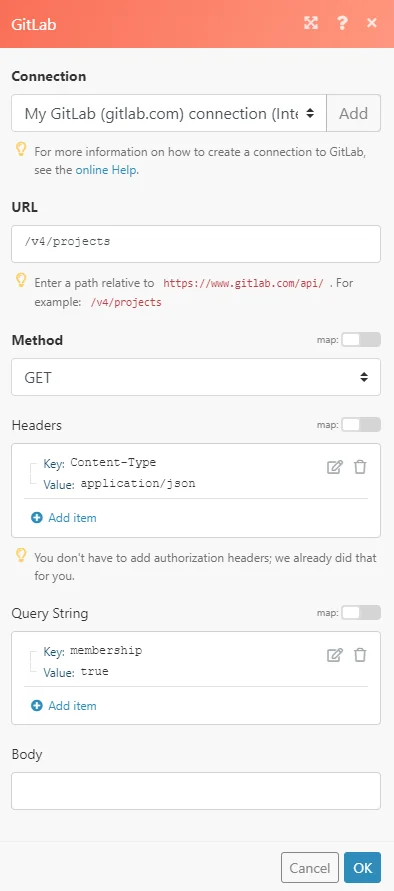
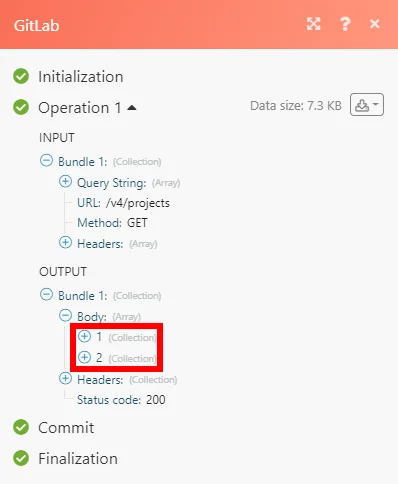
The result can be found in the module’s Output under Bundle > Body.
In our example, 2 projects were returned:
Changelog
Changelog between GitLab [v2] and GitLab [1]:
Modules Deprecated in v2:
-
Watch Repository Branches (was not working)
-
Watch Commit/MR/Issue/Snippet Comments
-
Watch Merge Request Comments
New Modules in v2:
-
Search Group
-
Create a Group
-
List Merge Requests closing an Issue
Legacy article, imported from the original Boost.space knowledge base (/knowledge-base/applications/it-and-development/gitlab/).

