In order to use WordsAPI with Boost.space Integrator, it is necessary to have a Rapid API account. If you do not have one, you can create a Rapid API account at rapidapi.com/marketplace.
The module dialog fields that are displayed in bold (in the Boost.space Integrator scenario, not in this documentation article) are mandatory!
Connect WordsAPI to Boost.space Integrator
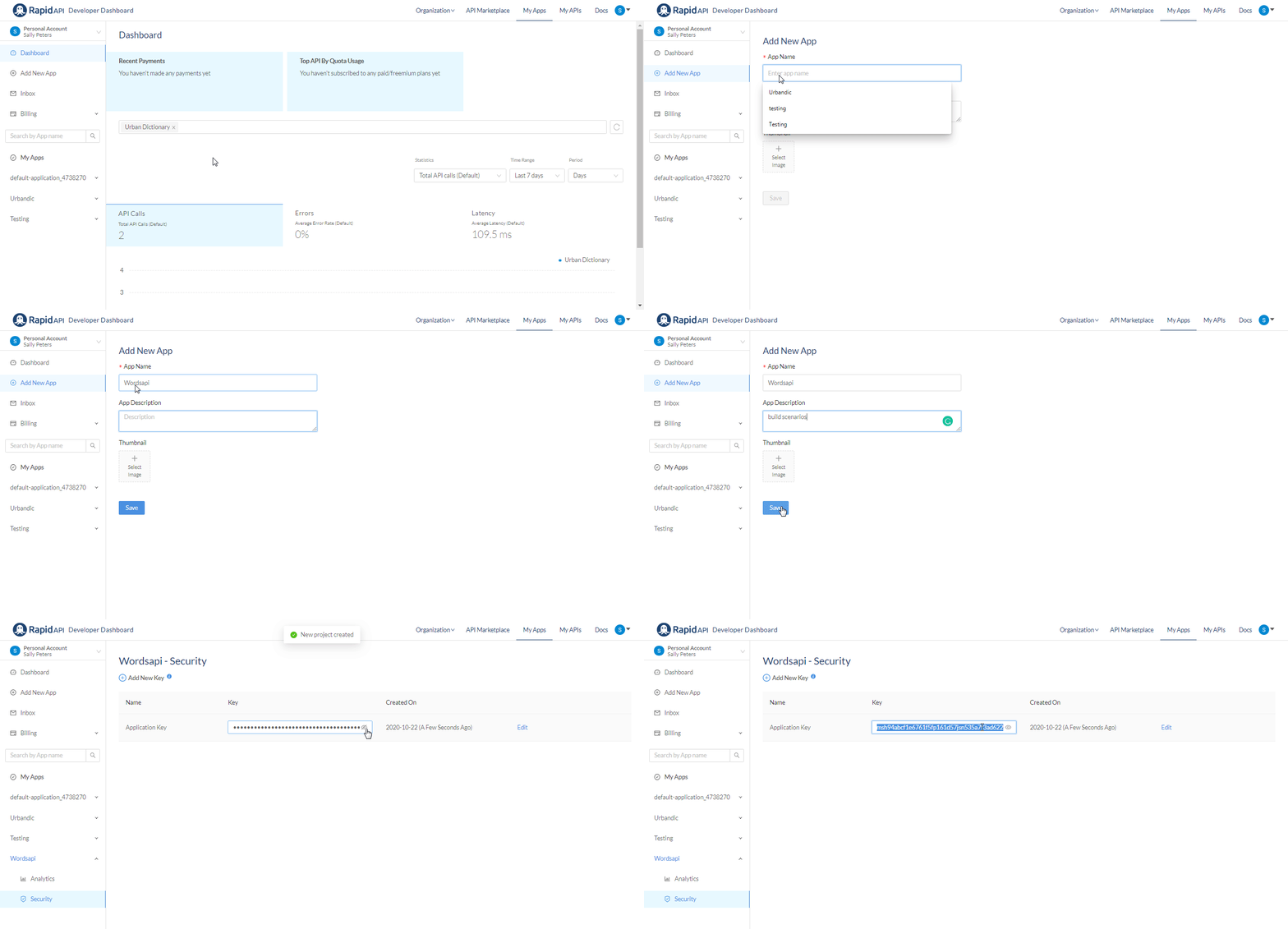
To connect your WordsAPI account to Boost.space Integrator you need to obtain the API Key from your Rapid API account and insert it in the Create a connection dialog in the Boost.space Integrator module.
Login to your Rapid API account.
Click Add New App, enter the details, and click Save to create the API.
App Name
Enter a name for the API.
App Description
Enter the details of the API.
Thumbnail
(Optional) Click Select Image to add an app image.
You need a subscription with Rapid API to use this Application Key for integration.
Go to Boost.space Integrator and open the WordsAPI module’s _Create a connectio_n dialog.
In the Connection name field, enter a name for the connection.
In the API Key field, enter the API key copied in step 2 and click Continue.
The connection has been established.

Actions
Get a Word
Retrieves all details of a word.
Connection
Establish a connection to your WordsAPI account.
Word
Enter the word whose details you want to retrieve.
Get Word Details
Retrieves a specific set of details of a word.
Connection
Establish a connection to your WordsAPI account.
Word
Enter the word whose details you want to retrieve.
Details to Retrieve
Select the details you want to retrieve. For example, Synonyms, Antonyms.
Get Rhymes
Returns a list of rhyming words.
Connection
Establish a connection to your WordsAPI account.
Word
Enter the word whose rhyming word details you want to retrieve.
Get Frequency
Returns the frequency score for a specific word.
Connection
Establish a connection to your WordsAPI account.
Word
Enter the word to retrieve the details on how frequently the word is used.
Get a Random Word
Returns one random word matching the search criteria.
Connection
Establish a connection to your WordsAPI account.
Searches
Search Words
Searches for words fitting specified parameters.
Connection
Establish a connection to your WordsAPI account.
Limit
Set the maximum number of words Boost.space Integrator should return during one scenario execution cycle. The default is 1 and the maximum is 100.
Letter Pattern
Enter the letter pattern to search the words based on the specified pattern. For example, search all the 5 letter words starting with d you must enter ^d.{4}$.
Letters
Enter the number of letters in a word to search all the words based on the number of letters specified. For example, enter 4 to find all the four-letter words.
Minimum Letters
Enter the number of letters to search the words with minimum letters specified. For example, to search all the words with at least 12 letters, you must enter 12.
Maximum Letters
Enter the number of letters to search the words with minimum letters specified. For example, to search all the words with at most 12 letters, you must enter 12.
Pronunciation Pattern
Enter the pronunciation pattern of the words you want to search that matches a regular expression.For example, to search all the words that end with the æm sound (as at the end of diagram), you must enter .*æm$.
Sounds
Enter a specific number of sounds to search the words based on the number of IPA phonemes used in the pronunciation.For example, to find the words with 5 phonemes, you would use 5.
Minimum Sounds
Enter the number of sounds to search the words with at least the specified number of sounds.For example, to search all the words with at least 12 phonemes, you must enter 12.
Maximum Sounds
Enter the number of sounds to search the words with at most the specified number of sounds.For instance, to find all words with at least 12 phonemes, you must enter 12.
Parts of Speech
Enter the parts of speech to search the words with at least one definition whose part of speech matches the specified value.For example, to search all the nouns, enter noun.
Has Details
Select the option to search the words consisting of the selected details.