ViewDNS
The ViewDNS modules enable you to integrate the tools provided by ViewDNS.info into your own sites in a simple and effective manner.
Getting Started With ViewDNS
Prerequisites
- A ViewDNS account
In order to use ViewDNS with Boost.space Integrator, it is necessary to have a ViewDNS account. If you do not have one, you can create a ViewDNS account at viewdns.info.
The module dialog fields that are displayed in bold (in the Boost.space Integrator scenario, not in this documentation article) are mandatory!
Connect ViewDNS to Boost.space Integrator
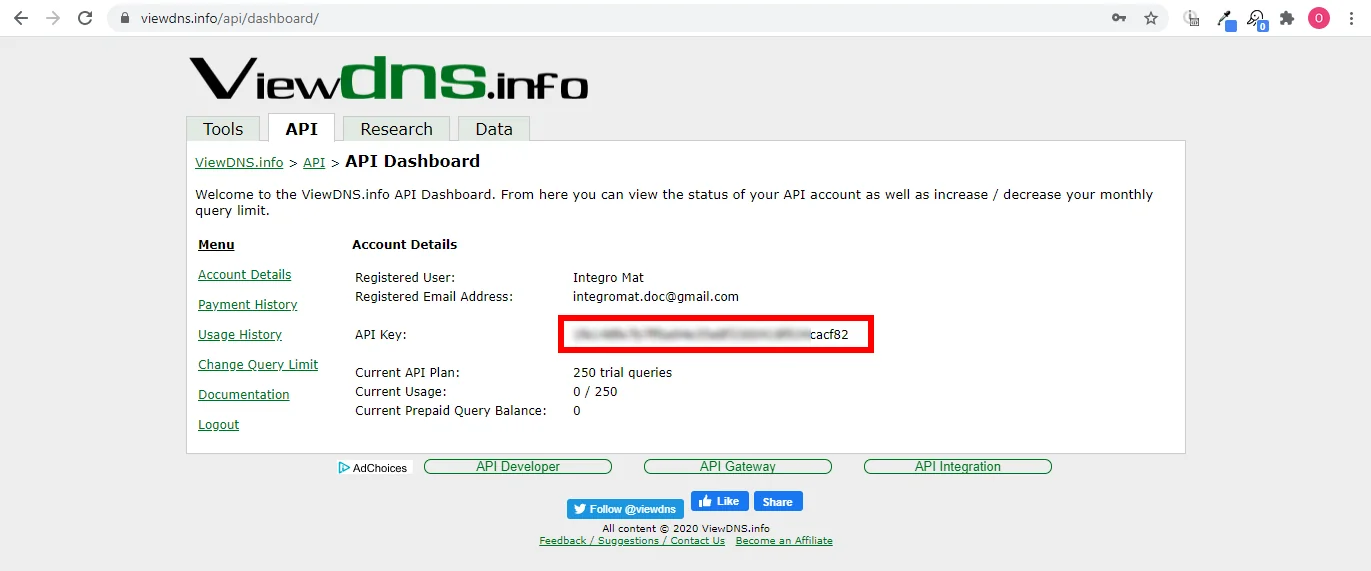
To connect your ViewDNS account to Boost.space Integrator, you need to obtain the API Key from your ViewDNS account, and insert it into the module’s Create a connection dialog.
-
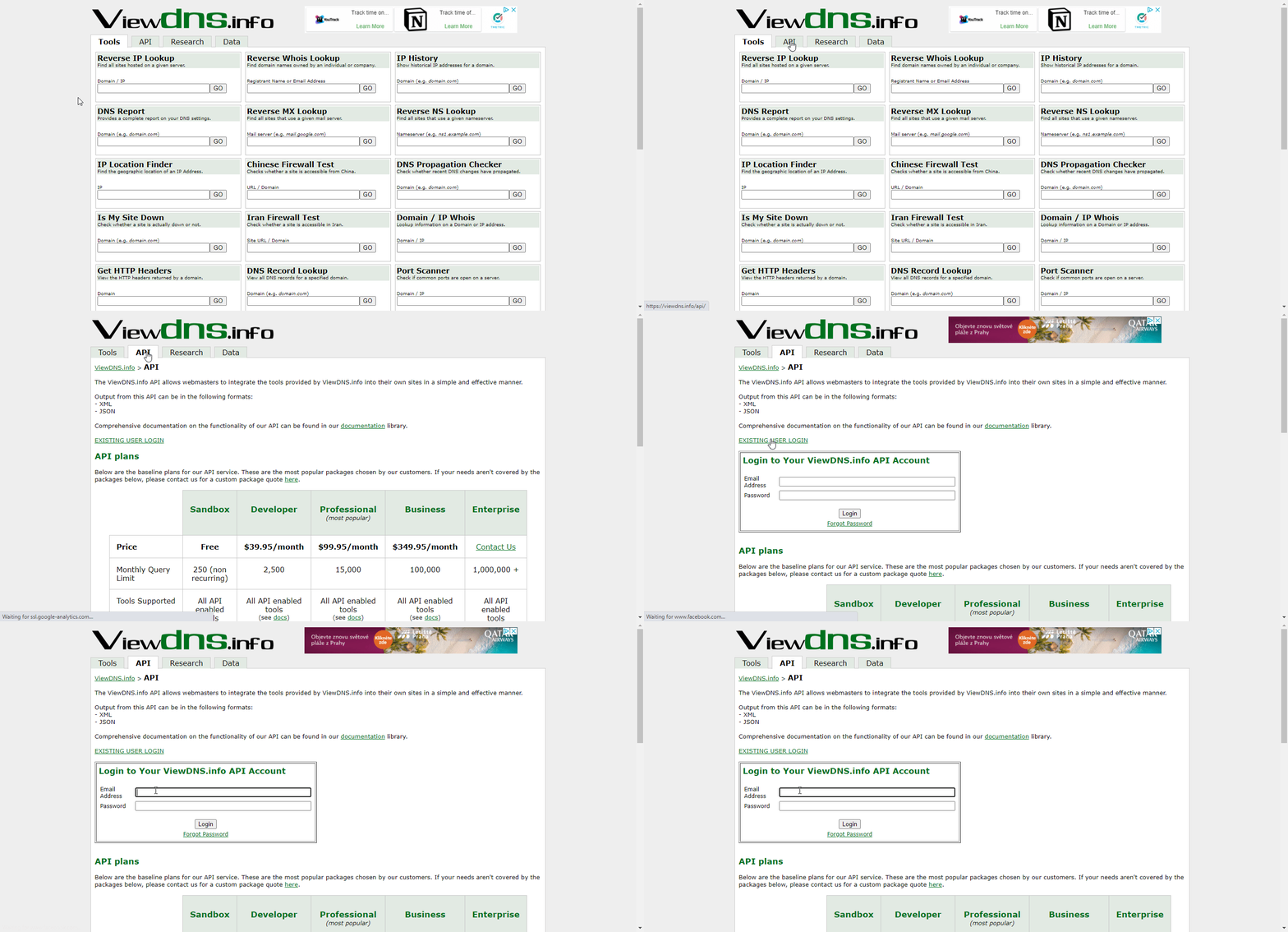
Log in to your ViewDNS account.
-
Copy the provided API Key.
-

Go to Boost.space Integrator, and open the ViewDNS module’s Create a connection dialog.
-
Enter the API Key you have copied in step 2 in the respective field, and click the Continue button to establish the connection.
The connection has been established. You can proceed with setting up the module.
Actions
Look Up Abuse Contact
Returns abuse contact address for a domain name. This is where you would send complaints about spam originating from that domain.
Connection
Establish a connection to your ViewDNS account.
Domain
Enter the domain name to find the abuse contact for, such as make.com
Check Chinese Firewall
Checks whether a site is blocked by the Great Firewall of China. This test checks across a number of servers from various locations in mainland China to determine if access to the site provided is possible from behind the Great Firewall of China.This test checks for symptoms of DNS poisoning, one of the more common methods used by the Chinese government to block access to websites.
Connection
Establish a connection to your ViewDNS account.
Domain
Enter the domain name to test, for example, youtube.com
Look Up Domain / IP Whois
Displays owner/contact information for a domain name. Can also be used to determine if a domain name is registered or not.
Available for paid accounts only!
Connection
Establish a connection to your ViewDNS account.
Domain
Enter a domain name, e.g., twitter.com or an IP address, e.g., 8.8.8.8
Look Up IP Location
Returns geographic information about a supplied IP address including city, country, latitude, longitude, and more.
Connection
Establish a connection to your ViewDNS account.
IP Address
Enter the IP address you want to find the location of.
Look Up MAC Address
Returns the name of the company that manufactured a specific network device based on its MAC address.
Connection
Establish a connection to your ViewDNS account.
MAC Address
Enter the MAC address you want to find, e.g., 52:9f:38:dc:b1:c5
Look Up Reverse DNS
Retrieves the reverse DNS entry (PTR) for a given IP. This is generally the server or host name.
Connection
Establish a connection to your ViewDNS account.
IP Address
Enter the IP address to retrieve the reverse DNS record for.
Searches
Check DNS Propagation
Check whether recent changes to DNS entries have propagated to DNS servers all over the world. Provides a status report on DNS propagation globally.
Connection
Establish a connection to your ViewDNS account.
Domain
Enter a domain you want to check.
Look Up DNS Records
Returns all configured DNS records (A, MX, CNAME, etc.) for a specified domain name.
Connection
Establish a connection to your ViewDNS account.
Domain
Enter a domain you want to check.
Record Type
Select the type of DNS record you want to retrieve.
Number of results to return
Set the maximum number of records Boost.space Integrator will return during one execution cycle.
Look Up IP History
Returns a historical list of IP addresses a given domain name has been hosted on, as well as where that IP address is geographically located, and the owner of that IP address.
Connection
Establish a connection to your ViewDNS account.
Domain
Enter a domain to find historical IP addresses for.
Number of results to return
Set the maximum number of records Boost.space Integrator will return during one execution cycle.
Scan Ports
Scans common ports on a server. Useful in determining if a specific service (e.g., HTTP) is up or down on a specific server.Ports scanned are: 21, 22, 23, 25, 80, 110, 139, 143, 445, 1433, 1521, 3306 and 3389.
Connection
Establish a connection to your ViewDNS account.
Host
Enter the host’s domain or IP address you want to perform the port scanning.
Look Up Reverse IP
Retrieves all other domains hosted from the same server as specified domain or IP address. Useful for finding phishing sites or identifying other sites on the same shared hosting server.
Connection
Establish a connection to your ViewDNS account.
Host
Enter the domain or IP address to find all hosted domains on.
Number of results to return
Set the maximum number of domains Boost.space Integrator will return during one execution cycle.
Legacy article, imported from the original Boost.space knowledge base (/knowledge-base/applications/it-and-development/view-dns/).

