The Pocket modules enable you to monitor, add, retrieve, archive, delete, or add to favorites items in your Pocket account.
Getting Started with Pocket
Prerequisites
- A Pocket account
In order to use Pocket with Boost.space Integrator, it is necessary to have a Pocket account. If you do not have one, you can create a Pocket account at getpocket.com.
The module dialog fields that are displayed in bold (in the Boost.space Integrator scenario, not in this documentation article) are mandatory!
Connect Pocket to Boost.space Integrator
To connect your Pocket account to Boost.space Integrator follow the general instructions for Connecting to services.
After you click the Continue button, Boost.space Integrator will redirect you to the Pocket website where you will be prompted to grant Boost.space Integrator access to your account.
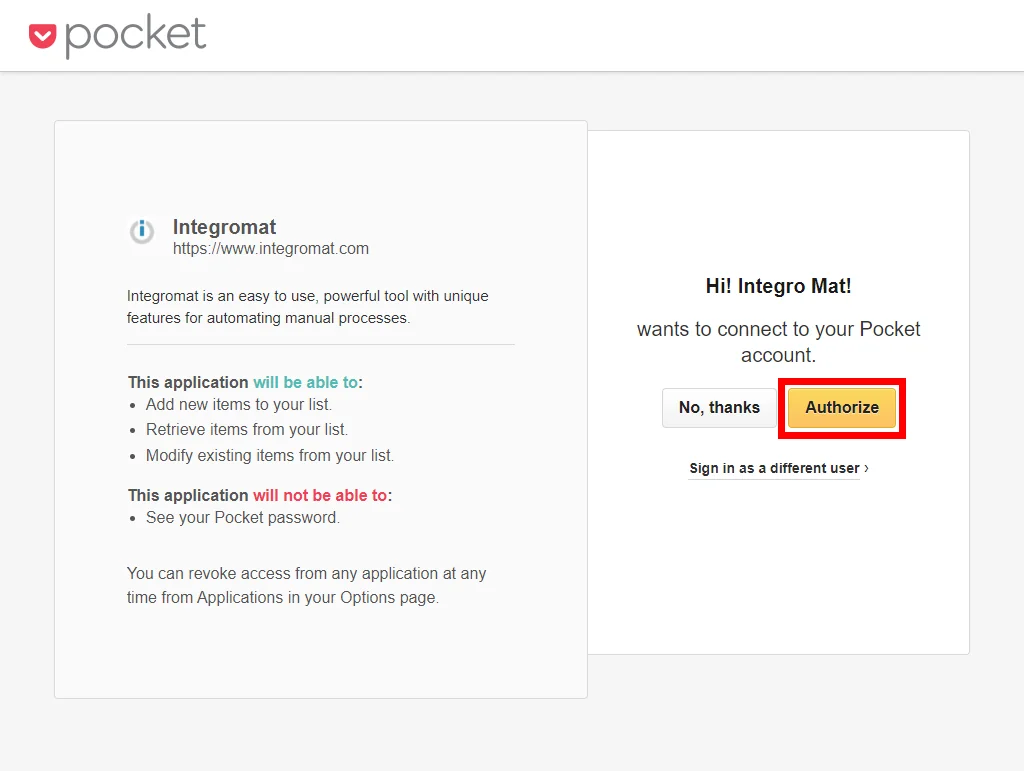
Confirm the dialog by clicking the Allow button.
Triggers
Watch Items
Retrieves item details when an item is created.
Connection
Establish a connection to your Pocket account.
State
Select the state of the items that will be returned.
unread
Returns only unread items (default)
archive
Returns only archived items
all
Returns both, unread and archived items
Favorite
Select the Yes option to return only favorite items.
Tag
Enter the tag name to filter items by tag.
Enter _untagged_ value to return untagged items only.
Domain
Enter the domain to return items from a particular domain.
Limit
Set the maximum number of items Boost.space Integrator will return during one execution cycle.
Actions
Add an Item
Adds a new item to the user’s Pocket list.
Connection
Establish a connection to your Pocket account.
URL
Enter the URL of the item you want to save to your list.
Label
Enter the title for the item. This can be included in cases where an item does not have a title, which is typical for image or PDF URLs. If Pocket detects a title from the content of the page, this parameter will be ignored.
Tags
Add the tags you want to apply to the added item.
Archive an Item
Moves an item to the archive.
Connection
Establish a connection to your Pocket account.
Item ID
Enter (map) the ID of the item you want to move from the list to the archive.
Delete an Item
Permanently removes an item from the user’s account.
Connection
Establish a connection to your Pocket account.
Item ID
Enter (map) the ID of the item you want to delete.
Mark as Favorite
Marks an item from your list as a favorite.
Connection
Establish a connection to your Pocket account.
Item ID
Enter (map) the ID of the item you want to mark as a favorite.
Modify Item Tags
Allows you to add, replace, or remove item’s tags.
Connection
Establish a connection to your Pocket account.
Action
Select the action you want to perform:
-
Add one or more tags to an item
-
Remove one or more tags from an item
-
Replace all of the tags for an item with one or more provided tags
-
Remove all tags from an item
Tag
Enter a comma-delimited list of one or more tags you want to add, remove, or replace by. E.g. Tag1, Tag2, Tag3, etc.
Item ID
Enter the Item ID of the item you want to add tag(s) to, replace tag(s), or remove the tag(s) from.
Re-add an Item to the List
Moves an item from archived items to the user’s list.
Connection
Establish a connection to your Pocket account.
Item ID
Enter (map) the ID of the item you want to move from the archive to the list.
Remove From the Favorites
Removes an item from the user’s favorites.
Connection
Establish a connection to your Pocket account.
Item ID
Enter (map) the ID of the item you want to remove from favorites.
Searches
Get Items
Lists items by the specified filter settings.
Connection
Establish a connection to your Pocket account.
State
Select the state of the items that will be returned.
unread
Returns only unread items (default)
archive
Returns only archived items
all
Returns both, unread and archived items
Favorite
Select the Yes option to return favorite items only.
Tag
Enter the tag name to filter items by tag.
Enter _untagged_ value to return untagged items only.
Domain
Enter the domain to return items from a particular domain.
Sort
Select whether you want to:
-
return items in order of newest to oldest
-
return items in order of oldest to newest
-
return items in order of title alphabetically
-
return items in order of URL alphabetically
Limit
Set the maximum number of items Boost.space Integrator will return during one execution cycle.
Legacy article, imported from the original Boost.space knowledge base (/knowledge-base/applications/lifestyle/pocket/).

