Strava
The Strava modules enable you to monitor activities or athletes, or create, retrieve, and update activities in your Strava account.
Getting Started with Strava
Prerequisites
- A Strava account
In order to use Strava with Boost.space Integrator, it is necessary to have a Strava account. If you do not have one, you can create a Strava account at www.strava.com.
The module dialog fields that are displayed in bold (in the Boost.space Integrator scenario, not in this documentation article) are mandatory!
Connect Strava to Boost.space Integrator
1. Go to Boost.space Integrator and open the Strava module’s Create a connection dialog.
2. Enter the name of the connection to the Connection name field and click Continue.

After you click the Continue button, Boost.space Integrator will redirect you to the Strava website where you will be prompted to grant Boost.space Integrator access to your account.
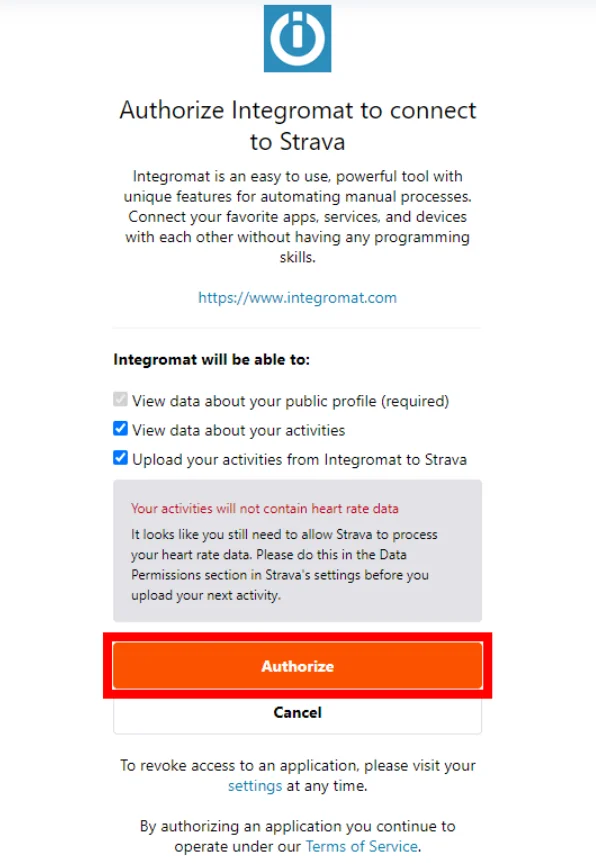
Confirm the dialog by clicking the Authorize button.
The connection has been established.
Activities
Watch Activities and Athletes
Triggers when an activity or an athlete is added, updated or deleted.
Required Permissions: activity
Strava webhooks may be delayed (minutes/hours).
1. Add the Watch Activities and Athletes module to your Boost.space Integrator scenario.
2. Run the scenario.
Now, every time the activity is performed, the Watch Activities and Athletes module in your Boost.space Integrator scenario is triggered.
Create an Activity
Creates a new activity.
Required Permissions: activity
Connection
Establish a connection to your Strava account.
Name
Enter the name of the activity.
Type
Select the type of activity you want to add.
Start Date Local
Enter the start date and time. The list of supported date and time formats.
Elapsed Time in Seconds
Enter the elapsed time of the activity in seconds.
Description
Enter the description of the activity.
Distance in Meters
Enter the distance of the activity (in meters).
Is Trainer Activity
Select the Yes option to tag the activity as a trainer activity (for example Treadmill for Run activity type).
Is Commute
Select the Yes option to tag the activity as Commute.
Get an Activity
Retrieves activity details.
Connection
Establish a connection to your Strava account.
Activity ID
Enter (map) or select the activity you want to retrieve details about.
Include All Segments Efforts
Select the Yes option to include all segments efforts.
List Activities
Retrieves all activities in your account.
Required Permissions: activity
Connection
Establish a connection to your Strava account.
Before
Enter the date and time to filter activities that have taken place before the entered time. The list of supported date and time formats.
After
Enter the date and time to filter activities that have taken place after the entered time. The list of supported date and time formats.
Limit
Set the maximum number of activities Boost.space Integrator will return during one execution cycle.
Update an Activity
Updates an existing activity.
Required Permissions: activity
Connection
Establish a connection to your Strava account.
Activity ID
Enter (map) or select the activity you want to update.
Please find the descriptions of the fields in the Create an Activity section above.
Stats
Get a Stats Report
Retrieves your activity report.
Required Permissions: activity
Connection
Establish a connection to your Strava account.
Other
Make an API Call
Allows you to perform a custom API call.
Connection
Establish a connection to your Strava account.
URL
Enter a path relative to https://www.strava.com/api. For example: /v3/athlete/activities.
For the list of available endpoints, refer to the Strava API Documentation.
Method
Select the HTTP method you want to use:
GET
to retrieve information for an entry.
POST
to create a new entry.
PUT
to update/replace an existing entry.
PATCH
to make a partial entry update.
DELETE
to delete an entry.
Headers
Enter the desired request headers. You don’t have to add authorization headers; we already did that for you.
Query String
Enter the request query string.
Body
Enter the body content for your API call.
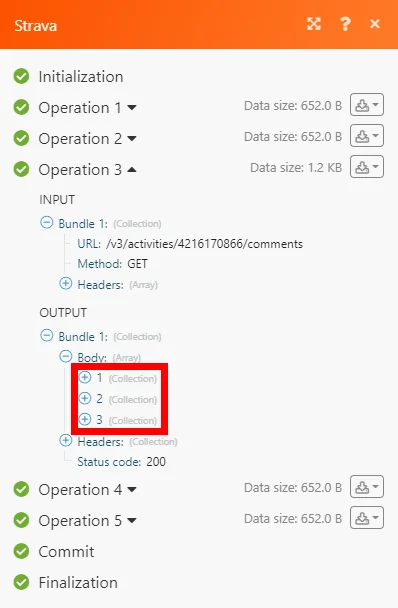
Example of Use – List Activity Comments
The following API call returns all comments of the specified activity in your Strava account:
URL: /v3/activities/{activity_ID}/comments/
Method: GET
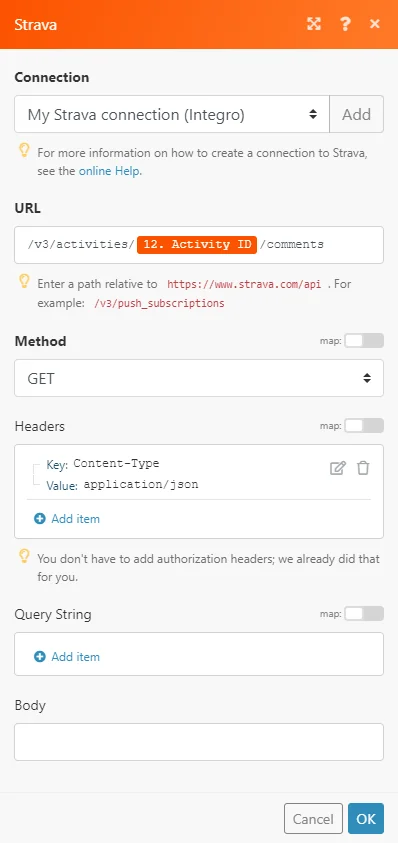
The result can be found in the module’s Output under Bundle > Body. In our example, 3 comments were returned:
Legacy article, imported from the original Boost.space knowledge base (/knowledge-base/applications/lifestyle/strava/).

