AWeber
The AWeber modules allow you to watch, create, update, list, and/or delete items, accounts, custom fields, lists, subscribers, and tags in your AWeber account.
Prerequisites
- An AWeber account
In order to use AWeber with Boost.space Integrator, it is necessary to have an AWeber account. If you do not have one, you can create an AWeber at https://www.aweber.com/order.htm.
The module dialog fields that are displayed in bold (in the Boost.space Integrator scenario, not in this documentation article) are mandatory!
Connecting AWeber to Boost.space Integrator
-

Go to Boost.space Integrator and open the AWeber module’s Create a connection dialog.
-
Click Continue.
-
Enter your AWeber login credentials and confirm the dialog by clicking the Allow Access button.
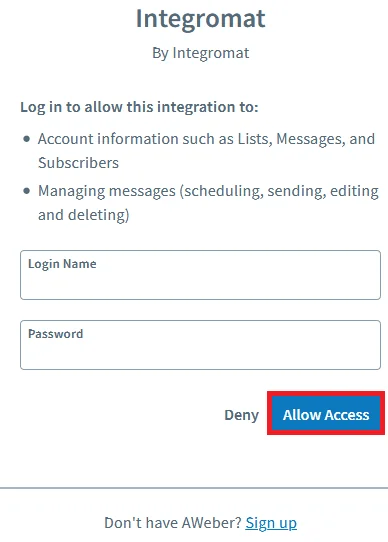
The connection has been established.
In the following video, you can see how to use templates to get started with an AWeber integration. You can easily modify your scenarios after setting up a template so feel free to replace the apps that are used in the templates.
Triggers
Watch Accounts
Triggers when a new account is added.
Required Permissions: account.read
Connection
Establish a connection to your AWeber account.
Limit
Set the maximum number of accounts Boost.space Integrator should return during one scenario execution cycle.
Watch Custom Fields
Triggers when a new custom field is added to the list.
Required Permissions: account.read, list.read
Connection
Establish a connection to your AWeber account.
Account
Select the account whose custom fields you want to watch.
List
Select the list whose custom fields you want to watch.
Limit
Set the maximum number of custom fields Boost.space Integrator should return during one scenario execution cycle.
Watch Lists
Triggers when a new list is added.
Required Permissions: list.read, account.read
Connection
Establish a connection to your AWeber account.
Account
Select the account whose custom fields you want to watch.
Limit
Set the maximum number of lists Boost.space Integrator should return during one scenario execution cycle.
Watch Subscribers
Triggers when a new subscriber is added to the list.
Required Permissions: list.read, account.read, subscriber.read, subscriber.read-extended
Connection
Establish a connection to your AWeber account.
Account
Select the account whose subscribers you want to watch.
List
Select the list whose subscribers you want to watch.
Limit
Set the maximum number of subscribers Boost.space Integrator should return during one scenario execution cycle.
Actions
Add a Custom Field
Creates a custom field.
Connection
Establish a connection to your AWeber account.
Account
Select the account to which you want to add the custom field.
List
Select the list to which you want to add the custom field.
Name
Enter a name for the custom field.
Add a Subscriber
Creates a new subscriber.
Required Permissions: list.read, account.read, subscriber.write
Connection
Establish a connection to your AWeber account.
Account
Select the account to which you want to add the subscriber.
List
Select the list to add the subscriber.
Email address
Enter the email address of the subscriber.
Name
Enter the name of the subscriber.
Ad tracking
Enter the subscriber ad tracking number.
IP address
Enter the subscriber’s IP address.
Last followup message number sent
Enter the sequence number of the last follow-up message sent to the subscriber.
Notes
Enter the details of the subscriber you want to mention.
Tags
Add the tags or the keywords that are used to filter the subscribers when searching.
Delete a Custom Field
Deletes a custom field.
Required Permissions: account.read, list.read, list.write
Connection
Establish a connection to your AWeber account.
Account
Select the account whose custom fields you want to delete.
List
Select the list whose custom fields you want to delete.
Custom Field ID
Enter (map) the Custom Field ID you want to delete.
Delete a Subscriber
Deletes a Subscriber.
Required Permissions: list.read, account.read, subscriber.write
Connection
Establish a connection to your AWeber account.
Account
Select the account whose subscriber you want to delete.
List
Select the list whose subscriber you want to delete.
Subscriber ID
Enter (map) the Subscriber ID you want to delete.
Get a Custom Field
Gets info about a custom field.\
Required Permissions: account.read, list.write, list.read
Connection
Establish a connection to your AWeber account.
Account
Select the account whose custom field details you want to retrieve.
List
Select the list whose custom field details you want to retrieve.
Custom Field ID
Enter (map) the Custom Field ID whose details you want to retrieve.
Get a List
Gets info about a specified list.
Required Permissions: list.read, account.read
Connection
Establish a connection to your AWeber account.
Account
Select the account whose list details you want to retrieve.
List ID
Enter (map) the List ID whose details you want to retrieve.
Get Tags for List
Gets the most popular tags for a list. This will return an array containing up to 500 tags sorted by descending popularity.
Required Permissions: list.read, account.read
Connection
Establish a connection to your AWeber account.
Account
Select the account whose list’s tag details you want to retrieve.
List ID
Enter (map) the List ID whose tags details you want to retrieve.
Get a Subscriber
Gets info about a subscriber.
Required Permissions: list.read, account.read, subscriber.read, subscriber.read-extended
Connection
Establish a connection to your AWeber account.
Account
Select the account whose subscriber details you want to retrieve.
List
Select the list whose subscriber details you want to retrieve.
Subscriber ID
Enter (map) the Subscriber ID whose information you want to retrieve.
Move a Subscriber
Moves a subscriber to a different list.
Required Permissions: list.read, account.read, subscriber.write
Connection
Establish a connection to your AWeber account.
Account
Select the account whose subscriber you want to move from one to list to another.
List
Select the list whose subscriber you want to move to another list.
Subscriber ID
Enter (map) the subscriber ID you want to move to another list.
New List
Select the list to which you want to add the subscriber.
Enforce custom field mapping
When selected, you can move the subscriber from one list to another only if the custom field data of the subscriber matches in both the lists.
Last followup message number sent
Enter (Map) the sequence number of the last follow-up message sent to the subscriber.
Update a Custom Field
Updates a custom field.
Required Permissions: account.read, list.read, list.write
Connection
Establish a connection to your AWeber account.
Account
Select the account whose custom field you want to update.
List
Select the list whose custom field you want to update.
Custom Field ID
Enter (map) the Custom Field ID you want to update. You can create custom fields at Custom Fields.
Name
Enter a new name for the custom field.
Subscriber can be updated
Select if you want to allow the subscriber to update the custom field.
Update a Subscriber
Updates a Subscriber.
Required Permissions: list.read, account.read, subscriber.write
Connection
Establish a connection to your AWeber account.
Account
Select the account whose subscriber you want to update.
List
Select the list whose subscriber you want to update.
Subscriber ID
Enter the Subscriber ID you want to update.
Custom Field 1
Enter a new name for the custom field.
Custom Field 2
Enter a new name for the custom field.
Email Address
Enter the email address of the subscriber.
Name
Enter a new name for the subscriber.
Ad Tracking
Enter the subscriber ad tracking number.
Last followup message number sent
Enter the sequence number of the last follow-up message sent to the subscriber.
Notes
Enter the details of the subscriber you want to mention.
Tags to Add
Add the tags or the keywords that are used to filter the subscribers when searching.
Tags to Remove
Add the tags to remove from the subscriber.
Make an API Call
Performs an arbitrary authorized API call.
Connection
Establish a connection to your AWeber account.
URL
Enter a path relative to https://api.aweber.com/. For example: /1.0/accounts
For the list of available endpoints, refer to the AWeber API Documentation.
Method
Select the HTTP method you want to use:
GET
to retrieve information for an entry.
POST
to create a new entry.
PUT
to update/replace an existing entry.
PATCH
to make a partial entry update.
DELETE
to delete an entry.
Headers
Enter the desired request headers. You don’t have to add authorization headers; we already did that for you.
Query String
Enter the request query string.
Body
Enter the body content for your API call.
Example of Use – Get Subscribers
The following API call returns all the subscribers from your AWeber account:
URL:
/1.0/accounts/#1603949/lists/awlist5781214/subscribers
Method
:GET
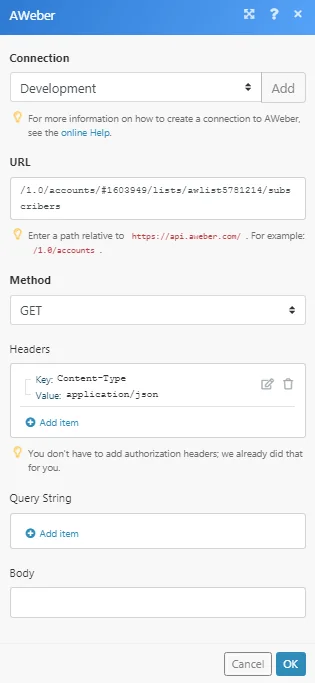
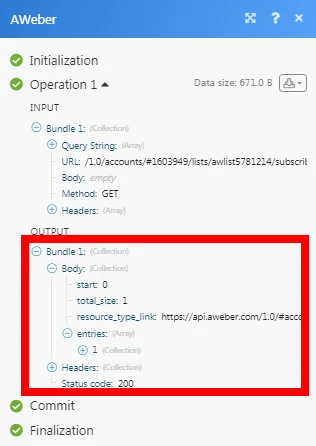
Matches of the search can be found in the module’s Output under Bundle > Body > entries.
In our example, 1 subscriber is returned:
Searches
Find a List
Finds a list by its name or unique list ID.
Required Permissions: list.read, account.read
Connection
Establish a connection to your AWeber account.
Account
Select the account whose list you want to find.
Name or Unique List ID
Enter the name of the list or the List ID to search.
Limit
The maximum number of lists Boost.space Integrator should return during one execution cycle.
Find Subscribers for Account
Finds the collection of subscribers that match search criteria for the specified account across all lists.
Required Permissions: list.read, account.read, subscriber.read, subscriber.read-extended
Connection
Establish a connection to your AWeber account.
Account
Select the account whose subscriber you want to find.
Enter the email address of the subscriber you want to find.
Name
Enter the name of the subscriber you want to find.
Status
Select the status of the subscriber you want to find:
-
Subscribed
-
Unsubscribed
-
Unconfirmed
Country
Enter the country to which the subscriber belongs to.
Latitude
Enter the subscriber’s location latitude.
Longitude
Enter the subscriber’s location longitude.
Limit
Enter the maximum number of subscribers Boost.space Integrator should return during one scenario execution cycle.
Find Subscribers for List
Finds the collection of subscribers that match search criteria for the specified account and list.
Required Permissions: list.read, account.read, subscriber.read, subscriber.read-extended
Connection
Establish a connection to your AWeber account.
Account
Select the account whose subscriber you want to find.
List
Select the list whose subscriber you want to find.
Enter (map) the email address of the subscriber you want to find.
Name
Enter (map) the name of the subscriber you want to find.
Status
Select the status of the subscriber you want to find:
-
Subscribed
-
Unsubscribed
-
Unconfirmed
Country
Enter (map) the country to which the subscriber belongs to.
Latitude
Enter (map) the subscriber’s location latitude.
Longitude
Enter (map) the subscriber’s location longitude.
Limit
Enter the maximum number of subscribers Boost.space Integrator should return during one scenario execution cycle.
Get Custom Fields
Lists all available custom fields for a specified list.
Required Permissions: account.read, list.write, list.read
Connection
Establish a connection to your AWeber account.
Account
Select the account whose custom fields you want to retrieve.
List
Select the list whose custom field details you want to retrieve.
Limit
Enter the maximum number of custom fields Boost.space Integrator should return during one scenario execution cycle.
Get Subscriber Activity
Retrieves the analytics activity for a subscriber.
Required Permissions: list.read, account.read, subscriber.read, subscriber.read-extended
Connection
Establish a connection to your AWeber account.
Account
Select the account whose subscriber activity you want to retrieve.
List
Select the list whose subscriber activity you want to retrieve.
Subscriber ID
Enter (map) the Subscriber ID whose activity details you want to retrieve.
Get Subscribers
List all available subscribers.
Required Permissions: list.read, account.read, subscriber.read, subscriber.read-extended
Connection
Establish a connection to your AWeber account.
Account
Select the account whose subscriber details you want to retrieve.
List
Select the list whose subscriber details you want to retrieve.
Limit
Enter the maximum number of subscribers Boost.space Integrator should return during one scenario execution cycle.
Get Accounts
Lists all available accounts.
Required Permissions: account.read
Connection
Establish a connection to your AWeber account.
Get Lists
Lists all available lists for a specified account.
Connection
Establish a connection to your AWeber account.
Account
Select the account whose list details you want to retrieve.
Legacy article, imported from the original Boost.space knowledge base (/knowledge-base/applications/marketing/aweber/).

