Clearbit
The Clearbit modules enable you to monitor changes, retrieve persons or companies in your Clearbit account.
Getting Started with Clearbit
Prerequisites
- A Clearbit account
In order to use Clearbit with Boost.space Integrator, it is necessary to have a Clearbit account. If you do not have one, you can create a Clearbit account at clearbit.com/signup.
The module dialog fields that are displayed in bold (in the Boost.space Integrator scenario, not in this documentation article) are mandatory!
Connecting Clearbit to Boost.space Integrator
To connect your Clearbit account to Boost.space Integrator you need to obtain the API Key.
-
Log in to your Clearbit account.
-

Go to API on the menu on the left and copy the provided API Key.
-
Go to Boost.space Integrator and open the Clearbit module’s Create a connection dialog.
-
Enter the API Key you have copied in step 2 to the respective field and click the Continue button to establish the connection.
The connection has been established. You can proceed with setting up the module.
Person
Get a Person or Company
Retrieves a person and company simultaneously based on an email address.
Connection
Establish a connection to your Clearbit account.
Email Address
Enter the email address to look up.
Given Name
Enter the first name of the person.
Family Name
Enter the last name of the person. If you have this, specifying this is strongly recommended to improve match rates.
IP address
Enter the IP address of the person. If you have this, specifying this is strongly recommended to improve match rates.
Location
The city or country where the person resides.
Company
The name of the person’s company.
Company Domain
The domain of the person’s company.
Linked In
The LinkedIn URL for the person.
The Twitter handle for the person.
Enter The Facebook URL for the person.
Exclude EU related data ?
Select exclude eu records to exclude person records with country data in the EU. Select exclude eu records or with null country data to exclude person records with country data in the EU or with null country data.
Subscribe to changes for this person ?
Select the Yes option to subscribe to the changes to the person.
If you subscribe, every update of this person’s information will trigger a webhook and count as an API call on Clearbit. You can set the webhook URL associated with your account on your dashboard. You need the Watch Changes trigger module to receive the updated information.
Select No to unsubscribe.
Get a Person
Retrieves a person by their email address. Alongside the email address you may also provide any additional attributes you have about the person.
Connection
Establish a connection to your Clearbit account.
Email Address
Enter the email address to look up.
Given Name
Enter the first name of the person.
Family Name
Enter the last name of the person. If you have this, specifying this is strongly recommended to improve match rates.
IP address
Enter the IP address of the person. If you have this, specifying this is strongly recommended to improve match rates.
Location
The city or country where the person resides.
Company
The name of the person’s company.
Company Domain
The domain of the person’s company.
Linked In
The LinkedIn URL for the person.
The Twitter handle for the person.
Enter The Facebook URL for the person.
Exclude EU related data ?
Select exclude eu records to exclude person records with country data in the EU. Select exclude eu records or with null country data to exclude person records with country data in the EU or with null country data.
Subscribe to changes for this person ?
Select the Yes option to subscribe to the changes to the person.
If you subscribe, every update of this person’s information will trigger a webhook and count as an API call on Clearbit. You can set the webhook URL associated with your account on your dashboard. You need the Watch Changes trigger module to receive the updated information.
Select No to unsubscribe.
Company
Get a Company
Retrieves company data via a domain name.
Connection
Establish a connection to your Clearbit account.
Domain
Enter the domain of the company’s website.
Company name
Enter the name of the company.
Linked In
Enter the company’s Linkedin URL.
Enter the Twitter screen name.
Enter the company’s Facebook ID.
Get a Company’s Domain
Retrieves a company by its domain.
Connection
Establish a connection to your Clearbit account.
Name
Enter the name of the company you want to retrieve the domain for.
Other
Watch Changes
Triggers when a person you are subscribed to is updated.
Webhook name
Enter the name for the webhook.
Connection
Establish a connection to your Clearbit account.
Make an API Call
Allows you to perform a custom API call.
Connection
Establish a connection to your Clearbit account.
Choose your API
Select the API. The streaming version of the API is preferred to ensure synchronous response.
URL
Enter a path relative to https://{api}.clearbit.com. E.g. /v2/companies/flag
For the list of available endpoints, refer to the Clearbit API Documentation.
Method
Select the HTTP method you want to use:
GET
to retrieve information for an entry.
POST
to create a new entry.
PUT
to update/replace an existing entry.
PATCH
to make a partial entry update.
DELETE
to delete an entry.
Headers
Enter the desired request headers. You don’t have to add authorization headers; we already did that for you.
Query String
Enter the request query string.
Body
Enter the body content for your API call.
Example of Use – Domain Lookup
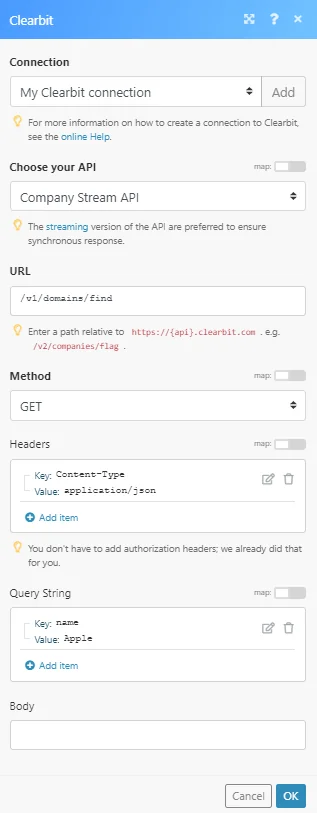
The following API call returns company information by the specified domain:
Choose your API:
Company Stream API
Method: GET
Query String:
Key: name
Value: {{the name of the company you want to retrieve a domain for}}
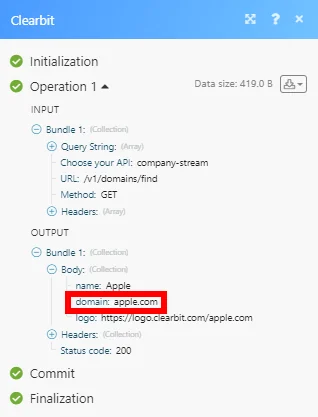
The company’s domain can be found in the module’s Output under Bundle > Body > domain:
Legacy article, imported from the original Boost.space knowledge base (/knowledge-base/applications/marketing/clearbit/).

