Eventbrite
The Eventbrite modules allow you to watch, create, update, list, and/or delete attendees, events, orders, tickets in your Eventbrite account.
Getting Started with Eventbrite
Prerequisites
- An Eventbrite account
In order to use Eventbrite with Boost.space Integrator, it is necessary to have an Eventbrite account. You can use your Facebook or Apple account to connect to Eventbrite or you can create an Eventbrite account at eventbrite.com/signin/.
The module dialog fields that are displayed in bold (in the Boost.space Integrator scenario, not in this documentation article) are mandatory!
Connecting Eventbrite to Boost.space Integrator
-

Go to Boost.space Integrator and open the Eventbrite module’s Create a connection dialog.
-
Enter the Connection name and click Continue.
-
Enter your Eventbrite user login credentials and click Sign In.
-
Confirm the dialog by clicking Allow.
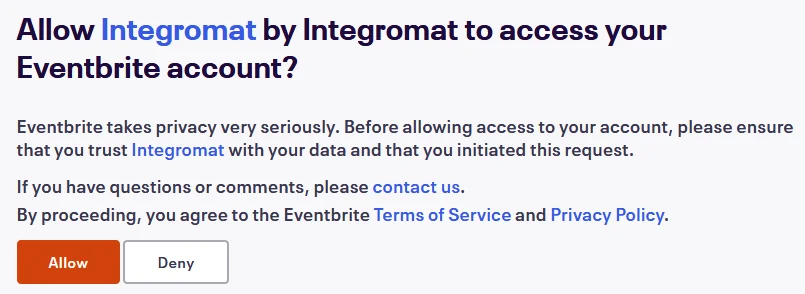
The connection has been established.
Events
Watch Events
Triggers when a new event matching the specified requirements is found.
Connection
Establish a connection to your Eventbrite account.
Organizations
Select the organization whose events you want to watch.
Name Filter
Enter the name of the event you want to watch.
Currency Filter
Enter the three-digit currency whose applicable events you want to watch.
Show Series Parent
Select whether you want to display the parent series events of the events you want to watch:
-
Yes
-
No
-
Not defined
Status
Select the status of the events you want to watch:
-
Draft
-
Live
-
Started
-
Ended
-
Completed
-
Canceled
-
All
Time Filter
Select the time of the events you want to watch:
-
All
-
Past
-
Current Future
Venue Filter
Add the locations whose events you want to watch:
Venue ID
Enter the location whose events you want to watch.
Organizer Filter
Add the organizers whose events you want to watch:
Organizer ID
Enter the location whose events you want to watch.
Limit
Enter the maximum number of events Boost.space Integrator should return during one scenario execution cycle.
Search for Events by Organization
Retrieves a list of events by the corresponding organization.
Connection
Establish a connection to your Eventbrite account.
Organization
Select the organization whose events you want to search by venue.
Name Filter
Enter the event name to filter the events based on the specified name.
Currency Filter
Enter the three-digit currency code to search the events with applicable specified currency. For example, USD.
Order By
Select the order in which you want to sort the event:
-
Start (ascending)
-
Start (Descending)
-
Created (ascending)
-
Created (Descending)
-
Name (ascending)
-
Name (Descending)
Show Series Parent
Select whether you want to view only parent events:
-
Yes
-
No
-
Not defined
Status
Select the status of the event:
-
Draft
-
Live
-
Started
-
Ended
-
Completed
-
Canceled
-
All
Event Group ID
Enter the Group Event ID to list events that are part of the event group.
Time Filter
Select the option to filter the events based on time:
-
All
-
Past
-
Current Feature
Venue Filter
Add the venues whose events you want to list:
Venue ID
Enter the Venue ID.
Organization Filter
Add the organization whose events you want to list:
Organization ID
Enter the Organization ID.
Limit
Enter the maximum number of events Boost.space Integrator should return during one scenario execution cycle.
Search for Events by Series
Retrieves a list of events by the corresponding series.
Connection
Establish a connection to your Eventbrite account.
Event Series ID
Enter the Event Series ID whose events you want to list.
Time Filter
Select the option to filter the events based on time:
-
All
-
Past
-
Current Feature
Order By
Select the order in which you want to sort the event:
-
Start (ascending)
-
Start (Descending)
-
Created (ascending)
-
Created (Descending)
Limit
Enter the maximum number of events Boost.space Integrator should return during one scenario execution cycle.
Searches for Events by Venue
Retrieves a list of events by the corresponding venue.
Connection
Establish a connection to your Eventbrite account.
Organization
Select the organization whose events you want to search by venue.
Venue
Select the venue whose event you want to list.
Status
Select the status of the venue:
-
Draft
-
Live
-
Started
-
Ended
-
Completed
-
Canceled
-
All
Order by
Select the order in which you want to sort the event:
-
Start (ascending)
-
Start (Descending)
-
Created (ascending)
-
Created (Descending)
Limit
Enter the maximum number of events Boost.space Integrator should return during one scenario execution cycle.
Create an Event
Creates a new event.
Connection
Establish a connection to your Eventbrite account.
Organization
Select the organization whose events you want to create.
Name
Enter a name for the event.
Start
Enter the start date and time of the event.
End
Enter the start date and time of the event.
Hide Start Date
Select the checkbox if you want to hide the event start date and time.
Hide End Date
Select the checkbox if you want to hide the event end date and time.
Currency
Enter the three-digit currency code applicable for the event payment.
Online Event
Select the checkbox if this is an online event.
Listed
Select the checkbox if this event is listed publicly and shareable on the Eventbrite website.
Shareable
Select the checkbox if the event is shareable by including social sharing buttons for the event.
Invite Only
Select the checkbox if you want only the members who received an email invitation for the event can access or view the event details in the Eventbrite.
Show Remaining Tickets
Select the checkbox if you want to display the remaining number of tickets for the event.
Description
Enter the details of the event.
Organizer ID
Enter the event Organizer ID.
Venue ID
Enter the event Venue ID.
Category
Select the applicable category for the event. For example, Music.
Format
Select the event format. For example, a conference.
Password
Enter the password required to view the event details.
Capacity
Enter the maximum number of tickets that can be sold to the attendees for the event.
Publish an Event
Publishes an existing event.
Connection
Establish a connection to your Eventbrite account.
Organization
Select the organization whose events you want to publish.
Event
Select the event you want to publish.
For publishing an event, the event must have all the required information, including a name and description, an organizer, at least one ticket, and valid payment options.
Unpublish an Event
Unpublishes an existing event.
Connection
Establish a connection to your Eventbrite account.
Organization
Select the organization whose events you want to publish.
Event
Select the event you want to unpublish.
Attendees
Watch Attendees
Triggers when a new attendee is signed up to a specified event.
Connection
Establish a connection to your Eventbrite account.
Organization
Select the organization whose event attendees you want to watch.
Event
Select the event whose attendees you want to watch.
Limit
Enter the maximum number of attendees Boost.space Integrator should return during one scenario execution cycle.
Status
Select the status of the attendees you want to watch:
-
Attending
-
Not attending
-
Unpaid
Watch Attendees in Organization
Triggers when a new attendee is signed up to an event in the given organization.
Connection
Establish a connection to your Eventbrite account.
Organization
Select the organization whose attendees you want to watch.
Limit
Enter the maximum number of attendees Boost.space Integrator should return during one scenario execution cycle.
Status
Select the status of the attendees you want to watch:
-
Attending
-
Not attending
List Attendees
Retrieves a list of attendees for a specified event.
Connection
Establish a connection to your Eventbrite account.
Organization
Select the organization whose event attendees you want to list.
Event
Select the event whose attendees you want to list.
Status
Select the status of the attendees you want to watch:
-
Attending
-
Not attending
-
Unpaid
Changed Since
Enter the date and time to list the event attendees that are modified on or after the specified date and time.
Orders
Watch Orders
Triggers when a new order is placed for tickets to a specified event.
Webhook Name
Enter a name for the webhook.
Connection
Establish a connection to your Eventbrite account.
Organization
Select the organization whose event orders you want to watch.
Event
Select the event whose orders you want to watch.
See the Connecting to an Eventbrite Webhook using Boost.space Integrator for adding the webhook in Eventbrite.
Watch My Orders
Triggers when you place a new order.
Connection
Establish a connection to your Eventbrite account.
Limit
Enter the maximum number of orders Boost.space Integrator should return during one scenario execution cycle.
Watch Orders by Event
Triggers when a new order is placed for tickets to a specified event.
Connection
Establish a connection to your Eventbrite account.
Organization
Select the organization whose event orders you want to watch.
Event
Select the event whose orders you want to watch.
Limit
Enter the maximum number of orders Boost.space Integrator should return during one scenario execution cycle.
Status
Select the status of orders you want to watch:
-
Active
-
Inactive
-
All
-
All not deleted
Changed Since
Enter the date and time to watch only the orders that are modified on or after the specified date and time.
Only Emails
Add the email addresses whose orders you want to watch:
Value
Enter the email addresses.
Exclude Emails
Add the email addresses whose orders you do not want to watch:
Value
Enter the email addresses.
Refund Request Statuses
Add the refund request status:
-
Completed
-
Pending
-
Outside Policy
-
Disputed
-
Denied
List Orders
Retrieves a list of all orders for a specified event.
Connection
Establish a connection to your Eventbrite account.
Organization
Select the organization whose event orders you want to list.
Event
Select the event whose orders you want to list.
Status
Select the status of orders you want to list:
-
Active
-
Inactive
-
All
-
All not deleted
Changed Since
Enter the date and time to list only the orders that are modified on or after the specified date and time.
Only Emails
Add the email addresses whose orders you want to list:
Value
Enter the email addresses.
Exclude Emails
Add the email addresses whose orders you do not want to list:
Value
Enter the email addresses.
Refund Request Statuses
Add the refund request status:
-
Completed
-
Pending
-
Outside Policy
-
Disputed
-
Denied
Ticket Classes
List Ticket Classes
Retrieves a list of ticket classes for a specified event.
Connection
Establish a connection to your Eventbrite account.
Organization
Select the organization whose event ticket classes you want to list.
Events
Select the event whose ticket classes you want to list.
Create a Ticket Class
Creates a new ticket class.
Connection
Establish a connection to your Eventbrite account.
Organization
Select the organization for whose event you want to create a ticket class.
Event
Select the event for which you are creating the ticket class.
Sales Start After
Select the ticket class after which this new ticket class sales begin:
-
Standard
-
Early Bird
-
Freebies
-
VIP
Hide Description
Select the checkbox if you want to hide the ticket class description.
Donation
Select the checkbox if this ticket class is a donation.
Free
Select the checkbox if this is a free ticket.
Sales Channel
Select the sales channel for this ticket class:
-
Online only
-
At the door only
-
Online and at the door
Include Fee
Select the checkbox if the ticket price includes the Eventbrite fee.
Split Fee
Select the checkbox if the ticket price displays the event ticket price and the Eventbrite fee separately.
Auto Hide
Select the checkbox to hide the ticket when the event tickets are not on sale.
Hidden
Select the checkbox to hide the ticket class.
Name
Enter the name for the ticket class.
Description
Enter the details of the ticket class.
Quantity Total
Enter the total number of tickets allocated to this ticket class. For example, 256.
Cost
Enter the cost of each ticket in the ticket class.
Sales Start
Enter the start date of the ticket class sales.
Sales End
Enter the end date of the ticket class sales.
Auto Hide Before
Enter the date and time before which the ticket class should be hidden for sales.
Auto Hide After
Enter the date and time after which the ticket class should be hidden for sales.
Minimum Quantity
Enter the number of minimum tickets allowed per order or per person for purchase.
Maximum Quantity per Order
Enter the maximum number of tickets allowed per order or per person for purchase.
Order Confirmation Message
Enter the order confirmation message to display after purchasing the order.
Other
Make an API Call
Performs an arbitrary authorized API call.
Connection
Establish a connection to your Eventbrite account.
URL
Enter a path relative to https://www.eventbriteapi.com. For example, /v3/users/me/organizations.
For the list of available endpoints, refer to the Eventbrite API Documentation.
Method
Select the HTTP method you want to use (see the API documentation):
GET
to retrieve information for an entry.
POST
to create a new entry.
PUT
to update/replace an existing entry.
PATCH
to make a partial entry update.
DELETE
to delete an entry.
Headers
Enter the desired request headers. You don’t have to add authorization headers; we already did that for you.
Query String
Enter the request query string.
Body
Enter the body content for your API call.
Example of Use – List Events
The following API call returns events from your Eventbrite account:
URL:
/v3/users/me/events/
Method:
GET
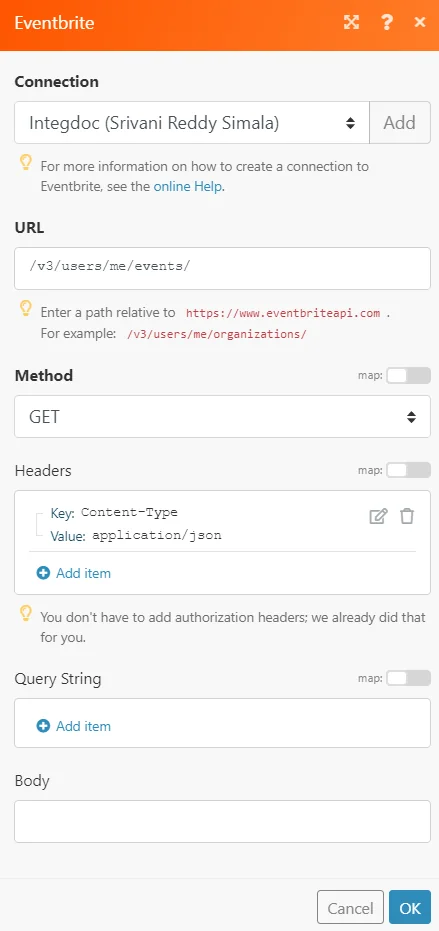
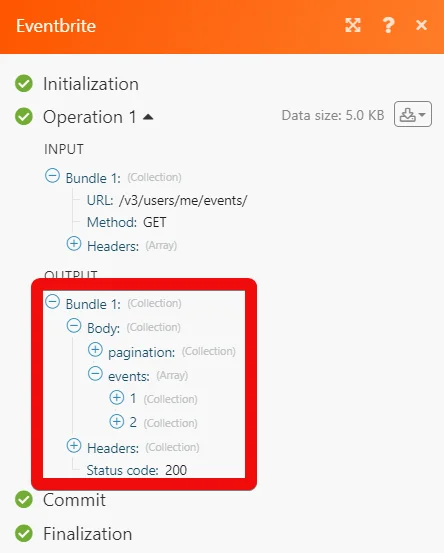
Matches of the search can be found in the module’s Output under Bundle > Body > events.
In our example, 2 events were returned:
Connecting to an Eventbrite Webhook using Boost.space Integrator
-
Open the Watch Order module and enter the details as mentioned in Watch Orders, click OK, and then click Watch address. Copy the link to your clipboard.
-
Login to your Eventbrite account.
-
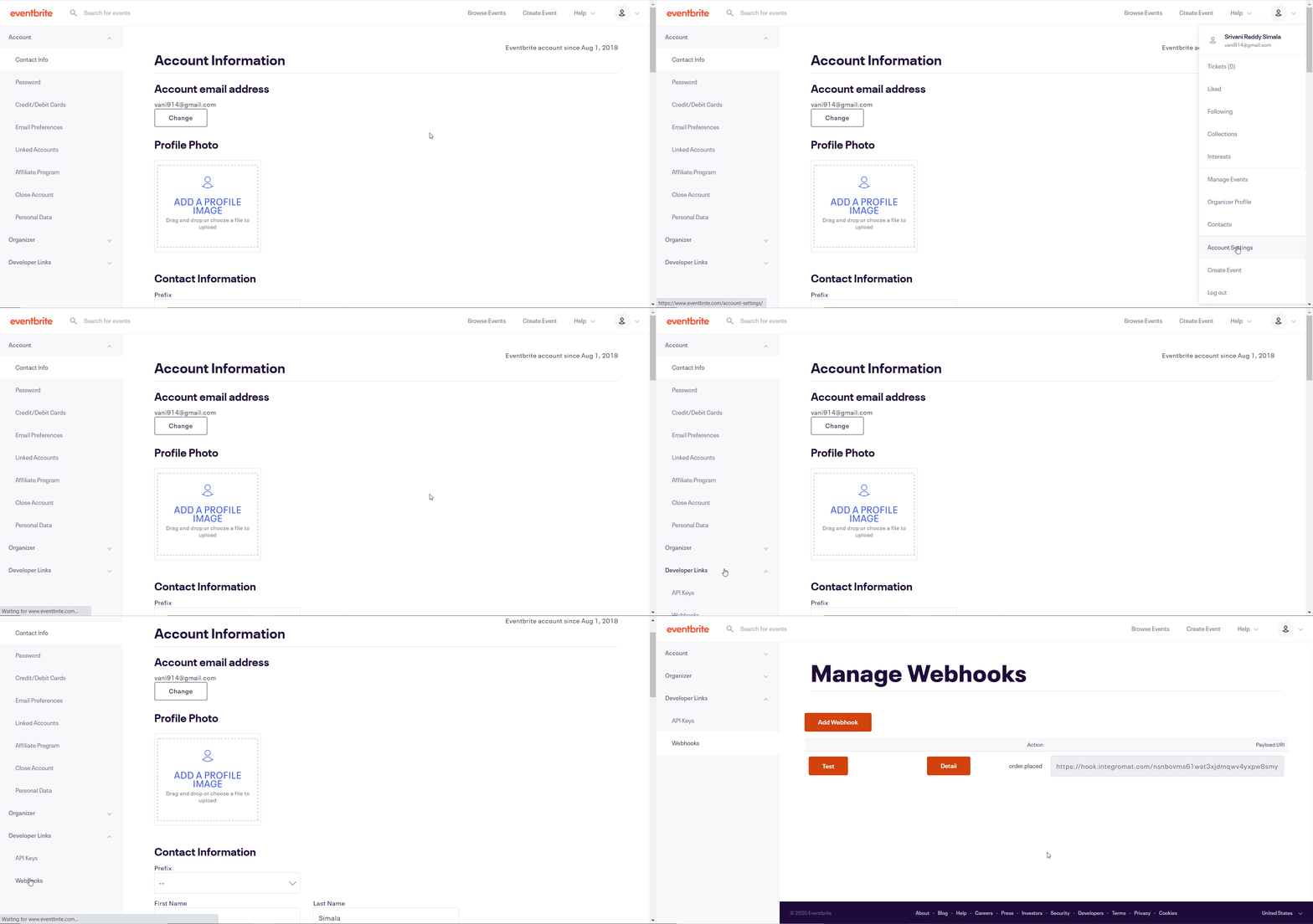
Click your Profile Icon> Account Settings > _Developer Link_s > Webhooks.
-
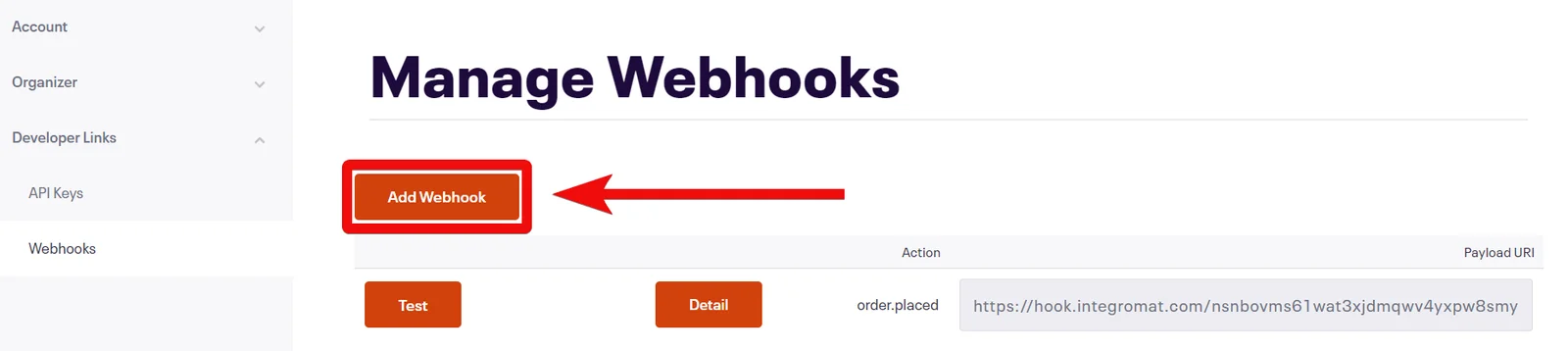
Click Add Webhook.
-
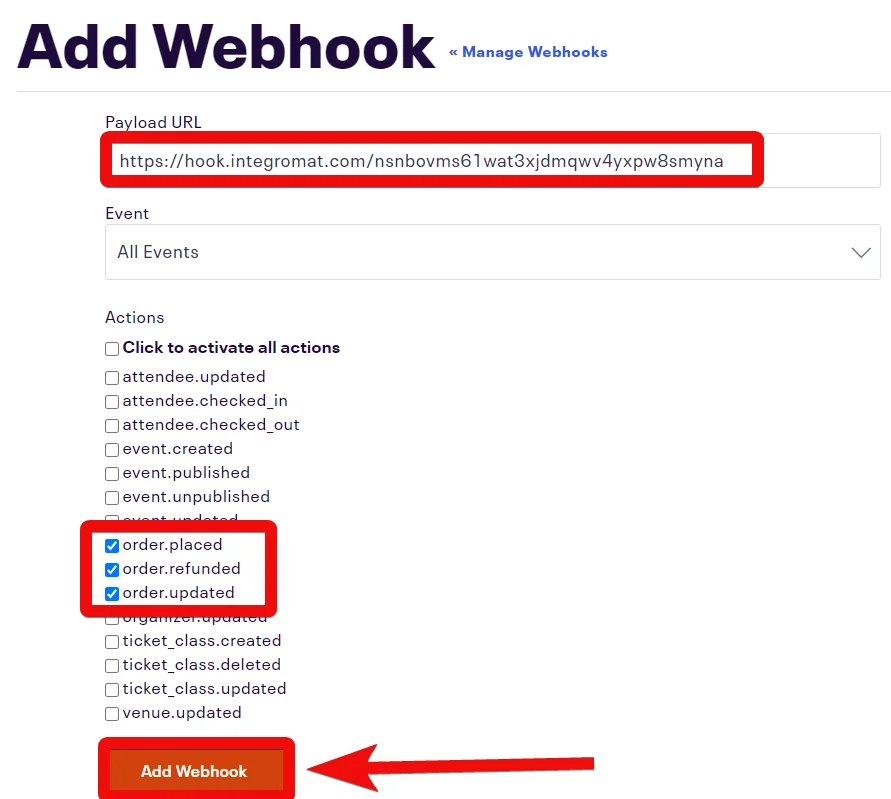
In the Playload URL field, enter the URL address copied in step 1, select the event and options you want to watch. Click Add Webhook.
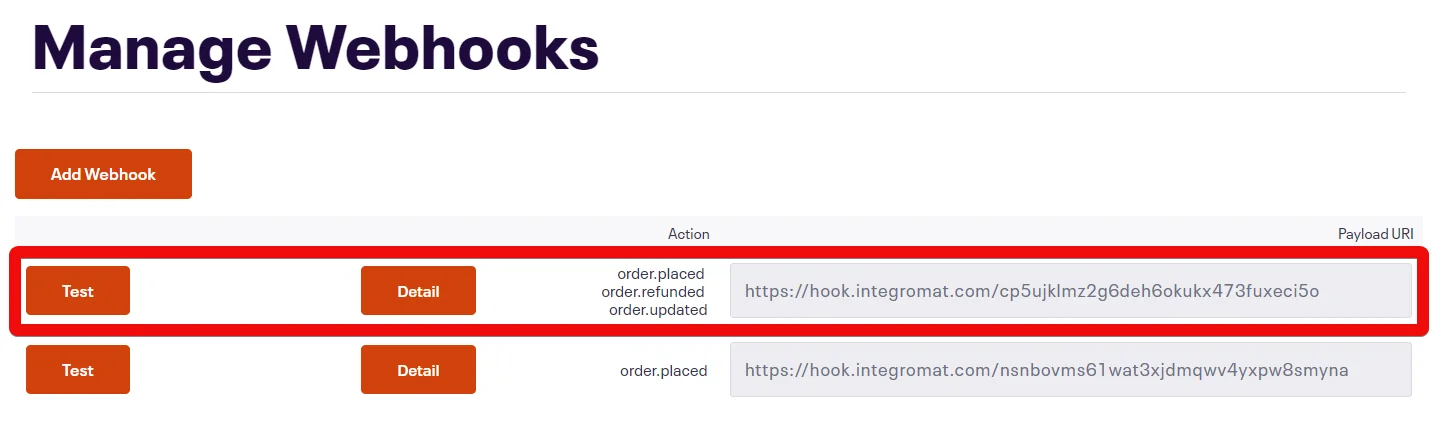
You have successfully added the webhook.
Legacy article, imported from the original Boost.space knowledge base (/knowledge-base/applications/marketing/eventbrite/).

