Instapage
The Instapage modules allow you to monitor the form submissions in your Instapage account.
Getting Started with Instapage
Prerequisites
- An Instapage account – create an account at instapage.com/.
The module dialog fields that are displayed in bold (in the Boost.space Integrator scenario, not in this documentation article) are mandatory!
Setting Up Instapage Webhooks
-

Open the Watch Form Submissions module, enter a name for the webhook, click Save, and copy the URL address to your clipboard. Click OK and save the trigger.
-
Log in to your Instapage account.
-
Click Settings > Integrations > Webhooks.
-
In the URL field, enter the URL address copied in step 1, and click CONNECT.
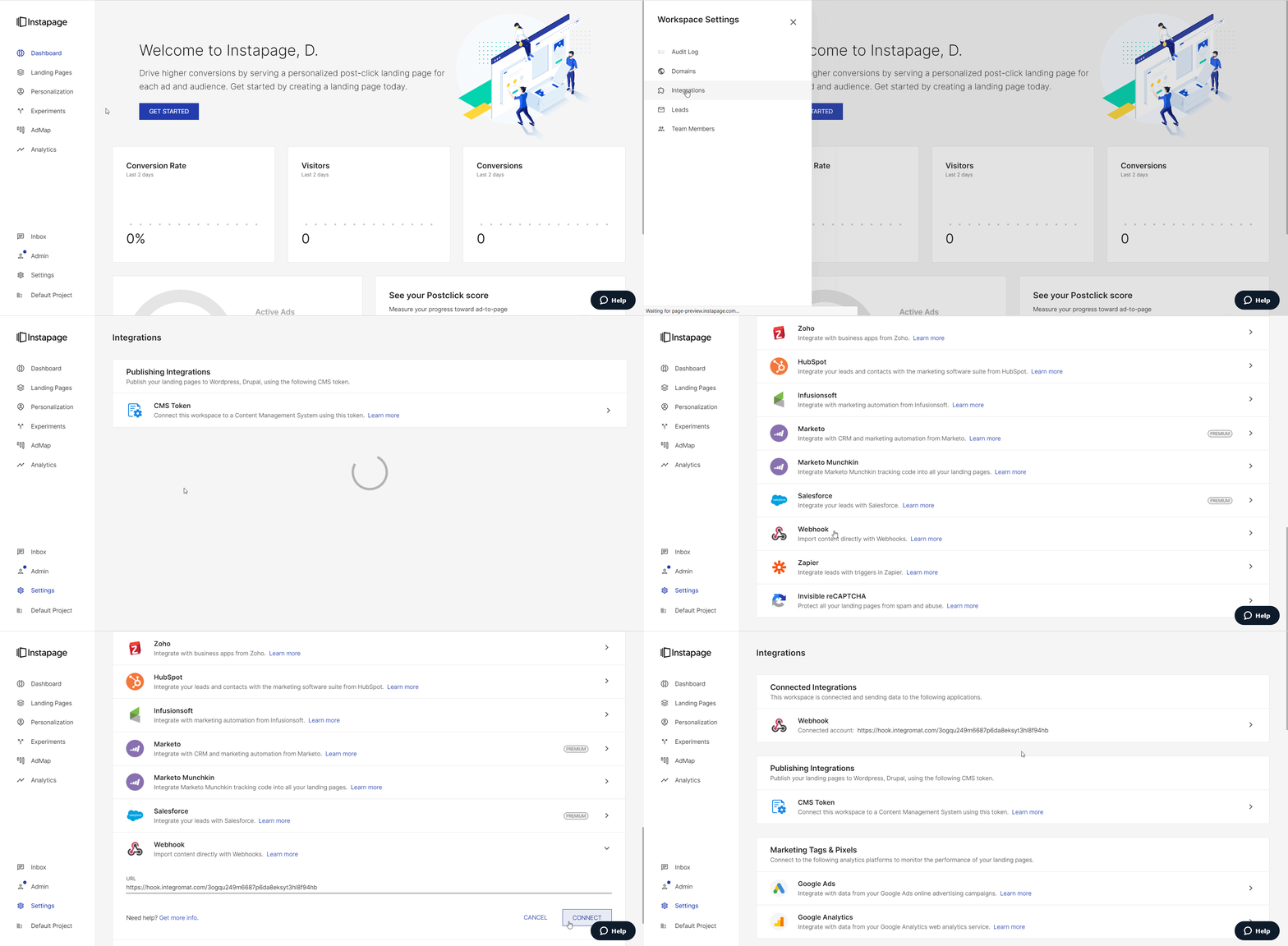
You have successfully added the webhook.
Triggers
Watch Form Submissions
Triggers when a new form response is submitted.
Webhook Name
Enter a name for the webhook.
See the Setting Up Instapage Webhooks for adding webhooks to your Instapage account.
For more information, please see the Connecting the Webhooks.
Legacy article, imported from the original Boost.space knowledge base (/knowledge-base/applications/marketing/instapage/).

