Sendy
The Sendy modules allow you to create, get, add, delete, subscribe and/or unsubscribe users, and campaigns in your Sendy account.
Prerequisites
- A Sendy account
In order to use Sendy with Boost.space Integrator, it is necessary to have a Sendy account. If you do not have one, you can create a Sendy account at https://sendy.co/.
The module dialog fields that are displayed in bold (in the Boost.space Integrator scenario, not in this documentation article) are mandatory!
Connecting Sendy to Boost.space Integrator
To connect your Sendy account to Boost.space Integrator you need to obtain your Host URL and API Key.
-
Log into your Sendy account.
-

From the right top corner, click your account name and then click Settings.
-
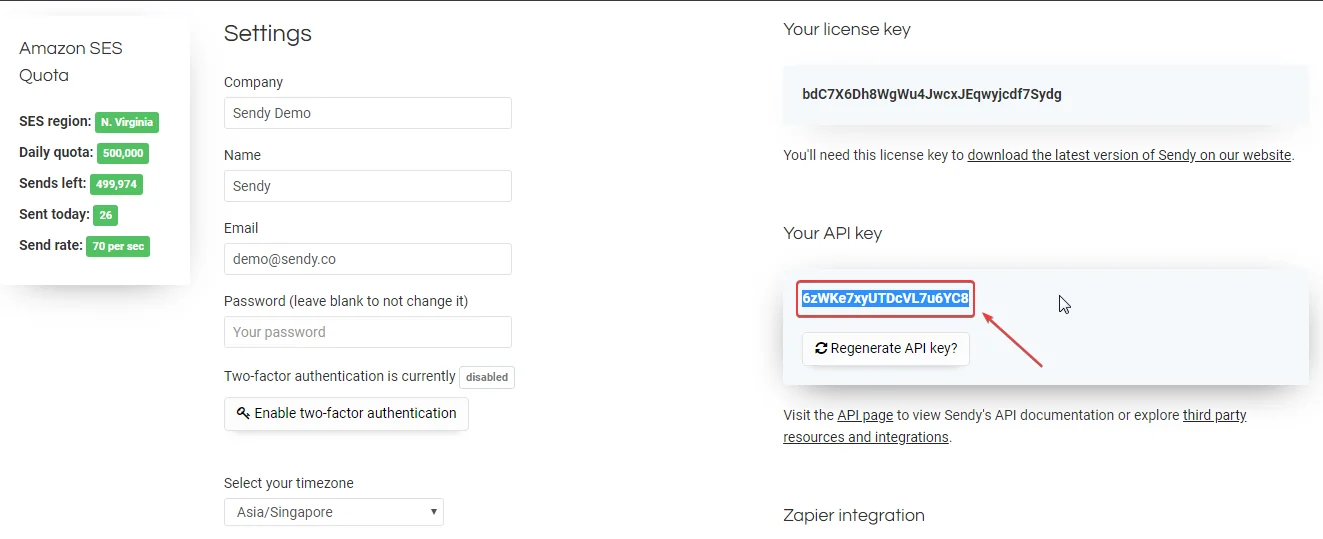
Copy the API Key available in the Your API Key.
-

Go to Boost.space Integrator and open the Sendy module’s Create a connection dialog.
-
In the Connection name field, enter a name for your connection.
-
In the Host URL field, enter the website URL you use to access Sendy. For example, https://sendy.co/demo/.
-
In the API Key field, enter the API Key copied in Step 3 and click Continue.
The connection has been established.
Actions
Add Subscriber
Adds a new subscriber to a list.
Connection
Establish a connection to your Sendy account.
List
Enter the List ID where you want to add the new subscriber.
Name
Enter the name of the subscriber.
Email Address
Enter the email address of the subscriber.
Create Campaign
Creates a campaign (with an option to send it too).
Connection
Establish a connection to your Sendy account.
From name
Enter the name from whom you want to send the campaign.
From email
Enter the email address from which you want to send the campaign.
Reply to
Title
Enter the name of the campaign.
Subject
Enter the details of the campaign.
Plain text
Enter the plain text version of the campaign.
HTML text
Enter the HTML version of the campaign.
List IDs
Enter the List IDs separated by commas of who you want to send the campaign.
Brand ID
Enter the Brand ID if you are creating a draft campaign.
Query string
Enter the request query string.
Send campaign
Select whether you want to send the campaign:
-
Yes
-
No
Delete Subscriber
Deletes a subscriber off a list (only supported in Sendy version 2.1.1.4 and above).
Connection
Establish a connection to your Sendy account.
List
Enter the List ID whose subscriber you want to delete.
Email Address
Enter the email address of the subscriber you want to delete.
Get Active Subscriber Count
Gets the total active subscriber count of a list.
Connection
Establish a connection to your Sendy account.
List ID
Enter the List ID whose active subscriber count you want to retrieve.
Get Subscriber Status
Gets the current status of a subscriber.
Connection
Establish a connection to your Sendy account.
List
Enter the List ID whose subscriber status you want to retrieve.
Email Address
Enter the email address of the subscriber whose status you want to retrieve.
Unsubscribe User
Unsubscribes a user from a list.
Connection
Establish a connection to your Sendy account.
List
Enter the List ID whose user you want to unsubscribe.
Email Address
Enter the email address of the user you want to unsubscribe.
Legacy article, imported from the original Boost.space knowledge base (/knowledge-base/applications/marketing/sendy/).

