Etsy
With the Etsy modules in Boost.space Integrator, you can:
-
create, update, list, retrieve, and delete listings, active listings, and upload listing images
-
list and retrieve account ledger entries
-
watch, update, list, and retrieve receipts, and submit tracking info
-
retrieve products and offerings
-
list and delete user addresses
-
update and retrieve inventories
-
list payments
-
call APIs
To get started with Etsy, create an account at etsy.com.
Connect Etsy to Make
To connect to Etsy:
-
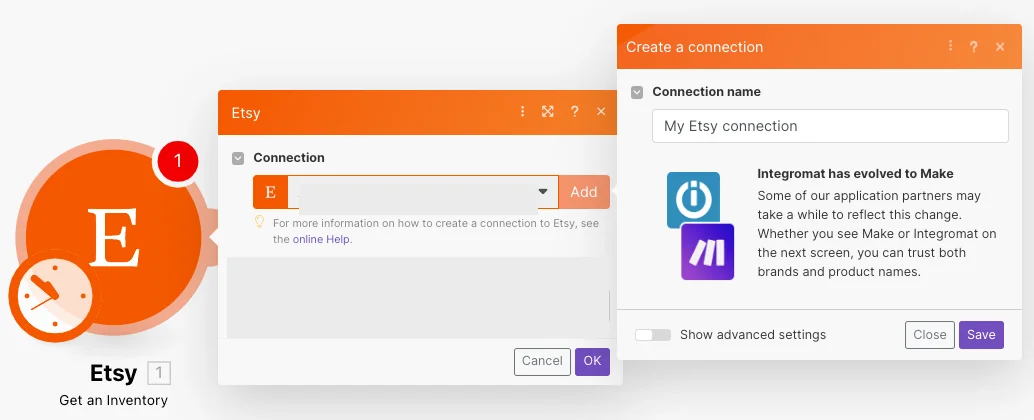
Log in to your Boost.space Integrator account, add any Etsy module scenario, and click the Add button next to the Connection field.
-
Optional: In the Connection name field, enter a name for your connection.
-
Optional: Click Show Advanced Settings and enter the client credentials from your custom app.
-
Click Save.
-
Confirm the access by clicking Grant Access.
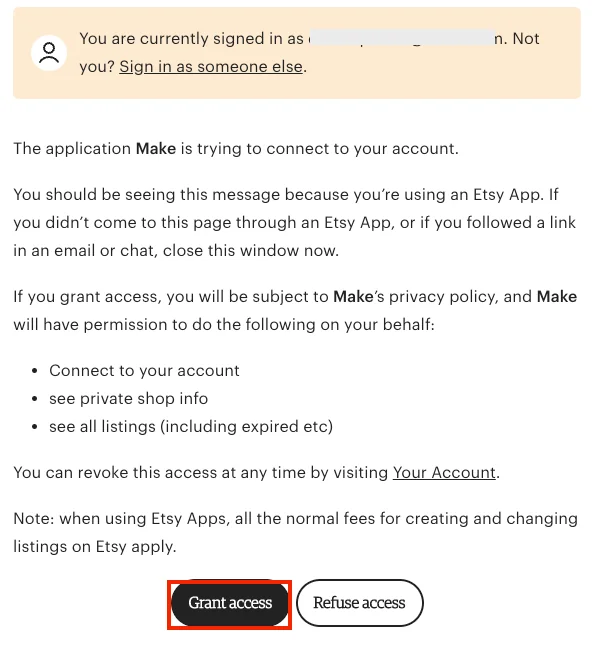
You have successfully established the connection. You can now edit Boost.space Integrator and add more Etsy modules. If your connection needs reauthorization at any point, follow the connection renewal steps here.
Listings
You can create, update, list, retrieve, and delete listings and upload listing images using the following modules.
Create a Listing
Creates a new listing.
Connection
Establish a connection to your Etsy account.
Title
Enter a name for the listing you want to create.
For the field descriptions, refer to Etsy Listing API documentation.
Update a Listing
Updates the selected listing.
Connection
Establish a connection to your Etsy account.
Listing state to filter Listings
Select or map the status of the listing to choose the listing whose details you want to update.
Listing ID
Select or map the Listing ID whose details you want to update.
For the field descriptions, refer to Etsy API Listing documentation.
Upload a Listing Image
Uploads a new image for a listing.
Connection
Establish a connection to your Etsy account.
Listing State
Select or map the status of the listing to which you want to upload an image.
Listing ID
Select or map the Listing ID to which you want to upload an image.
For the field descriptions, refer to Etsy Listing Image API documentation.
List Shop Listings
List shop listings.
Connection
Establish a connection to your Etsy account.
Listing State
Select or map the status of the listing you want to list.
Keywords
Enter the term you want to search the listings for.
Sort On
Select or map an option to sort the search results. For example, price.
When using the Score the results will always be in descending order, regardless of the Sort Order parameter.
Sort Order
Select the sort order. For example, ascending.
Includes
Select or map the options you want to include in the search to filter the listings.
Limit
Set the maximum number of listings Boost.space Integrator will return during one execution cycle.
List All Active Listings
Retrieve a list of all active listings filtered by criteria.
Connection
Establish a connection to your Etsy account.
Keywords
Enter the keywords to list the active listing that matches the specified keywords.
Sort on
Select or map the option to sort the results. For example, price, creation date, or score.
When using Score, the results will always be in descending order, regardless of the Sort Order parameter.
Sort Order
Select or map the sort order. For example, ascending.
sort_order only works when combined with one of the search options such as keywords, region, etc.,
Min Price
Set the minimum price of the listing results.
Max Price
Set the maximum price of the listing results.
Taxonomy
Select or map the category to list the active listing that matches the specified taxonomy. For example, Jewellery.
Shop Location
Enter the shop location information to list the active listing that matches the specified location.
Limit
Set the maximum number of active listings Boost.space Integrator will return during one execution cycle.
Get a Listing
Retrieves the details of a listing.
Connection
Establish a connection to your Etsy account.
Listing ID
Click Search and select the Listing ID whose details you want to retrieve.
Delete Listing
Removes a listing.
Connection
Establish a connection to your Etsy account.
Listing ID
Click Search and select the Listing ID you want to delete.
Ledger Entries
You can list and retrieve ledger entries using the following modules.
Get a Ledger Entry
Retrieves a shop payment account ledger’s entry.
Connection
Establish a connection to your Etsy account.
Ledger Entry ID
Enter the Ledger Entry ID whose details you want to retrieve.
List Account Ledger Entries
Retrieves a list of account ledger entries filtered by criteria.
Connection
Establish a connection to your Etsy account.
Min Created
Enter the date and time to list the ledger entries created on or after the specified time.
See the list of supported date formats.
The date range between Min Created and Max Created must not be more than 31 days.
Max Created
Enter the date and time to list the ledger entries created on or before the specified time.
See the list of supported date formats.
The date range between Min Created and Max Created must not be more than 31 days.
Limit
Set the maximum number of ledger entries Boost.space Integrator will return during one execution cycle.
Receipts
You can watch, update, list, retrieve shop receipts and submit tracking using the following modules.
Watch Shop Receipts
Triggers when a new shop receipt is created.
Connection
Establish a connection to your Etsy account.
Limit
Set the maximum number of shop receipts Boost.space Integrator will return during one execution cycle.
Update a Receipt
Updates a shop receipt.
Connection
Establish a connection to your Etsy account.
Receipt ID
Select or map the Receipt ID you want to update.
Was Shipped
Select whether the receipt is shipped.
Was Paid
Select whether the receipt is paid.
List Shop Receipts
Retrieves a list of shop receipts.
Connection
Establish a connection to your Etsy account.
Min Created
Enter the date and time to list shop receipts that were created on or after the specified date.
See the list of supported date formats.
Max Created
Enter the date and time to list shop receipts that were created on or before the specified date.
See the list of supported date formats.
Min Last Modified
Enter the date and time to list the shop receipts that were last modified on or after the specified date.
See the list of supported date formats.
Max Last Modified
Enter the date and time to list the shop receipts that were last modified on or before the specified date.
Sort On
Select or map the option to sort the results. For example, price.
When using Score, the results will always be in descending order, regardless of the Sort Order parameter.
Sort Order
Select or map the order to sort the receipts. For example, ascending.
Was Paid
Select whether you want to list the shop receipts where the seller has received the payments for the receipt.
Was Shipped
Select whether you want to list the shop receipts where the seller has shipped the product(s) in the receipt.
Was Delivered
Select whether you want to list the shop receipts whose shipments are delivered.
Limit
Set the maximum number of receipts Boost.space Integrator will return during one execution cycle.
Get a Receipt
Retrieves the details of a shop receipt.
Connection
Establish a connection to your Etsy account.
Receipt ID
Select or map the Receipt ID whose details you want to retrieve.
Submit a Tracking
Submits tracking information and sends a shipping notification email to the buyer.
Connection
Establish a connection to your Etsy account.
Receipt ID
Receipt ID you want to track.
Tracking Code
An alphanumeric tracking code provided by the mail carrier.
A tracking code may be submitted for an order that has already been marked as shipped as long as no shipping notification email has been sent.
Carrier Name
The carrier name will be viewable on the shipping notification email sent to the buyer.
Click to view the carrier names and their corresponding values that Etsy will recognize in the carrier name parameter.
Send Bcc
Select whether you want to send the shipping notification to the seller.
Note to Buyer
Add any additional information you want to share with the buyer.
Shop Inventory
You can update and retrieve listing inventories using the following modules.
Update a Listing Inventory
Updates a listing’s inventory.
Connection
Establish a connection to your Etsy account.
Listing State
Select or map the status of the listing whose inventory details you want to update
Listing ID
Select or map the Listing ID whose inventory details you want to update.
Products
A JSON array of products is available in a listing, even if only one product.
All field names in the JSON blobs are lowercase.
Price on Property
Add the unique listing Property ID for the properties that change product prices, if any.
For example, if you charge specific prices for different-sized products in the same listing, this array contains the property ID for size.
Quantity on Property
Add the unique Listing Property IDs for the properties that change the quantity of the products, if any.
For example, if you stock specific quantities of different colored products in the same listing, this array contains the Property ID for color.
SKU on Property
Add the unique Listing Property IDs for the properties that change the product SKU, if any.
For example, if you use specific SKUs for different colored products in the same listing, this array contains the property ID for color.
Get an Inventory
Retrieves the inventory record for a listing.
Connection
Establish a connection to your Etsy account.
Listing ID
Click Search to select the Listing ID whose inventory details you want to retrieve.
Show Deleted
Select whether you want to include the deleted inventories.
User Addresses
You can list and delete user addresses using the following modules.
List User Addresses
Lists user addresses.
Connection
Establish a connection to your Etsy account.
Limit
Set the maximum number of user addresses Boost.space Integrator will return during one execution cycle.
Delete a User Address
Deletes the selected user address.
Connection
Establish a connection to your Etsy account.
User Address ID
Select or map the User Address ID you want to delete.
Product
You can retrieve products using the following module.
Get a Product
Retrieves the details of a product.
Connection
Establish a connection to your Etsy account.
Listing State
Select or map the status of the listing whose product details you want to retrieve.
Listing ID
Select or map the Listing ID that contains the product whose details you want to retrieve.
Product ID
Select or map the Product ID of the product you want to retrieve information about.
Product Offerings
You can retrieve product offerings using the following module.
Get an Offering
Retrieves an offering for a listing.
To understand the difference between listing, product, and offering, see the page, Working with Inventory.
Connection
Establish a connection to your Etsy account.
Listing State
Select or map the listing state whose listing’s product offering details you want to retrieve.
Listing ID
Select or map the Listing ID whose product offering details you want to retrieve.
Product ID
Enter the Product ID whose product offering details you want to retrieve information about.
Product Offering ID
Enter the Product Offering ID whose details you want to retrieve.
Transactions
You can watch transactions using the following module.
Watch Transactions
Triggers when a transaction is made.
Connection
Establish a connection to your Etsy account.
Limit
Set the maximum number of transactions Boost.space Integrator will return during one execution cycle.
Payments
You can list payments using the following module.
List Payments
Lists all payments.
Connection
Establish a connection to your Etsy account.
Payment IDs
Add the comma-separated array of Payment IDs.
Limit
Set the maximum number of payments Boost.space Integrator will return during one execution cycle.
Other
You can call APIs using the following module.
Make an API Call
Performs an arbitrary authorized API call.
Connection
Establish a connection to your Etsy account.
URL
Enter a path relative to https://openapi.etsy.com/v3/application/. For example, users/me.
For the list of available endpoints, refer to the Etsy API Documentation.
Method
Select the HTTP method you want to use:
GET
to retrieve information for an entry.
POST
to create a new entry.
PUT
to update/replace an existing entry.
PATCH
to make a partial entry update.
DELETE
to delete an entry.
Headers
Enter the desired request headers. You don’t have to add authorization headers; we already did that for you.
Query String
Enter the request query string.
Body
Enter the body content for your API call.
Example of Use – List All Active Listings
The following API call returns all the active listings:
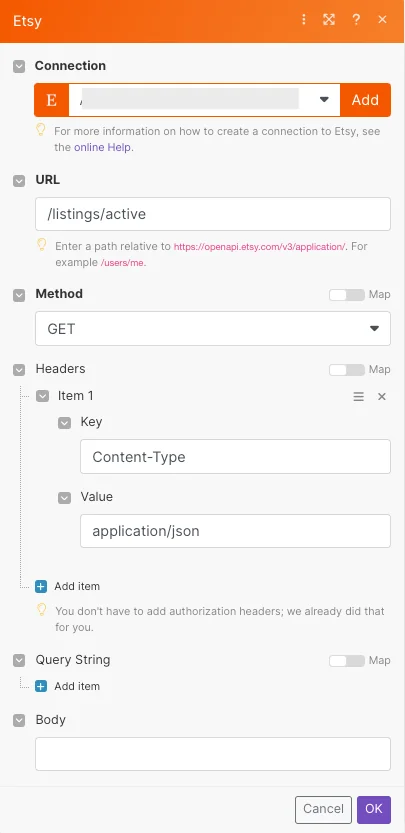
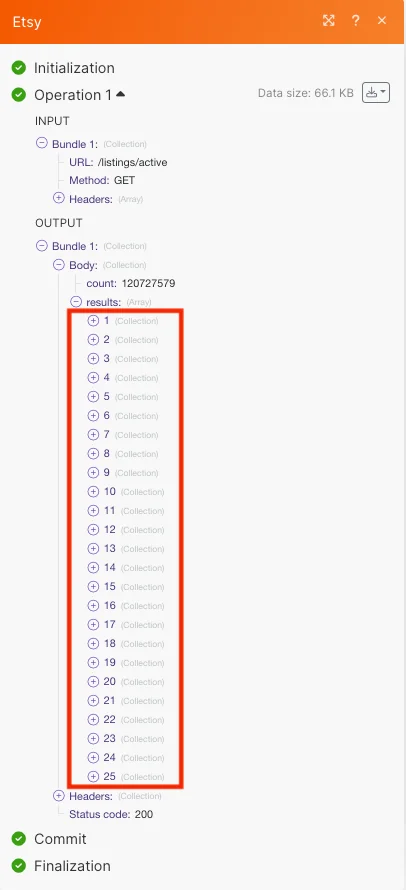
Matches of the search can be found in the module’s Output under Bundle > Body > results.
In our example, 25 listings were returned:
Legacy article, imported from the original Boost.space knowledge base (/knowledge-base/applications/commerce/etsy/).

