PrestaShop
This is the latest version of the Prestashop app. See the documentation to replace your existing modules.
Prestashop version 1.7.7.x or above will crash if you use PHP 7.2. This will result in errors in our application. Roll back to PHP 7.1 or 7.0 until the problem is resolved by the Prestashop team.
With Prestashop modules you can manage the customers, orders, products, manufacturers, addresses, carts, images, and languages in your Prestashop account.
To use the PrestaShop modules, you must have a PrestaShop account. You can create an account at prestashop.com.
Refer to the PrestaShop Webservice API for a list of available endpoints.
Connect PrestaShop to Boost.space Integrator
To establish the connection, you must:
-
Obtain your Webservice key in PrestaShop.
-
Establish the connection in Boost.space Integrator.
Obtain your Webservice key in PrestaShop
To obtain your Webservice key from your PrestaShop account:
-
Log in to your Prestashop account.
-
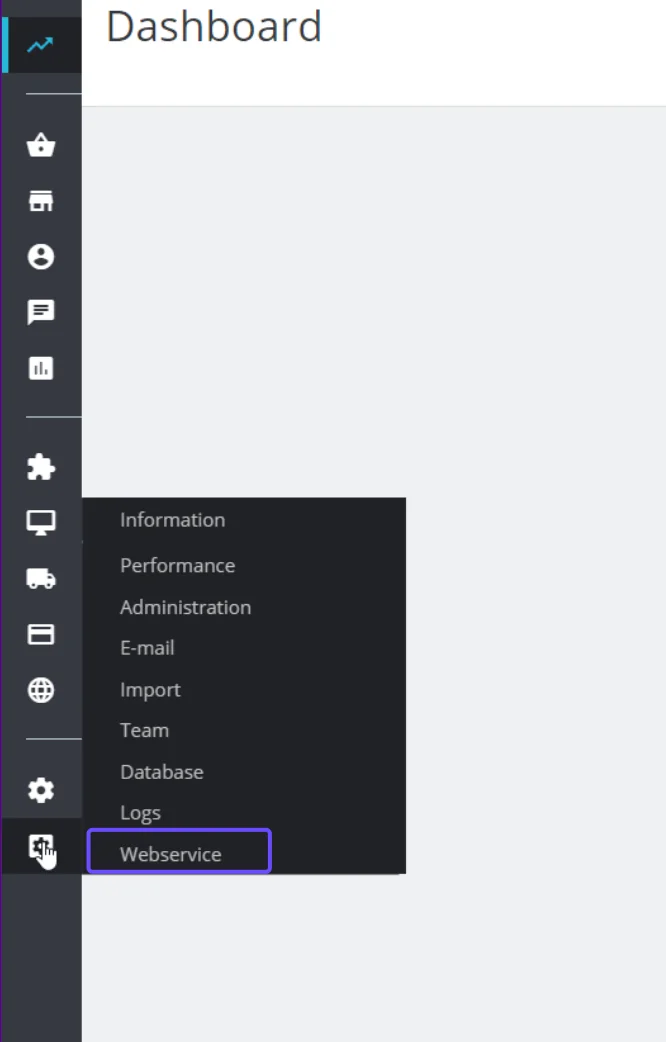
From the left menu, click on clog symbol > Webservices.
-
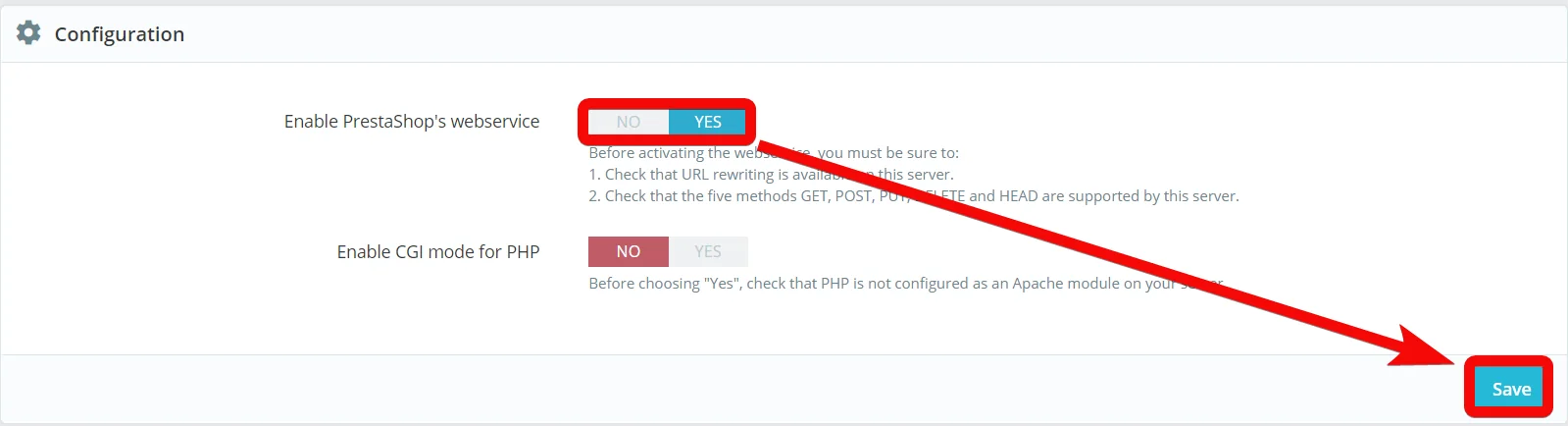
In the Configuration section, ensure that Webservice is enabled for your account.
-
Click Add new webservice key. Click Generate to create a new key, enter the following details, and assign permissions. Click Save.
Key
Click Generate to create the key.
Key Description
Enter the details of the key.
Status
Select the status of the key. To make it active, click YES.
Permissions
Select the permissions for the key.
-
Copy the Webservice Key and store it in a safe place.

You will use this value in the Webservice Key field in Boost.space Integrator.
Establish the connection with PrestaShop in Boost.space Integrator
To establish the connection in Boost.space Integrator:
-
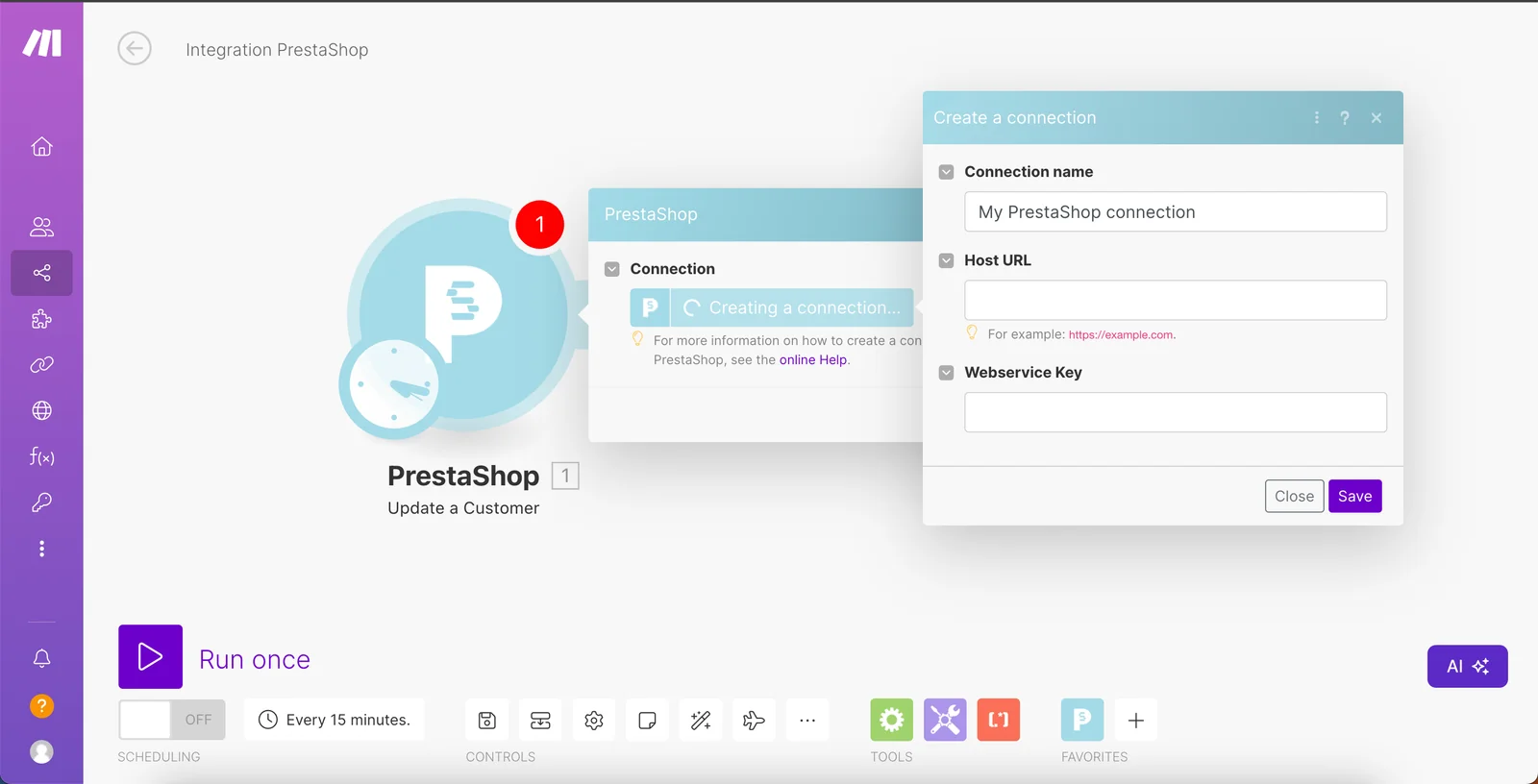
Log in to your Boost.space Integrator account, add a PrestaShop module to your scenario, and click Create a connection.
-
Optional: In the Connection name field, enter a name for the connection.
-
In the Host URL field, enter your Prestashop account’s host URL address. For example:
https://example.com. -
In the Webservice Key field, enter the Webservice key copied above.
-
Click Save.
-
If prompted, authenticate your account and confirm access.
You have successfully established the connection. You can now edit your scenario and add more PrestaShop modules. If your connection requires reauthorization at any point, follow the connection renewal steps here.
Customers
Watch Customers
Triggers when a customer is created or updated.
Connection
Establish a connection to your Prestashop account.Connecting the PrestaShop service to Boost.space Integrator
Watch for
Select or map the option to watch the customers:
-
New Customers
-
All Changes
Limit
Set the maximum number of customers Boost.space Integrator should return during one execution cycle.
List Customers
Retrieves a list of customers and filters by criteria.
Connection
Establish a connection to your Prestashop account.Connecting the PrestaShop service to Boost.space Integrator
Search Criteria
Select or map the search criteria and their value to filter the customers that match the specified criteria.
Sort By
Add the options to sort the customers:
Field
Select or map the field by which you want to sort the customers. For example, Firstname.
Order
Select or map the order in which you want to sort the customers. For example, Ascending.
Fields to be displayed
Select or map the fields whose details you want to list in the output.
Limit
Set the maximum number of customers Boost.space Integrator should return during one execution cycle.
List Customer Groups
Retrieves a list of customer groups and filters by criteria.
Connection
Establish a connection to your Prestashop account.Connecting the PrestaShop service to Boost.space Integrator
Search Criteria
Select or map the search criteria and their value to filter the customer groups that match the specified criteria.
Sort By
Add the options to sort the customer groups:
Field
Select or map the field by which you want to sort the customers. For example, name.
Order
Select or map the order in which you want to sort the customer groups. For example, Ascending.
Fields to be displayed
Select or map the fields whose details you want to list in the output.
Limit
Set the maximum number of customer groups Boost.space Integrator should return during one execution cycle.
Create a Customer
Creates a new customer.
Connection
Establish a connection to your Prestashop account.Connecting the PrestaShop service to Boost.space Integrator
First Name
Enter (map) the first name of the customer.
Last Name
Enter (map) the last name of the customer.
Enter (map) the email address of the customer.
Password
Enter (map) a password for the customer account. Enter a valid password between 5 and 72 characters long. It must match pattern, /^[.a-zA-Z_0-9-!@#$%\^&*()]{5,72}$/.
Group IDs
Select or map the Group IDs to which you want to add the customer.
Default Group ID
Select or map the default Group ID for the customer. For example, visitor.
Social Title
Select or map the customer title. For example, Mr. or Mrs.
Birthday
Enter (map) the customer’s date of birth. See the list of supported date and time formats.
Company
Enter (map) the customer’s company name.
Website
Enter (map) the customer’s website URL address.
Active
Select the checkbox if the customer status is active.
Newsletter
Select the checkbox if the customer has opted for newsletters.
Opt In
Select the checkbox whether the customer opted in for marketing communication.
Is Guest
Select whether the customer is a guest.
Language ID
Select or map the applicable Language ID for the customer. For example, English.
SIRET
Enter (map) the SIRET number of the customer location.
APE
Enter (map) the customer’s business APE number.
Outstanding Allow Amount
Enter (map) the outstanding amount allowed for the user in the store with your store specified currency.
Show Public Prices
Select whether you want to show the public prices of the store.
Max Payment Days
Enter (map) the maximum payments days allowed.
Note
Enter (map) any additional information applicable to the customer.
Shop ID
Select or map the customer’s Shop ID.
Shop Group ID
Select or map the customer’s Shop Group ID.
Get a Customer
Retrieves the details of a customer by its ID.
Connection
Establish a connection to your Prestashop account.Connecting the PrestaShop service to Boost.space Integrator
Customer ID
Enter (map) the Customer ID whose details you want to retreive.
Update a Customer
Updates an existing customer by its ID.
Connection
Establish a connection to your Prestashop account.Connecting the PrestaShop service to Boost.space Integrator
Customer ID
Enter (map) the Customer ID whose details you want to update.
First Name
Enter (map) the first name of the customer.
Last Name
Enter (map) the last name of the customer.
Enter (map) the email address of the customer.
Password
Enter (map) a password for the customer account. Enter a valid password between 5 and 72 characters long. It must match pattern /^[.a-zA-Z_0-9-!@#$%\^&*()]{5,72}$/.
Group IDs
Select or map the Group IDs to which you want to add the customer.
Default Group ID
Select or map the default Group ID for the customer. For example, visitor.
Social Title
Select or map the customer title. For example, Mr. or Mrs.
Birthday
Enter (map) the customer’s date of birth. See the list of supported date and time formats.
Company
Enter (map) the customer’s company name.
Website
Enter (map) the customer’s website URL address.
Active
Select the checkbox if the customer status is active.
Newsletter
Select the checkbox if the customer has opted for newsletters.
Opt In
Select the checkbox whether the customer opted in for marketing communication.
Is Guest
Select whether the customer is a guest.
Language ID
Select or map the applicable Language ID for the customer. For example, English.
SIRET
Enter (map) the SIRET number of the customer location.
APE
Enter (map) the customer’s business APE number.
Outstanding Allow Amount
Enter (map) the outstanding amount allowed for the user in the store with your store specified currency.
Show Public Prices
Select whether you want to show the public prices of the store.
Max Payment Days
Enter (map) the maximum payments days allowed.
Note
Enter (map) any additional information applicable to the customer.
Shop ID
Select or map the customer’s Shop ID.
Shop Group ID
Select or map the customer’s Shop Group ID.
Orders
Watch Orders
Triggers when an order is created or updated.
Connection
Establish a connection to your Prestashop account.Connecting the PrestaShop service to Boost.space Integrator
Watch for
Select or map the option to watch the orders:
-
New Orders
-
All Changes
Order State
Select or map the status of the order you want to watch. For example, Shipped.
Limit
Set the maximum number of orders Boost.space Integrator should return during one execution cycle.
List Orders
Retrieves a list of rows of an order by the order ID.
Connection
Establish a connection to your Prestashop account.Connecting the PrestaShop service to Boost.space Integrator
Search Criteria
Select or map the search criteria and their value to filter the orders that match the specified criteria.
Sort By
Add the options to sort the orders:
Field
Select or map the field by which you want to sort the orders. For example, Shop ID.
Order
Select or map the order in which you want to sort the orders. For example, Ascending.
Fields to be displayed
Select or map the fields whose details you want to list in the output. For example, Customer ID.
Limit
Set the maximum number of orders Boost.space Integrator should return during one execution cycle.
List Order Rows
Retrieves the details of an order by its ID.
Connection
Establish a connection to your Prestashop account.Connecting the PrestaShop service to Boost.space Integrator
Order ID
Enter (map) the Order ID whose row details you want to list.
Create an Order
Creates a new order.
Connection
Establish a connection to your Prestashop account.Connecting the PrestaShop service to Boost.space Integrator
Address Delivery ID
Enter (map) the Address Delivery ID of the order.
Address Invoice ID
Enter (map) the Address Invoice ID of the order.
Cart ID
Enter (map) the Cart ID of the order.
Currency ID
Enter (map) the Currency ID applicable for the order.
Language ID
Select or map the Language ID applicable for the order.
Customer ID
Enter (map) the Customer ID applicable for the order.
Carrier ID
Enter (map) the Carrier ID in which the order will be sent.
Module
Enter (map) the module to which the order belongs. For example, Administration.
Payment
Enter (map) the payment amount applicable for the order.
Total Paid
Enter (map) the total amount paid for the order.
Total Paid Real
Enter (map) the total amount paid real.
Total Products
Enter (map) the total number of products in the order.
Total Product Wt.
Enter (map) the weight of the total products
Conversion Rate
Enter (map) the currency conversion rate applicable on the order.
Current State
Select or map the order status. For example, shipped.
Invoice Number
Enter (map) the order invoice number.
Invoice Date
Enter (map) the order invoice date. See the list of supported date and time formats.
Delivery Number
Enter (map) the order delivery number.
Delivery Date
Enter (map) the expected delivery date of the order. See the list of supported date and time formats.
Valid
Enter (map) the date until which the order is valid. See the list of supported date and time formats.
Date Add
Enter (map) the date on which the order is added. See the list of supported date and time formats.
Date Update
Enter (map) the date on which the order is updated. See the list of supported date and time formats.
Shipping Number
Enter (map) the order shipping number. Enter a valid tracking number and it must match the pattern, /^[~:#,%&_=\(\)\[\]\.\? \+\-@\/a-zA-Z0-9]+$/.
Shop Group ID
Select or map the Shop Group ID of the order.
Shop ID
Select or map Shop ID applicable to the order.
Secure Key
Enter (map) the order secure key. Enter a valid MD5 string: 32 characters, mixing lowercase, uppercase, and numerals. The pattern must match with the /^[a-f0-9A-F]{32}$/.
Recyclable
Select whether the items in the order are recyclable.
Gift
Select whether the order is a gift.
Gift Message
Enter (map) the gift message.
Mobile Theme
Select whether the order has a mobile theme.
Total Discounts
Enter (map) the total discount applied to the order.
Total Discounts Tax Inclusive
Enter (map) the total discount inclusive of the tax.
Total Discounts Tax Exclusive
Enter (map) the total discount excluding the tax amount.
Total Paid Tax Inclusive
Enter (map) the total amount paid for the order including the tax.
Total Paid Tax Exclusive
Enter (map) the total amount paid for the order excluding the tax.
Total Shipping
Enter (map) the total shipping charges for the order.
Total Shipping Tax Inclusive
Enter (map) the total shipping charges including the tax.
Total Shipping Tax Exclusive
Enter (map) the total shipping charges excluding the tax.
Carrier Tax Rate
Enter (map) the order carrier tax price.
Total Wrapping
Enter (map) the total wrapping charges for the order.
Total Wrapping Tax Inclusive
Enter (map) the total wrapping charges for the order including tax.
Total Wrapping Tax Exclusive
Enter (map) the total wrapping charges for the order excluding tax.
Round Mode
Enter (map) the round mode details of the order.
Round Type
Enter (map) the round type.
Reference
Enter (map) the order reference number.
Orde Row
Add the rows:
Product ID
Enter (map) the Product ID of the item in the order.
Product Attribute ID
Enter (map) the Product Attribute ID of the item.
Product Quantity
Enter (map) the number of items.
ID
Enter (map) the Item ID.
Customization ID
Enter (map) the item customization ID.
Get an Order
Retrieves the details of an order by its ID.
Connection
Establish a connection to your Prestashop account.Connecting the PrestaShop service to Boost.space Integrator
Order ID
Enter (map) the Order ID whose details you want to retreive.
Update an Order
Updates an existing order by its ID.
Connection
Establish a connection to your Prestashop account.Connecting the PrestaShop service to Boost.space Integrator
Order ID
Enter (map) the Order ID whose details you want to update.
Address Delivery ID
Enter (map) the Address Delivery ID of the order.
Address Invoice ID
Enter (map) the Address Invoice ID of the order.
Cart ID
Enter (map) the Cart ID of the order.
Currency ID
Enter (map) the Currency ID applicable for the order.
Language ID
Select or map the Language ID applicable for the order.
Customer ID
Enter (map) the Customer ID applicable for the order.
Carrier ID
Enter (map) the Carrier ID in which the order will be sent.
Module
Enter (map) the module to which the order belongs. For example, Administration.
Payment
Enter (map) the payment amount applicable for the order.
Total Paid
Enter (map) the total amount paid for the order.
Total Paid Real
Enter (map) the total amount paid real.
Total Products
Enter (map) the total number of products in the order.
Total Product Wt.
Enter (map) the weight of the total products
Conversion Rate
Enter (map) the currency conversion rate applicable on the order.
Current State
Select or map the order status. For example, shipped.
Invoice Number
Enter (map) the order invoice number.
Invoice Date
Enter (map) the order invoice date. See the list of supported date and time formats.
Delivery Number
Enter (map) the order delivery number.
Delivery Date
Enter (map) the expected delivery date of the order. See the list of supported date and time formats.
Valid
Enter (map) the date until which the order is valid. See the list of supported date and time formats.
Date Add
Enter (map) the date on which the order is added. See the list of supported date and time formats.
Date Update
Enter (map) the date on which the order is updated. See the list of supported date and time formats.
Shipping Number
Enter (map) the order shipping number. Enter a valid tracking number and it must match the pattern, /^[~:#,%&_=\(\)\[\]\.\? \+\-@\/a-zA-Z0-9]+$/.
Shop Group ID
Select or map the Shop Group ID of the order.
Shop ID
Select or map Shop ID applicable to the order.
Secure Key
Enter (map) the order secure key. Enter a valid MD5 string: 32 characters, mixing lowercase, uppercase, and numerals. The pattern must match with the /^[a-f0-9A-F]{32}$/.
Recyclable
Select whether the items in the order are recyclable.
Gift
Select whether the order is a gift.
Gift Message
Enter (map) the gift message.
Mobile Theme
Select whether the order has a mobile theme.
Total Discounts
Enter (map) the total discount applied to the order.
Total Discounts Tax Inclusive
Enter (map) the total discount inclusive of the tax.
Total Discounts Tax Exclusive
Enter (map) the total discount excluding the tax amount.
Total Paid Tax Inclusive
Enter (map) the total amount paid for the order including the tax.
Total Paid Tax Exclusive
Enter (map) the total amount paid for the older excluding the tax.
Total Shipping
Enter (map) the total shipping charges for the order.
Total Shipping Tax Inclusive
Enter (map) the total shipping charges including the tax.
Total Shipping Tax Exclusive
Enter (map) the total shipping charges excluding the tax.
Carrier Tax Rate
Enter (map) the order carrier tax price.
Total Wrapping
Enter (map) the total wrapping charges for the order.
Total Wrapping Tax Inclusive
Enter (map) the total wrapping charges for the order including tax.
Total Wrapping Tax Exclusive
Enter (map) the total wrapping charges for the order excluding tax.
Round Mode
Enter (map) the round mode details of the order.
Round Type
Enter (map) the round type.
Reference
Enter (map) the order reference number.
Orde Row
Add the rows:
Product ID
Enter (map) the Product ID of the item in the order.
Product Attribute ID
Enter (map) the Product Attribute ID of the item.
Product Quantity
Enter (map) the number of items.
ID
Enter (map) the Item ID.
Customization ID
Enter (map) the item Customization ID.
Products
Watch Products
Triggers when a product is created or updated.
Connection
Establish a connection to your Prestashop account.Connecting the PrestaShop service to Boost.space Integrator
Watch for
Select or map the option to watch the orders:
-
New Products
-
All Changes
Limit
Set the maximum number of products Boost.space Integrator should return during one execution cycle.
List Products
Retrieves a list of products and filters by criteria.
Connection
Establish a connection to your Prestashop account.Connecting the PrestaShop service to Boost.space Integrator
Search Criteria
Select or map the search criteria and their value to filter the products that match the specified criteria.
Sort By
Add the options to sort the products:
Field
Select or map the field by which you want to sort the products. For example, Quantity.
Order
Select or map the order in which you want to sort the products. For example, Ascending.
Fields to be displayed
Select or map the fields whose details you want to list in the output. For example, Default Image ID.
Limit
Set the maximum number of products Boost.space Integrator should return during one execution cycle.
Create a Product
Creates a new product.
Connection
Establish a connection to your Prestashop account.Connecting the PrestaShop service to Boost.space Integrator
Price
Enter (map) the product’s price.
Name
Add the product name:
Language ID
Select or map the Language ID in which you want to mention the product name.
Name in this Language
Enter (map) the product name.
Link Rewrite
Add the product URL link:
Language ID
Select or map the Language ID in which you want to mention the product link address.
Name in this Language
Enter (map) the product URL link address in the specified language.
Summary
Add the product summary:
Language ID
Select or map the Language ID in which you want to mention the product summary.
Name in this Language
Enter (map) the product summary in the specified language.
Description
Add the product details:
Language ID
Select or map the Language ID in which you want to mention the product details.
Name in this Language
Enter (map) the product details in the specified language.
Manufacturer ID
Select or map the product Manufacturer ID.
Reference
Enter (map) the product reference number. Must match pattern /^[^<>;={}]*$/.
Tax Rules Group ID
Select or map the Tax Rules Group ID of the product.
Category Default ID
Select or map the product category default ID.
Default Image ID
Enter (map) the default product Image ID.
Default Combination ID
Enter (map) the default Combination ID.
Minimal Quantity
Enter (map) the minimum number of products that should be ordered.
Location
Enter (map) the product reference details. Must match pattern /^[^<>;={}]*$/.
Low Stock Threshold
Enter (map) the product items in stock below which the system would send the low stock alert.
Low Stock Alert
Select whether you want to keep an alert when the product stock is low.
Available Now
Add the product meta title:
Language ID
Select or map the Language ID in which you want to mention the product meta title.
Available Now in this Language
Enter (map) the details about the product availability in the specified language.
Available Later
Add the product meta title:
Language ID
Select or map the Language ID in which you want to mention the product meta title.
Available Later in this Language
Enter (map) the details about the product availability in the specified language.
Available Date
Enter (map) the date when the product is available for sale. See the list of supported date and time formats.
Width
Enter (map) the product width measurement.
Height
Enter (map) the product height measurement.
Depth
Enter (map) the product depth measurement.
Weight
Enter (map) the product weight measurement.
Additional Delivery Times
Select or map the product delivery times. For example, default delivery time.
Additional Shipping Cost
Enter (map) the product shipping charges.
Unit Price Ratio
Enter (map) the product unit price ratio details.z
Unity
Enter (map) the product unit details.
On Sale
Select whether the product is on sale.
Wholesale Price
Enter (map) the product wholesale price.
Meta Title
Add the product meta title:
Language ID
Select or map the Language ID in which you want to mention the product meta title.
Meta Title in this Language
Enter (map) the product meta details in the specified language.
Meta Description
Add the product meta details:
Language ID
Select or map the Language ID in which you want to mention the product meta details.
Meta Description in this Language
Enter (map) the product meta details in the specified language.
Meta Keywords
Add the product meta keywords:
Language ID
Select or map the Language ID in which you want to mention the product meta keywords.
Meta Keywords in this Language
Enter (map) the product meta keywords in the specified language.
Redirect Type
Select or map the option to redirect the users when they look for the product. For example, Permanent redirection to a category.
Visibility
Select or map the product visibility. For example, the catalog only.
Available for Order
Select whether the product is available for ordering.
Show Price
Select whether you want to show the product price.
Online Only
Select whether the product is available online only.
Condition
Select or map the product’s condition. For example, new, refurbished.
Show Condition
Select whether you want to display the product condition.
ISBN
Enter (map) the product’s ISBN number. The number must be lower than or equal to 13 characters.
EAN13
Enter (map) the product’s EAN 13 number. The number must be lower than or equal to 13 characters.
UPC
Enter (map) the product’s UPC number. The number must be lower than or equal to 12 characters.
MPN
Enter (map) the product’s MPN number. The number must be 40 characters long.
Supplier ID
Enter (map) the product Supplier ID.
Supplier Reference
Enter (map) the product supplier reference number. Enter a valid product reference must match the pattern /^[^<>;={}]*$/.
Shop Default
Select or map the Shop Default ID applicable to the product.
Product Features
Add the product features:
Feature ID
Select or map the product feature ID.
Feature Value ID
Select or map the feature value.
Combination
Add the product combination ID.
Category
Add the product categories. For example, clothes.
Images
Add the product Images ID.
Tags
Add the applicable tags for the product. For example, cups.
Update a Product
Updates an existing product by its ID.
Connection
Establish a connection to your Prestashop account.Connecting the PrestaShop service to Boost.space Integrator
Product ID
Select or map the Product ID whose details you want to update.
See the Create a Product module for the field descriptions.
Get a Product
Updates an existing product by its ID.
Connection
Establish a connection to your Prestashop account.Connecting the PrestaShop service to Boost.space Integrator
ID
Select or map the Product ID whose details you want to retrieve.
Get a Product’s Stock
Retrieves the stock quantity of a product by the product ID.
Connection
Establish a connection to your Prestashop account.Connecting the PrestaShop service to Boost.space Integrator
Stock Available ID
Select or map the Product Stock Available ID whose details you want to retrieve
Update a Product’s Stock
Updates stock quantity of a product by the product ID.
Connection
Establish a connection to your Prestashop account.Connecting the PrestaShop service to Boost.space Integrator
Stock Available ID
Select or map the Product Stock Available ID whose details you want to update.
Product ID
Enter (map) a new Product ID.
Product Attribute ID
Enter (map) the Product Attribute ID.
Quantity
Enter (map) the number of product items.
Depends On Stock
Select the quantity depends on the stock.
Out of Stock
Select whether the product is out of stock.
Shop ID
Select or map the Shop ID applicable for the product.
Shop Group ID
Select or map the Shop Group ID applicable for the product.
Location
Enter (map) the product location details.
Manufacturers
Watch Manufacturers
Triggers when a manufacturer is created or updated.
Connection
Establish a connection to your Prestashop account.Connecting the PrestaShop service to Boost.space Integrator
Watch for
Select or map the option to watch the manufacturers:
-
New Manufacturers
-
All Changes
Limit
Set the maximum number of manufacturers Boost.space Integrator should return during one execution cycle.
List Manufacturers
Retrieves a list of manufacturers and filters by criteria.
Connection
Establish a connection to your Prestashop account.Connecting the PrestaShop service to Boost.space Integrator
Search Criteria
Select or map the search criteria and their value to filter the manufacturers that match the specified criteria.
Sort By
Add the options to sort the manufacturers:
Field
Select or map the field by which you want to sort the manufacturers. For example, Name.
Order
Select or map the order in which you want to sort the manufacturers. For example, Ascending.
Fields to be displayed
Select or map the fields whose details you want to list in the output. For example, Active.
Limit
Set the maximum number of manufacturers Boost.space Integrator should return during one execution cycle.
Get a Manufacturer
Retrieves the details of a manufacturer by its ID.
Connection
Establish a connection to your Prestashop account.Connecting the PrestaShop service to Boost.space Integrator
Manufacturer ID
Enter (map) the manufacturer ID whose details you want to retreive.
Addresses
List Addresses
Retrieves a list of addresses and filters by criteria.
Connection
Establish a connection to your Prestashop account.Connecting the PrestaShop service to Boost.space Integrator
Search Criteria
Select or map the search criteria and their value to filter the addresses that match the specified criteria.
Sort By
Add the options to sort the addresses:
Field
Select or map the field by which you want to sort the addresses. For example, Phone.
Order
Select or map the order in which you want to sort the addresses. For example, Ascending.
Fields to be displayed
Select or map the fields whose details you want to list in the output. For example, Phone.
Limit
Set the maximum number of addresses Boost.space Integrator should return during one execution cycle
Get an Address
Retrieves the details of an address by its ID.
Connection
Establish a connection to your Prestashop account.Connecting the PrestaShop service to Boost.space Integrator
ID
Enter (map) the Address ID whose details you want to retreive.
Carts
Watch Carts
Triggers when a cart is created or updated.
Connection
Establish a connection to your Prestashop account.Connecting the PrestaShop service to Boost.space Integrator
Watch for
Select or map the option to watch the carts:
-
New carts
-
All Changes
Limit
Set the maximum number of carts Boost.space Integrator should return during one execution cycle.
List Carts
Retrieves a list of customer carts and filters by criteria.
Connection
Establish a connection to your Prestashop account.Connecting the PrestaShop service to Boost.space Integrator
Search Criteria
Select or map the search criteria and their value to filter the carts that match the specified criteria.
Sort By
Add the options to sort the carts:FieldSelect or map the field by which you want to sort the carts. For example, Name.OrderSelect or map the order in which you want to sort the carts. For example, Ascending.
Fields to be displayed
Select or map the fields whose details you want to list in the output. For example, Active.
Limit
Set the maximum number of carts Boost.space Integrator should return during one execution cycle
Create a Cart
Creates a new cart.
Connection
Establish a connection to your Prestashop account.Connecting the PrestaShop service to Boost.space Integrator
Currency ID
Enter (map) the Currency ID applicable for the cart.
Language ID
Select or map the Language ID applicable for the cart.
Cart Rows
Add the rows:
Product ID
Enter (map) the Product ID of the item in the cart.
Product Attribute ID
Enter (map) the Product Attribute ID of the item.
Address Delivery ID
Enter (map) the Address Delivery ID of the item.
Quantity
Enter (map) the number of items.
Customization ID
Enter (map) the item customization ID.
Customer ID
Enter (map) the Customer ID applicable for the cart.
Address Delivery ID
Enter (map) the Address Delivery ID of the cart.
Address Invoice ID
Enter (map) the Address Invoice ID of the cart.
Carrier ID
Enter (map) the applicable Carrier ID for the items in the cart.
Delivery Option
Enter (map) the delivery option for the items in the cart.
Gift
Select whether the items in the cart are for a gift.
Gift Message
Enter (map) the gift message.
Recyclable
Select whether the items in the cart are recyclable.
Mobile Theme
Select whether the cart has a mobile theme.
Allow Separated Package
Select whether the cart allows the separate package.
Guest ID
Select or map the Guest ID for the cart.
Shop ID
Select or map Shop ID applicable to the cart.
Shop Group ID
Select or map the Shop Group ID of the cart.
Get a Cart
Retrieves the details of a customer cart by its ID.
Connection
Establish a connection to your Prestashop account.Connecting the PrestaShop service to Boost.space Integrator
ID
Enter (map) the Cart ID whose row details you want to list.
Update a Cart
Updates an existing cart by its ID.
Connection
Establish a connection to your Prestashop account.Connecting the PrestaShop service to Boost.space Integrator
Cart ID
Select or map the Cart ID whose details you want to update.
Currency ID
Enter (map) the Currency ID applicable for the cart.
Language ID
Select or map the Language ID applicable for the cart.
Cart Rows
Add the rows:
Product ID
Enter (map) the Product ID of the item in the cart.
Product Attribute ID
Enter (map) the Product Attribute ID of the item.
Address Delivery ID
Enter (map) the Address Delivery ID of the items.
Quantity
Enter (map) the number of items.
Customization ID
Enter (map) the item customization ID.
Customer ID
Enter (map) the Customer ID applicable for the cart.
Address Delivery ID
Enter (map) the Address Delivery ID of the cart.
Address Invoice ID
Enter (map) the Address Invoice ID of the cart.
Carrier ID
Enter (map) the applicable Carrier ID for the items in the cart.
Delivery Option
Enter (map) the delivery option for the items in the cart.
Gift
Select whether the items in the cart are for a gift.
Gift Message
Enter (map) the gift message.
Recyclable
Select whether the items in the cart are recyclable.
Mobile Theme
Select whether the cart has a mobile theme.
Allow Separated Package
Select whether the cart allows the separate package.
Guest ID
Select or map the Guest ID for the order.
Shop ID
Select or map Shop ID applicable to the cart.
Shop Group ID
Select or map the Shop Group ID of the cart.
Other
List Images
Retrieves a list of images of a specific entity.
Connection
Establish a connection to your Prestashop account.Connecting the PrestaShop service to Boost.space Integrator
Entity Type
Select or map the entity type and its related ID whose images you want to list.
Limit
Set the maximum number of images Boost.space Integratort should return during one execution cycle.
Get a Language
Retrieves the details of a specified language by its ID.
Connection
Establish a connection to your Prestashop account.Connecting the PrestaShop service to Boost.space Integrator
Language ID
Select or map the Language ID whose details you want to retrieve.
Make an API Call
Performs an arbitrary authorized API call.
Connection
Establish a connection to your Prestashop account.Connecting the PrestaShop service to Boost.space Integrator
URL
Enter a relative path URL for the API. For example: /api/addresses
For the list of available endpoints, refer to the Prestashop API Documentation.
Method
Select the HTTP method you want to use:
GET
to retrieve information for an entry**.**
POST
to create a new entry.
PUT
to update/replace an existing entry.
PATCH
to make a partial entry update.
DELETE
to delete an entry.
Headers
Enter the desired request headers. You don’t have to add authorization headers; we already did that for you.
Query String
Enter the request query string.
Body
Enter the body content for your API call.
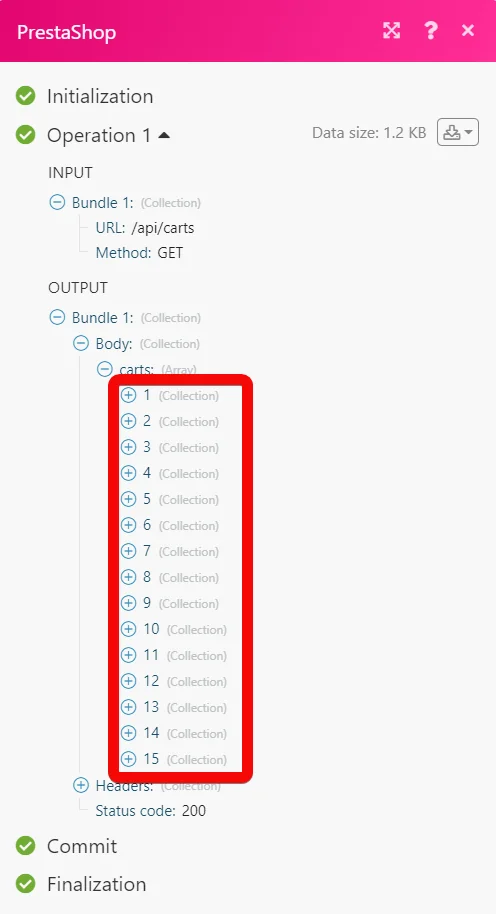
Example of Use – List Carts
The following API call returns all the carts from your Prestashop account:
URL:
/api/carts
Method:
GET
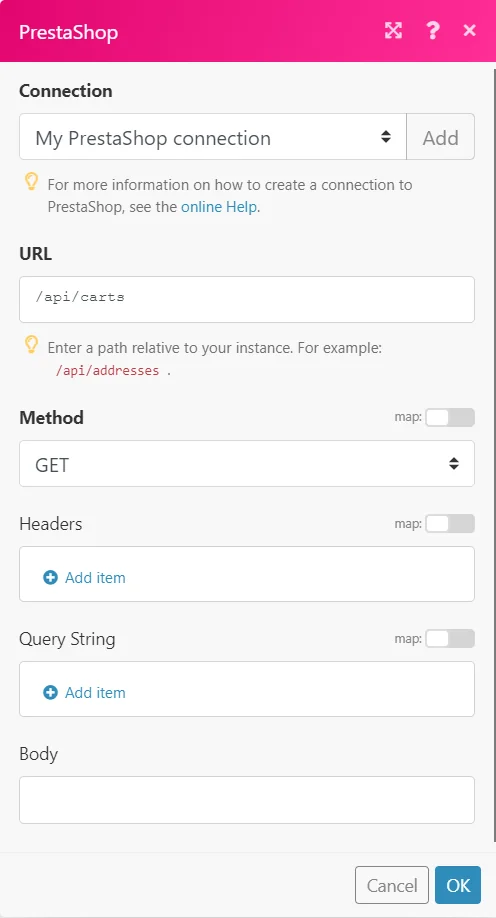
Matches of the search can be found in the module’s Output under Bundle > Body > carts.
In our example, 15 carts were returned:
Changelog
Removed the following modules:
-
Get product images
-
Iterate order rows
-
Update Order Status
Added the following new modules:
-
Create a Cart
-
Create a Customer
-
Create an Order
-
Create a Product
-
Get a Cart
-
Get a Language
-
Get an Order
-
Get a Product’s Stock
-
List Addresses
-
List an Order’s Cart Rules
-
List Carts
-
List Customer Groups
-
List Customers
-
List Images
-
List Manufacturers
-
List Order Rows
-
List Orders
-
Make an API Call
-
Update a Cart
-
Update a Customer
-
Update an Order
-
Update a Product
-
Update a Product’s Stock
-
Watch Carts Trigger
Legacy article, imported from the original Boost.space knowledge base (/knowledge-base/applications/commerce/prestashop/).

