Printavo
The Printavo modules allow you to monitor, create, update, send, retrieve, and list the customers, tasks, inquiries, payments, expenses, payment terms, orders, order status, and users in your Printavo account.
Getting Started with Printavo
Prerequisites
- A Printavo account – create an account at printavo.com/
The module dialog fields that are displayed in bold (in the Boost.space Integrator scenario, not in this documentation article) are mandatory!
Connecting Printavo to Boost.space Integrator
1. Go to Boost.space Integrator and open the Printavo module’s Create a connection dialog.

2. In the Connection name field, enter a name for the connection.
3. In the Email and Password fields, enter your Printavo account’s login credentials and click Continue .
The connection has been established.
Customers
Watch Customers
Triggers when a new customer is created.
Connection
Establish a connection to your Printavo account.
Limit
Set the maximum number of customers Boost.space Integrator should return during one execution cycle.
Search Customers
Searches for customers or lists them all.
Connection
Establish a connection to your Printavo account.
Limit
Set the maximum number of customers Boost.space Integrator should return during one execution cycle.
Get a Customer
Gets a customer.
Connection
Establish a connection to your Printavo account.
Customer ID
Select or map the Customer ID whose details you want to retrieve.
Create a Customer
Creates a new customer.
Connection
Establish a connection to your Printavo account.
Company
Enter (map) the customer’s company name.
First Name
Enter (map) the customer’s first name.
Last Name
Enter (map) the customer’s last name.
User ID
Enter (map) the User ID assigned to the customer.
Customer Emails
Add the customer’s email address(s).
Phone
Enter (map) the customer’s phone number.
Default Payment Term ID
Select or map the customer’s default Payment Term ID.
Extra Notes
Enter (map) the additional information about the customer.
Fax
Enter (map) the customer’s fax number.
Tax Exempt
Select whether the customer is exempted from tax.
Tax Resale Number
Enter (map) the tax resale number.
Sales Tax
Enter (map) the sales tax percentage applicable to the customer.
Address 1
Enter (map) the customer’s billing address. Enter the street name.
Address 2
Enter (map) the street name.
City
Enter (map) the city name.
State
Enter (map) the state name.
Zip
Enter (map) the area zip code.
Country
Enter (map) the country name.
Address 1
Enter (map) the customer’s shipping address. Enter the street name.
Address 2
Enter (map) the customer’s street name.
City
Enter (map) the city name.
State
Enter (map) the state name.
Zip
Enter (map) the area’s zip code.
Country
Enter (map) the country name.
Sub-Customer Attributes
Enter (map) the sub-customers attributes:
First Name
Enter (map) the first name of the sub-customer.
Last Name
Enter (map) the last name of the sub-customer.
User ID
Select or map the User ID assigned to the sub-customer.
Phone
Enter (map) the phone number of the customer.
Enter (map) the customer’s email address.
Fax
Enter (map) the customer’s fax number.
Update a Customer
Updates a customer.
Connection
Establish a connection to your Printavo account.
Customer ID
Select or map the Customer ID whose details you want to update.
See the Create a Customer for the field descriptions.
Delete a Customer
Deletes a customer.
Connection
Establish a connection to your Printavo account.
Customer ID
Select or map the Customer ID you want to delete.
Tasks
Watch Tasks
Triggers when a new task is created.
Connection
Establish a connection to your Printavo account.
Limit
Set the maximum number of tasks Boost.space Integrator should return during one execution cycle.
List Tasks
Lists all tasks.
Connection
Establish a connection to your Printavo account.
Limit
Set the maximum number of tasks Boost.space Integrator should return during one execution cycle.
Get a Task
Gets a task.
Connection
Establish a connection to your Printavo account.
Task ID
Select or map the Task ID whose details you want to retrieve.
Create a Task
Creates a new task.
Connection
Establish a connection to your Printavo account.
Task Name
Enter (map) a task name.
Due Date
Enter (map) the date by when the task must be completed.
Assigned User ID
Select or map the User ID to whom the task is assigned.
Taskable Type
Select or map the task type. For example, customer or order.
Taskable ID
Select or map the Customer ID or Order ID.
Update a Task
Updates a task.
Connection
Establish a connection to your Printavo account.
Task ID
Select or map the Task ID whose details you want to update.
Due Date
Enter (map) the date by when the task must be completed.
Task Name
Enter (map) a task name.
Assigned User ID
Select or map the User ID to whom the task is assigned.
Taskable Type
Select or map the task type. For example, customer or order.
Taskable ID
Select or map the Customer ID or Order ID.
Deletes a Task
Deletes a task.
Connection
Establish a connection to your Printavo account.
Limit
Set the maximum number of tasks Boost.space Integrator should return during one execution cycle.
Payments
Watch Payments
Triggers when a new payment is created.
Connection
Establish a connection to your Printavo account.
Limit
Set the maximum number of payments Boost.space Integrator should return during one execution cycle.
List Payments
Lists all payments.
Connection
Establish a connection to your Printavo account.
Limit
Set the maximum number of Payments Boost.space Integrator should return during one execution cycle.
Get a Payments
Gets a payment.
Connection
Establish a connection to your Printavo account.
Payment ID
Select or map the Payment ID whose details you want to retrieve.
Create a Payment
Creates a new payment.
Connection
Establish a connection to your Printavo account.
Amount
Enter (map) the payment amount.
Name
Enter (map) the payment name.
Transaction Date
Enter (map) the date on which the payment was made.
Order ID
Select or map the Order ID associated with the payment.
Update a Payment
Updates a payment.
Connection
Establish a connection to your Printavo account.
Payment ID
Select or map the Payment ID whose details you want to update.
Amount
Enter (map) the payment amount.
Name
Enter (map) the payment name.
Delete a Payment
Deletes a payment.
Connection
Establish a connection to your Printavo account.
Payment ID
Select or map the Payment ID you want to delete.
Inquiries
Watch Inquiries
Triggers when a new inquiry is created.
Connection
Establish a connection to your Printavo account.
Limit
Set the maximum number of inquiries Boost.space Integrator should return during one execution cycle.
List Inquiries
Lists all inquiries.
Connection
Establish a connection to your Printavo account.
Limit
Set the maximum number of inquiries Boost.space Integrator should return during one execution cycle.
Get an Inquiry
Gets an inquiry.
Connection
Establish a connection to your Printavo account.
Inquiry ID
Select or map the Inquiry ID whose details you want to retrieve.
Create an Inquiry
Creates a new inquiry.
Connection
Establish a connection to your Printavo account.
Customer Name
Enter (map) the customer’s name.
Description
Enter (map) the inquiry text.
Customer Phone
Enter (map) the customer’s phone number.
Customer Email
Enter (map) the customer’s email address.
Update an Inquiry
Updates an inquiry.
Connection
Establish a connection to your Printavo account.
Inquiry ID
Select or map the Inquiry ID whose details you want to update .
Customer Name
Enter (map) the customer name.
Description
Enter (map) the inquiry text.
Customer Phone
Enter (map) the customer’s phone number.
Customer Email
Enter (map) the customer’s email address.
Delete an Inquiry
Deletes an inquiry.
Connection
Establish a connection to your Printavo account.
Inquiry ID
Select or map the Inquiry ID you want to delete.
Expenses
Watch Expenses
Triggers when a new expense is created.
Connection
Establish a connection to your Printavo account.
Limit
Set the maximum number of expenses Boost.space Integrator should return during one execution cycle.
List Expenses
Lists all expenses.
Connection
Establish a connection to your Printavo account.
Limit
Set the maximum number of customers Boost.space Integrator should return during one execution cycle.
Get an Expense
Gets an expense.
Connection
Establish a connection to your Printavo account.
Limit
Set the maximum number of expenses Boost.space Integrator should return during one execution cycle.
Create an Expense
Creates a new expense.
Connection
Establish a connection to your Printavo account.
Amount
Enter (map) the expense amount.
Name
Enter (map) the name of the expense.
Transaction Date
Enter (map) the date on which the expense was made.
Update an Expense
Updates an expense.
Connection
Establish a connection to your Printavo account.
Expense ID
Select or map the Expense ID whose details you want to update.
Amount
Enter (map) the expense amount.
Name
Enter (map) the name of the expense.
Transaction Date
Enter (map) the date on which the expense was made.
Orders
Watch Orders
Triggers when a new order is created.
Connection
Establish a connection to your Printavo account.
Limit
Set the maximum number of orders Boost.space Integrator should return during one execution cycle.
Search Orders
Searches for orders or lists them all.
Connection
Establish a connection to your Printavo account.
Query
Enter a keyword or phrase to search the orders based on the specified query.
Limit
Set the maximum number of orders Boost.space Integrator should return during one execution cycle.
Get an Order
Gets information about a specific order.
Connection
Establish a connection to your Printavo account.
Order ID
Select or map the Order ID whose details you want to retrieve.
Create an Order
Creates a new order.
Connection
Establish a connection to your Printavo account.
User ID
Select or map the User ID who is creating the order.
Customer ID
Select or map the Customer ID whose order you are creating.
Customer Due Date
Enter (map) the date by when the customer order must be fulfilled.
Due Date
Enter (map) the date by when the order must be delivered.
Order Status ID
Select or map the Order Status ID: For example, In Production.
Custom Created at Date
Enter (map) the date on which the customer created the order.
Invoice Date
Enter (map) the date on which the order’s invoice date.
Payment Due Date
Enter (map) the date on which the order’s amount payment is due.
Sales Tax
Enter (map) the sales tax amount applicable to the order.
Discount
Enter (map) the discount amount applicable to the order.
Discount as Percentage
Select whether the mentioned discount is a percentage.
Order Nickname
Enter (map) any nickname for the order.
Approved
Select whether the order is approved.
Approved Name
Enter (map) the member name who has approved the order. The approved name is mandatory if approved is true.
Production Notes
Enter (map) the additional information about the ordered item’s production. This information is visible to the customer and user accounts logged in.
Notes
Enter (map) the additional information about the order. This information is visible to the customer and to user accounts logged in.
Payment Term ID
Select or map the Payment Term ID applicable to the order.
Delivery Method ID
Select or map the delivery method of the order. For example, delivery or pickup.
Order Addresses Attributes
Add the order delivery or billing address:
Name
Enter (map) the contact person at the address.
Address 1
Enter (map) the street name.
Address 2
Enter (map) the street name.
City
Enter (map) the city name.
State
Enter (map) the state name.
Zip
Enter (map) the area zip code.
Country
Enter (map) the country name.
Line Item Attributes
Add the line item attributes for the order:
Unit Cost
Enter (map) the item unit cost amount.
Style Description
Enter (map) the item model or style details.
Style Number
Enter (map) the item model or style number.
Colo r
Enter (map) the item color.
Category ID
Select or map the item’s Category ID.
S ize – 6 Months
Enter (map) the item’s size details.
Size – 12 Months
Enter (map) the item’s size details.
Size – 18 Months
Enter (map) the item’s size details.
Size – 24 Months
Enter (map) the item’s size details.
Size – 2 Toddler
Enter (map) the item’s size details.
Size – 3 Toddler
Enter (map) the item’s size details.
Size – 4 Toddler
Enter (map) the item’s size details.
Size – 5 Toddler
Enter (map) the item’s size details.
Size – Youth X-Small
Enter (map) the item’s size details.
Size – Youth Small
Enter (map) the item’s size details.
Size – Youth Medium
Enter (map) the item’s size details.
Size – Youth Large
Enter (map) the item’s size details.
Size – Youth X-Large
Enter (map) the item’s size details.
Size – X-Small
Enter (map) the item’s size details.
Size – Small
Enter (map) the item’s size details.
Size – Medium
Enter (map) the item’s size details.
Size – Large
Enter (map) the item’s size details.
Size – X-Large
Enter (map) the item’s size details.
Size – 2X-Large
Enter (map) the item’s size details.
Size – 3X-Large
Enter (map) the item’s size details.
Size -4X-Large
Enter (map) the item’s size details.
Size – 5X-Large
Enter (map) the item’s size details.
Taxable
Select whether the item price is taxable.
Image Attributes
Add the item’s image details:
File URL Enter (map) the URL address of the production files.
Mime Type Enter (map) the file name with extension. For example, image.png.
Print Locations Attributes
Add the item’s print location details if applicable.
Production Notes Files Attributes
Add the production files are used to store vectorized/digitized files in order:
File URL Enter (map) the URL address of the production files.
Mime Type Enter (map) the file name with extension. For example, image.png.
Order Fees Attributes
Add the order fess attributes for the order:
Amount Enter (map) the fee amount.
Description Enter (map) the details of the order fee.
Taxable Select whether this order fee amount is taxable.
Update an Order
Updates an existing order.
Connection
Establish a connection to your Printavo account.
Order ID
Select or map the Order ID whose details you want to update.
See the Create an Order for the field descriptions.
Deletes an Order
Deletes a specific order.
Connection
Establish a connection to your Printavo account.
Order ID
Select or map the Order ID you want to delete.
Payment Terms
Watch Payment Terms
Triggers when a new payment term is created.
Connection
Establish a connection to your Printavo account.
Limit
Set the maximum number of payment terms Boost.space Integrator should return during one execution cycle.
List Payment Terms
Lists all payment terms.
Connection
Establish a connection to your Printavo account.
Limit
Set the maximum number of payment terms Boost.space Integrator should return during one execution cycle.
Get a Payment Term
Gets a payment term.
Connection
Establish a connection to your Printavo account.
Payment Term ID
Select or map the Payment Term ID whose details you want to retrieve.
Create a Payment Term
Creates a new payment term.
Connection
Establish a connection to your Printavo account.
Name
Enter (map) the payment term name. For example, net 30.
Days
Enter (map) the number of days assigned for the payment term.
Update a Payment Term
Updates a payment term.
Connection
Establish a connection to your Printavo account.
Payment Term ID
Select or map the Payment Term ID whose details you want to update.
Name
Enter (map) a new payment term name. For example, net 30.
Days
Enter (map) the number of days assigned for the payment term
Users
Watch Users
Triggers when a new user is created.
Connection
Establish a connection to your Printavo account
Limit
Set the maximum number of users Boost.space Integrator should return during one execution cycle.
List Users
Lists all users.
Connection
Establish a connection to your Printavo account .
User ID
Set the maximum number of users Boost.space Integrator should return during one execution cycle.
Get a User
Gets a user.
Connection
Establish a connection to your Printavo account .
User ID
Select or map the User ID whose details you want to retrieve.
Order Statuses
Watch Order Status
Triggers when a new order status is created.
Connection
Establish a connection to your Printavo account.
Limit
Set the maximum number of order statuses Boost.space Integrator should return during one execution cycle.
List Order Statuses
List order statuses.
Connection
Establish a connection to your Printavo account.
Limit
Set the maximum number of order statuses Boost.space Integrator should return during one execution cycle.
Get an Order Status
Gets an order status.
Connection
Establish a connection to your Printavo account.
Order Status ID
Select or map the Order Status ID whose details you want to retrieve.
Other
Make an API Call
Performs an arbitrary authorized API call.
Connection
Establish a connection to your Printavo account.
URL
Enter a path relative to https://www.printavo.com/api For example: /v1/tasks
For the list of available endpoints, refer to the Printavo API Documentation.
Method
Select the HTTP method you want to use:
GET to retrieve information for an entry.
POST to create a new entry.
PUT to update/replace an existing entry.
PATCH to make a partial entry update.
DELETE to delete an entry.
Headers
Enter the desired request headers. You don’t have to add authorization headers; we already did that for you.
Query String
Enter the request query string.
Body
Enter the body content for your API call.
Example of Use – List Customers
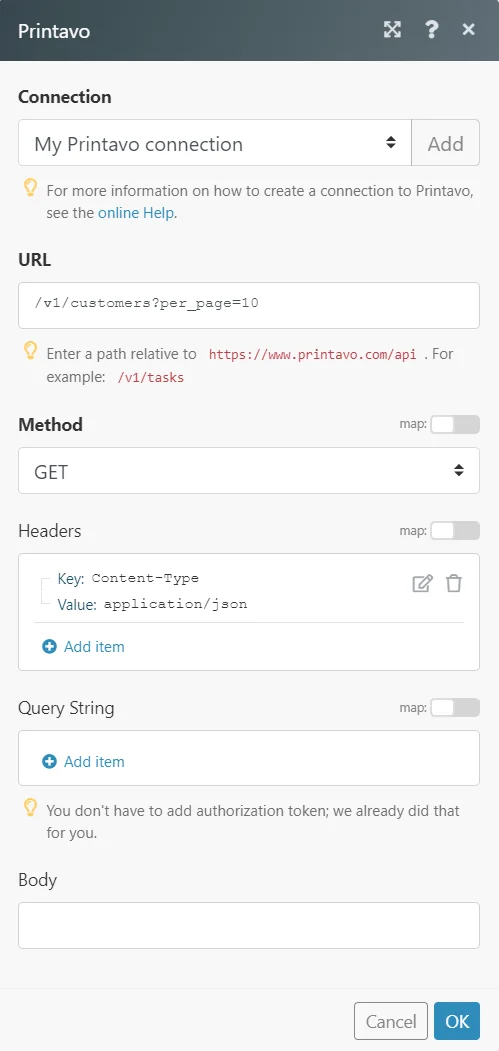
The following API call returns all the customers from your Printavo account:
URL: /v1/Customers
Method: GET
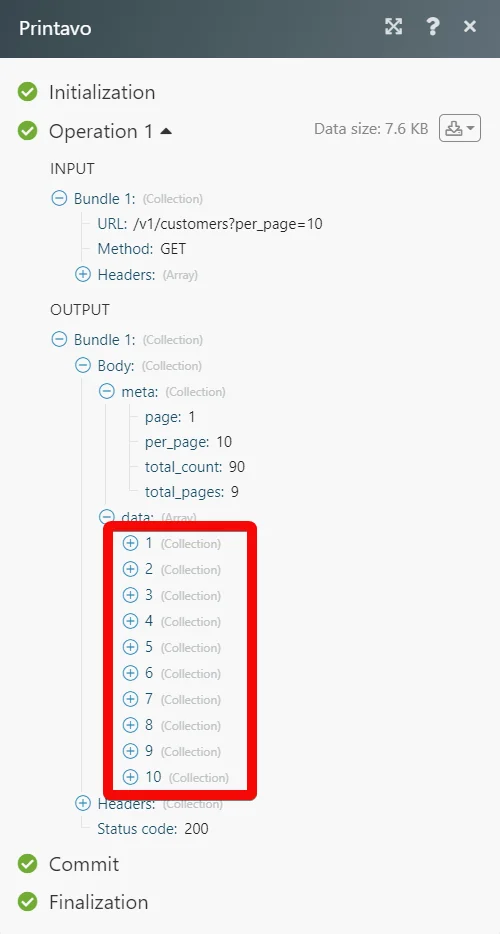
Matches of the search can be found in the module’s Output under Bundle > Body > data. In our example, the 90 customers were returned:
Legacy article, imported from the original Boost.space knowledge base (/knowledge-base/applications/commerce/printavo/).

