Burst SMS
The Burst SMS modules allow you to watch the SMS, and contact, add and remove contacts, format phone numbers, and send SMS in your Burst SMS account.
To get started with Burst SMS, create an account at burstsms.com.
The module dialog fields that are displayed in bold (in the Boost.space Integrator scenario, not in this documentation article) are mandatory!
Connecting Burst SMS to Boost.space Integrator
To connect your Burst SMS account to Boost.space Integrator you need to obtain the API Key and API Secret from your Burst SMS account and insert it in the Create a connection dialog in the Boost.space Integrator module.
-

Log in to your Burst SMS account.
-
In the top menu, click Settings.
-
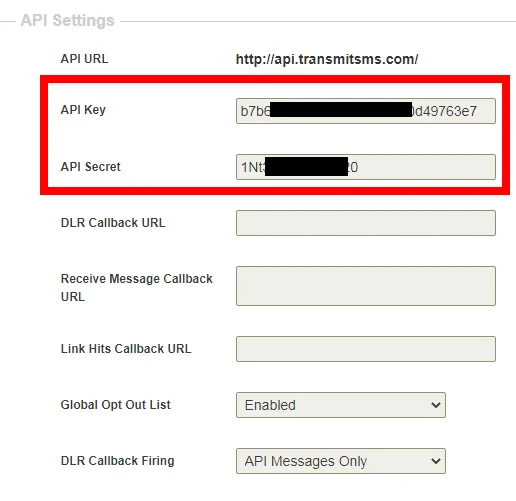
Navigate to API Settings section and copy the API key and API secret details to a safe place.
-
Go to Boost.space Integrator and open any of the Burst SMS module’s Create a connection dialog.
-
In the_Connection name_ field, enter a name for the connection.
-
In the API Key and API Secret fields, enter the details copied in step 3 respectively, and click Continue.
The connection has been established.
SMS

Watch SMS Receive to Inbox
Watches for SMS to be received in the inbox.
Connection
Establish a connection to your Burst SMS account.
Max
Set the maximum number of SMS Boost.space Integrator should return during one scenario execution cycle.
See the Connecting to Burst SMS Webhook using Boost.space Integrator to add the webhook in your Burst SMS account.
Watch Delivery Receipt
Watches for the delivery receipt to arrive after sending SMS.
Connection
Establish a connection to your Burst SMS account.
Max
Set the maximum number of SMS Boost.space Integrator should return during one scenario execution cycle.
See the Connecting to Burst SMS Webhook using Boost.space Integrator to add the webhook in your Burst SMS account.
Watch SMS Reply
Watches for replies to SMS.
Webhook Name
Enter a name for the webhook.
Connection
Establish a connection to your Burst SMS account.
See the Connecting to Burst SMS Webhook using Boost.space Integrator to add the webhook in your Burst SMS account.
Watch SMS Received to Virtual Number
Watches for SMS replies to a specific virtual number.
You do not have to add the webhooks in the Burst SMS as it is automatically done for you once you add and save an instant trigger module to your scenario.
Webhook Name
Enter a name for the webhook.
Connection
Establish a connection to your Burst SMS account.
Virtual Number
Select the number for which you want to watch the SMS received.
Watch Link Hits
Watches for link hits from shorted URL links in SMS.
Webhook Name
Enter a name for the webhook.
Connection
Establish a connection to your Burst SMS account.
See the Connecting to Burst SMS Webhook using Boost.space Integrator to add the webhook in your Burst SMS account.
Send SMS to List
Sends an SMS text message to everyone on a specific contact list.
Connection
Establish a connection to your Burst SMS account.
BurstSMS Contact List
Select the contact list to which you want to send the text message.
Message Content
Enter the message text you want to send. The text can include alphanumeric and special characters. The message text can have a maximum of 612 characters.
Tracked Link
Enter the tracking URL address of the SMS. The full URL is shortened and inserted via this [tracked-link] variable added to your Message. Hits to this link can be tracked and also passed via the Link Hit trigger. Should be in the format https://www.mydomain.com/.
Format Number
Enter a two-letter ISO 3166 format country code or country name to which the recipient number belongs to. Automatically formats numbers to the international format required for reliable SMS delivery. For example, for Australia 0422222222 will become 6142222222 when set to AU or Australia.
Sender ID
Enter the Sender ID details. A dedicated virtual number or shortcode is found in the NUMBERS section of your account.
If no value is set here, defaults to the shared sender ID for the country you are sending to. Send ID can also be an 11 character alphanumeric sender if available for the destination country.
Send Later
Enter the date when you want to send the SMS to be sent.
Send Replies to this Email
Enter the email address to which recipients can send responses to the message.
Notify this callback URL of Delivery
Enter the URL address to send a delivery notification to this callback URL
A URL address on your system which Burst SMS can call to notify about the Delivery Receipts. If required, this parameter can be different for each message sent.
This overrides the default DLR Callback URL if set in the Settings section of your account.
Notify this callback URL of Link Hit
Enter the URL address to send a link hit notification to this callback URL
A URL address on your system which Burst SMS can call to notify of a hit on your [tracked-link]. If required, this parameter can be different for each message sent.
This overrides the default DLR Callback URL if set in the Settings section of your account.
Notify this callback URL of Reply
Enter the URL address to send a reply notification to a callback URL
A URL address on your system which we can call to notify you of incoming messages. If required, this parameter can be different for each message sent.
This overrides the default Reply Callback URL if set in the Settings section of your account.
Send SMS
Sends one SMS text message.
Connection
Establish a connection to your Burst SMS account.
Recipient’s Mobile Number
Enter the mobile number to which you want to send the text message.
Message Content
Enter the message text you want to send. The text can include alphanumeric and special characters. The message text can have a maximum of 612 characters.
Tracked Link
Enter the tracking URL address of the SMS. The full URL is shortened and inserted via this [tracked-link] variable added to your Message. Hits to this link can be tracked and also passed via the Link Hit trigger. Should be in the format https://www.mydomain.com/.
Format Number
Enter a two-letter ISO 3166 format country code or country name to which the recipient number belongs to. Automatically formats the numbers to the international format required for reliable SMS delivery. For example, for Australia 0422222222 will become 6142222222 when set to AU or Australia.
Sender ID
Enter the Sender ID details. A dedicated virtual number or shortcode found in the NUMBERS section of your account.
If no value is set here, defaults to the shared sender ID for the country you are sending to. Send ID can also be an 11 character alphanumeric sender if available for the destination country.
Send Later
Enter the date when you want to send the SMS to be sent.
Send Replies to this Email
Enter the email address to which recipients can send responses to the message.
Notify this callback URL of Delivery
Enter the URL address to send a delivery notification to this callback URL
A URL address on your system which Burst SMS can call to notify about the Delivery Receipts. If required, this parameter can be different for each message sent.
This overrides the default DLR Callback URL if set in the Settings section of your account.
Notify this callback URL of Link Hit
Enter the URL address to send a link hit notification to this callback URL
A URL address on your system which Burst SMS can call to notify you of a hit on your [tracked-link]. If required, this parameter can be different for each message sent.
This overrides the default DLR Callback URL if set in the Settings section of your account.
Notify this callback URL of Reply
Enter the URL address to send a reply notification to a callback URL
A URL on your system which we can call to notify you of the incoming messages. If required, this parameter can be different for each message sent.
This overrides the default Reply Callback URL if set in the Settings section of your account.
Reporting
Get SMS Record
Gets information about a message that was sent.
Connection
Establish a connection to your Burst SMS account.
Message ID
Enter the Message-ID whose records you want to retrieve.
Watch New Contact Added to List
Watches for a new contact being added to a list.
You do not have to add the webhooks in the Burst SMS as it is automatically done for you once you add and save an instant trigger module to your scenario.
Webhook Name
Enter a name for the webhook.
Connection
Establish a connection to your Burst SMS account.
List ID
Select the List-ID whose new contacts you want to watch.
Contacts and Lists
Format Number
Formats and validate a given number.
Connection
Establish a connection to your Burst SMS account.
Mobile Number
Enter the mobile number you want to format.
Country Code
Enter the country code of the number. For example, +1 for the US.
Add Contact to List
Adds or updates a contact on al ist found in Contacts.
Connection
Establish a connection to your Burst SMS account.
List ID
Select the List ID to which you want to add the contact.
Mobile Number
Enter the mobile number of the contact.
First Name
Enter the first name of the contact.
Last Name
Enter the last name of the contact.
Format Number
Enter a two-letter ISO 3166 format country code or country name to which the recipient number belongs to. Automatically formats numbers to the international format required for reliable SMS delivery. For example, for Australia 0422222222 will become 6142222222 when set to AU or Australia.
Remove Contact
Removes a contact from one list or all lists.
Connection
Establish a connection to your Burst SMS account.
List ID
Select the List ID from which you want to remove the contact.
Mobile Number
Enter the mobile number of the contact.
Update Contact
Updates contact.
Connection
Establish a connection to your Burst SMS account.
List ID
Select the List ID whose contact details you want to update.
Mobile Number
Enter the mobile number of the contact.
First Name
Enter the first name of the contact.
Last Name
Enter the last name of the contact.
Format Number
Enter a two-letter ISO 3166 format country code or country name to which the recipient number belongs to. Automatically formats numbers to the international format required for reliable SMS delivery. For example, for Australia 0422222222 will become 6142222222 when set to AU or Australia.
Others
Make an API Call
Performs an arbitrary authorized API call.
Connection
Establish a connection to your Burst SMS account.
URL
Enter a path relative to https://api.transmitsms.com/. For example: get-balance.json
For the list of available endpoints, refer to the Burst SMS API Documentation.
Method
Select the HTTP method you want to use:
GET
to retrieve information for an entry.
POST
to create a new entry.
PUT
to update/replace an existing entry.
PATCH
to make a partial entry update.
DELETE
to delete an entry.
Headers
Enter the desired request headers. You don’t have to add authorization headers; we already did that for you.
Query String
Enter the request query string.
Body
Enter the body content for your API call.
Example of Use – Get Numbers
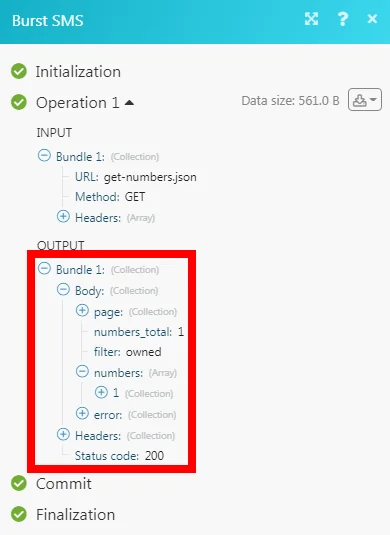
The following API call returns all the numbers from your Burst SMS account:
URL:
get-numbers.json
Method:
GET
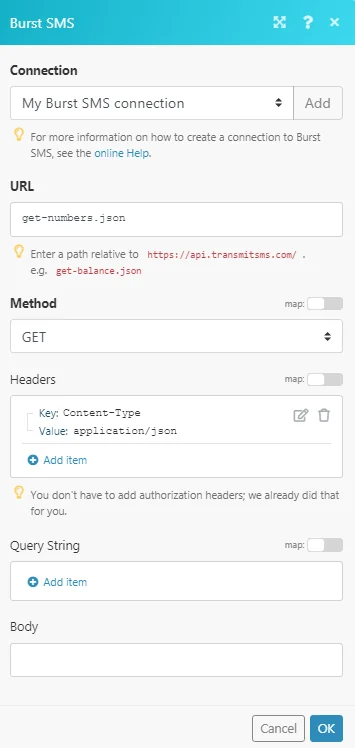
Matches of the search can be found in the module’s Output under Bundle > Body > numbers.
In our example, 1 number is returned:
Connecting to a Burst SMS Webhook using Boost.space Integrator
The following procedure shows adding the webhook for Watch SMS Reply module. For more information on adding various webhooks, refer to the Adding Webhooks in Burst SMS.
-

Open the_Watch Events_ module, enter the details as mentioned in the respective module description, and copy the address to your clipboard. Click OK and save the webhook.
-

Log in to your Burst SMS account. Click Settings, navigate to API Settings, and in the Receive Message Callback URL field, enter the URL address copied in step 1. Click Update Profile.
You have successfully added the webhook.
Legacy article, imported from the original Boost.space knowledge base (/knowledge-base/applications/communication/burst-sms/).

