Phaxio
The Phaxio modules allow you to create, send, resend, and cancel as fax in your Phaxio account.
Prerequisites
- A Phaxio account
In order to use Phaxio with Boost.space Integrator, it is necessary to have a Phaxio account. If you do not have one, you can create a Phaxio account at https://www.phaxio.com/.
The module dialog fields that are displayed in bold (in the Boost.space Integrator scenario, not in this documentation article) are mandatory!
Connecting Phaxio to Boost.space Integrator
To connect your Phaxio account to Boost.space Integrator, you need to obtain your API Key and API Secret.
1. Login to your Phaxio account.
2. From the left menu, click API Keys.

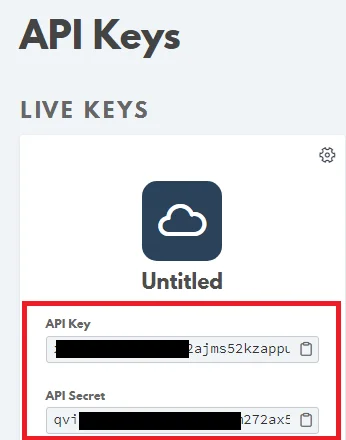
3. Copy the API Key and API Secret to your clipboard.

4. Go to Boost.space Integrator and open the Phaxio module’s Create a connection dialog.
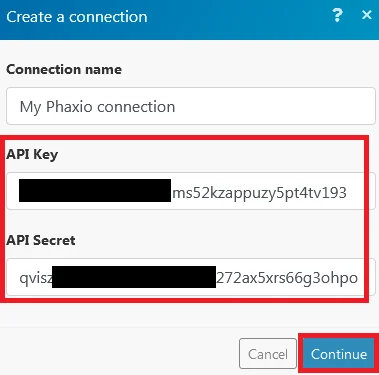
5. In the Connection name field, enter a name for the connection.
6. In the API Key and API Secret fields, enter the details copied in step 3 respectively.
7. Click Continue.
The connection has been established.
Actions
Cancel Fax
Cancels a fax.
Connection
Establish a connection to your Phaxio account.
Fax ID
Enter the Fax ID you want to cancel.
Create and Send Fax
Create and sends a fax.
Connection
Establish a connection to your Phaxio account.
Phone number
Enter the phone number to which you want to send the fax. You can send multiple phone numbers in the following format:
(+[country code][number])
Files
Add files you want to fax:
File name
Enter the file name. For example, sample.doc
Data
Enter the file data to the field or map the source of the file.
URL
Enter the URL to the fax files you want to attach to the message.
Header Text
Enter the text that appears at the top of the fax.
Callback URL
Enter the URL that can overwrite the defined URL globally.
Batch Delay
Enter the time in seconds for which you want to delay sending the fax. You can delay the batch up to 1 hour (3600 seconds).
Batch collision avoidance
Select Yes if you want to block the fax until the receiving machine is ready or not busy:
-
Yes
-
No
-
Not defined
Cancel timeout
Enter the number of minutes after which the fax will be canceled if it has not been completed yet.
Enter a value between 3 and 60.
Caller ID
Enter the Phaxio phone number which you would like to use for the caller ID.
Resend Fax
Resends a fax.
Connection
Establish a connection to your Phaxio account.
Fax ID
Enter the Fax ID you want to resend.
Legacy article, imported from the original Boost.space knowledge base (/knowledge-base/applications/communication/phaxio/).

