Bigin by Zoho CRM
With Bigin by Zoho CRM modules in Boost.space Integrator, you can manage the companies, contacts, tasks, events, calls, pipelines, users, and tags in your Bigin by Zoho CRM account.
To use the Bigin by Zoho CRM modules, you must have a Bigin account. You can create an account at bigin.com.
Refer to the Bigin by Zoho CRM API documentation for a list of available endpoints.
Connect Bigin by Zoho CRM to Boost.space Integrator
To establish the connection in Boost.space Integrator:
-
Log in to your Boost.space Integrator account, add a Bigin by Zoho CRM module to your scenario, and click Create a connection.
-
Optional: In the Connection name field, enter a name for the connection.
-
In the Choose your location field, select your region.
-
For Additional Scopes, add any necessary scopes you may require.Additional scopes are required for the Make an API Call module. For details, see the Bigin by Zoho CRM documentation. Add scopes for every API call you will make with this connection.
-
Optional: Switch on the Show advanced settings toggle and enter your custom app client credentials. For more information, refer to the Create a custom application in Bigin by Zoho CRM section.
-
Click Save.
-
If prompted, authenticate your account and confirm access.
You have successfully established the connection. You can now edit your scenario and add more Bigin by Zoho CRM modules. If your connection requires reauthorization at any point, follow the connection renewal steps here.
Create a custom application in Bigin by Zoho CRM
To create a Bigin by Zoho CRM custom application and retrieve your client credentials:
-
Log in to the Zoho API Console.
-
Click + Add Client.
-
Choose a Client Type.
-
Enter the app details as shown below and click CREATE.
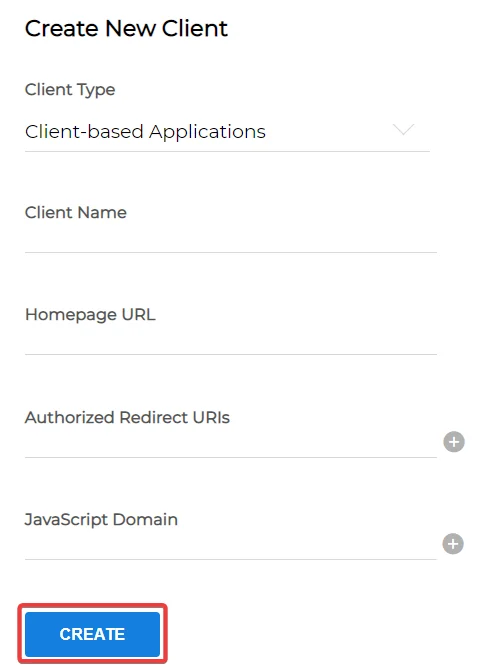
Client Name
Enter your application name.
Homepage URL
Enter your homepage URL, for example:
https://www.make.com/enAuthorize Redirect URIs
Add the redirect URI:
https://integrator.boost.space/oauth/cb/bigin-by-zohohttps://integrator.boost.space/oauth/cb/bigin-by-zoho2 -
Copy your Client ID and Client Secret values and store them in a safe place.
Companies
You can manage companies using the following modules.
Watch Company
Triggers when a new company has been created.
Connection
Establish a connection to your Bigin by Zoho CRM account.
Limit
Set the maximum number of companies Boost.space Integrator will return during one execution cycle. The default value is 10.
Search Companies
Searches for companies.
Connection
Establish a connection to your Bigin by Zoho CRM account.
Limit
Set the maximum number of companies Boost.space Integrator will return during one execution cycle. The default value is 10.
Create a Company
Creates a new company.
Connection
Establish a connection to your Bigin by Zoho CRM account.
Company Name
Enter the name of the company.
For field descriptions, see the Bigin by Zoho CRM Companies API reference.
Get a Company
Retrieves an existing company.
Connection
Establish a connection to your Bigin by Zoho CRM account.
Company ID
Select or map the Company ID whose details you want to retrieve.
Update a Company
Updates an existing company.
Connection
Establish a connection to your Bigin by Zoho CRM account.
Company ID
Select or map the Company ID whose details you want to update.
For field descriptions, see the Bigin by Zoho CRM Companies API reference.
Delete a Company
Deletes an existing company.
Connection
Establish a connection to your Bigin by Zoho CRM account.
Company ID
Select or map the Company ID you want to delete.
Contacts
You can manage contacts using the following modules.
Watch Contacts
Triggers when a new contact has been created.
Connection
Establish a connection to your Bigin by Zoho account.
Limit
Set the maximum number of contacts Boost.space Integrator will return during one execution cycle. The default value is 10.
Search Contacts
Searches for contacts.
Connection
Establish a connection to your Bigin by Zoho account.
Limit
Set the maximum number of contacts Boost.space Integrator will return during one execution cycle. The default value is 10.
Create a Contact
Creates a new contact.
Connection
Establish a connection to your Bigin by Zoho account.
For field descriptions, see the Bigin by Zoho CRM Contacts API reference.
Get a Contact
Retrieves an existing contact.
Connection
Establish a connection to your Bigin by Zoho account.
Contact ID
Select or map the Contact ID whose details you want to retrieve.
Update a Contact
Updates an existing contact.
Connection
Establish a connection to your Bigin by Zoho account.
Contact ID
Select or map the Contact ID whose details you want to update.
For field descriptions, see the Bigin by Zoho CRM Contacts API reference.
Delete a Contact
Deletes an existing contact.
Connection
Establish a connection to your Bigin by Zoho account.
Contact ID
Select or map the Contact ID you want to delete.
Tasks
You can manage tasks using the following modules.
Watch Tasks
Triggers when a new task has been created.
Connection
Establish a connection to your Bigin by Zoho account.
Limit
Set the maximum number of tasks Boost.space Integrator will return during one execution cycle. The default value is 10.
Search Tasks
Searches for tasks.
Connection
Establish a connection to your Bigin by Zoho account.
Limit
Set the maximum number of tasks Boost.space Integrator will return during one execution cycle. The default value is 10.
Create a Task
Creates a new task.
Connection
Establish a connection to your Bigin by Zoho account.
For field descriptions, see the Bigin by Zoho CRM Tasks API reference.
Get a Task
Retrieves an existing task.
Connection
Establish a connection to your Bigin by Zoho account.
Task ID
Select or map the Task ID whose details you want to retrieve.
Update a Task
Updates an existing task.
Connection
Establish a connection to your Bigin by Zoho account.
Task ID
Select or map the Task ID whose details you want to update.
For field descriptions, see the Bigin by Zoho CRM Tasks API reference.
Delete a Task
Deletes an existing task.
Connection
Establish a connection to your Bigin by Zoho account.
Task ID
Select or map the Task ID you want to delete.
Events
You can manage events using the following modules.
Watch Events
Triggers when a new event has been created.
Connection
Establish a connection to your Bigin by Zoho CRM account.
Limit
Set the maximum number of events Boost.space Integrator will return during one execution cycle. The default value is 10.
Search Events
Searches for events.
Connection
Establish a connection to your Bigin by Zoho CRM account.
Limit
Set the maximum number of events Boost.space Integrator will return during one execution cycle. The default value is 10.
Create an Event
Creates a new event.
Connection
Establish a connection to your Bigin by Zoho CRM account.
For field descriptions, see the Bigin by Zoho CRM Events API reference.
Get an Event
Retrieves an existing event.
Connection
Establish a connection to your Bigin by Zoho CRM account.
Event ID
Select or map the Event ID whose details you want to retrieve.
Update an Event
Updates an existing event.
Connection
Establish a connection to your Bigin by Zoho CRM account.
Event ID
Select or map the Event ID whose details you want to update.
For field descriptions, see the Bigin by Zoho CRM Events API reference.
Delete an Event
Deletes an existing event.
Connection
Establish a connection to your Bigin by Zoho CRM account.
Event ID
Select or map the Event ID you want to delete.
Calls
You can manage calls using the following modules.
Watch Calls
Triggers when a new call has been created.
Connection
Establish a connection to your Bigin by Zoho CRM account.
Limit
Set the maximum number of calls Boost.space Integrator will return during one execution cycle. The default value is 10.
Search Calls
Searches for calls.
Connection
Establish a connection to your Bigin by Zoho CRM account.
Limit
Set the maximum number of calls Boost.space Integrator will return during one execution cycle. The default value is 10.
Create a Call
Creates a new call.
Connection
Establish a connection to your Bigin by Zoho CRM account.
For field descriptions, see the Bigin by Zoho CRM Calls API reference.
Get a Call
Retrieves an existing call.
Connection
Establish a connection to your Bigin by Zoho CRM account.
Call ID
Select or map the Call ID whose details you want to retrieve.
Update a Call
Updates an existing call.
Connection
Establish a connection to your Bigin by Zoho CRM account.
Call ID
Select or map the Call ID whose details you want to update.
For field descriptions, see the Bigin by Zoho CRM Calls API reference.
Delete a Call
Deletes an existing call.
Connection
Establish a connection to your Bigin by Zoho CRM account.
Call ID
Select or map the Call ID you want to delete.
Pipelines
You can manage pipelines using the following modules.
Watch Pipelines
Triggers when a new pipeline has been created.
Connection
Establish a connection to your Bigin by Zoho CRM account.
Limit
Set the maximum number of pipelines Boost.space Integrator will return during one execution cycle. The default value is 2.
Search Pipelines
Searches for pipelines.
Connection
Establish a connection to your Bigin by Zoho CRM account.
Limit
Set the maximum number of pipelines Boost.space Integrator will return during one execution cycle. The default value is 10.
Create a Pipeline
Creates a new pipeline.
Connection
Establish a connection to your Bigin by Zoho CRM account.
For field descriptions, see the Bigin by Zoho CRM API reference.
Get a Pipeline
Retrieves an existing pipeline.
Connection
Establish a connection to your Bigin by Zoho CRM account.
Pipeline ID
Select or map the Pipeline ID whose details you want to retrieve.
Update a Pipeline
Updates an existing pipeline.
Connection
Establish a connection to your Bigin by Zoho CRM account.
Deal ID
Select or map the Pipeline ID whose details you want to update.
For field descriptions, see the Bigin by Zoho CRM API reference.
Delete a Pipeline
Deletes an existing pipeline.
Connection
Establish a connection to your Bigin by Zoho CRM account.
Pipeline ID
Select or map the Pipeline ID you want to delete.
Users
You can manage users using the following modules.
Watch Users
Triggers when a new user has been created.
Connection
Establish a connection to your Bigin by Zoho CRM account.
Limit
Set the maximum number of users Boost.space Integrator will return during one execution cycle. The default value is 10.
List Users
Retrieves a list of users.
Connection
Establish a connection to your Bigin by Zoho CRM account.
Limit
Set the maximum number of users Boost.space Integrator will return during one execution cycle. The default value is 10.
Create a User
Creates a new user.
Connection
Establish a connection to your Bigin by Zoho CRM account.
For field descriptions, see the Bigin by Zoho CRM Users API reference.
Get a User
Retrieves an existing user.
Connection
Establish a connection to your Bigin by Zoho CRM account.
User ID
Select or map the User ID whose details you want to retrieve.
Update a User
Updates an existing user.
Connection
Establish a connection to your Bigin by Zoho CRM account.
User ID
Select or map the User ID whose details you want to update.
For field descriptions, see the Bigin by Zoho CRM Users API reference.
Delete a User
Deletes an existing user.
Connection
Establish a connection to your Bigin by Zoho CRM account.
User ID
Select or map the User ID you want to delete.
Tags
You can add tags to records and remove tags from records using the following modules.
Add Tags to Records
Adds selected tags to records of the specified entity. Not available on a free plan.
Connection
Establish a connection to your Bigin by Zoho CRM account.
For field descriptions, see the Bigin by Zoho CRM Tags API reference.
Remove Tags from Records
Removes selected tags from records of the specified entity. Not available on the free plan.
Connection
Establish a connection to your Bigin by Zoho CRM account.
For field descriptions, see the Bigin by Zoho CRM Tags API reference.
Other
You can call APIs using the following module.
Make an API Call
Performs an arbitrary authorized API call.
For the list of available endpoints, refer to the Bigin by Zoho CRM API documentation.
Connection
Establish a connection to your Bigin by Zoho CRM account.
Method
GET
to retrieve information for an entry.
POST
to create a new entry.
PUT
to update/replace an existing entry.
PATCH
to make a partial entry update.
DELETE
to delete an entry.
URL
Enter a path relative to https://www.zohoapis.in/bigin. For example, /v1/Contacts.
Headers
Enter the desired request headers. You don’t have to add authorization headers; we already did that for you.
Query String
Enter the request query string.
Body
Enter the body content for your API call.
Example of use – List Contacts
The following API call returns all contacts from your account.
URL: /v1/Contacts
Method: GET
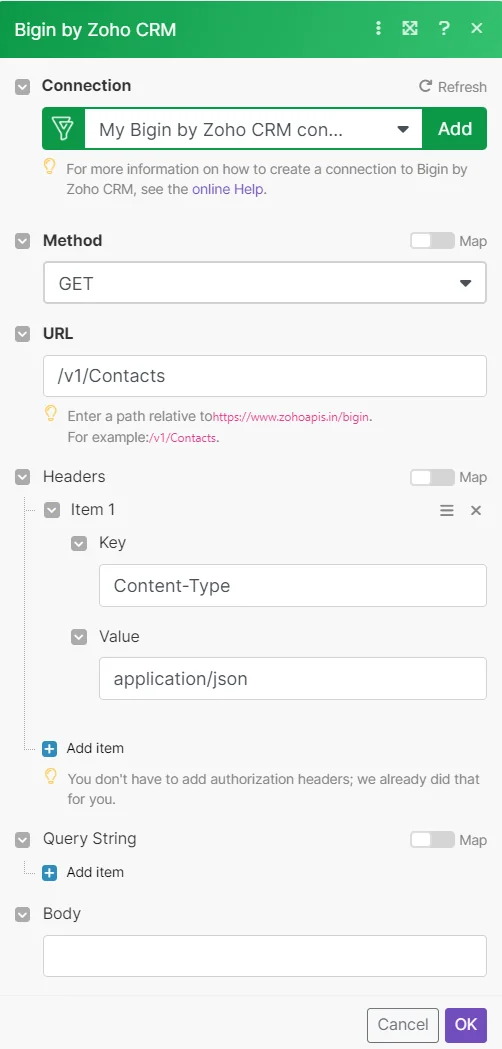
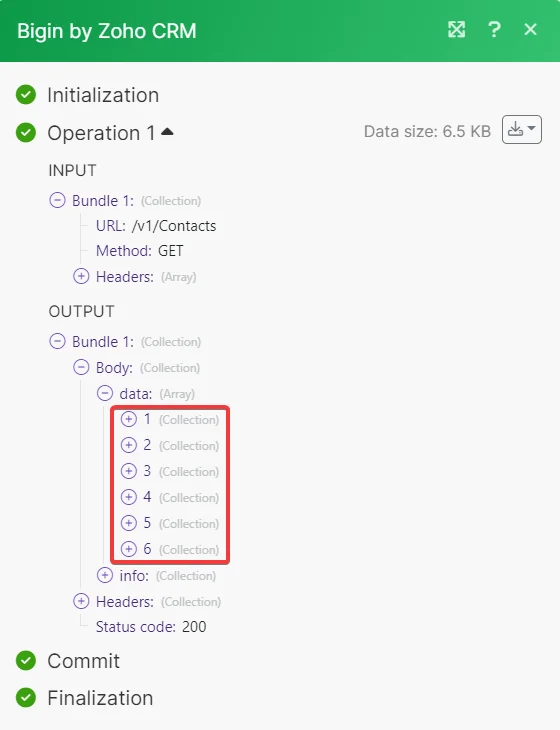
The search matches can be found in the module’s Output under Bundle > Body > data.
In our example 6 contacts were returned:
Legacy article, imported from the original Boost.space knowledge base (/knowledge-base/applications/crm-and-sales-tools/bigin-by-zoho-crm/).

