Salesflare
With Salesflare modules in Boost.space Integrator, you can manage the accounts, campaigns, contacts, opportunities, tasks, and other elements in your Salesflare account.
To use the Salesflare modules, you must have a Salesflare account. You can create an account at app.salesflare.com/signup.
Refer to the Salesflare API documentation for a list of available endpoints.
Connect Salesflare to Boost.space Integrator
To establish the connection, you must:
Obtain your API key in Salesflare
To obtain your API key from your Salesflare account:
-
Log in to your Salesflare account.
-
In the left sidebar, click Settings > API keys.
-
In the bottom right corner, click the blue plus icon, and enter a name for your API key.
-
Click Create.
-
Copy the API key value shown and store it in a safe place.
You will use this value in the API Key field in Boost.space Integrator.
Establish the connection with Salesflare in Boost.space Integrator
To establish the connection in Boost.space Integrator:
-
Log in to your Boost.space Integrator account, add a Salesflare module to your scenario, and click Create a connection.
-
Optional: In the Connection name field, enter a name for the connection.
-
In the API Key field, enter the API key copied above.
-
Optional: Click Show advanced settings and enter your API URL.
-
Click Save.
-
If prompted, authenticate your account and confirm access.
You have successfully established the connection. You can now edit your scenario and add more Salesflare modules. If your connection requires reauthorization at any point, follow the connection renewal steps here.
Accounts
Watch Accounts
Triggers when a new account is added.
Connection
Establish a connection to your Salesflare account.Connecting Salesflare to Boost.space Integrator
Select Type of Date Sorting
Select whether you want to sort the response by creation date or modification date.
Limit
Set the maximum number of results Boost.space Integrator will return during one execution cycle.
Find Accounts
Retrieves account details based on the specified filters.
Connection
Establish a connection to your Salesflare account.Connecting Salesflare to Boost.space Integrator
Account ID
Select the accounts you want to retrieve information about.
Name
Select or enter the name of the account you want to retrieve information about.
Details
If this option is enabled, more detailed account information will be returned.
Domain
Enter the domain you want to filter the accounts by.
Tag
Filter the results by tags.
Address
Enter the address details you want to filter the accounts by.
Creation
Filter accounts by creation date. Set Creation After and/or Creation before dates. Please use the YYYY-MM-DD HH:mm format.
Limit
Set the maximum number of accounts Boost.space Integrator will return during one execution cycle.
Create Account
Creates a new account.
Connection
Establish a connection to your Salesflare account.Connecting Salesflare to Boost.space Integrator
Name
Enter a name for the new account
Website
Enter the new account’s website.
Description
Enter the description of the account.
Add the account’s email addresses.
Tags
Add a tag to the account.
Phone Number
Add the account’s phone numbers.
Addresses
Add the account’s address details.
Size
Enter the size of the account. Only numbers are allowed.
Picture URL
Enter the image URL that will be used as a profile picture.
Limit
Set the maximum number of accounts Boost.space Integrator will return during one execution cycle.
Add Contact to Account
Adds a selected contact to the account.
Connection
Establish a connection to your Salesflare account.Connecting Salesflare to Boost.space Integrator
Account ID
Select or map the account you want to add a contact to.
Contact ID
Select or map the contact you want to add to the account.
Add User to Account
Adds a selected user to the account.
Connection
Establish a connection to your Salesflare account.Connecting Salesflare to Boost.space Integrator
Account ID
Select or map the account you want to add a contact to.
Contact ID
Select or map the Salesflare user you want to add to the account.
Get Account
Retrieves a selected account’s details.
Connection
Establish a connection to your Salesflare account.Connecting Salesflare to Boost.space Integrator
Account ID
Select or map the account you want to retrieve information about.
Delete Account
Deletes a selected account.
Connection
Establish a connection to your Salesflare account.Connecting Salesflare to Boost.space Integrator
Account ID
Select or map the account you want to delete.
Find Internal Note
Retrieves an internal note’s details.
Connection
Establish a connection to your Salesflare account.Connecting Salesflare to Boost.space Integrator
Account ID
Select or map the account you want to retrieve internal notes from.
After
Enter the start date the notes should be retrieved from. List of supported date formats.
Before
Enter the end date the notes should be retrieved to. List of supported date formats.
Limit
Set the maximum number of notes Boost.space Integrator will return during one execution cycle.
Campaigns
Find Campaigns
Retrieves a list of campaigns with details.
Connection
Establish a connection to your Salesflare account.Connecting Salesflare to Boost.space Integrator
Name
Enter the exact name of the campaign you want to retrieve. All campaigns will be returned if the field is left empty.
Type
Select whether you want to retrieve Manual or Automatic campaigns, or both, by leaving the field empty.
Status
Select the status of the campaign to filter the results by.
Limit
Set the maximum number of campaigns Boost.space Integrator will return during one execution cycle.
Create Campaign
Creates a new campaign.
Connection
Establish a connection to your Salesflare account.Connecting Salesflare to Boost.space Integrator
Campaign Name
Enter the name for the new campaign.
Audience
Select the contacts you want to send the campaign to OR create a new contact. Find the descriptions of the fields in the Create Contactsection.
Type
Select whether you want to create a manual or an automatic campaign.
Status
Select the status of the new campaign.
Subject
Enter the campaign’s subject.
Body
Enter the campaign body’s content.
HTML formatting is allowed.
From
Select or map the user who created the campaign.
Schedule Date
Enter the date for scheduling the campaign. List of supported date formats.
Attachments
Add an email attachment from the URL if needed.
Get Campaign
Retrieves information about the desired campaign.
Connection
Establish a connection to your Salesflare account.Connecting Salesflare to Boost.space Integrator
Campaign ID
Map or select the campaign ID you want to retrieve details about.
Contacts
Watch Contacts
Triggers when a new contact is added.
Connection
Establish a connection to your Salesflare account.Connecting Salesflare to Boost.space Integrator
Select Type of Date Sorting
Select whether you want to sort the response by creation date or modification date.
Limit
Set the maximum number of contacts Boost.space Integrator will return during one execution cycle.
Find Contacts
Retrieves a list of contacts.
Connection
Establish a connection to your Salesflare account.Connecting Salesflare to Boost.space Integrator
Contact ID
Select or map the contacts you want to retrieve information about.
Name
Enter or select the name of the contact you want to filter results by.
Enter or select the email of the contact you want to filter results by.
Phone Number
Enter or select the phone number of the contact you want to filter results by.
Account ID
Select or map the account of the contact you want to filter results by.
Tag
Enter or select the tag you want to filter results by.
Limit
Set the maximum number of contacts Boost.space Integrator will return during one execution cycle.
Create Contact
Creates a new contact.
Connection
Establish a connection to your Salesflare account.Connecting Salesflare to Boost.space Integrator
First Name
Enter the contact’s first name.
Last Name
Enter the contact’s last name.
Enter the contact’s email address.
Picture URL
Enter the URL of the image that will be used as a profile picture.
Phone Numbers
Add the phone numbers of the contact.
Skype IDs
Enter the contact’s Skype ID.
Addresses
Add the contact’s address details.
Positions
Add an organization and the role of the contact.
Tags
Add a tag to the new contact.
Get Contact
Retrieves contact details about the desired contact.
Connection
Establish a connection to your Salesflare account.Connecting Salesflare to Boost.space Integrator
Contact ID
Map or select the Contact ID you want to retrieve details about.
Delete Contact
Deletes a selected contact.
Connection
Establish a connection to your Salesflare account.Connecting Salesflare to Boost.space Integrator
Contact ID
Map or select the Contact ID you want to delete.
Opportunities
Watch Opportunities
Triggers when a new opportunity is created.
Connection
Establish a connection to your Salesflare account.Connecting Salesflare to Boost.space Integrator
Select Type of Date Sorting
Select whether you want to sort the response by a creation date or modification date.
Limit
Set the maximum number of opportunities Boost.space Integrator will return during one execution cycle.
Find Opportunities
Retrieves a list of opportunities.
Connection
Establish a connection to your Salesflare account.Connecting Salesflare to Boost.space Integrator
Opportunity ID
Select or map the opportunities you want to retrieve information about.
Name
Enter or select the name of the opportunity you want to filter results by.
Account ID
Select or map the account of the opportunity you want to filter results by.
Limit
Set the maximum number of opportunities Boost.space Integrator will return during one execution cycle.
Create Opportunity
Creates an opportunity.
Connection
Establish a connection to your Salesflare account.Connecting Salesflare to Boost.space Integrator
Account ID
Select the account you want to create an opportunity for.
Stage
Select the stage that the new opportunity is in.
Assignee
Select or map the user assigned to this opportunity.
Owner
Select or map the owner of the new opportunity.
Close date
Set the expected close date in the YYYY-MM-DD format.
Opportunity Name
Enter the opportunity name.
Value
Enter the opportunity value in USD.
Tags
Add tags for the new opportunity.
Get Opportunity
Retrieves an opportunity’s details.
Connection
Establish a connection to your Salesflare account.Connecting Salesflare to Boost.space Integrator
Opportunity ID
Map or select the opportunity you want to retrieve details about.
Delete Opportunity
Deletes an opportunity.
Connection
Establish a connection to your Salesflare account.Connecting Salesflare to Boost.space Integrator
Opportunity ID
Map or select the opportunity you want to delete.
Tasks
Watch Tasks
Triggers when a new task is created.
Connection
Establish a connection to your Salesflare account.Connecting Salesflare to Boost.space Integrator
Select Type of Date Sorting
Select whether you want to sort the response by the creation date or modification date.
Limit
Set the maximum number of tasks Boost.space Integrator will return during one execution cycle.
Create Task
Creates a new task.
Connection
Establish a connection to your Salesflare account.Connecting Salesflare to Boost.space Integrator
Description
Enter the description of the new task.
Reminder Date
Enter the date in the YYYY-MM-DD HH:mm format.
Account ID
Select or map the account you want to create the task for.
Assignees
Select or map the team member you want to assign to this task.
Find Tasks
Retrieves a list of tasks based on filter settings.
Connection
Establish a connection to your Salesflare account.Connecting Salesflare to Boost.space Integrator
Task ID
Select or map the tasks you want to retrieve information about.
Assignees
Enter or select the name of the assignee you want to filter results by.
Reminder After
Enter the date the tasks should be retrieved from. List of supported date formats.
Reminder Before
Enter the date the tasks should be retrieved up to. List of supported date formats.
Account IDs
Select or map the account of the task you want to filter results by.
Show Only Completed Tasks
If this option is enabled, only completed tasks will be returned.
Show Only Today Tasks
If this option is enabled, only tasks whose reminder date is set to today will be returned.
Show Only Upcoming Tasks
If this option is enabled, only future tasks will be returned.
Limit
Set the maximum number of tasks Boost.space Integrator will return during one execution cycle.
Delete Task
Deletes a task.
Connection
Establish a connection to your Salesflare account.Connecting Salesflare to Boost.space Integrator
Task ID
Map or select the task you want to delete.
Stages
Find Stage
Retrieves a list of stages in the pipeline based on filter settings.
Connection
Establish a connection to your Salesflare account.Connecting Salesflare to Boost.space Integrator
Stage ID
Select or map the stage you want to filter the results by.
Pipeline Name
Map or select the pipeline of the stages you want to retrieve.
Stage Name
Enter the name of the stage to filter results by.
Limit
Set the maximum number of stages Boost.space Integrator will return during one execution cycle.
Get Stage
Retrieves stage details.
Connection
Establish a connection to your Salesflare account.Connecting Salesflare to Boost.space Integrator
Stage ID
Select or map the stage you want to retrieve information about.
Persons
Find Persons
Retrieves a list of persons based on filter settings.
Connection
Establish a connection to your Salesflare account.Connecting Salesflare to Boost.space Integrator
Person ID
Select or map the person you want to filter the results by.
Name
Enter the name of the person you want to filter the results by.
Enter the person’s email address to filter results by.
Limit
Set the maximum number of persons Boost.space Integrator will return during one execution cycle.
Get Person
Retrieves information about the person.
Connection
Establish a connection to your Salesflare account.Connecting Salesflare to Boost.space Integrator
Person ID
Select or map the person you want to retrieve information about.
Other
Create Meeting
Creates a new meeting.
Connection
Establish a connection to your Salesflare account.Connecting Salesflare to Boost.space Integrator
Start Date
Enter the start date and time in the YYYY-MM-DD HH:mm format.
End Date
Enter the end date and time in the YYYY-MM-DD HH:mm format.
Subject
Enter the subject of the meeting.
Participants
Add meeting participants.
Description
Enter a description of the meeting.
Notes
Enter notes for the meeting.
Create Call
Creates a new call.
Connection
Establish a connection to your Salesflare account.Connecting Salesflare to Boost.space Integrator
Start Date
Enter the start date and time in the YYYY-MM-DD HH:mm format.
End Date
Enter the end date and time in the YYYY-MM-DD HH:mm format.
Subject
Enter the subject of the call.
Participants
Add call participants.
Description
Enter a description of the call.
Notes
Enter notes for the call.
Create Internal Note
Creates an internal note.
Connection
Establish a connection to your Salesflare account.Connecting Salesflare to Boost.space Integrator
Account ID
Enter the account you want to create an internal note for.
Body
Enter the text content of the note.
Note Date
Enter the date and time in the YYYY-MM-DD HH:mm format.
Make an API Call
Allows you to perform a custom API call.
Connection
Establish a connection to your Salesflare account.Connecting Salesflare to Boost.space Integrator
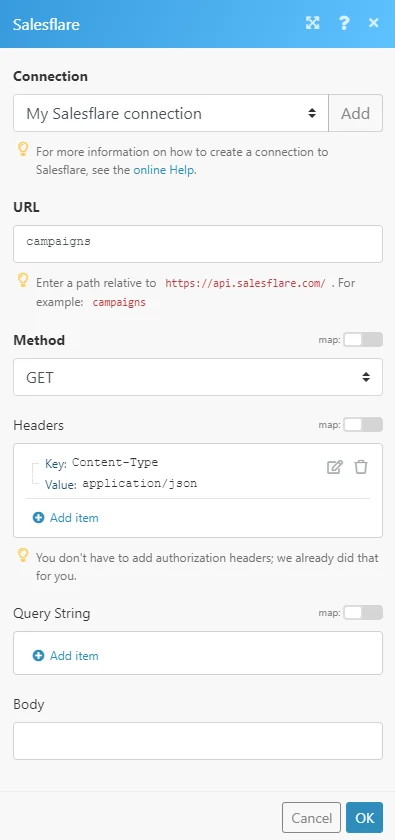
URL
Enter a path relative to https://api.salesflare.com/. E.g. campaigns
For the list of available endpoints, refer to the Salesflare REST API documentation.
Method
Select the HTTP method you want to use:
GET
to retrieve information for an entry.
POST
to create a new entry.
PUT
to update/replace an existing entry.
PATCH
to make a partial entry update.
DELETE
to delete an entry.
Headers
Enter the desired request headers. You don’t have to add authorization headers; we already did that for you.
Query String
Enter the request query string.
Body
Enter the body content for your API call.
Example of Use – List Campaigns
The following API call returns all campaigns:
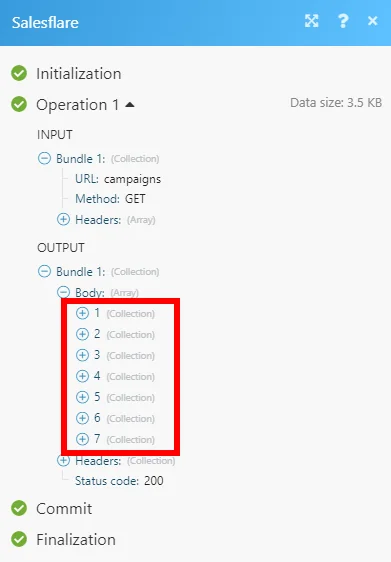
Matches of the search can be found in the module Output under Bundle > Body.
In our example, 7 campaigns were returned:
Legacy article, imported from the original Boost.space knowledge base (/knowledge-base/applications/crm-and-sales-tools/salesflare/).

