TeamWave
The TeamWave modules enable you to create, update, retrieve, or delete tasks, events, milestones, organizations, persons, and deals in your TeamWave account.
Getting Started with TeamWave
Prerequisites
- A TeamWave account
In order to use TeamWave with Boost.space Integrator, it is necessary to have a TeamWave account. If you do not have one, you can create a TeamWave account at teamwave.com.
The module dialog fields that are displayed in bold (in the Boost.space Integrator scenario, not in this documentation article) are mandatory!
Connecting TeamWave to Boost.space Integrator
To connect your TeamWave account to Boost.space Integrator, you’ll need to obtain an API Key from your TeamWave account.
1. Log in to your TeamWave account.
2. Click your profile icon in the bottom-left corner, and select the Profile option.


3. Open the API Key tab, and copy the provided API Key.
4. Go to Boost.space Integrator, and open the TeamWave module’s Create a connection dialog.
5. Enter the API Key you have copied in step 3 into the respective field, and click the Continue button to establish the connection.
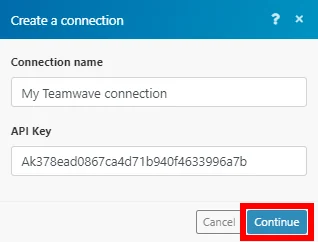
The connection has been established. You can proceed with setting up the module.
Projects
Create a Project
Creates a new project.
Connection
Establish a connection to your TeamWave account.
Project name
Enter the name of the project.
Estimated cost currency
Select the currency for the estimated cost.
Description
Add a description or some extra details about the project.
Label text
Enter a 2-letter label text for the project’s icon.
List Projects
Retrieves details of all the projects in your account.
Connection
Establish a connection to your TeamWave account.
Limit
Set the maximum number of projects Boost.space Integrator will return during one execution cycle.
Project’s Tasks
Create a Task in a Project
Creates a new task in an existing project.
Connection
Establish a connection to your TeamWave account.
Project ID
Select the project or map the ID of the project you want to create the task for.
Task Group ID
Select or map the task list you want to add a task to.
Name
Enter the name of the task.
Due date
Enter the due date for the task, e.g., 2020-01-29. Please consult the list of supported date and time formats.
Assigned to
Select or map the user you want to assign the task to.
Estimated time
Enter the estimated duration of the task in minutes.
Update a Task in a Project
Updates a task in a specified project.
Connection
Establish a connection to your TeamWave account.
Project ID
Select the project or map the ID of the project you want to update the task for.
Task Group ID
Select or map the task list that contains the task you want to update.
Task ID
Select or map the task you want to update.
Please find the descriptions of the fields in the Create a Task in a Project section above.
Delete a Task in a Project
Deletes a task in a specified project.
Connection
Establish a connection to your TeamWave account.
Project ID
Select the project or map the ID of the project you want to delete the task from.
Task Group ID
Select or map the task list that contains the task you want to delete.
Task ID
Select or map the task you want to delete.
List Task Groups
Retrieves all task lists for a specified project.
Connection
Establish a connection to your TeamWave account.
Project ID
Select the project or map the ID of the project you want to retrieve the task lists for.
Limit
Set the maximum number of task lists Boost.space Integrator will return during one execution cycle.
Get a Task in a Project
Retrieves task details.
Connection
Establish a connection to your TeamWave account.
Project ID
Select the project or map the ID of the project you want to retrieve the task from.
Task Group ID
Select or map the task list that contains the task you want to retrieve details about.
Task
Select or map the task you want to retrieve details about.
Project Events
Create an Event in a Project
Creates a new event.
Connection
Establish a connection to your TeamWave account.
Project ID
Select the project or map the ID of the project you want to create the event for.
Start
Enter the start date, e.g., 2020-01-29. Please consult the list of supported date and time formats.
Start time
Enter the start time of the event in the HH:mm format.
End
Enter the end date, e.g., 2020-01-29. Please consult the list of supported date and time formats.
End time
Enter the end time of the event in the HH:mm format.
Title
Enter the event’s title.
Repeats
Select whether the event is recurring and when it recurs.
All-day
Enable this option if it is an all-day event.
Description
Enter a description of the event.
Allowed users
Assign a user to the event.
Is private
Enable this option to set this event as visible only to you.
List Project Events
Retrieves all events in the project for a specified date range.
Connection
Establish a connection to your TeamWave account.
Project ID
Select the project or map the ID of the project you want to retrieve events for.
Start
Enter the start date, e.g., 2020-01-29. Please consult the list of supported date and time formats.
End
Enter the end date, e.g., 2020-01-29. Please consult the list of supported date and time formats.
Limit
Set the maximum number of events Boost.space Integrator will return during one execution cycle.
Delete an Event
Deletes an event.
Connection
Establish a connection to your TeamWave account.
Project ID
Select the project or map the ID of the project that contains the event you want to delete.
Event ID
Select or map the event you want to delete.
Send email
Enable this option to send a notification email.
Milestones
Create a Milestone
Creates a milestone in a specified project.
Connection
Establish a connection to your TeamWave account.
Project ID
Select the project or map the ID of the project you want to create the milestone for.
Title
Enter the name of the milestone.
Start
Enter the start date, e.g., 2020-01-23 10:00:00. Please consult the list of supported date and time formats.
Description
Enter a description of the milestone.
Is private
Enable this option to make the milestone accessible only to its assignee.
Notify time
Enter the notify time of the milestone in the HH:mm format.
Start time
Enter the start time of the milestone in the HH:mm format.
Delete a Milestone
Deletes a milestone in a specified project.
Connection
Establish a connection to your TeamWave account.
Project ID
Select the project or map the ID of the project you want to delete the milestone from.
Milestone ID
Select the milestone or map the ID of the milestone you want to delete.
Organizations
Create an Organization
Creates a new company in your contacts.
Connection
Establish a connection to your TeamWave account.
Name
Enter the name of the organization.
Owner
Select the user you want to set as the owner of the organization.
Domain
Enter the organization’s website.
Company size
Select the size of the company.
Country
Select the company’s country.
Company email
Enter the email address of the company.
Update an Organization
Updates a specified company.
Connection
Establish a connection to your TeamWave account.
Company ID
Select the organization or map the ID of the organization you want to update.
Please find the descriptions of the fields in the Create an Organization section above.
Get an Organization
Retrieves organization details.
Connection
Establish a connection to your TeamWave account.
Organization ID
Select the organization or map the ID of the organization you want to retrieve details about.
List All Organizations
Retrieves the organizations in your account.
Connection
Establish a connection to your TeamWave account.
Limit
Set the maximum number of organizations Boost.space Integrator will return during one execution cycle.
Delete an Organization
Deletes an organization.
Connection
Establish a connection to your TeamWave account.
Organization ID
Select the organization or map the ID of the organization you want to delete.
Persons
Create a Person
Creates a person in your contacts.
Connection
Establish a connection to your TeamWave account.
Enter the person’s email address.
First Name
Enter the person’s first name.
Last Name
Enter the person’s last name.
Owner
Assign an owner to the person.
Is public
Enable this option to set the contact as public.
Job title
Enter the person’s job title.
Custom fields
Enter further information associated with the person you want to create.
Update a Person
Updates a specified person.
Connection
Establish a connection to your TeamWave account.
Person
Select the person or map the ID of the person you want to update.
Please find the descriptions of the fields in the Create a Person section above.
Get a Person
Retrieves a person’s details.
Connection
Establish a connection to your TeamWave account.
Person ID
Select the person or map the ID of the person you want to retrieve details about.
Search for Persons
Performs a search for a person by a specified filter.
Connection
Establish a connection to your TeamWave account.
Limit
Set the maximum number of persons Boost.space Integrator will return during one execution cycle.
Delete a Person
Deletes a person.
Connection
Establish a connection to your TeamWave account.
Person
Select the person or map the ID of the person you want to delete.
Deals
Create a Deal
Creates a new deal.
Connection
Establish a connection to your TeamWave account.
Title
Enter the deal name.
Deal value
Enter the deal value.
Expected close
Enter the expected close date, e.g., 2020-02-14.
Pipeline
Select the pipeline you want to add the deal to.
Stage
Select a stage of the pipeline.
Currency
Select the currency of the deal.
Custom fields
Specify values for custom fields (e.g., description).
Update a Deal
Updates a deal.
Connection
Establish a connection to your TeamWave account.
Deal ID
Select the deal or map the ID of the deal you want to update.
Please find the descriptions of the fields in the Create a Deal section above.
Delete a Deal
Deletes a deal.
Connection
Establish a connection to your TeamWave account.
Deal ID
Select the deal or map the ID of the deal you want to delete.
Other
Make an API Call
Allows you to perform a custom API call.
Connection
Establish a connection to your TeamWave account.
URL
Enter a path relative to https://app.teamwave.com. For example: /api/crm/deals.
For the list of available endpoints, refer to the Teamwave API Reference.
Method
Select the HTTP method you want to use:
GET to retrieve information for an entry.
POST to create a new entry.
PUT to update/replace an existing entry.
PATCH to make a partial entry update.
DELETE to delete an entry.
Headers
Enter the desired request headers. You don’t have to add authorization headers; we’ve already done this for you.
Query string
Enter the request query string.
Body
Enter the body content for your API call.
Example of Use – List Deals
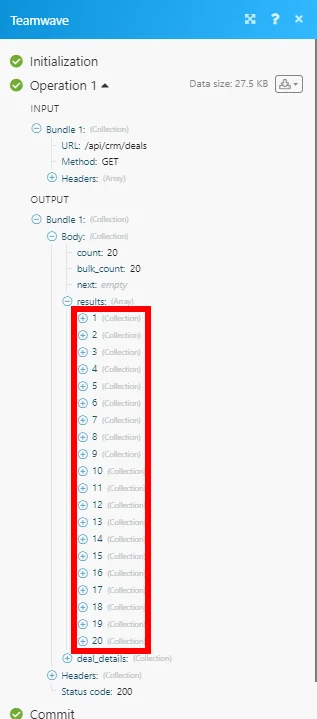
The following API call returns all the deals in your TeamWave account:
URL: /api/crm/deals
Method: GET
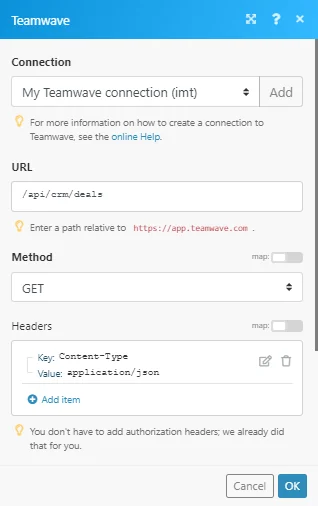
The result can be found in the module’s Output under Bundle > Body > results. In our example, 20 deals were returned:
Legacy article, imported from the original Boost.space knowledge base (/knowledge-base/applications/crm-and-sales-tools/teamwave/).

