Teamwork CRM
With the Teamwork CRM modules, you can:
-
Watch, create, update, retrieve, search and delete the companies
-
Watch, create, update, retrieve, search and delete the contacts
-
Watch, create, update, retrieve, search and delete the deals
-
Watch, create, update, retrieve, search and delete the activities
-
Watch, create, update, retrieve, search and delete the notes
-
Create, update, retrieve, search and delete the pipelines
-
Create, update, retrieve, search and delete the products
-
Create, update, retrieve, search and delete the stages
-
Update, retrieve, search and delete the users
-
Update, search and delete the files
To get started with the Teamwork CRM, create an account at teamwork.com.
Connect Teamwork CRM with Boost.space Integrator
To connect the Teamwork CRM app with the Boost.space Integrator:
-
Log in to your Teamwork CRM account.
-
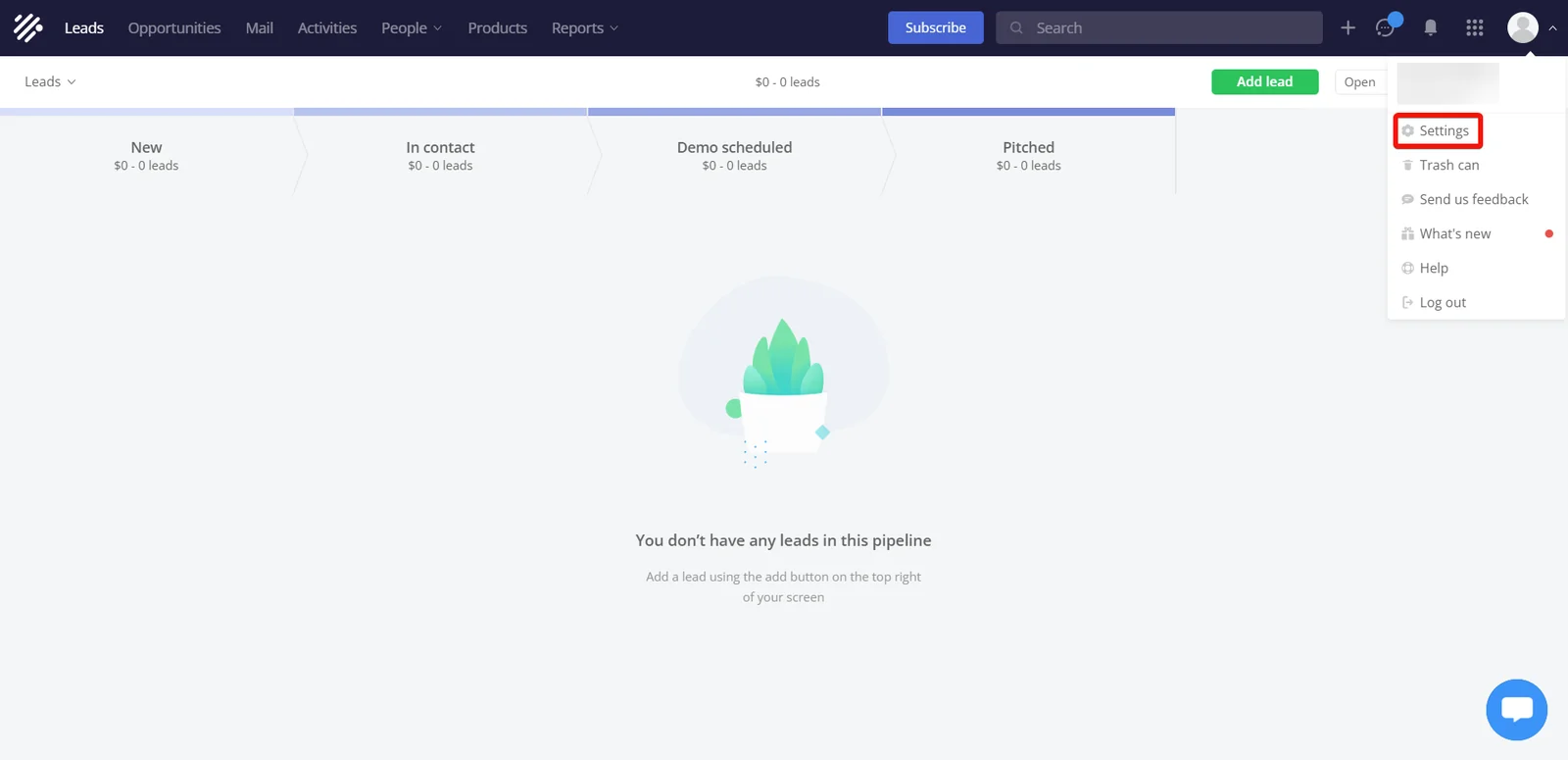
Click Profile > Settings.
-
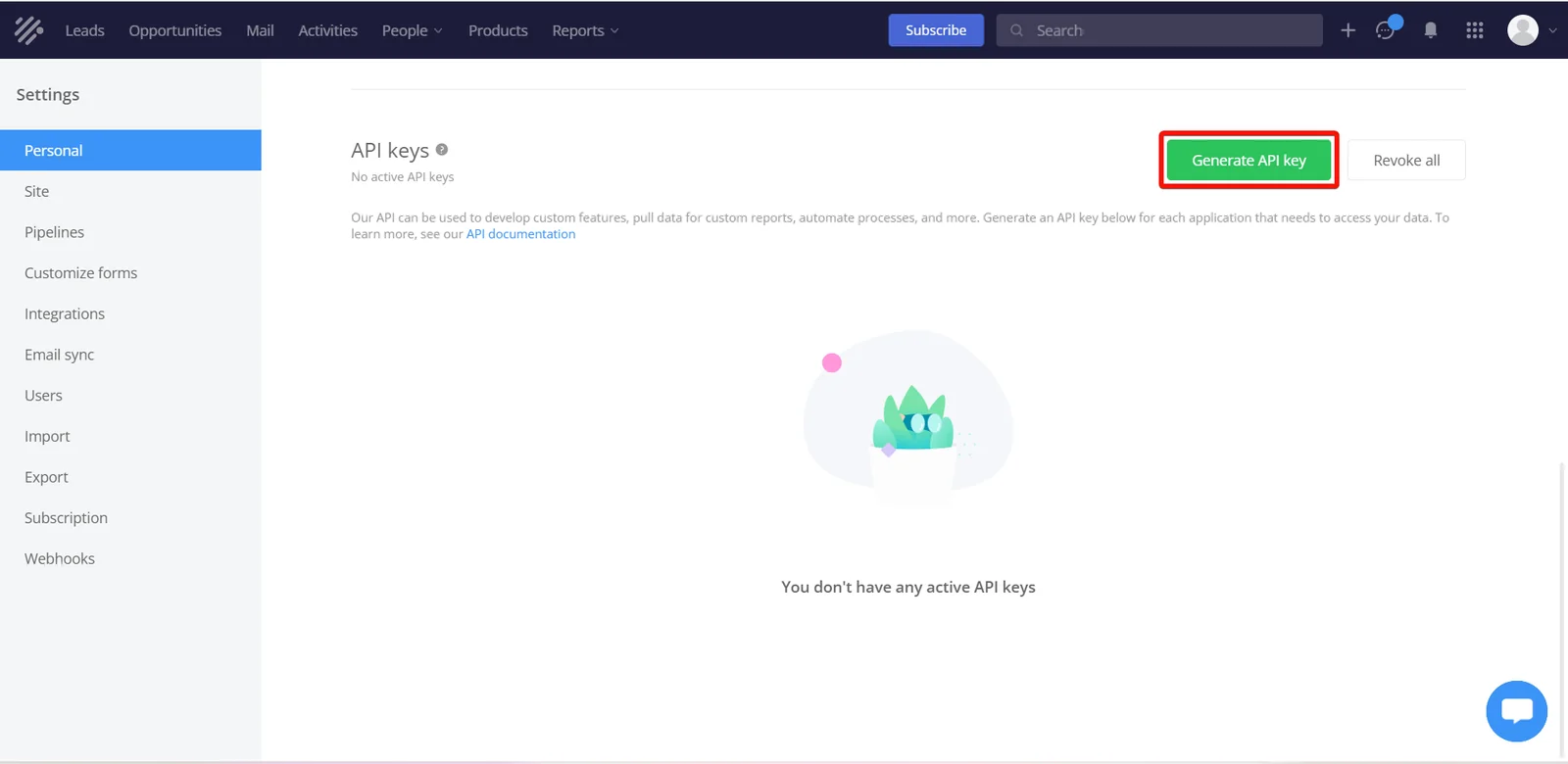
Navigate to the API Keys > Generate API key.
-
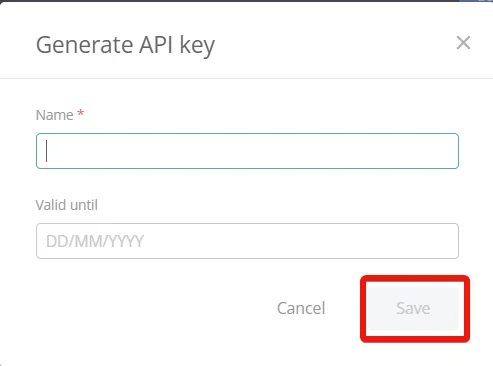
Enter a name and validity date for generating the API key, and click Save.
-
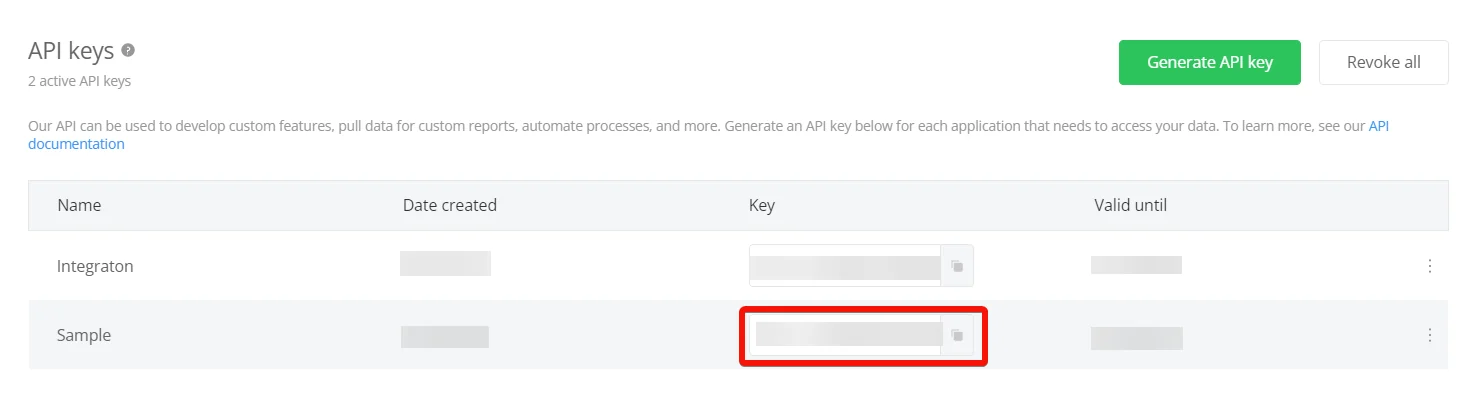
Copy the API key and store it in a safe place.
-

Log in to your Boost.space Integrator and add a module from the Teamwork CRM into a Boost.space Integrator scenario.
-
Click Add next to the Connection field.
-
In the Connection name field, enter a name for the connection.
-
In the Company Name field, enter the company name from the domain URL and API Key field enter the details copied in step 5, and click Save.
You have successfully connected the Teamwork CRM app with Boost.space Integrator and can now build scenarios.
Companies
You can watch, create, update, retrieve, search, and delete the companies using the following modules.
Watch Created Companies
Triggered when you add a new company.
Webhook name
Enter a name for the webhook.
Connection
Establish a connection to your Teamwork CRM account.
Boost.space Integrator automatically creates a webhook in Teamwork CRM you add an instant trigger to your scenario.
Create a Company
Creates a new company.
Connection
Establish a connection to your Teamwork CRM account.
Company Name
Optional: In the Server field, enter your server address. If you are using the public SAAS Server, enter https://cloud.seatable.io. If you are using your own on-premise SeaTable server, enter your server address.
Owner
Select or map the Owner ID of the company.
Address Line 1
Enter (map) the company’s street address.
Address Line 2
Enter (map) the company’s street address.
City
Enter (map) the company’s city name.
Contacts
Select or map the contacts associated with the company.
Сountry
Select or map the company’s country name.
Email Addresses
Add the contact email addresses of the company.
Phone Numbers
Add the phone number details of the company.
State or County
Enter (map) the company’s state name.
Timezone
Select (or) map the company’s timezone.
Website
Enter (map) the company’s website URL address.
Zipcode
Enter (map) the company’s zipcode.
Include
Select (or) map all the side-loaded data of response.
Custom Fields
Enter (map) the entity’s custom fields key-value pair. The properties accepted here will depend on the account settings.
Update a Company
Updates a company.
Connection
Establish a connection to your Teamwork CRM account.
Company ID
Select or map the Company ID whose details you want to update.
Company Name
Enter (map) the company’s name.
Owner
Select or map the Owner ID of the company.
Address Line 1
Enter (map) the company’s street address.
Address Line 2
Enter (map) the company’s street address.
City
Enter (map) the company’s city name.
Contacts
Select or map the contacts associated with the company.
Сountry
Select or map the company’s country name.
Email Addresses
Add the company contact email addresses.
Phone Numbers
Add the company’s phone number details.
State or County
Enter (map) the company’s state name.
Timezone
Select (or) map the company’s timezone.
Website
Enter (map) the company’s website URL address.
Zipcode
Enter (map) the company’s zipcode.
Include
Select (or) map all the side-loaded data of response.
Custom Fields
Enter (map) the entity’s custom field key-value pair. The properties accepted here will depend on the settings.
Get a Company
Gets a company.
Connection
Establish a connection to your Teamwork CRM account.
Company ID
Select or map the Company ID whose details you want to retrieve.
Include
Select (or) map all the side-loaded data of response.
Searches Companies
Searches companies by given criteria.
Connection
Establish a connection to your Teamwork CRM account.
Query String
Enter (map) the query string:
Order Mode
Select the direction to order the results. For example, ASC for ascending order.
Order by
Select or map the sorting by which the items are returned with.
Filter
Add the filters to sort the companies.
Limit
Set the maximum number of companies Boost.space Integrator will return during one execution cycle. The default value is 10.
Delete a Company
Deletes a company.
Connection
Establish a connection to your Teamwork CRM account.
Company ID
Select or map a Company ID you want to delete.
Contact
You can watch, create, update, retrieve, search, and delete using the following modules.
Watch Created Contacts
Triggered when you add a new contact.
Webhook name
Enter (map) a name for the webhook.
Connection
Establish a connection to your Teamwork CRM account.
Boost.space Integrator automatically creates a webhook in Teamwork CRM you add an instant trigger to your scenario.
Create a Contact
Creates a new contact.
Connection
Establish a connection to your Teamwork CRM account.
First Name
Enter (map) the contact’s first name.
Last Name
Enter (map) the contact’s last name.
Email Addresses
Add the contact’s email addresses.
Owner
Select or map the owner of the company.
Phone Numbers
Add the contact phone numbers.
Address Line 1
Enter (map) the contact’s street address.
Address Line 2
Enter (map) the contact’s street address.
City
Enter (map) the contact’s city name.
Company
Select or map the contact’s company name.
Сountry
Select or map the contact’s country name.
State or County
Enter (map) the contact’s state name.
Timezone
Select (or) map the contact’s timezone.
Title
Enter (map) the contact’s name.
Zipcode
Enter (map) the contact’s zipcode.
Include
Select (or) map all the side-loaded data of response.
Custom Fields
Enter (map) the entity’s custom fields key-value pair. The properties accepted here will depend on the settings.
Update a Contact
Updates a contact.
Connection
Establish a connection to your Teamwork CRM account.
Contact ID
Select or map a Contact ID whose details you want to update the details.
First Name
Enter (map) the contact’s first name.
Last Name
Enter (map) the contact’s last name.
Owner
Select or map the Owner ID of the company.
Email Addresses
Add the contact’s email addresses.
Phone Numbers
Add the contact phone number details.
Address Line 1
Enter (map) the contact’s street address.
Address Line 2
Enter (map) the contact’s street address.
City
Enter (map) the contact’s city name.
Company
Select or map the contact’s company name.
Сountry
Select or map the contact’s country name.
State or County
Enter (map) the contact’s state name.
Timezone
Select (or) map the contact’s timezone.
Title
Enter (map) the contact’s name.
Zipcode
Enter (map) the contact’s zipcode.
Include
Select (or) map all the side-loaded data of response.
Custom Fields
Enter (map) the entity’s custom fields key-value pair. The properties accepted here will depend on the settings.
Get a Contact
Gets a contact.
Connection
Establish a connection to your Teamwork CRM account.
Contact ID
Select or map a Contact ID whose details you want to retrieve.
Include
Select (or) map all the side-loaded data of response.
Search Contacts
Searches contacts by given criteria.
Connection
Establish a connection to your Teamwork CRM account.
Query String
Enter (map) the query string:
To use the Chatra modules, you must have a paid Chatra account. You can create an account at chatra.com. For subscription information, refer to the Chatra Pricing page.
Select the direction to order the results. For example, ASC for ascending order.
Order by
Select or map the option to sort the results.
Filter
Add the filter details for contacts.
Limit
Set the maximum number of contacts Boost.space Integrator will return during one execution cycle. The default value is 10.
Delete a Contact
Delete a contact.
Connection
Establish a connection to your Teamwork CRM account.
Contact ID
Select or map the Contact ID you want to delete.
Deals
You can watch, create, update, search, retrieve, and delete the deals using the following modules.
Watch Created Deals
Triggered when you add a new deal.
Webhook name
Enter a name for the webhook.
Connection
Establish a connection to your Teamwork CRM account.
Boost.space Integrator automatically creates a webhook in Teamwork CRM you add an instant trigger to your scenario.
Watch Created Deals
Triggered when a deal is updated.
Webhook name
Enter a name for the webhook.
Connection
Establish a connection to your Teamwork CRM account.
Boost.space Integrator automatically creates a webhook in Teamwork CRM you add an instant trigger to your scenario.
Watch Created Deals
Triggered when a deal is deleted.
Webhook name
Enter a name for the webhook.
Connection
Establish a connection to your Teamwork CRM account.
Boost.space Integrator automatically creates a webhook in Teamwork CRM you add an instant trigger to your scenario.
Create a Deal
Creates a new deal.
Connection
Establish a connection to your Teamwork CRM account.
Title
Enter (map) a title for the deal.
Stage
Select the deal’s stage:
-
New
-
Qualified
-
In contact
-
Engaged
-
Demo scheduled
-
Committed
-
Pitched
-
Negotiation
-
Forecasted
Products
Add the product details:
ID
Select or map the Product ID.
Meta
Enter (map) the product meta details:
-
Price: Enter (map) the price of the product in the same currency as the deal in its lowest denomination. For example, for USD the value is cents.
-
Quantity: Enter (map) the quantity of this product at the price with a discount.
-
Discount: Enter (map) the discount to apply to the price.
State
Select the deal status. For example, open.
Company
Select or map the company associated with the deal.
Contacts
Add the contacts related to the deal.
Currency
Select or map the deal’s currency.
Custom Value
Enter (map) a custom value of the deal, this will be combined with the product’s prices to calculate the total value of the deal.
Expected Close Date
Enter (map) a deal’s expected closing date. See the list of supported date and time formats.
Owner
Select or map the Owner ID of the deal.
Teamwork Projects
Enter (map) the Project IDs associated with the deal.
Include
Select (or) map the options to include in the response.
Custom Fields
Enter (map) the entity’s custom fields key-value pair. The properties accepted here will depend on the settings.
Foreign Item Links
Enter (map) the foreign item links. For example, task.
Update a Deal
Updates a deal.
Connection
Establish a connection to your Teamwork CRM account.
Deal ID
Select or map a Deal ID of a deal whose details you want to update.
Title
Enter (map) a title for the deal.
Stage
Select the deal’s stage. For example, new.
Products
Enter (map) the product details:
-
ID: Select or map the Product ID.
-
Meta: Enter (map) the product meta details
State
Select the deal status. For example, lost.
Company
Select or map the company associated with the deal.
Contacts
Enter (map) the contacts related to the deal:
-
ID: Select or map the Contact ID.
-
Meta: Select whether this is the main contact.
Currency
Select or map the deal’s currency.
Custom Value
Enter (map) a custom value of the deal, this will be combined with the product’s prices to calculate the Total Value of the deal.
Expected Close Date
Enter (map) a deal’s expected closing date. See the list of supported date and time formats.
Owner
Select or map the owner associated with the deal.
Teamwork Projects
Enter (map) the Project IDs associated with the deal.
Include
Select (or) map all the side-loaded data of response.
Custom Fields
Enter (map) the entity’s custom fields key-value pair. The properties accepted here will depend on the account settings.
Foreign Item Links
Enter (map) the foreign item links.
Get a Deal
Gets a deal.
Connection
Establish a connection to your Teamwork CRM account.
Deal ID
Select or map a Deal ID whose details you want to retrieve.
Include
Select (or) map all the side-loaded data of response.
Search Deals
Searches deals by given criteria.
Connection
Establish a connection to your Teamwork CRM account.
Query String
Enter (map) the query string:
Order Mode
Select the direction to order the results. For example, ASC for ascending order.
Order by
Select or map the sorting by which the items are returned with.
Filter
Add the filters to search the deals.
Limit
Set the maximum number of deals Boost.space Integrator will return during one execution cycle. The default value is 10.
Delete a Deal
Deletes a deal.
Connection
Establish a connection to your Teamwork CRM account.
Deal ID
Select or map a Deal ID you want to delete.
Activities
You can watch, create, update, search, retrieve, and delete the activities using the following modules.
Watch Created Activities
Triggered when you add a new activity.
Webhook name
Enter a name for the webhook.
Connection
Establish a connection to your Teamwork CRM account.
Boost.space Integrator automatically creates a webhook in Teamwork CRM you add an instant trigger to your scenario.
Watch Updated Activities
Triggered when an activity is updated.
Webhook name
Enter a name for the webhook.
Connection
Establish a connection to your Teamwork CRM account.
Boost.space Integrator automatically creates a webhook in Teamwork CRM you add an instant trigger to your scenario.
Watch Created Activities
Triggered when an activity is deleted.
Webhook name
Enter a name for the webhook.
Connection
Establish a connection to your Teamwork CRM account.
Boost.space Integrator automatically creates a webhook in Teamwork CRM you add an instant trigger to your scenario.
Create an Activity
Creates a new activity.
Connection
Establish a connection to your Teamwork CRM account.
Title
Enter (map) a name for the activity.
Activity Type
Select the activity type. For example, meeting.
Deal
Select or map a Deal ID whose activity you want to create.
Assignees
Select or map the users assigned to this activity.
Start Date
Enter (map) the start date of the activity. See the list of supported date and time formats.
Contacts
Select or map the contacts associated with the activity.
Description
Enter (map) the activity description.
Duration
Duration in minutes of how long the activity will take to complete.
Is All Day
Select whether this is an all-day activity.
Is Complete
Select whether this activity is complete.
Reminders
Select or map the details of reminders:
Receivers
Select or map the receivers.
Time
Enter (map) the time before the activity due date to send the reminders.
Time Unit
Select the unit of time. For example, minutes.
Include
Select (or) map all the data to include in the response.
Update an Activity
Updates an activity.
Connection
Establish a connection to your Teamwork CRM account.
Activity ID
Select or map an Activity ID whose details you want to update.
Title
Enter (map) a new name for the activity.
Activity Type
Select the activity type. For example, Meeting.
Assignees
Select or map the users assigned to this activity.
Contacts
Select or map the contacts associated with the activity.
Start Date
Enter (map) the start date of the activity. See the list of supported date and time formats.
Description
Enter (map) the activity details.
Duration
Duration in minutes of how long the activity will take to complete.
Is All Day
Select whether this is an all-day activity.
Is Complete
Select whether this activity is complete.
Reminders
Select or map the details of reminders:
Receivers
Select or map the receivers.
Time
Enter (map) the time before the activity due date to send the reminders.
Time Unit
Select the unit of time. For example, minutes.
Include
Select (or) map all the side-loaded data of response.
Get an Activity
Gets an activity.
Connection
Establish a connection to your Teamwork CRM account.
Deal ID
Select or map an Activity ID whose details you want to retrieve.
Include
Select (or) map the options to include in the response.
Search Activities
Search activities by given criteria.
Connection
Establish a connection to your Teamwork CRM account.
Query String
Enter (map) the query string:
Order Mode
Select the direction to order the results. For example, enter ASC for ascending order.
Order by
Select or map the sorting by which the items are returned with.
Filter
Add the filters to sort the searched activities.
Limit
Set the maximum number of activities Boost.space Integrator will return during one execution cycle. The default value is 10.
Delete an Activity
Deletes an activity.
Connection
Establish a connection to your Teamwork CRM account.
Activity ID
Select or map an Activity ID you want to delete.
Notes
You can watch, create, update, search, retrieve, and delete the notes using the following modules.
Watch Created Notes
Triggers when you add a new note.
Webhook name
Enter a name for the webhook.
Connection
Establish a connection to your Teamwork CRM account.
Boost.space Integrator automatically creates a webhook in Teamwork CRM you add an instant trigger to your scenario.
Create a Note
Creates a new note.
Connection
Establish a connection to your Teamwork CRM account.
Description
Enter (map) the notes text.
Subject
Select the note’s subject details.
Is Pinned
Select whether the note should appear immediately after the section in the UI in which you can create new notes.
Include
Select whether to include the creator details in the note.
Update a Note
Updates a note.
Connection
Establish a connection to your Teamwork CRM account.
Note ID
Select or map a Note ID whose details you want to update.
Description
Enter (map) new note text.
Is Pinned
Select whether the note should appear immediately after the section in the UI in which you can create new notes.
Include
Select whether to include the creator details in the note.
Get a Note
Gets a note.
Connection
Establish a connection to your Teamwork CRM account.
Note ID
Select or map a Note ID whose details you want to retrieve.
Include
Select whether to include the creator details in the note.
Search Notes
Searches notes by given criteria.
Connection
Establish a connection to your Teamwork CRM account.
Query String
Enter (map) the query string:
Order Mode
Select the direction to order the results. For example, ASC for ascending order.
Order by
Select or map the option to sort the items:
-
Created at
-
Updated at
Filter
Add the filters to search the notes.
Limit
Set the maximum number of notes Boost.space Integrator will return during one execution cycle. The default value is 10.
Delete a Note
Deletes a note.
Connection
Establish a connection to your Teamwork CRM account.
Note ID
Select or map a Note ID you want to delete.
Pipelines
You can create, update, search, retrieve, and delete the pipelines using the following modules.
Create a Pipeline
Creates a new pipeline.
Connection
Establish a connection to your Teamwork CRM account.
Name
Enter (map) a name for the pipeline.
Is Qualified
Select whether the leads inside of this pipeline will be considered opportunities.
Order Index
Enter (map) a position of the pipeline in the set of all pipelines. Lower numbers come first when retrieving multiple elements at once.
Include
Select whether to include the stages.
Update a Pipeline
Updates a pipeline.
Connection
Establish a connection to your Teamwork CRM account.
Pipeline ID
Select the Pipeline ID:
-
Leads
-
Opportunities
Name
Enter (map) an updated name for the pipeline.
Order Index
Enter (map) a position of the pipeline in the set of all pipelines. Lower numbers come first when retrieving multiple elements at once.
Include
Select whether to include the stages.
Get a Pipeline
Gets a pipeline.
Connection
Establish a connection to your Teamwork CRM account.
Pipeline ID
Select the Pipeline ID:
-
Leads
-
Opportunities
Include
Select whether to include the stages.
Search Pipelines
Searches pipelines by given criteria.
Connection
Establish a connection to your Teamwork CRM account.
Query String
Enter (map) the query string:
Order Mode
Select the direction to order the results. For example, ASC for ascending order.
Order by
Select or map the sorting by which the items are returned with.
-
Created at
-
Order Index
-
Updated at
Filter
Add the filters to search the pipelines.
Limit
Set the maximum number of pipelines Boost.space Integrator will return during one execution cycle. The default value is 10.
Delete a Pipeline
Deletes a pipeline.
Connection
Establish a connection to your Teamwork CRM account.
Pipeline ID
Select or map a Pipeline ID you want to delete.
Products
You can create, update, search, retrieve, and delete the products using the following modules.
Create a Product
Create a new product.
Connection
Establish a connection to your Teamwork CRM account.
Name
Enter (map) a name for the product.
Owner
Select or map the owner of the product.
Prices
Enter (map) the price details:
Currency ID
Select or map the Currency ID applicable for the product.
Meta
Enter (map) the price of the product.
State
Enter (map) the state of the product.
Include
Select or map the options to include in the response.
Update a Product
Updates a product.
Connection
Establish a connection to your Teamwork CRM account.
Product ID
Select or map a Product ID whose details you want to update.
Name
Enter (map) a new name for the product.
Owner
Select or map the owner of the product.
Prices
Enter (map) the price details:
Currency ID
Select or map the Currency ID for the product.
Meta
Enter (map) the price of the product.
State
Enter (map) the state of the product.
Include
Select or map the side-loaded data of response.
Get a Product
Gets a product.
Connection
Establish a connection to your Teamwork CRM account.
Product ID
Select or map a Product ID whose details you want to retrieve.
Include
Select or map the options to include in the response.
Search Product
Searches products by given criteria.
Connection
Establish a connection to your Teamwork CRM account.
Query String
Enter (map) the query string:
Order Mode
Select the direction to order the results. For example, ASC for ascending order.
Order by
Select or map the sorting by which the items are returned with.
-
Created at
-
Name
-
Uploaded at
Filter
Enter (map) the details to filter.
Limit
Set the maximum number of products Boost.space Integrator will return during one execution cycle. The default value is 10.
Delete a Product
Deletes a product.
Connection
Establish a connection to your Teamwork CRM account.
Product ID
Select or map a Product ID you want to delete.
Stages
You can create, update, retrieve, search and delete the stages using the following modules.
Create a Stage
Create a new stage.
Connection
Establish a connection to your Teamwork CRM account.
Name
Enter (map) a name for the stage.
Pipeline
Select or map the Pipeline ID.
Order Index
Enter (map) a position of the stage in the set of all stages in the system. Lower numbers come first when retrieving multiple elements at once.
Probability
Enter (map) a percentage that defines how much of the stage’s value will be taken for the expected revenue in the forecast report.
Rotting Duration
Enter (map) the number of days for a deal to be in this stage before it is considered rotten.
Include
Select whether to include the pipeline and deals.
Update a Stage
Updates a Stage.
Connection
Establish a connection to your Teamwork CRM account.
Stage ID
Select or map the Stage ID. For example, New.
Name
Enter (map) a new name for the stage.
Order Index
Enter (map) a position of the stage in the set of all stages in the system. Lower numbers come first when retrieving multiple elements at once.
Probability
Enter (map) a percentage that defines how much of the stage’s value will be taken for the expected revenue in the forecast report.
Rotting Duration
Enter (map) the number of days for a deal to be in this stage before it is considered rotten.
Include
Select whether to include the pipeline and deals in the stage response.
Get a Stage
Gets a Stage
Connection
Establish a connection to your Teamwork CRM account.
Stage ID
Select the Stage ID. For example, New.
Include
Select whether to include the pipeline and deals information in the response.
Search Stages
Searches stages by given criteria.
Connection
Establish a connection to your Teamwork CRM account.
Query String
Enter (map) the query string:
Order Mode
Select the direction to order the results. For example, ASC for ascending order.
Order by
Select or map the sorting by which the items are returned with.
-
Created at
-
Order Index
-
Uploaded at
Filter
Add the filter details to sort the stages.
Limit
Set the maximum number of stages Boost.space Integrator will return during one execution cycle. The default value is 10.
Delete a Stage
Deletes a Stage.
Connection
Establish a connection to your Teamwork CRM account.
Stage ID
Select or map a Stage ID you want to delete.
Users
You can update, search, and delete users using the following modules.
Update a User
Updates a user.
Connection
Establish a connection to your Teamwork CRM account.
User ID
Select or map a User ID whose details you want to update.
First Name
Enter (map) a new first name.
Last Name
Enter (map) a new last name.
Job Title
Enter (map) a new job title for the user.
Date Format ID
Select or map the identifier of the date format.
Email Addresses
Add the user’s email addresses.
Email Notifications
Select whether the user should receive email notifications.
Phone Numbers
Add the user phone numbers.
Time Format ID
Select or map the identifier of the time format.
Timezone
Select or map the user’s timezone.
Include
Select (or) map the options to include the response.
Get a User
Gets a user.
Connection
Establish a connection to your Teamwork CRM account.
User ID
Select or map a User ID whose details you want to retrieve.
Include
Select (or) map the option to include in the response.
Search Users
Searches users by given criteria
Connection
Establish a connection to your Teamwork CRM account.
Query String
Enter (map) the query string:
Order Mode
Select the direction to order the results. For example, ASC for ascending order.
Order by
Select or map the option to sort the results.
-
Created at
-
Order Index
-
Uploaded at
Filter
Add the filters to search the users.
Limit
Set the maximum number of users Boost.space Integrator will return during one execution cycle. The default value is 10.
Delete a User
Deletes a user.
Connection
Establish a connection to your Teamwork CRM account.
User ID
Select or map a User ID you want to delete.
Transfer Items to
Select or map a User ID to whom you want to transfer this user’s items.
Files
You can update, search, and delete files using the following modules.
Update a File
Updates a file.
Connection
Establish a connection to your Teamwork CRM account.
File ID
Select or map a File ID whose details you want to update.
Description
Enter (map) the file details.
Name
Enter (map) a new name for the file.
Search Files
Searches files by given criteria.
Connection
Establish a connection to your Teamwork CRM account.
Query String
Enter (map) the query string:
Order Mode
Select the direction to order the results. For example, ASC for ascending order.
Order by
Select or map the sorting by which the items are returned with.
-
Created at
-
Uploaded at
Filter
Add the filters to search the files.
Limit
Set the maximum number of files Boost.space Integrator will return during one execution cycle. The default value is 10.
Delete a File
Deletes a file.
Connection
Establish a connection to your Teamwork CRM account.
File ID
Select or map a File ID you want to delete.
Other
You can call APIs using the following module.
Make an API Call
Performs an arbitrary authorized API call.
Connection
Establish a connection to your Teamwork CRM account.
URL
Enter a path relative to https://integromat.eu.teamwork.com/crm/api. For example, /v2/users.json.
For the list of available endpoints, refer to the Teamwork CRM API Documentation.
Method
GET
to retrieve information for an entry.
POST
to create a new entry.
PUT
to update/replace an existing entry.
PATCH
to make a partial entry update.
DELETE
to delete an entry.
Headers
Enter the desired request headers. You don’t have to add authorization headers; we already did that for you.
Query String
Enter the request query string.
Body
Enter the body content for your API call.
Example of Use – List all Products
The following API call returns all the products from your Teamwork CRM account:
URL:
/v2/products.json
Method:
GET
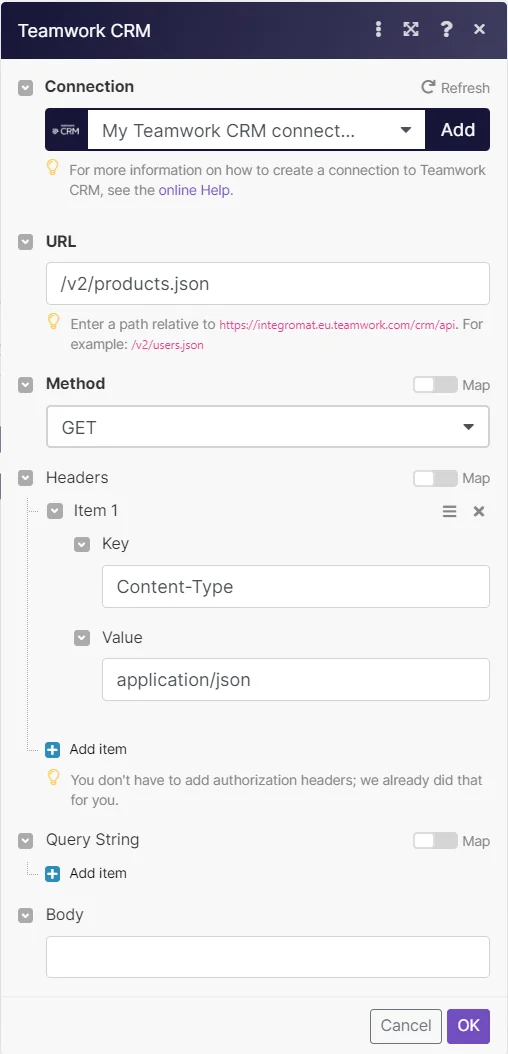
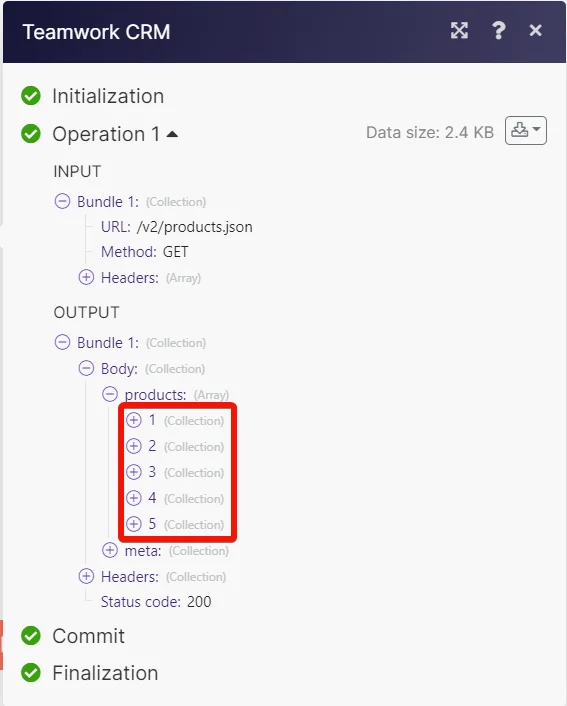
Matches of the search can be found in the module’s Output under Bundles > Body > products.
In our example, 5 products were returned:
Legacy article, imported from the original Boost.space knowledge base (/knowledge-base/applications/crm-and-sales-tools/teamwork-crm/).

