Jitbit

The Jitbit modules allow you to monitor, create, update, send, retrieve, and list the tickets, and users in your Jitbit account.
Getting Started with Jitbit
Prerequisites
- A Jitbit account – create an account at jitbit.com
The module dialog fields that are displayed in bold (in the Boost.space Integrator scenario, not in this documentation article) are mandatory!
Connect Jitbit to Boost.space Integrator
1. Go toBoost.space Integrator and open the Jitbit module’s Create a connection dialog.
2. In the Connection name field, enter a name for the connection.
3. In the Username and Password fields, enter your Jitbit account’s user credentials.
4. In the Subdomain field, enter your account’s domain name. For example, if your Jitbit account’s URL address is https://www.xyz.jitbit.com, then your subdomain is xyz.
5. Click Continue.
The connection has been established.
Tickets
Watch Tickets
Triggers when new ticket is created.
Connection
Establish a connection to your Jitbit account.
Limit
Set the maximum number of tickets Boost.space Integrator should return during one execution cycle.
Create a Ticket
Creates a new ticket.
Connection
Establish a connection to your Jitbit account.
Category ID
Select or map the Category ID of the ticket you want to create.
Subject
Enter (map) the subject line of the ticket.
Body
Enter (map) the body text of the ticket.
Priority
Select or map the priority of the ticket:
-
Critical
-
High
-
Medium
-
Low
User ID
Select or map the User ID who is submitting the ticket.
Tags
Add the tags for the ticket. For example, new.
Get a Ticket
Returns information about the selected ticket.
Connection
Establish a connection to your Jitbit account.
Ticket ID
Select or map the Ticket ID whose details you want to retrieve.
Update a Ticket
Updates an existing ticket.
Connection
Establish a connection to your Jitbit account.
Ticket ID
Select or map the Ticket ID whose details you want to retrieve.
Subject
Enter (map) a subject line of the ticket.
Body
Enter (map) the body text of the ticket.
Category ID
Select or map the Category ID of the ticket.
Priority
Select or map the priority of the ticket:
-
Critical
-
High
-
Medium
-
Low
Date
Enter (map) the date on which the ticket is created.
Due Date
Enter (map) the date by when the ticket must be resolved.
Technician’s ID
Select or map the Technician ID assigned to the ticket.
User ID
Select or map the User ID who created the ticket.
Time Spent In Seconds
Enter (map) the time spent working on the ticket in seconds.
Tags
Add the tags for the ticket. For example, new.
Search Tickets
Searches for tickets or lists them all.
Connection
Establish a connection to your Jitbit account.
Mode
Select or map the mode of the ticket you are searching for:
-
All
-
Unanswered
-
Unclosed
-
Handle by Me
Category ID
Select or map the Category ID of the ticket you are searching for. For example, General Sales.
Section ID
Enter (map) the Section ID to which the ticket you are searching for belongs.
Status
Select or map the status of the tickets you are searching for:
-
Critical
-
High
-
Low
-
Medium
Ticket Creator
Select or map the user to search the tickets that were created by the user.
Company
Select or map the company to search for the tickets that belong to the company.
Ticket Performer
Select or map the user to search the tickets the user is working on.
Tag Name
Enter (map) the tags separated by a comma to search the tickets that match the specified tags.
Creation Date (From)
Enter (map) the date to search the tickets that were created on or after the specified date.
Creation Date (To)
Enter (map) the date to search the tickets that were Created on or until the specified date.
Last Updated Date (From)
Enter (map) the date to search the tickets that were updated on or after the specified date.
Last Updated Date (To)
Enter (map) the date to search the tickets that were updated on or until the specified date.
Due in Days
Enter (map) the number of days to search the tickets that are due in the specified days.
Include Custom Fields
Select whether you want to include the custom fields of the tickets in the result.
Limit
Set the maximum number of tickets Boost.space Integrator should return during one execution cycle.
Users
Watch Users
Triggers when new users are created. Requires “helpdesk-administrator” permissions.
Connection
Establish a connection to your Jitbit account.
Limit
Set the maximum number of users Boost.space Integrator should return during one execution cycle.
Create a User
Creates a new user. Requires “helpdesk-administrator” permissions.
Connection
Establish a connection to your Jitbit account.
Email Address
Enter (map) the user’s email address.
Username
Enter (map) the user’s username.
Password
Enter (map) the user’s assigned password.
First Name
Enter (map) the user’s first name.
Last Name
Enter (map) the user’s last name.
Phone
Enter (map) the user’s phone number.
Location
Enter (map) the user’s address.
Company
Enter (map) the user’s company name. If the specified company name does not exist, a new company is created.
Department
Enter (map) the department name to which the user belongs to. If the specified department name does not exist, a new department is created.
Send Welcome Mail
Select whether you want to send a welcome mail to the user after successfully creating the user.
Get a User
Returns information about selected user. Requires “administrator” or “technician” permissions.
Connection
Establish a connection to your Jitbit account.
User ID
Select or map the User ID whose details you want to retrieve.
Update a User
Updates an existing user. Requires “administrator” or “technician” permissions.
Connection
Establish a connection to your Jitbit account.
User ID
Select or map the User ID whose details you want to update.
Email Address
Enter (map) the user’s email address.
Password
Enter (map) the user’s password.
Username
Enter (map) the user’s username.
First Name
Enter (map) the user’s first name.
Last Name
Enter (map) the user’s last name.
Notes
Enter (map) the additional information about the user.
Phone
Enter (map) the user’s phone number.
Location
Enter (map) the user’s address.
Department
Enter (map) the department name to which the user belongs to. If the specified department name does not exist, a new department is created.
Disabled
Select whether the user is disabled.
Company
Enter (map) the user’s company name. If the specified company name does not exist, a new company is created.
Enable Email Notifications
Select whether you want to enable the email notification for the user.
Search Users
Searches for users or lists them all. Requires “helpdesk-administrator” permissions.
Connection
Establish a connection to your Jitbit account.
List Mode
Select the list whose users you were searching for:
-
All
-
Admins
-
Disabled
-
Regular
-
Technicians
Department ID
Enter (map) the Department ID to search the users that match the specified department.
Company ID
Select or map the Company ID whose users you were searching for.
Limit
Set the maximum number of users Boost.space Integrator should return during one execution cycle.
Other
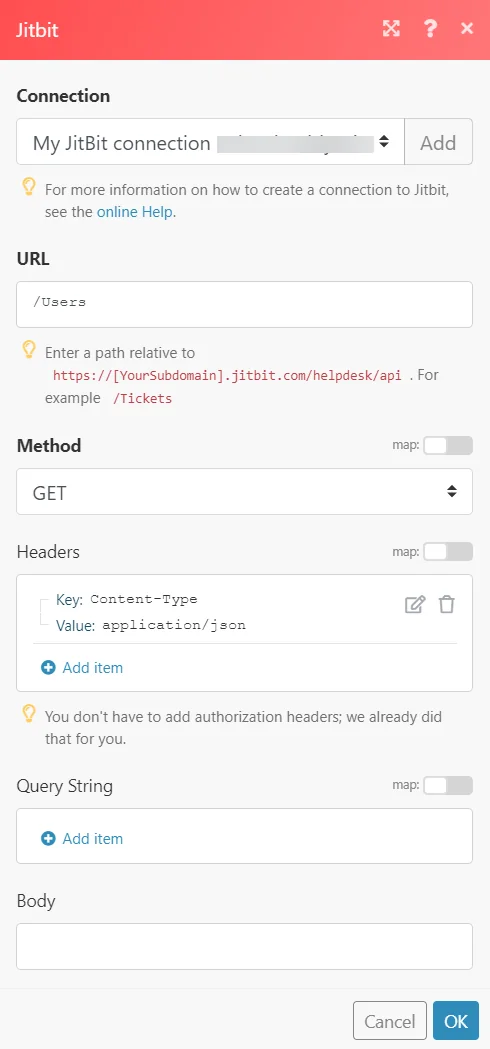
Make an API Call
Performs an arbitrary authorized API call.
Connection
Establish a connection to your Jitbit account.
URL
Enter a path relative to https://[YourSubdomain].jitbit.com/helpdesk/api. For example: /Tickets
For the list of available endpoints, refer to the Jitbit API Documentation.
Method
Select the HTTP method you want to use:
GET
to retrieve information for an entry.
POST
to create a new entry.
PUT
to update/replace an existing entry.
PATCH
to make a partial entry update.
DELETE
to delete an entry.
Headers
Enter the desired request headers. You don’t have to add authorization headers; we already did that for you.
Query String
Enter the request query string.
Body
Enter the body content for your API call.
Example of Use – List Users
The following API call returns all the users from your Jitbit account:
URL:
/Users
Method:
GET
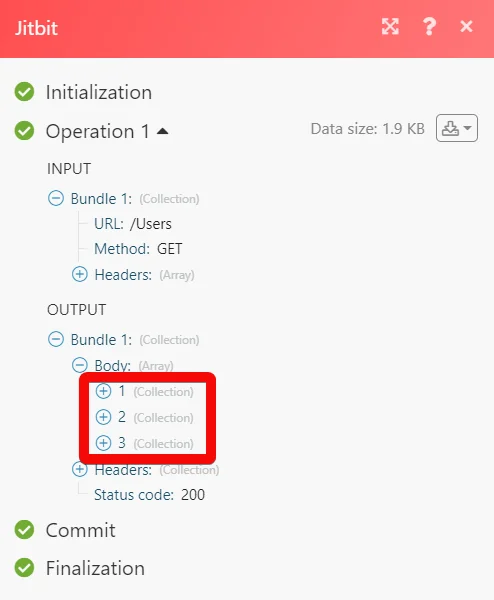
Matches of the search can be found in the module’s Output under Bundle > Body.
In our example, 3 users were returned:
Legacy article, imported from the original Boost.space knowledge base (/knowledge-base/applications/customer-support/jitbit/).

