Recruitee
The Recruitee modules allow you to watch, create, update, list, retrieve, and delete the candidates, notes, offers, and tags in your Recruitee account.
Getting Started with Recruitee
Prerequisites
- A Recruitee account
In order to use Recruitee with Boost.space Integrator, it is necessary to have a Recruitee account. If you do not have one, you can create a Recruitee account at auth.recruitee.com/sign-up.
The module dialog fields that are displayed in bold (in the Boost.space Integrator scenario, not in this documentation article) are mandatory!
Connecting Recruitee to Boost.space Integrator
To connect your Recruitee account to Boost.space Integrator you need to obtain the API Token from your Recruitee account and insert it in the Create a connection dialog in the Boost.space Integrator module.
-
Log in to your Recruitee account.
-
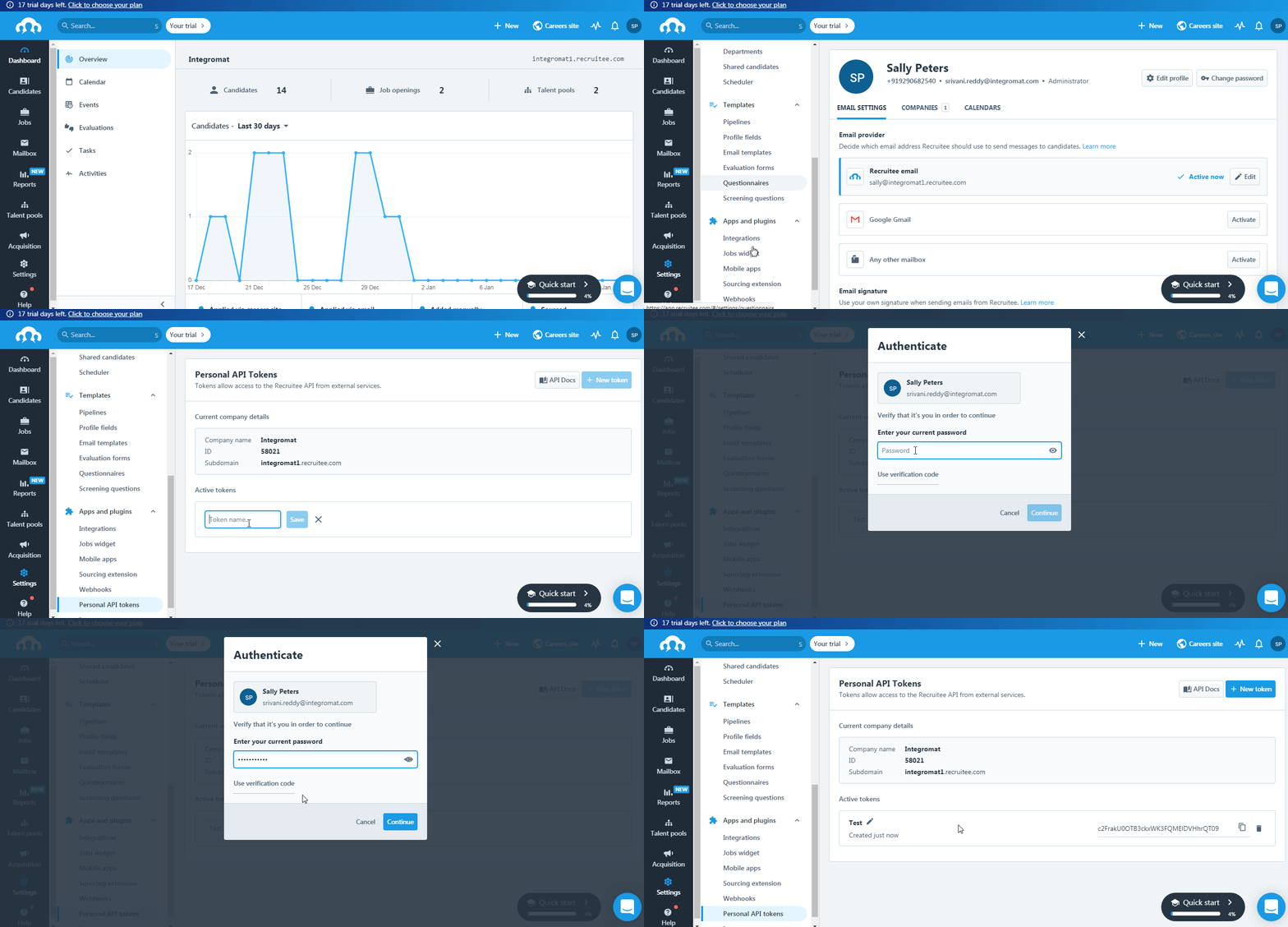
Click Settings > Personal API Tokens > New Token.
-
Enter a name for the token and click Save.
-
Authenticate by entering your Recruitee’s account password and click Continue.
-
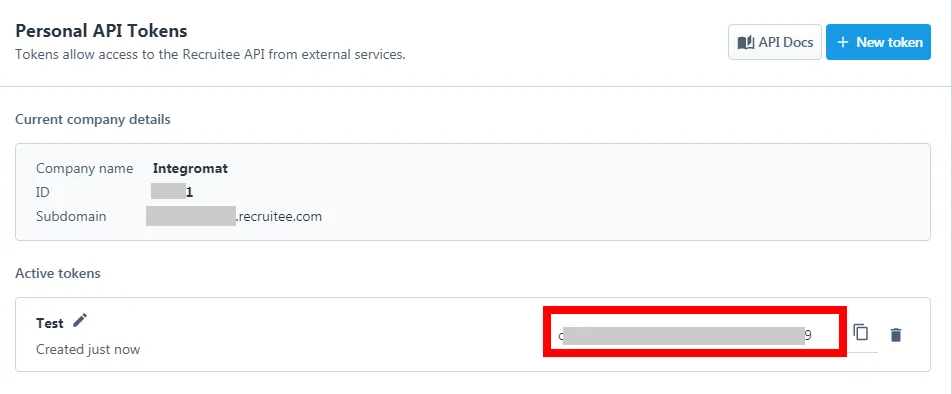
Copy the Access Token to your clipboard.
-

Go to Boost.space Integrator and open the Recruitee module’s Create a connection dialog.
-
In the Connection name field, enter a name for the connection.
-
In the API Token field, enter the token details copied in step 5.
-
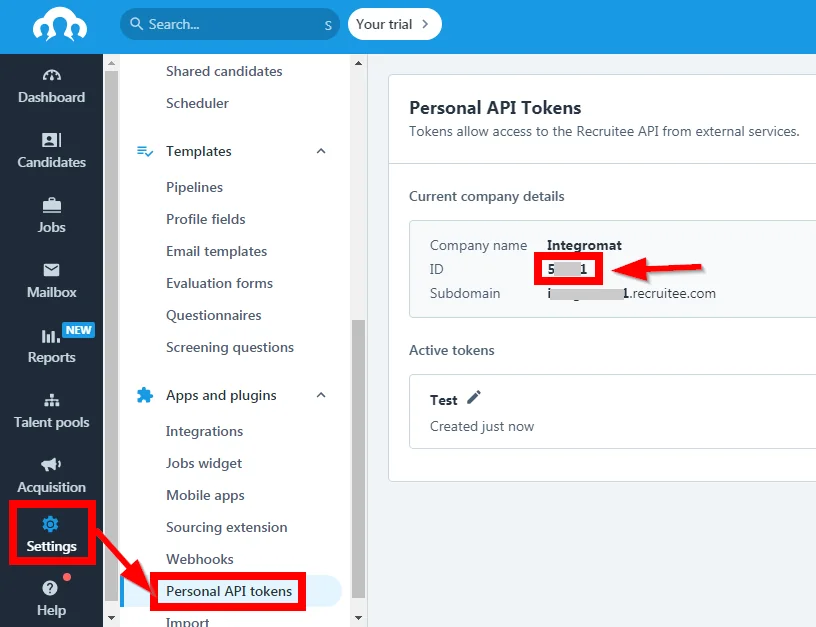
In the Company ID field, enter your company ID with which you want to establish a connection. You can find the Company ID at Settings > Personal API Tokens.
-
Click Continue.
The connection has been established.
Candidates
Watch Candidates
Triggers when a new candidate is created.
Connection
Establish a connection to your Recruitee account.
Limit
Set the maximum number of new candidates Boost.space Integrator should return during one scenario execution cycle.
Watch Requalified Candidates
Triggers when a candidate has been requalified.
Connection
Establish a connection to your Recruitee account.
Limit
Set the maximum number of requalified candidates Boost.space Integrator should return during one scenario execution cycle.
Watch Disqualified Candidates
Triggers when a candidate has been qualified.
Connection
Establish a connection to your Recruitee account.
Limit
Set the maximum number of disqualified candidates Boost.space Integrator should return during one scenario execution cycle.
List Candidates
Gets all candidates.
Connection
Establish a connection to your Recruitee account.
Limit
Set the maximum number of candidates Boost.space Integrator should return during one scenario execution cycle.
Created After
Enter the date to list the candidates created after the specified date. See the list of supported date and time formats.
Show Disqualified Only
Select whether you want to list only the disqualified candidates.
Show Qualified Only
Select whether you want to list only the qualified candidates.
Candidate IDs
Select the Candidate IDs whose details you want to list.
Offer ID
Select the Offer ID to list the candidates associated with the specified offer.
Query
Enter a keyword or phrase to list the candidates based on the specified query.
Sort
Select the option to sort the candidates:
-
By Date
-
By Last Message
Get a Candidate
Gets a candidate.
Connection
Establish a connection to your Recruitee account.
Candidate ID
Select the Candidate ID whose details you want to retrieve.
Create a Candidate
Creates a candidate.
Connection
Establish a connection to your Recruitee account.
Name
Enter the candidate’s name.
Remote Photo URL
Enter the URL address to the candidate’s photo.
Remote CV URL
Enter the URL address to the candidate’s resume or CV.
Emails
Add the candidate’s email address. You can add multiple email addresses.
Phones
Add the candidate’s phone number. You can add multiple phone numbers.
Links
Add the URL addresses to candidate’s related links such as portfolio, work samples, cover letter. You can add multiple links.
Social Links
Add the URL address to the candidate’s social links such as LinkedIn. You can add multiple social links.
Update a Candidate
Updates a candidate.
Connection
Establish a connection to your Recruitee account.
Candidate ID
Select the Candidate ID whose details you want to update.
Name
Enter the candidate’s name.
Remote Photo URL
Enter the URL address to the candidate’s photo.
Remote CV URL
Enter the URL address to the candidate’s resume or CV.
Emails
Add the candidate’s email address. You can add multiple email addresses.
Phones
Add the candidate’s phone number. You can add multiple phone numbers.
Links
Add the URL addresses to candidate’s related links such as portfolio, work samples, cover letter. You can add multiple links.
Social Links
Add the URL address to the candidate’s social links such as LinkedIn. You can add multiple social links.
Delete a Candidate
Deletes a candidate.
Connection
Establish a connection to your Recruitee account.
Candidate ID
Select the Candidate ID you want to delete.
Tags
List Tags
Gets all company tags.
Connection
Establish a connection to your Recruitee account.
Limit
Set the maximum number of tags Boost.space Integrator should return during one scenario execution cycle.
Query
Enter a keyword or phrase to list the tags based on the specified query.
Sort By
Select the option to sort the tags:
-
Name
-
Taggings Count
Sort Order
Select the order in which you want to list the tags:
-
ASC
-
DESC
Create a Tag
Creates a candidate tag.
Connection
Establish a connection to your Recruitee account.
Candidate ID
Select the Candidate ID whose tags you want to create.
Tag
Enter the tag name.
Update a Tag
Updates a company tag.
Connection
Establish a connection to your Recruitee account.
Tag ID
Select the Tag ID you want to update.
Name
Enter a new name for the tag.
Delete a Tag
Deletes a candidate tag.
Connection
Establish a connection to your Recruitee account.
Candidate ID
Select the Candidate ID whose tags you want to delete.
Tag ID
Select the Tag ID you want to delete.
Notes
List Notes
Get all notes.
Connection
Establish a connection to your Recruitee account.
Notes for
Select the option for which you want to list the notes:
-
Candidate
-
Offer
Candidate ID
Select the Candidate ID whose notes you want to list.
Offer ID
Select the Offer ID whose notes you want to list.
Limit
Set the maximum number of notes Boost.space Integrator should return during one scenario execution cycle.
Create Note
Creates a note.
Connection
Establish a connection to your Recruitee account.
Notes for
Select the option for which you want to create the notes:
-
Candidate
-
Offer
Candidate ID
Select the Candidate ID for whom you want to create the note.
Offer ID
Select the Offer ID to which you add a note.
Body
Enter the note text.
Visibility Level
Select the visibility for the note:
-
Public
-
Protected
-
Private
Update Note
Updates a note.
Connection
Establish a connection to your Recruitee account.
Notes for
Select the option whose notes you want to update:
-
Candidate
-
Offer
Candidate ID
Select the Candidate ID whose note you want to update.
Offer ID
Select the Offer ID whose note you want to update.
Note ID
Enter the Note ID you want to update.
Body
Enter the note text.
Attachment ID
Add the Attachment IDs of the note. For example, images, docs.
Visibility Level
Select the visibility for the note:
-
Public
-
Protected
-
Private
Delete Note
Deletes a note.
Connection
Establish a connection to your Recruitee account.
Notes for
Select the option whose notes you want to delete:
-
Candidate
-
Offer
Candidate ID
Select the Candidate ID whose note you want to delete.
Offer ID
Select the Offer ID whose note you want to delete.
Note ID
Select the Note ID you want to delete.
Offers
List Offers
Get all offers.
Connection
Establish a connection to your Recruitee account.
Limit
Set the maximum number of offers Boost.space Integrator should return during one scenario execution cycle.
Kind
Select the kind of offers you want to list:
-
Jobs
-
Talent Pool
Scope
Select the offer scope you want to list:
-
Archived
-
Active
-
Not Archived
View Mode
Select the offer view mode you want to list:
-
Default
-
Brief
Get an Offer
Gets an offer.
Connection
Establish a connection to your Recruitee account.
Offer ID
Select the Offer ID whose details you want to retrieve.
Create an Offer
Creates an offer.
Connection
Establish a connection to your Recruitee account.
Title
Enter the position for which you want to create the offer.
Description
Enter the details of the offer.
Requirements
Enter the offer requirements. For example, the job requires travel.
Country Code
Select the country in which the offer is being prepared for.
City
Enter the offer’s city name.
Postal Code
Enter the area postal code.
State Code
Enter the offer’s state code.
Kind
Select the offer type:
-
Job
-
Talent Pool
Department
Select the offer’s department name. For example, Sales.
Remote
Select whether this offer is for a remote position.
Update an Offer
Updates an offer.
Connection
Establish a connection to your Recruitee account.
Offer ID
Select the Offer ID whose details you want to update.
Title
Enter the position for which you want to create the offer.
Description
Enter the details of the offer.
Requirements
Enter the offer requirements. For example, the job requires travel.
Country Code
Select the country in which the offer is being prepared for.
City
Enter the offer’s city name.
Postal Code
Enter the area postal code.
State Code
Enter the offer’s state code.
Kind
Select the offer type:
-
Job
-
Talent Pool
Department
Select the offer’s department name. For example, Sales.
Remote
Select whether this offer is for a remote position.
Delete an Offer
Deletes an offer.
Connection
Establish a connection to your Recruitee account.
Offer ID
Select the Offer ID you want to delete.
Other
Make an API Call
Performs an arbitrary authorized API call.
Connection
Establish a connection to your Recruitee account.
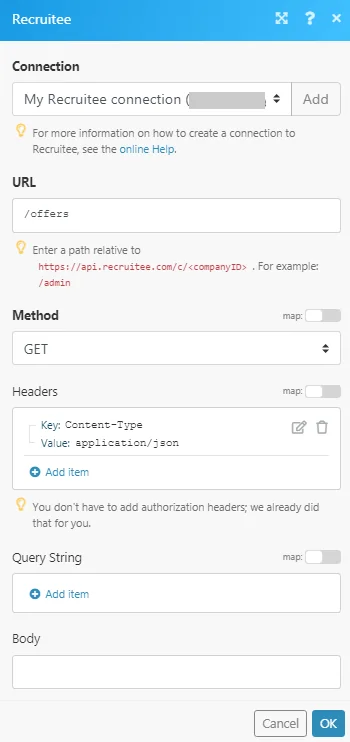
URL
Enter a path relative to https://api.recruitee.com/c/<companyID>. For example: /admin
For the list of available endpoints, refer to the Recruitee API Documentation.
Method
Select the HTTP method you want to use:
GET
to retrieve information for an entry.
POST
to create a new entry.
PUT
to update/replace an existing entry.
PATCH
to make a partial entry update.
DELETE
to delete an entry.
Headers
Enter the desired request headers. You don’t have to add authorization headers; we already did that for you.
Query String
Enter the request query string.
Body
Enter the body content for your API call.
Example of Use – List Offers
The following API call returns all the offers from your Recruitee account:
URL:
/offers
Method:
GET
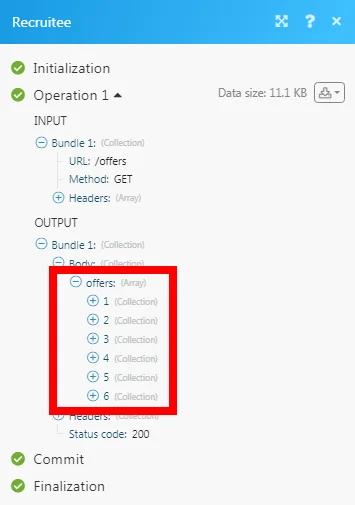
Matches of the search can be found in the module’s Output under Bundle > Body > offers.
In our example, 6 offers were returned:
Legacy article, imported from the original Boost.space knowledge base (/knowledge-base/applications/hr-management/recruitee/).

