Terraform Cloud
With Terraform Cloud modules in Boost.space Integrator, you can:
- watch, create, retrieve, list, and cancel runs
To get started with Terraform Cloud, create an account at terraform.io
Connect Terraform Cloud to Boost.space Integrator
To connect Terraform Cloud app, you need to obtain the API Key values from your Terraform Cloud account and insert them in the Terraform Cloud module Boost.space Integrator.
-
Log in to your Terraform Cloud account.
-
Click Profile > User Settings > Tokens > Create an API Token.
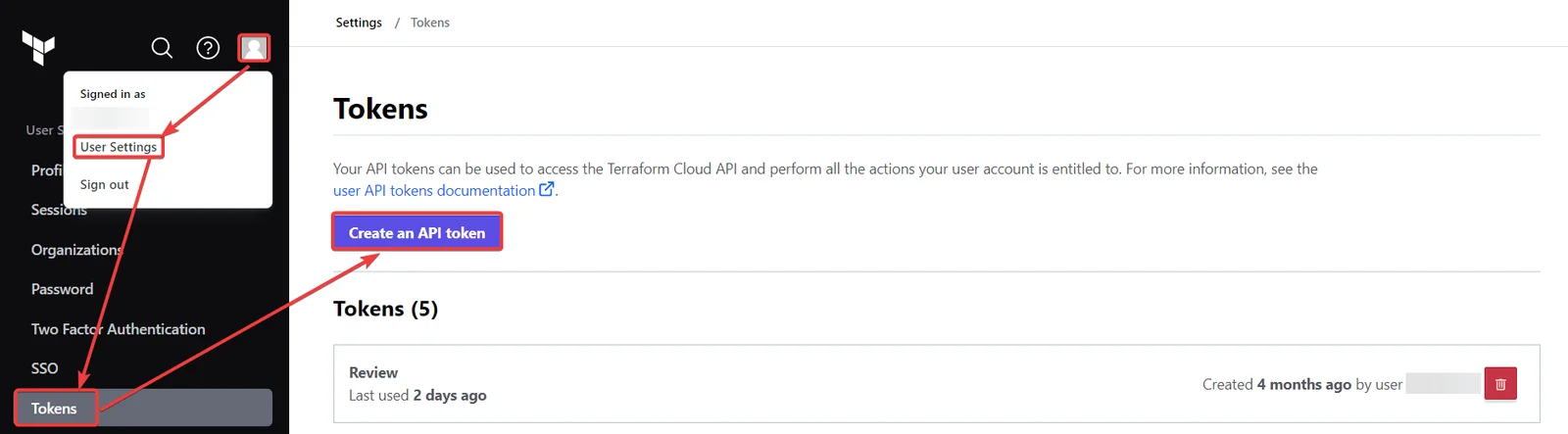
-
Enter a description for the API token and click Create API token. Copy the API token to a safe place.
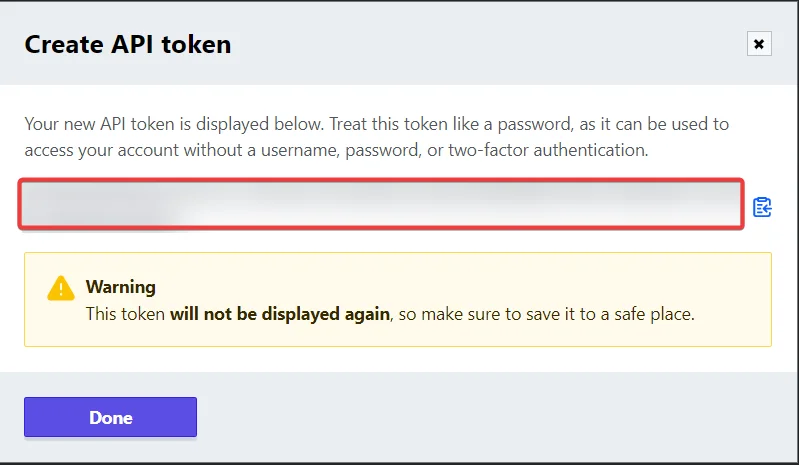
-
Log in to your Boost.space Integrator account, insert a Terraform Cloud module scenario, and click the Add button next to the Connection field.
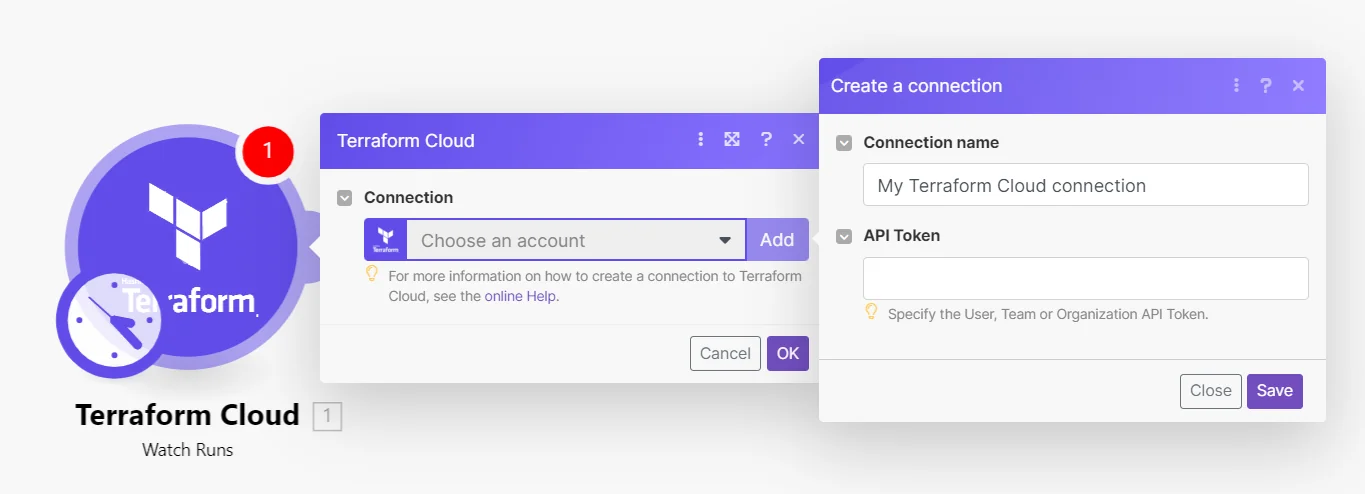
-
In the Connection name field, enter a name for the connection.
-
In the API Key field, enter the details copied in step 3 and click Save.
You have successfully established the connection. You can now edit your Scenario and add more Terraform Cloud modules. If your connection needs reauthorization at any point, follow the connection renewal steps here.
For module descriptions, refer to Terraform cloud API Documentation.
Runs
You can watch, create, retrieve, list, and cancel runs using the following modules.
Watch Runs
Triggers when a new workspace run is created.
Connection
Establish a connection to your Terraform Cloud account.
Organization ID
Select or map the Organization ID whose runs you want to watch.
Workspace ID
Select or map the Workspace ID whose runs you want to watch.
Limit
Set the maximum number of runs Boost.space Integrator will return during one execution cycle. The default value is 10.
Create a Run
Creates a run. It can be accessed with a User Token or a Team Token.
Connection
Establish a connection to your Terraform Cloud account.
Organization ID
Select or map the Organization ID whose run you want to create.
Workspace ID
Select or map the Workspace ID whose run you want to create.
Configuration Version ID
Select or map the Configuration Version ID whose run you want to create.
Auto-Apply
Select whether to apply changes when a Terraform plan is successful automatically.
Is Destroy
Select whether this plan is a destroy plan that will destroy all provisioned resources.
Message
Enter the message to be associated with this run.
Refresh
Select whether to refresh the state before a plan.
Refresh Only
Select whether this run should refresh the state without modifying any resources.
Replace Addresses
Enter an optional list of resource addresses to be passed to the -replace flag.
Target Addresses
Enter an optional list of resource addresses to be passed to the -target flag.
Variables
Enter the details of the variables:
For more information, refer to Terraform Cloud Plan Only API documentation.
Variable Key
Enter the variable key.
Variable Value
Enter the variable value.
Plan Only
Select whether this plan is a speculative, plan-only run that Terraform cannot apply. For more information, refer to Terraform Cloud Plan Only API documentation.
Terraform Version
Enter a valid Terraform version to use in this run. This is required for Plan-only runs.
Allow Empty Apply
Select whether the Terraform can apply the run even when the plan contains no changes.
Get a Run
Gets a run.
Connection
Establish a connection to your Terraform Cloud account.
Organization ID
Select or map the Organization ID whose details of run you want to retrieve
Workspace ID
Select or map the Workspace ID whose details of the run you want to retrieve.
Run ID
Select or map the Run ID whose details you want to retrieve.
List Runs
Gets all runs.
Connection
Establish a connection to your Terraform Cloud account.
Organization ID
Select or map the Organization ID whose runs you want to list.
Workspace ID
Select or map the Workspace ID whose runs you want to list.
Limit
Set the maximum number of runs Boost.space Integrator will return during one execution cycle. The default value is 10.
Cancel a Run
Cancels a run.
Connection
Establish a connection to your Terraform Cloud account.
Organization ID
Select or map the Organization ID whose run you want to cancel.
Workspace ID
Select or map the Workspace ID whose run you want to cancel.
Run ID
Select or map the Run ID you want to cancel.
Other
You can call APIs using the following module.
Make an API Call
Performs an arbitrary authorized API call.
For the list of available endpoints, refer to the Terraform Cloud API documentation.
Connection
Establish a connection to your Terraform Cloud account.
URL
Enter a path relative to https://app.terraform.io. For example: /api/v2/organizations.
Method
GET
to retrieve information for an entry.
POST
to create a new entry.
PUT
to update/replace an existing entry.
PATCH
to make a partial entry update.
DELETE
to delete an entry.
Headers
Enter the desired request headers. You don’t have to add authorization headers; we already did that for you.
Query String
Enter the request query string.
Body
Enter the body content for your API call.
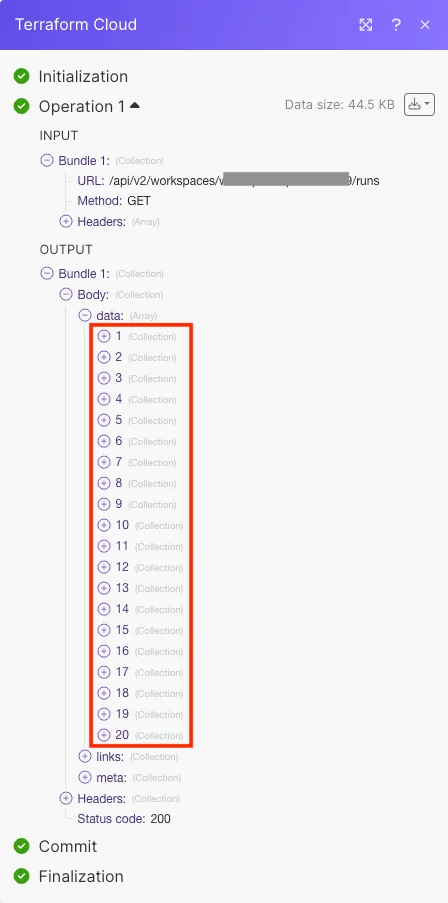
Example of use – List Runs
The following API call returns all runs from the workspace of your account.
URL: /api/v2/workspaces/:workspaceID/runs
Method: GET
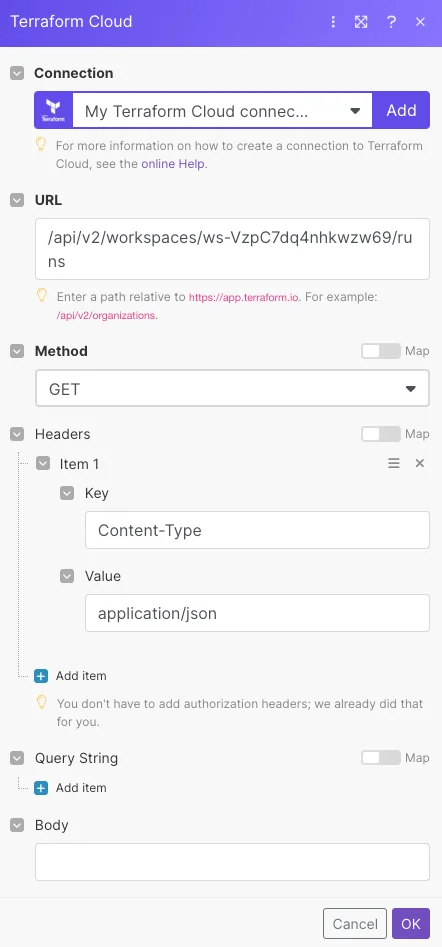
Matches of the search can be found in the module’s Output under Bundle > Body > data.
In our example, 20 runs were returned:
Legacy article, imported from the original Boost.space knowledge base (/knowledge-base/applications/it-and-development/terraform-cloud/).

