ActiveTrail
Any references to third-party products or services do not constitute Boost.space Product Documentation nor do they create any contractual obligations. This material is for informational purposes only and is subject to change without notice.
Boost.space does not warrant the availability, accuracy, reliability, completeness, or usefulness of any information regarding the subject of third-party services or systems.
The ActiveTrail modules allow you to watch, create, update, get, list, and/or remove the groups, members, contacts, and campaigns in your ActiveTrail account.
Prerequisites
- An ActiveTrail account
In order to use ActiveTrail with Boost.space Integrator, it is necessary to have a ActiveTrail account. If you do not have one, you can create a ActiveTrail account at https://app.activetrail.com/Public/Login.aspx?.
The module dialog fields that are displayed in bold (in the Boost.space Integrator scenario, not in this documentation article) are mandatory!
Connecting ActiveTrail to Boost.space Integrator
To connect your ActiveTrail account to Boost.space Integrator you need to obtain the API Key.
-
Log into your ActiveTrail account.
-
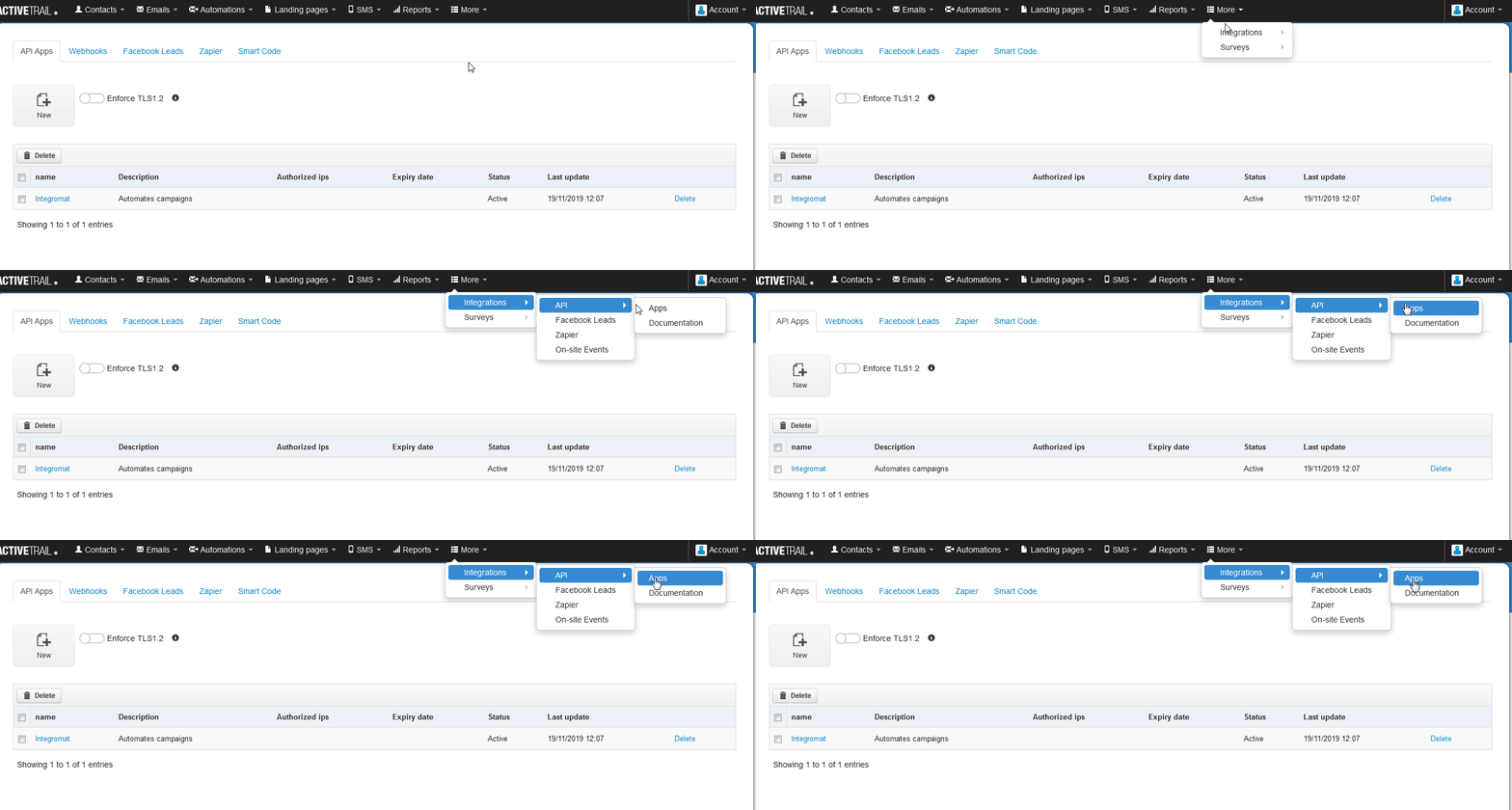
Click More > Integrations > API > Apps.
-

Click New and enter the details for the app. Click Save and copy the Access Token.
-
Go to Boost.space Integrator and open the ActiveTrail module’s Create a connection dialog.
-
In the API Key field, enter the Access Token copied in the step 3.
-
Click Continue.
The connection has been established.
Triggers for this module
Watch Campaigns
Triggers an operation when a new campaign is added to the account.
Connection
Establish a connection to your ActiveTrail account.
Limit
The maximum number of transactions Boost.space Integrator should return during one scenario execution cycle.
Search Text
Enter the keywords based on which triggers will be sent when a new campaign is added to the account.
From Date
Enter the date from which you want to watch the campaigns.
To Date
Enter the date until which you want to watch the campaigns.
Watch for contact unsubscribed
Triggers when a contact unsubscribes.
Webhook Name
Enter the name for webhook.
Connection
Establish a connection to your ActiveTrail account.
Webhook Name
Enter the webhook name that appears to the end user.
Watch for Automation Step
Triggers when a contact moves a step inside an automation.
Webhook Name
Enter the name for webhook.
Connection
Establish a connection to your ActiveTrail account.
Webhook Name
Enter the webhook name that appears to the end user.
Watch for Contact Added to a Group
Triggers when a contact is added to a group.
Webhook Name
Enter the name for webhook.
Connection
Establish a connection to your ActiveTrail account.
Webhook Name
Enter the webhook name that appears to the end user.
Actions
Add a Member to a Group
Updates a member or creates a new member in a group and sends a campaign if provided.
Connection
Establish a connection to your ActiveTrail account.
Group ID
Select the Group ID to which you want to add the member.
Email address
Enter the email address of the member.
Mobile Number
Enter the mobile number of the member.
Set contact to ‘Do not contact’ status?
Select Yes if you want the status of the member as Do not contact:
-
Yes
-
No
-
Not defined
Create/Update Contact
Creates a new contact or updates an existing contact.
Connection
Establish a connection to your ActiveTrail account.
Enter the email address of the contact.
SMS
Enter the number to which the messages will be sent to the contact.
First Name
Enter the first name of the contact.
Last Name
Enter the last name of the contact.
Anniversary
Enter the wedding anniversary date of the customer.
Birthday
Enter the birth date of the customer.
City
Enter the city name of the customer.
Fax
Enter the fax details of the customer.
Phone 1
Enter the primary contact number of the customer.
Phone 2
Enter the secondary contact number of the customer.
Street
Enter the street name of the customer contact address.
Zip Code
Enter the zip code of the customer contact address.
ext1 to ext 25
Enter the extension number of the customer. You can enter up to 25 extension numbers.
date1 to date5
Enter the important dates for the customer. You can enter up to five dates.
num1 to num5
Enter the contact numbers of the customer. You can enter up to five numbers.
Set as ‘Do Not Mail?’
Select Yes if no email has to be sent to the customer:
-
Yes
-
No
-
Not defined
Is deleted
Select Yes if the customer has been deleted:
-
Yes
-
No
-
Not defined
Delete a Contact
Removes a contact.
Connection
Establish a connection to your ActiveTrail account.
ID
Enter the Contact ID you want to delete.
Get a Contact
Gets a contact.
Connection
Establish a connection to your ActiveTrail account.
ID
Enter the Contact ID whose details you want to retrieve.
Remove a Member from a Group
Removes a member from a group.
Connection
Establish a connection to your ActiveTrail account.
Group ID
Select the Group ID whose member you want to remove from the group.
Member ID
Enter the Member ID you want to remove from the group.
Send SMS
Sends a text message (SMS) to a contact.
Connection
Establish a connection to your ActiveTrail account.
Message name (will be shown in your account)
Enter a name for the message.
Sender name (will be shown in the SMS message title)
Enter the name that displays as title of the message.
Message contents
Enter the message text.
Mobile number
Enter the mobile number to which the message will be sent.
Add unsubscribe link?
Select if you want add a link for unsubscribing in the message.
Searches
List Contacts
Gets a list of contacts.
Connection
Establish a connection to your ActiveTrail account.
Limit
The maximum number of contacts Boost.space Integrator should return during one scenario execution cycle.
Search Text
Enter any information about the contacts you want to list.
List Groups
Select a specific group in your account.
Connection
Establish a connection to your ActiveTrail account.
Limit
The maximum number of groups Boost.space Integrator should return during one scenario execution cycle.
Search Text
Enter any information about the group which you want to list.
Legacy article, imported from the original Boost.space knowledge base (/knowledge-base/applications/marketing/activetrail/).

