Zendesk Sell
With Zendesk Sell modules in Boost.space Integrator, you can watch, create, update, search, retrieve, and delete:
-
contacts
-
deals
-
deal sources
-
lead sources
-
notes
-
products
-
tasks
-
users
To get started with Zendesk Sell, create an account at Zendesk.com.
Connect Zendesk Sell to Boost.space Integrator
To connect Zendesk Sell app, you need to obtain the OAuth client credentials.
-
Log in to your Zendesk account.
-
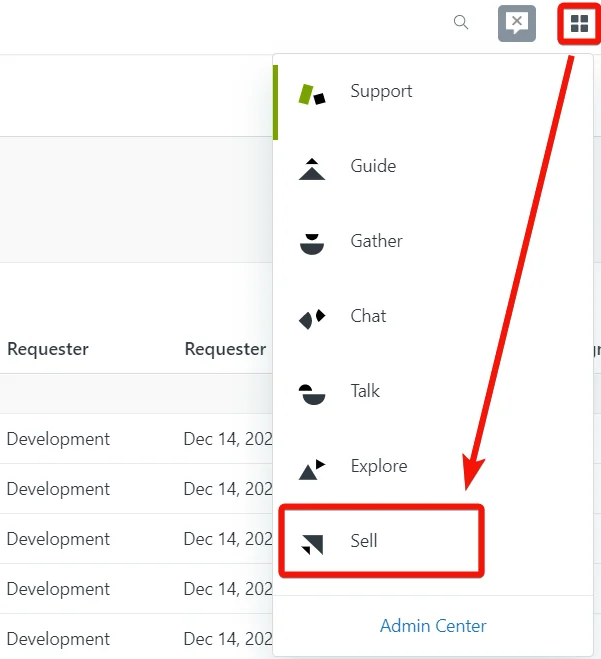
Click apps icon > Sell.
-
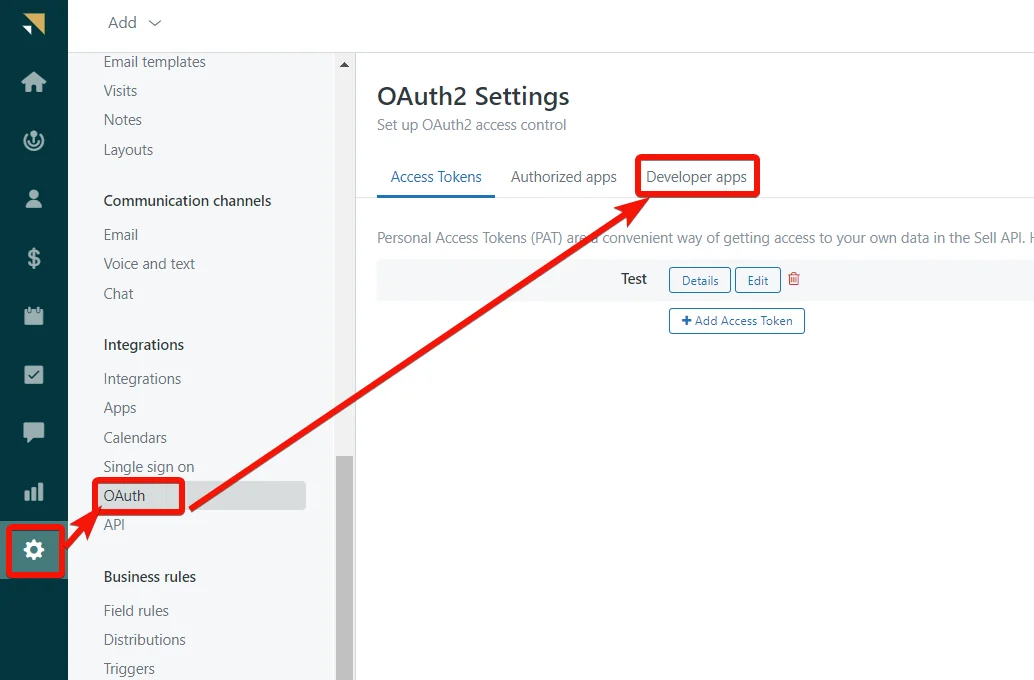
Click Settings > OAuth > Developer Apps.
-
Click Add Developer App and enter the following details as provided in the table.
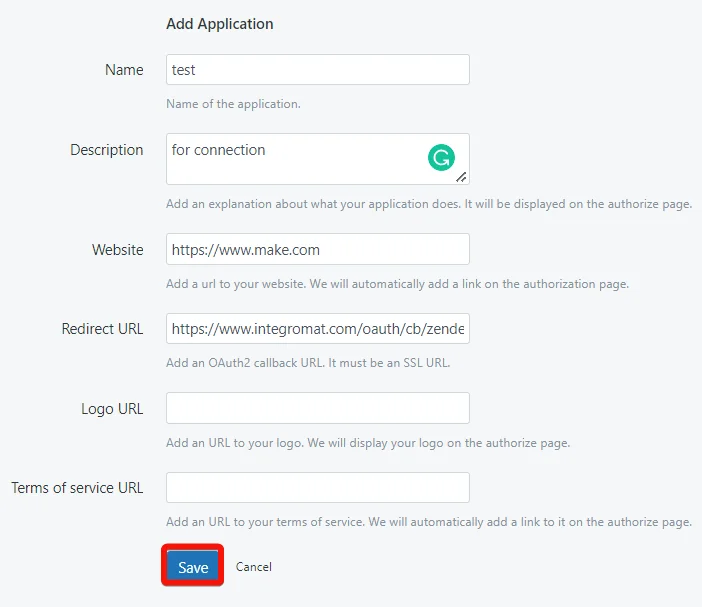
Name
Enter the app name. For example,
My app.Description
Enter the app details.
Website
Enter your website URL address.
Redirect URI
Enter the redirect URI as
https://integrator.boost.space/oauth/cb/zendesk-sell.Logo URL
Enter your app logo URL address.
Terms of service URL
Enter the URL address to your terms of service. Zendesk will automatically add a link to it on the authorization page.
-
Click Save. The app gets created.
-
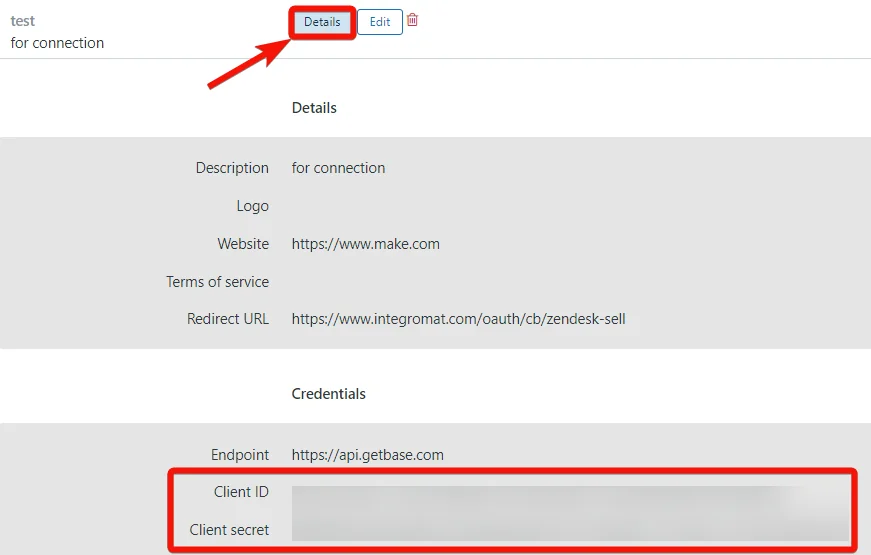
Click Details against the app name and copy the Client ID and Client Secret values.
-

In your Boost.space Integrator account, insert a Zendesk Sell module in your scenario and click the Add button next to the Connection field.
-
In the Connection name field, enter a name for the connection.
-
In the Client ID and Client Secret fields, enter the details copied in step 6 and click Save.
-
Confirm the access by clicking Authorize.
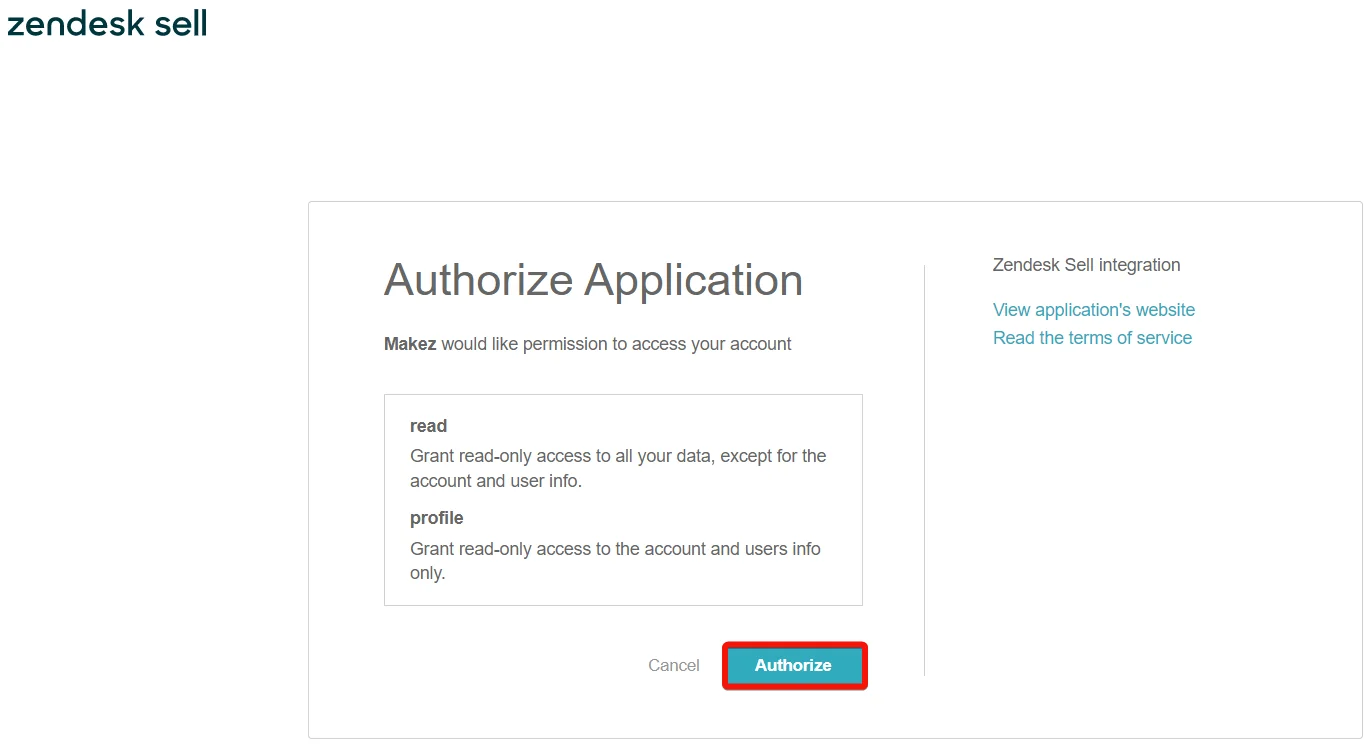
You have successfully connected the Zendesk Sell app and can now build scenarios.
Product
You can watch, retrieve, search, create, update, and delete products using the following modules.
Watch Products
Triggers when a new product is created or updated.
Connection
Establish a connection to your Zendesk Sell account.
Event Type
Select the event types you want to watch. For example, Created.
If you select the Updated option, the module watches both created and updated products.
Limit
Set the maximum number of contacts Boost.space Integrator will return during one execution cycle.
Get a Product
Returns a product.
Connection
Establish a connection to your Zendesk Sell account.
Product ID
Select or map the Product ID whose details you want to retrieve.
Search Products
Returns all products from the catalog according to the parameters provided.
Connection
Establish a connection to your Zendesk Sell account.
Limit
Set the maximum number of contacts Boost.space Integrator will return during one execution cycle.
See Zendesk Sell Product API reference for entering the field values to search the contacts that match the specified value.
Create a Product
Creates a new product. Products can be created only by an account administrator.
Connection
Establish a connection to your Zendesk Sell account.
For field descriptions, see the Zendesk Sell Product API reference.
Update a Product
Updates product information. If the specified product does not exist, the request will return an error. Products can be modified only by an account administrator.
Connection
Establish a connection to your Zendesk Sell account.
Product ID
Select or map the Product ID whose details you want to update.
For field descriptions, see the Zendesk Sell Product API reference.
Delete a Product
Deletes a product.
Connection
Establish a connection to your Zendesk Sell account.
Product ID
Select or map the Product ID you want to delete.
Users
You can search for users by using the following module.
Search Users
Returns all users according to the parameters provided.
Connection
Establish a connection to your Zendesk Sell account.
Sort By
Select or map the option to sort the users. For example, name.
User IDs
Add the User ID whose details you want to search.
Name
Enter the user name to search for the users that match the specified name.
Enter the user email address to search the users that match the specified email.
Role
Select or map the role to search for users that match the specified role. For example, admin.
Role ID
Select the Role ID of the user to search for users that match the specified ID.
Status
Select or map the user account status you want to search. For example, active.
Confirmed
Select whether you want to search only the confirmed users.
Zendesk User IDs
Add a list of Zendesk User IDs to search for users that match the specified IDs.
If your Sell account is linked to a Zendesk account, the user will have a Zendesk User ID.
Identity Type
Select or map the option to search the users based on their identity type:
-
a person – an agent
-
integration: an internal system user
Limit
Set the maximum number of users Boost.space Integrator will return during one execution cycle.
Deal Sources
You can search, retrieve, create, update, and delete deal sources using the following modules.
Search Deal Sources
Returns all deal sources available to the user according to the parameters provided.
Connection
Establish a connection to your Zendesk Sell account.
Sort By
Select or map the option to sort the deal sources. For example, name.
IDs
Add the Deal Source IDs whose details you want to search.
Name
Enter the deal source to whose details you want to search.
Limit
Set the maximum number of contacts Boost.space Integrator will return during one execution cycle.
Get a Deal Source
Returns a single source.
Connection
Establish a connection to your Zendesk Sell account.
ID
Select or map Deal Source ID whose details you want to retrieve.
Create a Deal Source
Creates a new deal source.
Connection
Establish a connection to your Zendesk Sell account.
Name
Enter a name for the deal source. For example, word of mouth.
Update a Deal Source
Updates a source.
Connection
Establish a connection to your Zendesk Sell account.
ID
Select or map the Deal Source ID whose details you want to update.
Name
Enter a new name for the deal source.
Delete a Deal Source
Deletes a specified source.
Connection
Establish a connection to your Zendesk Sell account.
ID
Select or map the Deal Source ID you want to delete.
Lead Sources
You can search, retrieve, create, update, and delete the lead sources using the following module.
Search Lead Sources
Returns all lead sources available to the user according to the parameters provided.
Connection
Establish a connection to your Zendesk Sell account.
Sort By
Select or map the option to sort the lead sources. For example, name.
Lead Source ID
Add the Lead Source IDs whose details you want to search.
Name
Enter the lead source name whose details you want to search.
Limit
Set the maximum number of lead sources Boost.space Integrator will return during one execution cycle.
Get a Lead Source
Returns a single source.
Connection
Establish a connection to your Zendesk Sell account.
Lead Source ID
Select or map the Lead Source ID whose details you want to retrieve.
Create a Lead Source
Creates a new lead source.
Connection
Establish a connection to your Zendesk Sell account.
Name
Enter a name for the lead source. For example, website.
Update a Lead Source
Updates lead source information.
Connection
Establish a connection to your Zendesk Sell account.
Lead Source ID
Select or map the Lead Source ID whose details you want to update.
Name
Enter a new name for the lead source. For example, website.
Delete a Lead Source
Deletes an existing source.
Connection
Establish a connection to your Zendesk Sell account.
Lead Source ID
Select or map the Lead Source ID you want to delete.
Tasks
You can watch, search, create, retrieve, update, and delete tasks using the following module.
Watch Tasks
Triggers when a new task is created or updated.
Connection
Establish a connection to your Zendesk Sell account.
Event Type
Select the event types you want to watch. For example, Created.
If you select the Updated option, the module watches both created and updated tasks.
Limit
Set the maximum number of tasks Boost.space Integrator will return during one execution cycle.
Search Tasks
Returns all tasks available to the user according to the parameters provided.
Connection
Establish a connection to your Zendesk Sell account.
Limit
Set the maximum number of tasks Boost.space Integrator will return during one execution cycle.
See the Zendesk Sell Task API reference for entering the field values to search the tasks that match the specified value.
Create a Task
Creates a new task. You can create either a floating task or create a related task and associate it with one of the resource types.
Connection
Establish a connection to your Zendesk Sell account.
For field descriptions, seethe Zendesk Sell Task API reference.
Get a Task
Returns a single task available to the user according to the unique task ID provided.
Connection
Establish a connection to your Zendesk Sell account.
Task ID
Select or map the Task ID whose details you want to retrieve.
Update a Task
Updates task information.
Connection
Establish a connection to your Zendesk Sell account.
Task ID
Select or map the Task ID whose details you want to update.
For field descriptions, see the Zendesk Sell API reference.
Delete a Task
Deletes an existing task. If the specified task does not exist, this query will return an error. The operation cannot be undone.
Connection
Establish a connection to your Zendesk Sell account.
Task ID
Select or map the Task ID you want to delete.
Deals
You can watch, search, retrieve, create, update, and delete the deals using the following modules.
Watch Deals
Triggers when a new deal is created or updated.
Connection
Establish a connection to your Zendesk Sell account.
Limit
Set the maximum number of deals Boost.space Integrator will return during one execution cycle.
Watch Deals Enters New Stage
Triggers when a deal enters a new stage.
Connections
Establish a connection to your Zendesk Sell account.
Limit
Set the maximum number of deals Boost.space Integrator will return during one execution cycle.
Search Deals
Returns all deals available to the user according to the parameters provided.
Connections
Establish a connection to your Zendesk Sell account.
Limit
Set the maximum number of deals Boost.space Integrator will return during one execution cycle.
See the Zendesk Sell Deal API reference for entering the field values to search for the contacts that match the specified value.
Get a Deal
Returns a single deal.
Connection
Establish a connection to your Zendesk Sell account.
Deal ID
Select or map the Deal ID whose details you want to retreive.
Create a Deal
Creates a new deal.
Connection
Establish a connection to your Zendesk Sell account.
For field descriptions, see the Zendesk Sell Deal API reference.
Update a Deal
Updates deal information. If the specified deal does not exist, the request will return an error.
Connection
.Establish a connection to your Zendesk Sell account.
Deal ID
Select or map the Deal ID whose details you want to update.
For field descriptions, see the Zendesk Sell Deal API reference.
Delete a Deal
Deletes an existing deal and removes all the associated contacts from the deal in a single call. If the specified deal does not exist, the request will return an error. This operation cannot be undone.
Connection
Establish a connection to your Zendesk Sell account.
Deal ID
Select or map the Deal ID you want to delete.
Contacts
You can watch, search, retrieve, create, and delete contacts using the following modules.
Watch Contacts
Triggers when a new contact is created or updated.
Connection
Establish a connection to your Zendesk Sell account.
Event Type
Select the event types you want to watch. For example, Created.
If you select the Updated option, the module watches both created and updated contacts.
Limit
Set the maximum number of contacts Boost.space Integrator will return during one execution cycle.
Search Contacts
Returns all contacts. Custom fields must be defined and have filterable property assigned (supported custom field types are Number, Single Line Text, Dropdown, and Multi-Select).
Connection
Establish a connection to your Zendesk Sell account.
Limit
Set the maximum number of contacts Boost.space Integrator will return during one execution cycle.
See Zendesk Sell Contact API reference for entering the field values to search the contacts that match the specified value.
Get a Contact
Returns a single contact available to the user, according to the unique contact ID provided. If the specified contact does not exist, the request will return an error.
Connection
Establish a connection to your Zendesk Sell account.
Contact ID
Select or map the Contact ID whose details you want to retrieve.
Create a Person Contact
Creates a new person contact.
Connection
Establish a connection to your Zendesk Sell account.
For field descriptions, see the Zendesk Sell Contact API reference.
Create a Company Contact
Creates a new company contact.
Connection
Establish a connection to your Zendesk Sell account.
For field descriptions, see the Zendesk Sell Contact API reference.
Update a Company Contact
Updates a company.
Connection
Establish a connection to your Zendesk Sell account.
Contact ID
Select or map the Contact ID whose company details you want to update.
For field descriptions, see the Zendesk Sell Contact API reference.
Update a Person Contact
Updates a person.
Connection
Establish a connection to your Zendesk Sell account.
Contact ID
Select or map the Contact ID whose details you want to update.
For field descriptions, see the Zendesk Sell Contact API reference.
Delete a Contact
Deletes an existing contact. If the specified contact does not exist, the request will return an error. This operation cannot be undone.
Connection
Establish a connection to your Zendesk Sell account.
Contact ID
Select or map the Contact ID you want to delete.
Notes
You can watch, retrieve, create, update, and delete notes using the following modules.
Watch Notes
Triggers when a new note is created or updated.
Connection
Establish a connection to your Zendesk Sell account.
Event Type
Select or map the event type for which you want to watch the notes. For example, created.
If you choose the updated option, the module triggers alerts for both created and updated.
Limit
Set the maximum number of notes Boost.space Integrator will return during one execution cycle.
Search Notes
Returns all notes available to the user, according to the parameters provided.
Connection
Establish a connection to your Zendesk Sell account.
Limit
Set the maximum number of notes Boost.space Integrator will return during one execution cycle.
For field descriptions, see the Zendesk Sell Note API reference.
Get a Note
Returns a single note available to the user, according to the unique note ID provided. If the note ID does not exist, this request will return an error.
Connection
Establish a connection to your Zendesk Sell account.
Note ID
Select or map the Note ID whose details you want to retrieve.
Create a Note
Creates a new note.
Connection
Establish a connection to your Zendesk Sell account.
For field descriptions, see the Zendesk Sell Note API reference.
Update a Note
Updates a note.
Connection
Establish a connection to your Zendesk Sell account.
Note ID
Select or map the Note ID whose details you want to update.
For field descriptions, see the Zendesk Sell Note API reference.
Delete a Note
Delete an existing note. If the note ID does not exist, this request will return an error. This operation cannot be undone.
Connection
Establish a connection to your Zendesk Sell account.
Note ID
Select or map the Note ID you want to delete.
Other
You can call APIs using the following module.
Make an API Call
Performs an arbitrary authorized API call.
For the list of available endpoints, refer to the Zendesk Sell API documentation.
Connection
Establish a connection to your Zendesk Sell account.
URL
Enter a path relative to https://api.getbase.com/. For example, /v2/contacts.
Method
GET
to retrieve information for an entry.
POST
to create a new entry.
PUT
to update/replace an existing entry.
PATCH
to make a partial entry update.
DELETE
to delete an entry.
Headers
Enter the desired request headers. You don’t have to add authorization headers; we already did that for you.
Query String
Enter the request query string.
Body
Enter the body content for your API call.
Example of use – Search Tasks
The following API call returns all tasks from your account.
URL: /v2/tasks
Method: GET
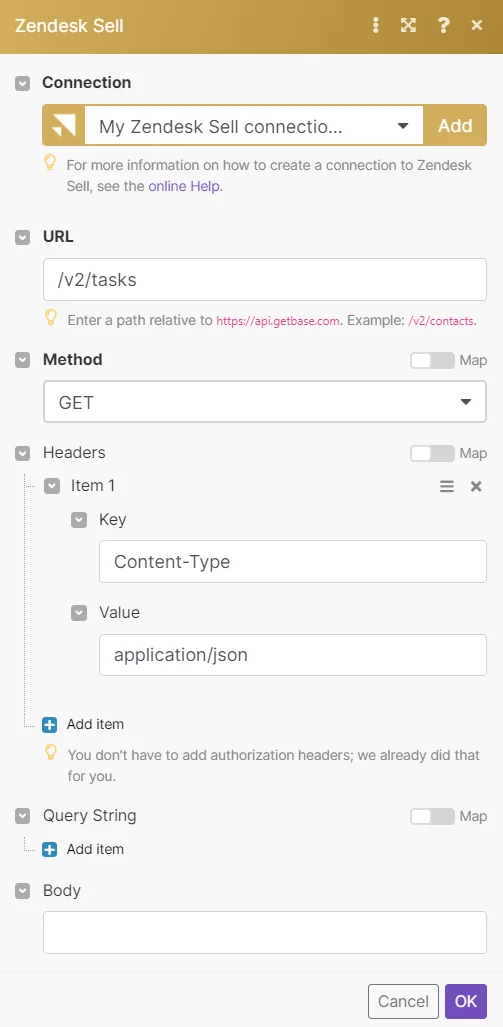
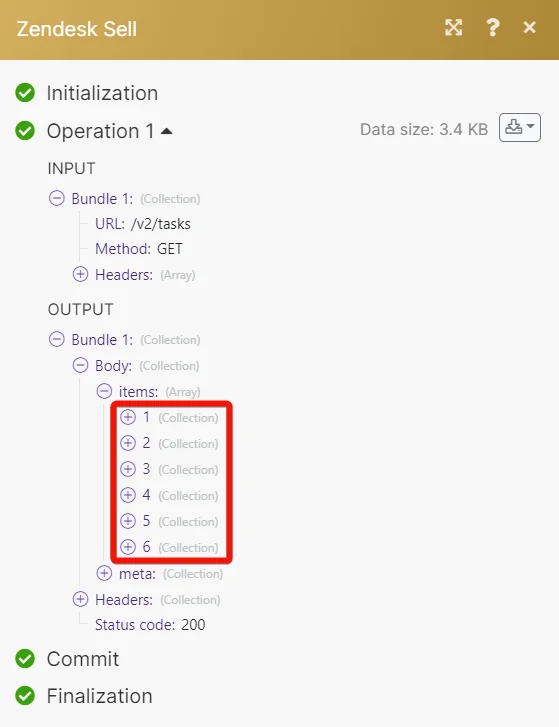
Matches of the search can be found in the module’s Output under Bundle > Body > items.
In our example 6 tasks were returned:
Legacy article, imported from the original Boost.space knowledge base (/knowledge-base/applications/marketing/zendesk-sell/).

