TMetric
The TMetric modules allow you to watch, create, update, list, and delete the tasks, and time entries in your TMetrict account.
Getting Started with TMetric
Prerequisites
- A TMetric account
In order to use TMetric with Boost.space Integrator, it is necessary to have a TMetric account. If you do not have one, you can create a TMetric account at id.tmetric.com/core/register.
Connecting TMetric to Boost.space Integrator
To connect your TMetric account to Boost.space Integrator you need to obtain the API Key from your TMetric account and insert it in the Create a connection dialog in the Boost.space Integrator module.

1. Log in to your TMetric account and open your Dashboard.
2. Click _Your Profile Name_in the bottom-left corner > My Profile.
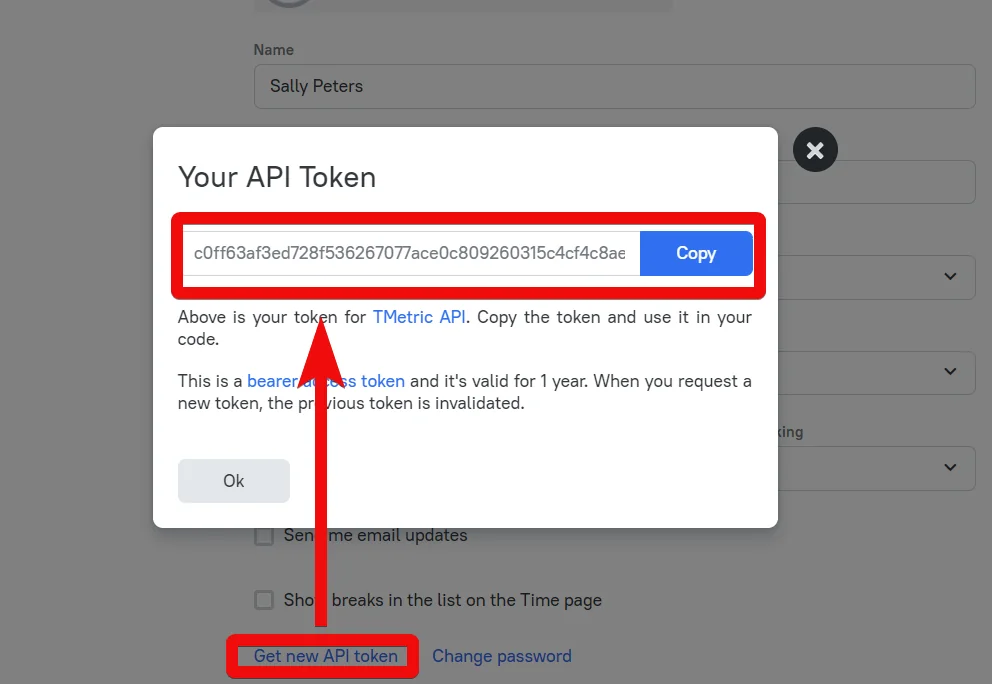
3. Click Get New API Token and copy the token to your clipboard.
4. Go to Boost.space Integrator and open the TMetric module’s Create a connection dialog.
5. In the Connection name field, enter a name for the connection.
6. In the API Token field, enter the token copied in step 3 and click Continue.
The connection has been established.
Tasks
Watch New Tasks
Triggers when a new task is created.
Connection
Establish a connection to your TMetric connection.
Account ID
Select the Account ID whose tasks you want to watch.
Limit
Enter the maximum number of tasks Boost.space Integrator should return during one scenario execution cycle.
Assignee List
Add the assignees whose tasks you want to watch.
Group List
Add the groups whose associated tasks you want to watch.
Project List
Add the projects whose tasks you want to watch.
Tag List
Add the keywords to filter the tasks when searching.
Completed
Select whether you want to watch the completed tasks:
-
Yes
-
No
-
Not defined
Create a Task
Creates a task.
Connection
Establish a connection to your TMetric connection.
Account ID
Select the Account ID for which you want to create the task.
Assignee ID
Select the Assignee ID to whom you want to assign the task.
Description
Enter the details of the task.
Project ID
Select the Project ID to which the task belongs to.
Tag Identifiers
Add the tag or keywords to filter the task when searching.
Is Completed
Select the checkbox if the task is completed.
Budget Size
Enter the budget details allocated for the task.
Creator ID
Select the user who created this task.
External Issue ID
Enter the External Issue ID of the task.
Integration ID
Enter the Integration ID if the task is tracked by integrating with another app.
Integration URL
Enter the Integration URL for the task.
Relative Issue URL
Enter the issue URL for which this task is being created.
Project Task ID
Select the Project Task ID associated with the task.
Show Issue ID
Select whether you want to show the Issue ID in the task.
Delete a Task
Deletes a task.
Connection
Establish a connection to your TMetric connection.
Account ID
Select the Account ID whose task you want to delete.
Task ID
Select the Task ID you want to delete.
Get a Task
Gets a single task.
Connection
Establish a connection to your TMetric connection.
Account ID
Select the Account ID whose task details you want to retrieve.
Task ID
Select the Task ID whose details you want to retrieve.
List Tasks
Lists all tasks for an account.
Connection
Establish a connection to your TMetric connection.
Account ID
Select the Account ID whose tasks you want to watch.
Assignee IDs List
Add the assignees whose tasks you want to watch.
Group IDs List
Add the groups whose associated tasks you want to watch.
Project IDs List
Add the projects whose tasks you want to watch.
Tag IDs List
Add the keywords to filter the tasks when searching.
Completed
Select whether you want to watch the completed tasks:
-
Yes
-
No
-
Not defined
Time Entries
Create a Time Entry
Creates a time entry.
Connection
Establish a connection to your TMetric connection.
Account ID
Select the Account ID for which you want to create the time entry.
User Profile ID
Select the User Profile ID whose time entry you are creating.
Start Time
Enter the start time.
End Time
Enter the end time.
Time Duration
Enter the duration of the time entry.
Project Name
Select the project name associated with the time entry.
Tags Identifiers
Add the keywords to filter the time entries when searching.
Is Billable
Select the checkbox if this time entry is billable.
Is Invoiced
Select the checkbox if the time entry is invoiced.
Description
Enter the details for creating the time entry.
Project ID
Select the Project ID associated with the time entry.
Project Task ID
Select the Project Task ID associated with the time entry.
List Time Entries
Lists all-time entries.
Connection
Establish a connection to your TMetric connection.
Account ID
Select the Account ID whose time entries you want to list.
User Profile ID
Select the User Profile ID whose time entries you want to list.
Use UTC Time
Select whether you want to list the time entries in UTC Time:
-
Yes
-
No
-
Not defined
Version
Enter the version of the time entries you want to list.
Latest Version
Enter the latest version of the time entries you want to list.
Include Deleted
Select whether you want to list the deleted time entries:
-
Yes
-
No
-
Not defined
Truncate
Select whether you want to list the truncated time entries:
-
Yes
-
No
-
Not defined
Start Time
Enter the start time of the time entry you want to list.
End Time
Enter the end time of the time entry you want to list.
Edit/Delete a Time Entry
Edits or deletes a time entry.
Connection
Establish a connection to your TMetric connection.
Account ID
Select the Account ID for which you want to update or delete the time entry.
User Profile ID
Select the User Profile ID whose time entries you want to update or delete.
Time Entry ID
Select the Time Entry ID you want to update or delete.
Start Time
Enter the start time of the time entry.
End Time
Enter the end time of the time entry.
Time Duration
Enter the duration of the time entry
Description
Enter the details for updating or deleting the time entry.
Project ID
Select the Project ID associated with the time entry.
Is Billable
Select the checkbox if this time entry is billable.
Is Invoiced
Select the checkbox if the time entry is invoiced.
Tags Identifiers
Add the keywords to filter the time entries when searching.
Is Deleted
Select the checkbox if the time entry is deleted.
Timer
Update a Timer
Updates, starts, and stops a timer.
Connection
Establish a connection to your TMetric connection.
Account ID
Select the Account ID for which you want to update or delete the time entry.
Is Started
Select whether the timer is started:
-
Yes
-
No
-
Not defined
Is Long
Select whether the timer is started:
-
Yes
-
No
-
Not defined
Start Time
Enter the start time of the timer.
End Time
Enter the end time of the timer.
Monthly Balance
Enter the balance hours of time remaining for the month.
Is Billable
Select whether the timer is billable:
-
Yes
-
No
-
Not defined
Tags Identifiers
Add the keywords to filter the time entries when searching.
Description
Enter the details for updating or stopping the timer.
Project ID
Select the Project ID for which you are tracking the time.
Project Task ID
Select the Project Task ID of the project for which you are updating the timer.
Other
Make an API Call
Performs an arbitrary authorized API call.
Connection
Establish a connection to your TMetric connection.
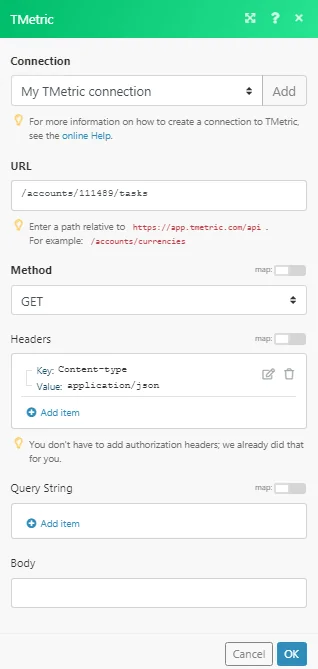
URL
Enter a path relative to https://app.tmetric.com/api. For example: /accounts/currencies
For the list of available endpoints, refer to the TMetric API Documentation.
Method
Select the HTTP method you want to use:
GETto retrieve information for an entry.
POST to create a new entry.
PUT to update/replace an existing entry.
PATCH to make a partial entry update.
DELETE to delete an entry.
Headers
Enter the desired request headers. You don’t have to add authorization headers; we already did that for you.
Query String
Enter the request query string.
Body
Enter the body content for your API call.
Example of Use – List Tasks
The following API call returns all the tasks from your TMetric account:
URL:/accounts/{{account_id}}/tasks
Method:GET
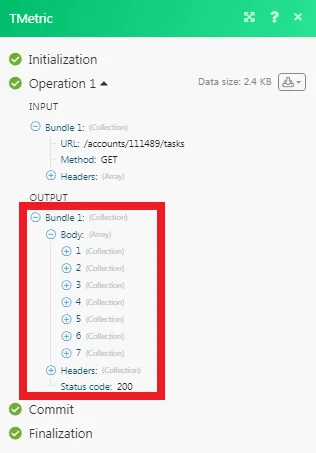
Matches of the search can be found in the module’s Output under Bundle > Body. In our example, 7 tasks were returned:
Legacy article, imported from the original Boost.space knowledge base (/knowledge-base/applications/productivity/tmetric/).

