Todoist
Getting Started with Todoist
The Todoist modules allow you to monitor, create, update, list, and delete projects, labels, tasks, comments, and more in your Todoist account.
Prerequisites
- A Todoist account
In order to use Todoist with Boost.space Integrator, it is necessary to have a Todoist account. If you do not have one, you can create a Todoist account at todoist.com.
Connecting Todoist to Boost.space Integrator
To connect Todoist to Boost.space Integrator you must connect your Todoist account to Boost.space Integrator. To do so, follow the general instructions for Connecting to services.
After you click the Continue button, Boost.space Integrator will redirect you to the Todoist website where you will be prompted to grant Boost.space Integrator access to your account.
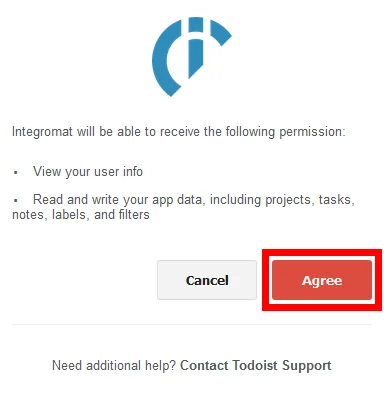
Confirm the dialog by clicking the Agree button.
Events
New Event
Triggers when a defined project, task, or comment action is performed.
Webhook name
Enter the name for the webhook. E.g. Task added.
Account
Establish a connection to your Todoist account.
Group
Select whether you want to watch for task, project, or comment events.
Watch events
Select Todoist events that trigger the Boost.space Integrator New Event module.
Projects
List Projects
Retrieves projects from your Todoist account.
Required Permissions: data
Connection
Establish a connection to your Todoist account.
Limit
Set the maximum number of projects Boost.space Integrator will return during one execution cycle.
Get a Project
Retrieves project details.
Required Permissions: data
Connection
Establish a connection to your Todoist account.
Project ID
Enter (map) the Project ID of the project you want to retrieve information about.
Create a Project
Creates a new project.
Required Permissions: data
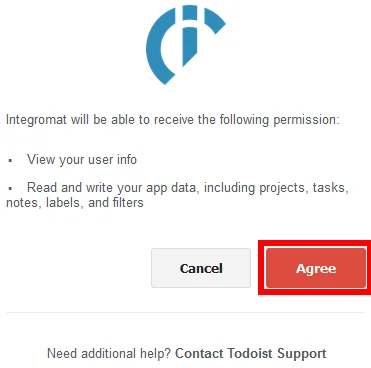
Some modules may need you to extend your permissions. Click on the Continue button and then on the _Agree_button to extend permissions.
Connection
Establish a connection to your Todoist account.
Name
Enter the name for the new project.
Parent project
Select the parent project if you don’t want to create a root project.
Update a Project
Updates a project.
Required Permissions: data
Connection
Establish a connection to your Todoist account.
Project ID
Enter (map) the project ID of the project you want to change.
Please find the field descriptions in the Create a Project section above.
Delete a Project
Deletes a project.
Required Permissions: project
Connection
Establish a connection to your Todoist account.
Project ID
Enter (map) the project ID of the project you want to delete.
Labels
List Labels
Retrieves labels from your Todoist account.
Required Permissions: data
Connection
Establish a connection to your Todoist account.
Limit
Set the maximum number of labels Boost.space Integrator will return during one execution cycle.
Get a Label
Retrieves information about a label.
Required Permissions: data
Connection
Establish a connection to your Todoist account.
Label ID
Enter (map) the Label ID of the label you want to retrieve information about.
Create a Label
Creates a label.
Required Permissions: data
Connection
Establish a connection to your Todoist account.
Name
Enter a name for the new label.
Update a Label
Changes the name of the label.
**Required Permissions:**data
Connection
Establish a connection to your Todoist account.
Label ID
Enter (map) the label ID of the label you want to edit.
Name
Enter a new name for the label.
Delete a Label
Deletes a label.
Required Permissions: data
Connection
Establish a connection to your Todoist account.
Label ID
Enter (map) the Label ID of the label you want to delete.
Tasks
List Uncompleted Tasks
Lists all uncompleted tasks.
**Required Permissions:**data
Connection
Establish a connection to your Todoist account.
Query
Enter a keyword or phrase to list the tasks that match the specified tasks.
Project
Select or map the project whose incomplete tasks you want to list.
Limit
Set the maximum number of tasks Boost.space Integrator should return during one execution cycle.
Get a Task
Retrieves details about a specified task.
**Required Permissions:**data
Connection
Establish a connection to your Todoist account.
Task ID
Enter (map) the Task ID of the task you want to retrieve information about.
Create a Task
Creates a new task.
Required Permissions: data
Connection
Establish a connection to your Todoist account.
Content
Enter the task content.
Project
Select the project or map the task ID. If not set, the task is put into the user’s Inbox.
Labels
Select the labels you want to associate with the task.
Due date
Date
Enter the date in YYYY-MM-DD format or YYYY-MM-DDTHH:MM:SS.
Human-readable representation of due date
What you type:
What Todoist understands:
today
Today (tod also works)
tomorrow
Tomorrow (tom also works)
next week
The next Monday by default (this can be changed in your Settings)
next month
1st day of the next month
jan 27
Jan 27 (27 jan, 27/1 also works)
01/27/2016
January 27, 2016 (27/01/2016, 2016/01/27, 2016-01-27 also work)
27th
27th day of the current month
mid January
January 15th
end of month
Last day of the current month
today at 10
Today at 10am
tomorrow at 16:00
Tomorrow at 4pm
Fri @ 7pm
Friday at 7pm (Friday @ 7pm, Fri at 7pm, Fri at 19:00 also work)
6pm
Today at 6pm (unless 6pm has passed, in which case tomorrow)
in 5 days
5 days from today (+5 days also works)
in 3 weeks
3 weeks from today
in 2 hours
2 hours from now
Is recurring
Select whether the task should be set as recurring.
Priority
Select the task priority.
Parent ID
Enter the ID of the parent task. Leave the field empty for root tasks.
Responsible
Select the user who is responsible for accomplishing the current task.
This works for shared projects only.
Assigned by
Select the user who has assigned this task.
This works for shared projects only.
Auto reminder
When this option is enabled, the default reminder will be added to the task if it has a due date with a time set.
Update a Task
Edits a specified task.
Required Permissions: data
Connection
Establish a connection to your Todoist account.
Task ID
Enter (map) the Task ID of the task you want to update.
Please find the descriptions of the fields in the Create a Task section above.
Delete a Task
Connection
Establish a connection to your Todoist account.
Task ID
Enter (map) the Task ID of the task you want to delete.
Complete a Task
Completes a task and all its descendants.
Connection
Establish a connection to your Todoist account.
Task ID
Enter (map) the Task ID of the task you want to set as complete.
Date completed
Enter the date of completion of the task (in UTC). If left empty, the server will set the value to the current time. The list of supported date and time formats.
Uncomplete a Task
Uncompletes an unarchived task and all its ancestors.
Required Permissions: data
Connection
Establish a connection to your Todoist account.
Task ID
Enter (map) the Task ID of the task you want to set as uncomplete.
Move a Task
Move a task to a different location.
Required Permissions: data
Connection
Establish a connection to your Todoist account.
Task ID
Enter (map) the Task ID of the task you want to move.
Project
Enter (map) the target location.
Parent ID
Enter the ID of the destination parent task.
Comments
List Project Comments
Returns all project comments.
**Required Permissions:**data
Connection
Establish a connection to your Todoist account.
Project
Select the project you want to list comments from.
Limit
Set the maximum number of comments Boost.space Integrator will return during one execution cycle.
List Task Comments
Returns all of the comments for a task.
**Required Permissions:**data
Connection
Establish a connection to your Todoist account.
Task
Select the task you want to list comments from.
Limit
Set the maximum number of tasks Boost.space Integrator will return during one execution cycle.
Get a Project Comment
Retrieves the details of a project comment.
Required Permissions: data
Connection
Establish a connection to your Todoist account.
Comment ID
Enter (map) the ID of the comment you want to retrieve information about.
Get a Task Comment
Retrieves the details of a task comment.
Required Permissions: data
Connection
Establish a connection to your Todoist account.
Comment ID
Enter (map) the ID of the comment you want to retrieve information about.
Create a Task Comment
Adds a comment to a task.
**Required Permissions:**data
Connection
Establish a connection to your Todoist account.
Task ID
Enter (map) the ID of the task you want to add the comment to.
Content
Enter the text content of the comment.
File Attachment
-
File URL: Enter the URL of the file you want to attach to the comment.
-
File name: Enter the file name.
Users to notify
Select users who will be notified when the comment is added.
Create a Project Comment
Adds a comment to the project.
Required Permissions: data
Connection
Establish a connection to your Todoist account.
Project
Select the project you want to add a comment to.
Content
Enter the text content of the comment.
File Attachment

Map the field values using the Upload a File module.
-
File URL: Enter the URL of the file you want to attach to the comment.
-
File name: Enter the file name.
Update a Comment
Changes the content of the comment.
**Required Permissions:**data
Connection
Establish a connection to your Todoist account.
Comment ID
Enter (map) the ID of the comment you want to update.
Content
Enter the new text for the comment.
File Attachment
Map the field values using the Upload a File module.
-
File URL: Enter the URL of the file you want to attach to the comment.
-
File name: Enter the file name.
Delete a Comment
Deletes a comment.
**Required Permissions:**data
Connection
Establish a connection to your Todoist account.
Comment ID
Enter (map) the ID of the comment you want to delete.
Other
Upload a File
Allows you to upload a file with the Create a Task Comment and/or the Create a Project Comment modules.
Required Permissions: data
Connection
Establish a connection to your Todoist account.
Source File
Map the file using the previous module (e.g. Dropbox > Get a File), or enter a file name and data manually.
Get Stats
Retrieves productivity stats.
**Required Permissions:**data
Connection
Establish a connection to your Todoist account.
Make an API Call
Allows you to perform a custom API call.
Connection
Establish a connection to your Todoist account.
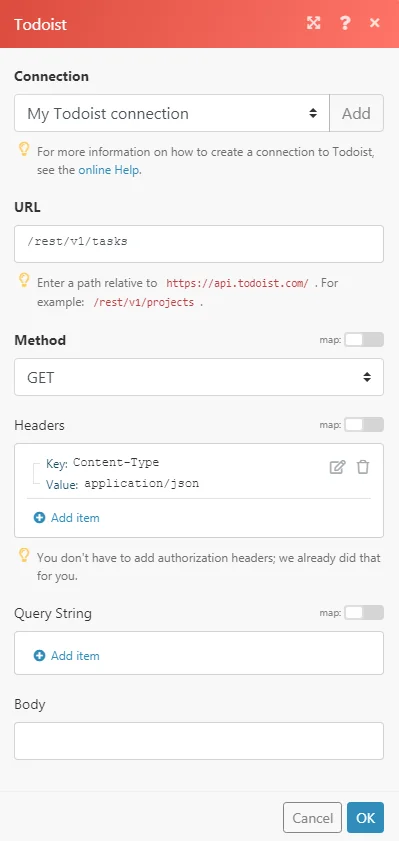
URL
Enter a path relative to https://api.todoist.com/ (e.g. /rest/v1/tasks or /sync/v8/sync)
For the list of available endpoints, refer to the Todoist REST API Documentation or Todoist Sync API Documentation.
Method
Select the HTTP method you want to use:
-
GET: to retrieve information for an entry.
-
POST: to create a new entry.
-
PUT: to update/replace an existing entry.
-
PATCH: to make a partial entry update.
-
DELETE: to delete an entry.
Headers
Enter the desired request headers. You don’t have to add authorization headers; we already did that for you.
Query String
Enter the request query string.
Body
Enter the body content for your API call.
Example of Use – Get Active Tasks
The following API call returns the list of all active tasks in your Todoist account:
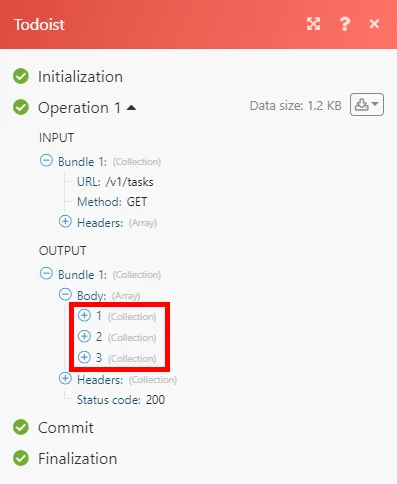
Matches of the search can be found in the module’s Output under Bundle > Body.
In our example, 3 active tasks were returned:
Legacy article, imported from the original Boost.space knowledge base (/knowledge-base/applications/productivity/todoist/).

