Zoho Projects
Getting Started with Zoho Projects
The Zoho Projects modules allow you to monitor, list, get, create, update, or delete projects, milestones, tasklists, tasks, bugs, forums, events, and documents in your Zoho Projects account.
Prerequisites
- A Zoho Projects account
In order to use Zoho Projects with Boost.space Integrator, it is necessary to have a Zoho Projects account. If you do not have one, you can create a Zoho Projects account at www.zoho.com/projects.
Connecting Zoho Projects to Boost.space Integrator
1. Open Boost.space Integrator and the Create a connection dialog of the desired Zoho Projects module.
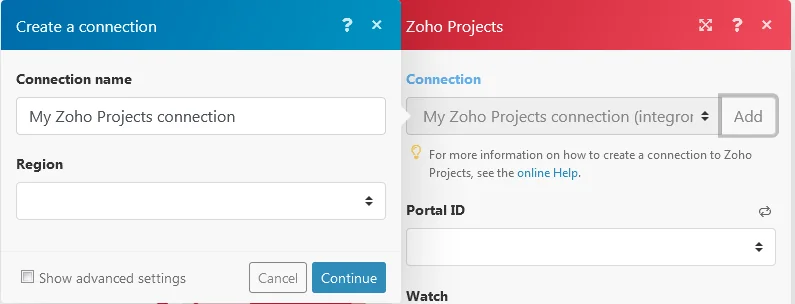
2. Enter the name for the connection and select the Region. Click Continue.
3. Optional: Click Show advanced settings and enter your custom app client credentials. For more information, refer to Zoho Projects OAuth 2.0 Guide.
If requested, use the following Redirect URI when creating your custom app: https://integrator.boost.space/oauth/cb/zoho-projects.
4. After you click the Continue button, Boost.space Integrator redirects you to the Zoho website where you will be prompted to grant Boost.space Integrator access to your account.
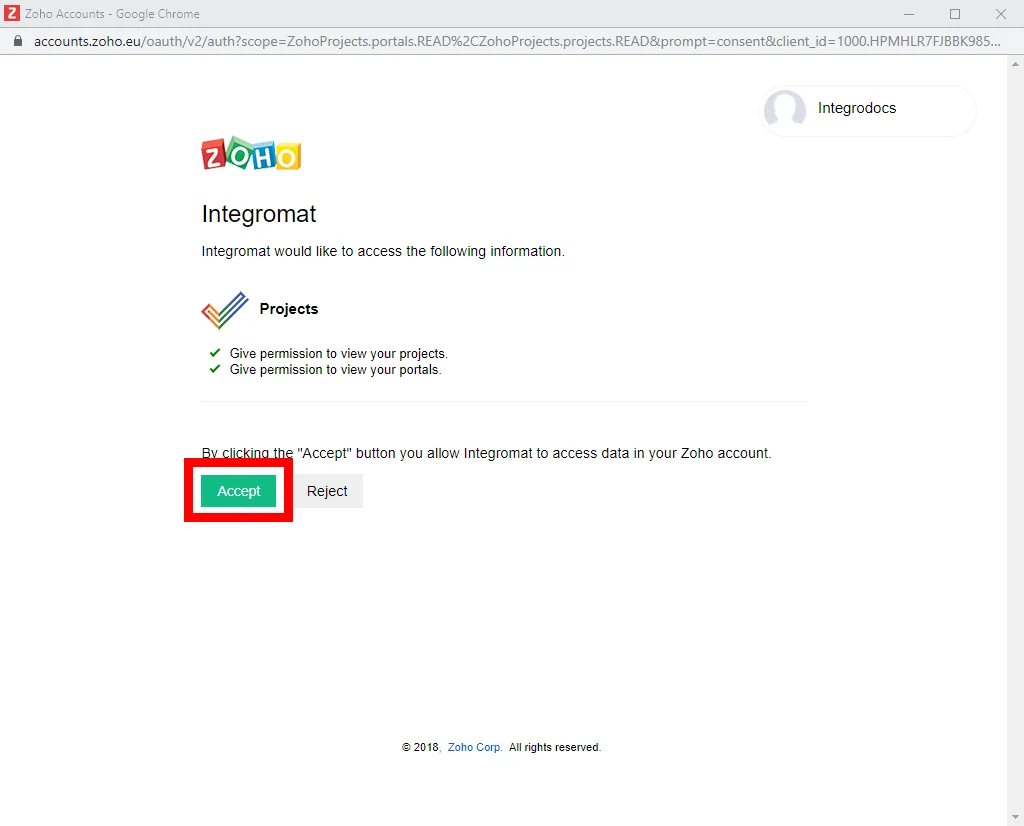
4. Confirm the dialog by clicking the Accept button.
The connection has been established.
Projects
Watch Projects
Triggers when a new project is created.
Required Permissions: ZohoProjects.projects.READ
Connection
Establish a connection to your Zoho Projects account.
Portal ID
Select the Portal ID whose projects you want to watch.
Watch
Select which kind of project updates you want to watch for:
-
Created Date
-
Updated Date
Limit
The maximum number of projects Boost.space Integrator should return during one scenario execution cycle.
List Projects
Gets all the projects in the portal for the logged in user.
Required Permissions: ZohoProjects.projects.READ
Connection
Establish a connection to your Zoho Projects account.
Portal ID
Select the Portal ID whose projects you want to watch.
Search By
Select how you want to list the projects:
-
Project Groups
-
Projects
Limit
The maximum number of projects Boost.space Integrator should return during one scenario execution cycle.
Get Project
List the details of the project.
Required Permissions: ZohoProjects.projects.READ
Connection
Establish a connection to your Zoho Projects account.
Portal ID
Select the Portal ID whose project you want to retrieve.
Project ID
Select the Project ID of the project you want to retrieve.
Create Project
Creates a new project.
Required Permissions:
-
ZohoProjects.users.READ -
ZohoProjects.projects.CREATE -
ZohoProjects.projects.READ
Connection
Establish a connection to your Zoho Projects account.
Portal ID
Select the Portal ID where you want to create a project.
Name
Enter a name for the new project.
Description
Enter the details of the project.
Start Date
Enter the start date of the project.
End Date
Enter the end date of the project.
Owner ID
Select the owner of the project.
Custom Field Layout
Select the layout of the custom field.
Strict Project
Select whether this project is strict:
-
Yes
-
No
Budget ID
Select the budget type for the project:
-
None
-
Based on Amount
-
Based on Hours
Update Project
Updates the project.
Required Permissions:
-
ZohoProjects.projects.READ -
ZohoProjects.users.READ -
ZohoProjects.projects.UPDATE
Connection
Establish a connection to your Zoho Projects account.
Portal ID
Select the Portal ID where you want to create a project.
Name
Select a new name for the project.
Description
Enter new details of the project.
Start Date
Select a new begin date for the project.
End Date
Select a new end date of the project.
Owner ID
Select the new owner of the project.
Custom Field Layout
Select the layout of the custom field.
Strict Project
Select whether this project is strict:
-
Yes
-
No
Budget ID
Select the new budget type for the project to update:
-
None
-
Based on Amount
-
Based on Hours
Delete Project
Deletes the project.
Required Permissions: ZohoProjects.projects.READ, ZohoProjects.projects.DELETE
Connection
Establish a connection to your Zoho Projects account.
Portal ID
Select the Portal ID whose projects you want to delete.
Project ID
Select the Project ID to be deleted.
List Project Activities
Lists all the recent activities of a project.
Required Permissions: ZohoProjects.projects.READ, ZohoProjects.activities.READ
Connection
Establish a connection to your Zoho Projects account.
Portal ID
Select the Portal ID whose projects activities you want to retrieve.
Project ID
Select the Project ID whose activities you want to retrieve.
Limit
The maximum number of records Boost.space Integrator should return during one scenario execution cycle.
Milestones
Watch Milestones
Triggers when a new milestone is created.
Required Permissions: ZohoProjects.projects.READ, ZohoProjects.milestones.READ
Connection
Establish a connection to your Zoho Projects account.
Portal ID
Select the Portal ID whose projects milestones you want to watch.
Project ID
Select the Project ID whose milestones you want to watch.
Watch
Select what kind of milestone updates you want to watch for the project:
-
Created Date
-
Updated Date
Limit
The maximum number of milestones Boost.space Integrator should return during one scenario execution cycle.
List Milestones
Gets all the milestones in a given project.
Required Permissions: ZohoProjects.projects.READ, ZohoProjects.milestones.READ
Connection
Establish a connection to your Zoho Projects account.
Portal ID
Select the Portal ID of the project whose milestones you want to list.
Project ID
Select the Project ID whose milestones you want to list.
Status
Select the status of the milestones:
-
All
-
Completed
-
Not Completed
Display Type
Select the way you want to display the milestones:
-
All
-
Upcoming
-
Delayed
Flag
Select the milestone with the specific flag:
-
All
-
Internal
-
External
Limit
The maximum number of milestones Boost.space Integrator should return during one scenario execution cycle.
Get Milestone
Gets the details of a milestone.
Required Permissions: ZohoProjects.projects.READ, ZohoProjects.milestones.READ
Connection
Establish a connection to your Zoho Projects account.
Portal ID
Select the Portal ID of the project whose milestone you want to retrieve.
Project ID
Select the Project ID whose milestone you want to retrieve.
Milestone ID
Select the Milestone ID you want to retrieve.
Create Milestone
Creates a new milestone in the given project.
Required Permissions: ZohoProjects.projects.READ, ZohoProjects.users.READ, ZohoProjects.milestones.CREATE
Connection
Establish a connection to your Zoho Projects account.
Portal ID
Select the Portal ID of the project that you want to create a milestone.
Project ID
Select the Project ID that you want to create a milestone for.
Owner
Select the owner of the milestone.
Name
Select a name for the milestone.
Start Date
Select the start date of the milestone.
End Date
Select the end date of the milestone.
Flag
Select the flag of the milestone:
-
Internal
-
External
Update Milestone
Updates the milestone in a given project.
Required Permissions: ZohoProjects.projects.READ, ZohoProjects.milestones.READ, ZohoProjects.users.READ, ZohoProjects.milestones.UPDATE
Connection
Establish a connection to your Zoho Projects account.
Portal ID
Select the Portal ID of the project whose milestone you want to update.
Project ID
Select the Project ID whose milestone you want to update.
Milestone ID
Select the Milestone ID to be updated.
Owner
Select a new owner for the milestone.
Name
Select a new name for the milestone.
Start Date
Select the start date of the milestone.
End Date
Select the end date of the milestone.
Flag
Select a new flag for the milestone:
-
Internal
-
External
Delete Milestone
Deletes a milestone in the given project.
Required Permissions: ZohoProjects.projects.READ, ZohoProjects.milestones.READ, ZohoProjects.milestones.DELETE
Connection
Establish a connection to your Zoho Projects account.
Portal ID
Select the Portal ID of the project whose milestone you want to delete.
Project ID
Select the Project ID whose milestone you want to delete.
Milestone ID
Select the Milestone ID to be deleted.
Tasklists
Watch Tasklists
Triggers when a new tasklist is created.
Required Permissions: ZohoProjects.projects.READ, ZohoProjects.tasklists.READ
Connection
Establish a connection to your Zoho Projects account.
Portal ID
Select the Portal ID of the project whose tasklists you want to watch.
Project ID
Select the Project ID whose tasklists you want to watch.
Flag
Select the flag of the tasklist you want to watch:
-
Internal
-
External
Watch
Select which kind of tasklist update you want to watch for in the project:
-
Created Date
-
Updated Date
Limit
The maximum number of tasklists Boost.space Integrator should return during one scenario execution cycle.
List Tasklists
Gets all tasklists in the given project.
Required Permissions: ZohoProjects.projects.READ, ZohoProjects.milestones.READ, ZohoProjects.tasklists.READ
Connection
Establish a connection to your Zoho Projects account.
Portal ID
Select the Portal ID of the project whose tasklists you want to list.
Project ID
Select the Project ID whose tasklists you want to list.
Milestone ID
Select the Milestone ID whose tasklist you want to list.
Flag
Select the flag of the tasklist you want to list:
-
Internal
-
External
Limit
The maximum number of tasklists Boost.space Integrator should return during one scenario execution cycle.
Create Tasklist
Creates a new tasklist in the given project.
Required Permissions: ZohoProjects.projects.READ, ZohoProjects.milestones.READ, ZohoProjects.tasklists.CREATE
Connection
Establish a connection to your Zoho Projects account.
Portal ID
Select the Portal ID of the projects that you want to create a tasklist.
Project ID
Select the Project ID that you want to create a tasklist.
Name
Select or enter a name for the tasklist.
Flag
Select the flag of the tasklist:
-
Internal
-
External
Milestone ID
Select the Milestone ID of the tasklist.
Update Tasklist
Updates a tasklist in the given project.
Required Permissions: ZohoProjects.projects.READ, ZohoProjects.tasklists.READ, ZohoProjects.milestones.READ, ZohoProjects.tasklists.UPDATE
Connection
Establish a connection to your Zoho Projects account.
Portal ID
Select the Portal ID of the project whose tasklist you want to update.
Project ID
Select the Project ID whose tasklist you want to update.
Tasklist ID
Select the tasklists you want to update.
Milestone ID
Select the Milestone ID of the tasklist.
Name
Enter a new name for the tasklist.
Flag
Select the flag of the tasklist:
-
Internal
-
External
Status
Select the status of the tasklist:
-
Active
-
Completed
Delete Tasklist
Deletes a tasklist in the given project.
Required Permissions: ZohoProjects.projects.READ, ZohoProjects.tasklists.READ, ZohoProjects.tasklists.DELETE
Connection
Establish a connection to your Zoho Projects account.
Portal ID
Select the Portal ID of the project whose tasklist you want to delete.
Project ID
Select the Project ID whose tasklist you want to delete.
Tasklist ID
Select the tasklist you want to delete.
Tasks
Watch Tasks
Triggers when a new task is created.
Required Permissions: ZohoProjects.projects.READ, ZohoProjects.tasks.READ
Connection
Establish a connection to your Zoho Projects account.
Portal ID
Select the Portal ID of the project whose tasks you want to watch.
Project ID
Select the Project ID whose tasks you want to watch.
Flag
Select the flag of the task you want to watch:
-
Internal
-
External
Watch
Select which kind of task update you want to watch for in the project:
-
Created Date
-
Updated Date
Limit
The maximum number of tasks Boost.space Integrator should return during one scenario execution cycle.
List Tasks
Gets all tasks in the given project. It fetches only the main tasks and not the subtasks.
Required Permissions: ZohoProjects.projects.READ, ZohoProjects.users.READ, ZohoProjects.tasklists.READ, ZohoProjects.milestones.READ, ZohoProjects.tasks.READ
Connection
Establish a connection to your Zoho Projects account.
Portal ID
Select the Portal ID of the project whose tasks you want to list.
Project ID
Select the Project ID whose tasks you want to list.
Milestone ID
Select the Milestone ID of the tasks you want to list.
Tasklist ID
Select the Tasklist ID of the task you want to list.
Owner
Select the owner of the tasks you want to be list.
Created By
Select the member who created the task that you want to list.
Status
Select the status of task you want to list:
-
Completed
-
Not Completed
Time
Select the time period of the task you want to list:
-
Overdue
-
Today
-
Tomorrow
Priority
Select the priority of the task you want to list:
-
None
-
Low
-
Medium
-
High
Sort Column
Select the column by which you want sort the task:
-
Created Time
-
Last Modified Time
Sort Order
Select the order in which you want the tasks to be listed:
-
Ascending Order
-
Descending Order
Last Modified Time
Select the time for when a task was last modified.
Limit
The maximum number of tasks Boost.space Integrator should return during one scenario execution cycle.
Get Task
Gets the details of the task.
Required Permissions: ZohoProjects.projects.READ, ZohoProjects.tasks.READ
Connection
Establish a connection to your Zoho Projects account.
Portal ID
Select the Portal ID of the project whose task you want to retrieve.
Project ID
Select the Project ID whose task you want to retrieve.
Task ID
Select the Task ID of the task you want to retrieve.
Create Task
Creates a new task in the given project.
Required Permissions: ZohoProjects.projects.READ, ZohoProjects.users.READ, ZohoProjects.tasklists.READ, ZohoProjects.tasks.CREATE
Connection
Establish a connection to your Zoho Projects account.
Portal ID
Select the Portal ID of the project you want to create a task.
Project ID
Select the Project ID whose tasks you want to create.
Person Responsible
Select the owner for the task.
Name
Select or enter the name for the task.
Tasklist ID
Select the Tasklist ID for the task.
Start Date
Select the start date of the task.
End Date
Select the end date of the task.
Duration Type
Select the duration of the task:
-
Days
-
Hrs
Priority
Select the priority of the task:
-
None
-
Low
-
Medium
-
High
Description
Enter the information about the task.
Work Type
Select the work type allocation of the task:
-
Work Hours Per Day
-
Work in Percentage
-
Work Hours
Reminder
Select the reminder for the task. You can select reminders in days, daily or same day. You can select reminders for maximum of 30 days.
Recurrence Frequency
Select the recurrence for reminders about the task:
-
Daily
-
Weekly
-
Monthly
-
Yearly
Time span
Select or enter the time span based on which the task occurs.
The time span must be greater than 1 and less than 15.
Number of Occurrences
Select the number of occurrences of the task occurs again.
Recur Task Comments
Enter any additional information for the recurrence of the task.
File Name
Enter the file name if you are uploading a file for the task.
Data
Map the file you want to upload from the previous module (e.g. Dropbox > Get a file), or enter the file name and file data manually.
Update Task
Updates the task in the given project.
Required Permissions: ZohoProjects.projects.READ, ZohoProjects.tasks.READ, ZohoProjects.users.READ, ZohoProjects.tasklists.READ, ZohoProjects.tasks.UPDATE
Connection
Establish a connection to your Zoho Projects account.
Portal ID
Select the Portal ID of the projects whose task you want to update.
Project ID
Select the Project ID whose task you want to update.
Task ID
Select the Task ID you want to update.
Person Responsible
Select a new owner of the task.
Name
Select a new name for the task.
Tasklist ID
Select the Tasklist ID for the task.
Start and End Date
Select a new start and end date of the task.
Duration Type
Select a new duration type of the task:
-
Days
-
Hrs
Priority
Select a new priority for the task:
-
None
-
Low
-
Medium
-
High
Description
Enter new information about the task.
Percent Complete
Select the percentage of completion of the task.
Work Type
Select the work type allocation of the task:
-
Work Hours Per Day
-
Work in Percentage
-
Work Hours
Reminder
Select the new reminder for the task to update. You can select reminders in days, daily or on sameday. You can select reminders for a maximum of 30 days.
Recurring Frequency
Select the recurrence for reminders about the task:
-
Daily
-
Weekly
-
Monthly
-
Yearly
Time Span
Select or enter the time span based on which the task occurs.
The time span must be greater than 1 and less than 15.
Number of Occurrences
Select the number of occurrences of the task that occurs again.
Recur Task Comments
Enter any additional information for the recurrence of the task.
File Name
Enter the file name if you are uploading a file for the task.
Data
Map the file you want to upload from the previous module (e.g. Dropbox > Get a file), or enter the file name and file data manually.
Reorder Task
Reorders the task in the given project.
Required Permissions: ZohoProjects.projects.READ, ZohoProjects.tasks.READ, ZohoProjects.tasks.UPDATE
Connection
Establish a connection to your Zoho Projects account.
Portal ID
Select the Portal ID of the project whose tasks you want to reorder.
Project ID
Select the Project ID whose task you want to reorder.
Task ID
Select the Task ID that you want to reorder.
Previous Task ID
Select the Previous Task ID that needs to be reordered.
New Task ID
Select the New Task ID with which the task needs to be reordered.
Delete Task
Deletes the tasks in the given project.
Required Permissions: ZohoProjects.projects.READ, ZohoProjects.tasks.READ, ZohoProjects.tasks.DELETE
Connection
Establish a connection to your Zoho Projects account.
Portal ID
Select the Portal ID of the project whose tasks you want to delete.
Project ID
Select the Project ID whose task you want to delete.
Task ID
Select the Task ID whose task you want to delete.
List Subtasks
Lists all the subtask in the given task.
Required Permissions: ZohoProjects.projects.READ, ZohoProjects.tasks.READ
Connection
Establish a connection to your Zoho Projects account.
Portal ID
Select the Portal ID of the project whose subtasks you want to list.
Project ID
Select the Project ID whose subtask you want to list.
Task ID
Select the Task ID whose subtasks you want to list.
Limit
The maximum number of subtasks Boost.space Integrator should return during one scenario execution cycle.
Create Subtask
Create the subtask in the given project.
Required Permissions: ZohoProjects.projects.READ, ZohoProjects.tasks.READ, ZohoProjects.users.READ, ZohoProjects.tasks.CREATE
Connection
Establish a connection to your Zoho Projects account.
Portal ID
Select the Portal ID of the project you want to create a subtask.
Project ID
Select the Project ID that you want to create a subtask.
Task ID
Select the Task ID that you want to create a subtask.
Persons Responsible
Select the assignee for the subtask.
Name
Enter a name for the new subtask.
Start Date
Enter the subtask start date.
End Date
Enter the subtask end date.
Duration Type
Select the duration type of the subtask:
-
Days
-
Hrs
Priority
Select the priority of the subtask:
-
None
-
Low
-
Medium
-
High
Description
Enter the description for the subtask.
Reminder
Select the reminder for the subtask. You can select reminders in days, daily or same day. You can select reminders for maximum of 30 days.
Time Logs
Watch Time logs
Triggers when a new time log is created.
Required Permissions: ZohoProjects.projects.READ, ZohoProjects.timesheets.READ
Connection
Establish a connection to your Zoho Projects account.
Portal ID
Select the Portal ID of the project whose time logs you want to watch.
Project ID
Select the Project ID whose time logs you want to watch.
Watch
Select which kind of time log updates you want to watch for:
-
Created Date
-
Updated Date
Limit
The maximum number of time logs Boost.space Integrator should return during one scenario execution cycle.
List Time Logs
Lists all the time logs in the given project.
Required Permissions: ZohoProjects.projects.READ, ZohoProjects.users.READ, ZohoProjects.tasks.READ, ZohoProjects.timesheets.READ
Connection
Establish a connection to your Zoho Projects account.
Search
Select the option to filter the time logs:
-
All
-
My Time Logs
-
By Task
Portal ID
Select the Portal ID of the project whose time logs you want to list.
Project ID
Select the Project ID whose time logs you want to list.
Users List
Select the users whose time logs you want to list.
View Type
Select the way you want to list the time logs:
-
Day
-
Week
-
Month
Date
Select the date to list the time logs.
Billing Status
Select the billing status of the time log you want to list:
-
Billable
-
Non Billable
Component Type
Select the type of activity of the time log you want to list:
-
Task
-
Bug
-
General
Approval Status
Select the approval status of the time log you want to list.
-
Approved
-
Pending
-
Rejected
Limit
The maximum number of time logs Boost.space Integrator should return during one scenario execution cycle.
Create Time Log
Creates the time log to a task.
Required Permissions: ZohoProjects.projects.READ, ZohoProjects.users.READ, ZohoProjects.tasks.READ, ZohoProjects.timesheets.CREATE
Connection
Establish a connection to your Zoho Projects account.
Portal ID
Select the Portal ID of the project whose task time log you want to create.
Project ID
Select the Project ID whose task time log you want to create.
Task ID
Select the Task ID for which you want to create the time log.
Date and Time
Select the date and time for the task to create the time log.
The given date should be in the range between the start and end date of the project entity. Also, time logging is not allowed for future dates (only past ~ present date)
Owner
Select the owner of the task.
Bill Status
Select the billing status of the task.
-
Billable
-
Non Billable
Notes
Enter any information about the task time log.
Bugs
Watch Bugs
Triggers when a new bug/issue is created.
Required Permissions: ZohoProjects.projects.READ, ZohoProjects.bugs.READ
Connection
Establish a connection to your Zoho Projects account.
Portal ID
Select the Portal ID of the project whose bugs you want to watch.
Project ID
Select the Project ID whose bugs you want to watch.
Watch
Select which kind of bug updates you want to watch for:
-
Created Date
-
Updated Date
Limit
The maximum number of records Boost.space Integrator should return during the execution of one complete scenario.
List Bugs
Lists all the bugs in the given project.
Required Permissions: ZohoProjects.projects.READ, ZohoProjects.users.READ, ZohoProjects.milestones.READ, ZohoProjects.bugs.READ
Connection
Establish a connection to your Zoho Projects account.
Portal ID
Select the Portal ID of the project whose bugs you want to list.
Project ID
Select the Project ID whose all the bugs you want to list.
Status Type
Select the status type of the bugs you want to list:
-
Open
-
Closed
Sort Column
Select the option to sort the bugs by columns:
-
Created Time
-
Last Modified Time
Sort Order
Select the order in which you want to list the bug:.
-
Ascending Order
-
Descending Order
Flag
Select the flag of the bug you want to list:
-
Internal
-
External
Status
Select the status of the bug you want to list:
-
Open
-
In Progress
-
To be Tested
-
Closed
Severity
Select the severity of the bug you want to list:
-
Show Stopper
-
Critical
-
Major
-
Minor
Classification
Select a classification of the bug from the following predefined options:
-
Security
-
Crash/Hand
-
Data Loss
-
Performance
-
UI/Usability
-
Other bug
-
Feature (New)
Module
Select the Module ID of the project whose bugs you want to list.
Milestone
Select a milestone of the bug that you want to list.
Affected Milestone
Select the affected milestone of the bug that you want to list.
Limit
The maximum number of bugs Boost.space Integrator should return during one scenario execution cycle.
Get Bug
Gets details of the bug.
Required Permissions: ZohoProjects.projects.READ, ZohoProjects.bugs.READ
Connection
Establish a connection to your Zoho Projects account.
Portal ID
Select the Portal ID of the project whose bugs you want to retrieve.
Project ID
Select the Project ID whose bugs you want to retrieve.
Bug ID
Select the Bug IDs of the bugs you want to retrieve details.
Create Bug
Creates a bug in the given project.
Required Permissions: ZohoProjects.projects.READ, ZohoProjects.milestones.READ, ZohoProjects.bugs.CREATE
Connection
Establish a connection to your Zoho Projects account.
Portal ID
Select the Portal ID to select the project for creating the bug.
Project ID
Select or enter the Project ID where you want to create the bug.
Title
Enter a new title for the bug.
Description
Enter a new description for the bug.
Assignee
Select a member to assign the bug.
Flag
Select a flag for the bug:
-
Internal
-
External
Classification
Select a classification for the bug from the following predefined options:
-
Security
-
Crash/Hand
-
Data Loss
-
Performance
-
UI/Usability
-
Other bug
-
Feature (New)
-
Enhancement
Milestone ID
Select a milestone for the bug.
Due Date
Select a due date by which the bug must be resolved or fixed.
Severity
Select the severity according to the bug:
-
Show Stopper
-
Critical
-
Major
-
Minor
Reproducible
Select the frequency in which the bug is reproducible:
-
Always
-
Sometimes
-
Rarely
-
Unable
-
Never Tried
-
Not Applicable
Affected Milestone ID
Select the affected Milestone ID for these bugs.
Update Bug
Updates a bug in the given project.
Required Permissions: ZohoProjects.projects.READ, ZohoProjects.bugs.READ, ZohoProjects.users.READ, ZohoProjects.milestones.READ, ZohoProjects.bugs.UPDATE
Connection
Establish a connection to your Zoho Projects account.
Portal ID
Select the Portal ID to select the project for updating the bug.
Project ID
Select or enter the Project ID whose bug you want to update.
Title
Enter a new title for the bug.
Description
Enter a new description for the bug.
Assignee
Select a member to assign the bug.
Flag
Select a new flag for the bug:
-
Internal
-
External
Classification
Select a new classification for the bug from the following predefined options:
-
Security
-
Crash/Hand
-
Data Loss
-
Performance
-
UI/Usability
-
Other bug
-
Feature (New)
-
Enhancement
Milestone ID
Select a Milestone ID for the bug.
Due Date
Select a new due date by which the bug must be resolved or fixed.
Severity
Select the new severity of the bug to update:
-
Show Stopper
-
Critical
-
Major
-
Minor
Reproducible
Select the new frequency in which the bug is reproducible:
-
Always
-
Sometimes
-
Rarely
-
Unable
-
Never Tried
-
Not Applicable
Affected Milestone ID
Select the new affected milestone ID.
Delete Bug
Delete a bug in the given project.
Required Permissions: ZohoProjects.projects.READ, ZohoProjects.bugs.READ, ZohoProjects.bugs.DELETE
Connection
Establish a connection to your Zoho Projects account.
Portal ID
Select or enter the Portal ID of the project whose bugs you want to delete.
Project ID
Select the project ID whose bugs you want to delete.
Bug ID
Select or enter all the bug IDs you want to delete.
Event
List Events
List all the events in the given project.
Required Permissions: ZohoProjects.projects.READ, ZohoProjects.events.READ
Connection
Establish a connection to your Zoho Projects account.
Portal ID
Select or enter the Portal ID of the project whose event you want to retrieve.
Project ID
Select or enter the Project ID whose events you want to list.
Status
Select the status of the events:
-
Open
-
Closed
Limit
The maximum number of events Boost.space Integrator should return during one scenario execution cycle.
Create Event
Creates an event in the given project.
Required Permissions: ZohoProjects.projects.READ, ZohoProjects.events.READ, ZohoProjects.users.READ, ZohoProjects.events.CREATE
Connection
Establish a connection to your Zoho Projects account.
Portal ID
Select or enter the Portal ID of the project where you want to create the event.
Project ID
Select or enter the Project ID where you want to create the event.
Title
Enter the title of the event.
Date
Select the date when the event begins. The format is MM-DD-YYYY.
Duration Hour
Select the duration of the event in hours.
Duration Minute
Select the event duration in minutes.
Participants
Enter the participant’s name for this event.
Remind Before
You can set a reminder to trigger on time or before 15 minutes or 30 minutes or in hours.
Repeat
Select the number of recurrences for the reminder. You can select to have reminders repeated every hour, every day, every week, every month, or every year.
Number of Times Repeat
Select the number of times you want to have reminders triggered before the event starts. Select a value between 2 to 10.
Location
Select or enter the location of the event.
Update Event
Update an event in the given project.
Required Permissions: ZohoProjects.projects.READ, ZohoProjects.events.READ, ZohoProjects.users.READ, ZohoProjects.events.UPDATE
Connection
Establish a connection to your Zoho Projects account.
Portal ID
Select or enter the Portal ID of the project whose event you want to update.
Project ID
Select or enter the Project ID whose event you want to update.
Event ID
Select or enter the Event ID that you want to update.
Title
Enter a new title of the event.
Date
Select a new date when the event begins. The format is MM-DD-YYYY.
Duration Hour
Select the event duration in hours.
Duration Minute
Select the event duration in minutes.
Participants
Select new participants to update.
Remind Before
Set a new reminder to trigger on time, before 15 minutes, before 30 minutes, or in hours.
Repeat
Select the number of recurrences for the reminder. You can select to have reminders repeated every hour, every day, every week, every month, or every year.
Number of Times Repeat
Select the number of times you want to have reminders triggered before the event starts. Select a value between 2 to 10.
Location
Enter a new location for the event.
Delete Event
Deletes an event in the given project.
Required Permissions: ZohoProjects.projects.READ, ZohoProjects.events.READ, ZohoProjects.events.DELETE
Connection
Establish a connection to your Zoho Projects account.
Portal ID
Select or enter the Portal ID of the project whose event you want to delete.
Project ID
Select or enter the Project ID whose event you want to delete.
Event ID
Select the Event ID of the event you want to delete.
Forum
List Forums
List all the forums in the given project.
Required Permissions: ZohoProjects.forums.READ, ZohoProjects.projects.READ
Connection
Establish a connection to your Zoho Projects account.
Portal ID
Select or enter the Portal ID of the project whose forums you want to list.
Project ID
Select the Project ID whose forums you want to list.
Category
Select the category of the forums you want to list.
Limit
The maximum number of forums Boost.space Integrator should return during one scenario execution cycle.
Get Forum
Fetches the details of the forum.
Required Permissions: ZohoProjects.forums.READ, ZohoProjects.projects.READ
Connection
Establish a connection to your Zoho Projects account.
Portal ID
Select or enter the Portal ID of the project whose forum you want to list.
Project ID
Select the Project ID whose forum you want to retrieve.
Forum ID
Select the Forum ID whose details you want to retrieve.
Create Forum
Create a forum in the given project.
**Required Permissions:**ZohoProjects.projects.READ, ZohoProjects.forums.READ, ZohoProjects.forums.CREATE, ZohoProjects.users.READ
Connection
Establish a connection to your Zoho Projects account.
Portal ID
Select or enter the Portal ID of the project where you want to create a forum.
Project ID
Select the Project ID where you want to create a forum.
Name
Enter a new name for the forum post.
Content Body
Enter the content for the forum post.
Category
Select the category of the forum post.
Type
Select the type of the forum post:
-
Q&A
-
Discussion
Sticky Post
Select yes to post the forum as a sticky:
-
Yes
-
No
-
Not Defined
Announcement
Select if the forum post is an announcement:
-
Yes
-
No
Update Forum
Updates a forum in the given project.
Required Permissions: ZohoProjects.projects.READ, ZohoProjects.forums.READ, ZohoProjects.forums.UPDATE
Connection
Establish a connection to your Zoho Projects account.
Portal ID
Select or enter the Portal ID of the project whose forum you want to update.
Project ID
Select the Project ID whose forum you want to update.
Forum ID
Select the Forum ID you want to update.
Name
Enter a new name for the forum post.
Content Body
Enter the content for the forum post.
Category
Select the category of the forum post.
Type
Select the type of the forum post:
-
Q&A
-
Discussion
Sticky Post
Select yes to post the forum as a sticky:
-
Yes
-
No
-
Not Defined
Announcement
Select if the forum post is an announcement:
-
Yes
-
No
-
Not defined
Delete Forum
Deletes a forum in the given project.
Required Permissions: ZohoProjects.forums.DELETE, ZohoProjects.forums.READ, ZohoProjects.projects.READ
Connection
Establish a connection to your Zoho Projects account.
Portal ID
Select or enter the Portal ID of the project whose forum you want to delete.
Project ID
Select the Project ID whose forum you want to delete.
Forum ID
Select the Forum ID you want to delete.
Add Forum Category
Adds a forum category.
Required Permissions: ZohoProjects.projects.READ, ZohoProjects.forums.READ, ZohoProjects.forums.CREATE
Connection
Establish a connection to your Zoho Projects account.
Portal ID
Select or enter the Portal ID where you want to add a project forum category.
Project ID
Select the Project ID where you want to add the forum category.
Category Name
Enter a new name for the forum category.
Document
Watch Documents
Triggers when a new document is added.
Required Permissions: ZohoProjects.projects.READ, ZohoProjects.documents.READ, ZohoPC.files.READ
Connection
Establish a connection to your Zoho Projects account.
Portal ID
Select the Portal ID of the project whose documents you want to watch.
Project ID
Select the Project ID whose documents you want to watch.
Watch
Select what kind of document updates you want to watch for:
-
Created Date
-
Updated Date
Limit
The maximum number of documents Boost.space Integrator should return during the execution of one complete scenario.
List Documents
List all the documents in the given project.
Required Permissions: ZohoProjects.projects.READ, ZohoProjects.documents.READ, ZohoPC.files.READ
Connection
Establish a connection to your Zoho Projects account.
Portal ID
Select or enter the Portal ID of the project whose documents you want to list.
Project ID
Select the Project ID whose documents you want to list.
Folder ID
Select the Folder ID whose documents you want to list
Sort Column
Select the column by which the documents needs to be sorted:
-
Date Order
-
Kind
-
Name
Sort Order
Select the order in which you want to list the documents:
-
Ascending
-
Descending
Category
Select the category of the documents to be listed:
-
All
-
Documents
-
Spreadsheets
-
Presentations
-
PDF
-
Images
-
Audios
-
Videos
Limit
The maximum number of documents Boost.space Integrator should return during one scenario execution cycle.
Get Document
Fetches the details of the document.
Connection
Establish a connection to your Zoho Projects account.
Portal ID
Select or enter the Portal ID of the project whose documents you want to list.
Project ID
Select the Project ID whose document details you want to list.
Resource ID
Select the document whose details you want to list.
Add Document
Adds a document in the folder.
Required Permissions: ZohoProjects.documents.CREATE, ZohoProjects.documents.READ, ZohoPC.files.CREATE, ZohoProjects.projects.READ, ZohoProjects.users.READ, ZohoPC.files.READ
Connection
Establish a connection to your Zoho Projects account.
Portal ID
Select or enter the Portal ID of the project you want to add documents.
Project ID
Select the Project ID that you want to add documents.
Source File
Specify the file you want to add to the folder.
File NameEnter the file name. E.g. document.pdf
DataEnter or map the file data. The file can be mapped from the previous module (E.g. Dropbox > Get a File or Google Drive > Get a File).
Folder ID
Select the Folder ID in which the documents need to be added.
Notify To
Select the members to be notified on adding the document.
Delete Document
Deletes the document.
Connection
Establish a connection to your Zoho Projects account.
Portal ID
Select or enter the Portal ID of the project whose document you want to delete.
Project ID
Select the Project ID whose document you want to delete.
Resource ID
Select the document name to delete.
Other
Make an API Call
Allows you to perform a custom API call.
Connection
Establish a connection to your Zoho Projects account.
URL
Enter a path relative to https://projectsapi.zoho.com/restapi/. E.g. portal/<Portal_ID>/projects/.
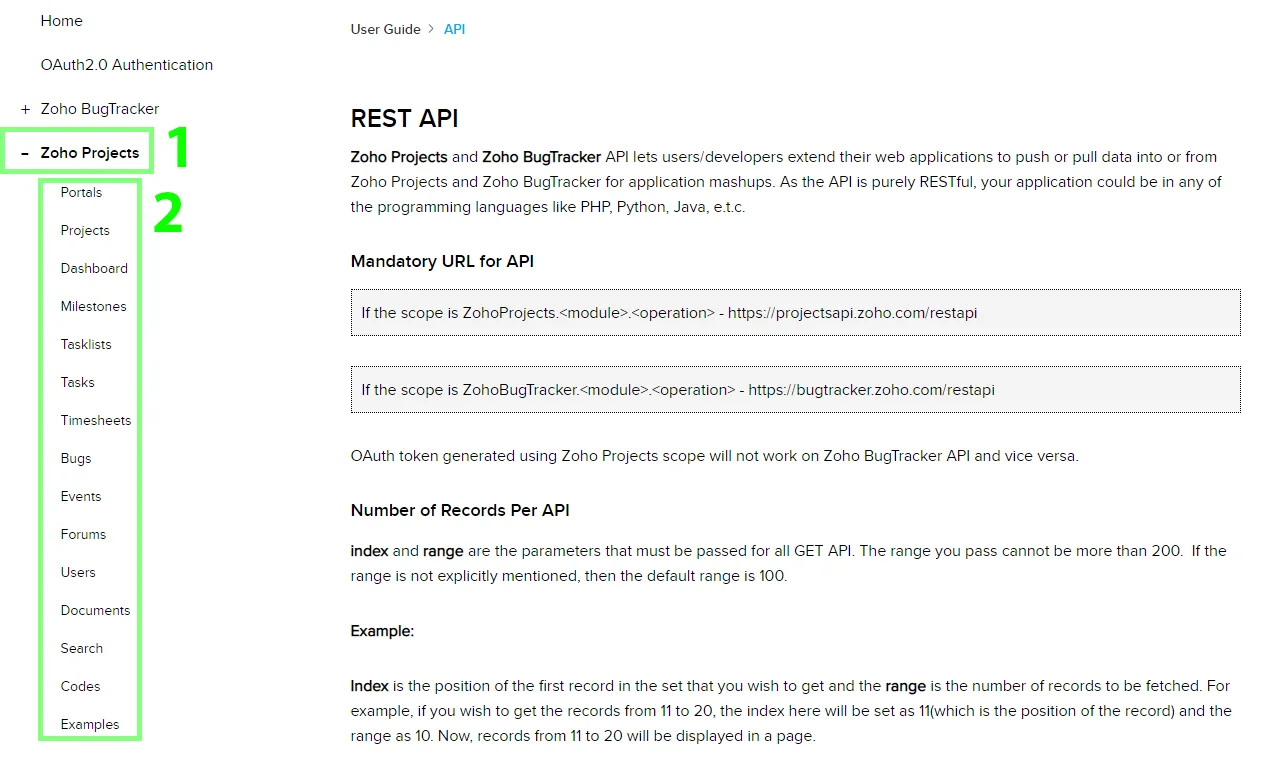
For the list of available endpoints, refer to the Zoho Projects API documentation.
-
Expand the “Zoho Projects” menu item in the left side menu.
-
Choose an entity you would like to work with.
Method
Select the HTTP method you want to use:
GET to retrieve information for an entry.
POST to create a new entry.
PUT to update/replace an existing entry.
PATCH to make a partial entry update.
DELETE to delete an entry.
Headers
Enter the desired request headers. You don’t have to add authorization headers; we already did that for you.
Query String
Enter the request query string.
Body
Enter the body content for your API call.
Example of Use – List Projects
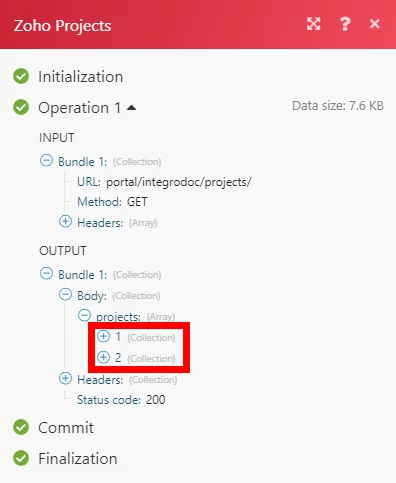
The following API call returns all projects from your Zoho Projects portal:
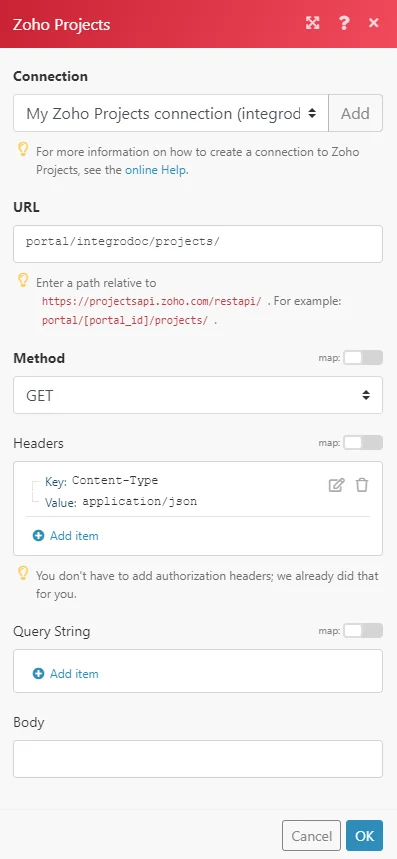
Matches of the search can be found in the module’s Output under Bundle > Body > projects. In our example, 2 projects were returned:
Legacy article, imported from the original Boost.space knowledge base (/knowledge-base/applications/productivity/zoho-projects/).

