CompanyHub
The CompanyHub modules allow you to monitor, create, update, list, retrieve, and delete the companies, contacts, deals, quotes, quote products, sales orders, sale order products, and records in your CompanyHub account.
Getting Started with CompanyHub
Prerequisites
- A CompanyHub account
In order to use CompanyHub with Boost.space Integrator, it is necessary to have a CompanyHub account. If you do not have one, you can create a CompanyHub account at companyhub.com.
The module dialog fields that are displayed in bold (in the Boost.space Integrator scenario, not in this documentation article) are mandatory!
Connecting CompanyHub to Boost.space Integrator
To connect your CompanyHub account to Boost.space Integrator you need to obtain the API Key from your CompanyHub account and insert it in the Create a connection dialog in the Boost.space Integrator module.
-
Log in to your CompanyHub.
-
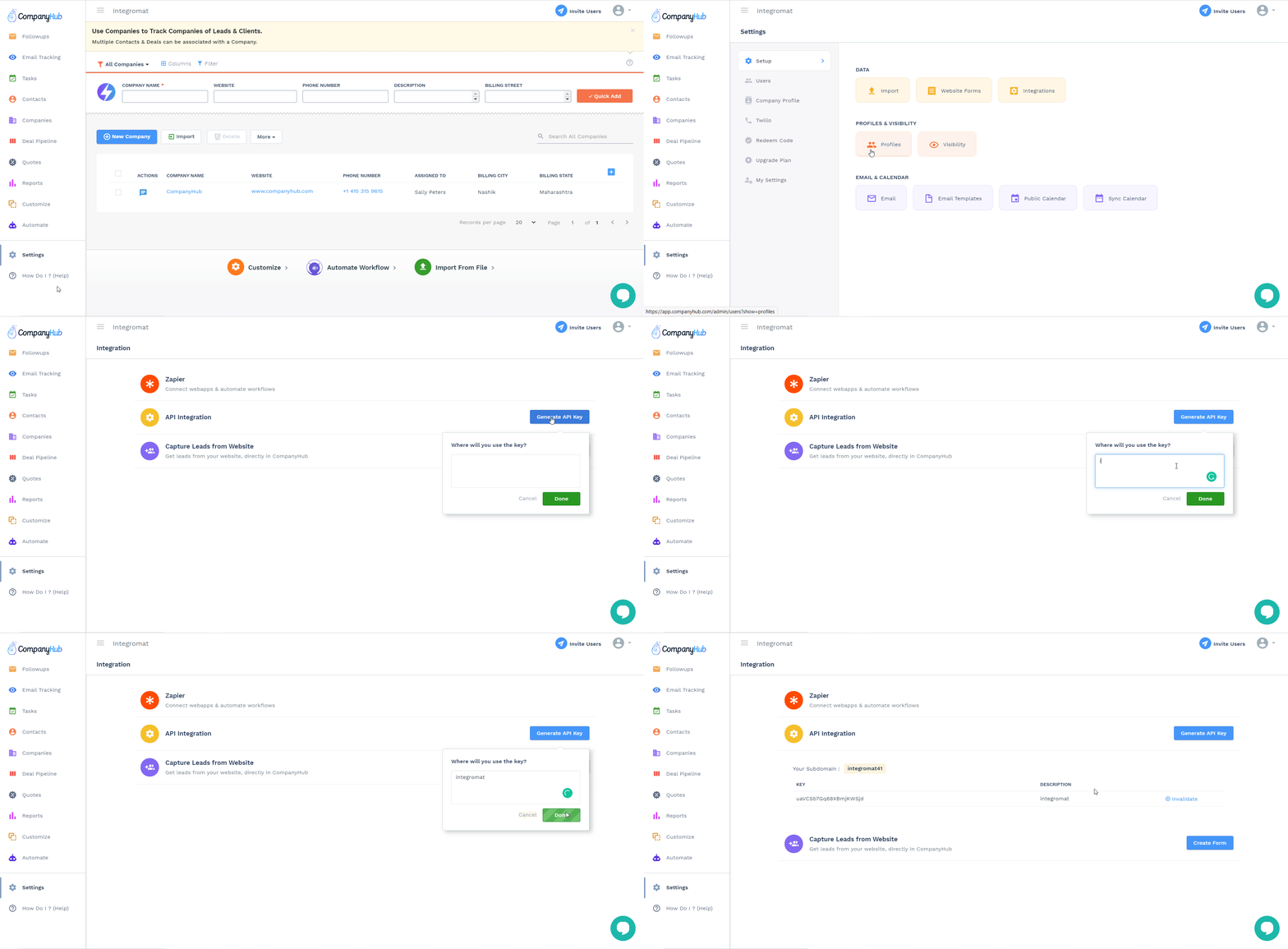
Click Settings > Integrations > Generate API Key. Enter the details for the API Key and click Save.
-
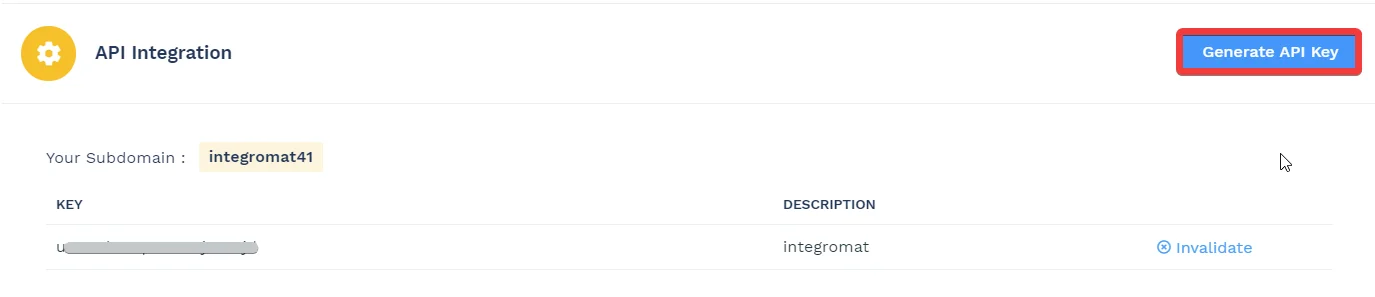
Copy the API Key to your clipboard.
-

Go to Boost.space Integrator and open the CompanyHub module’s Create a connection dialog.
-
In the Connection name field, enter a name for the connection.
-
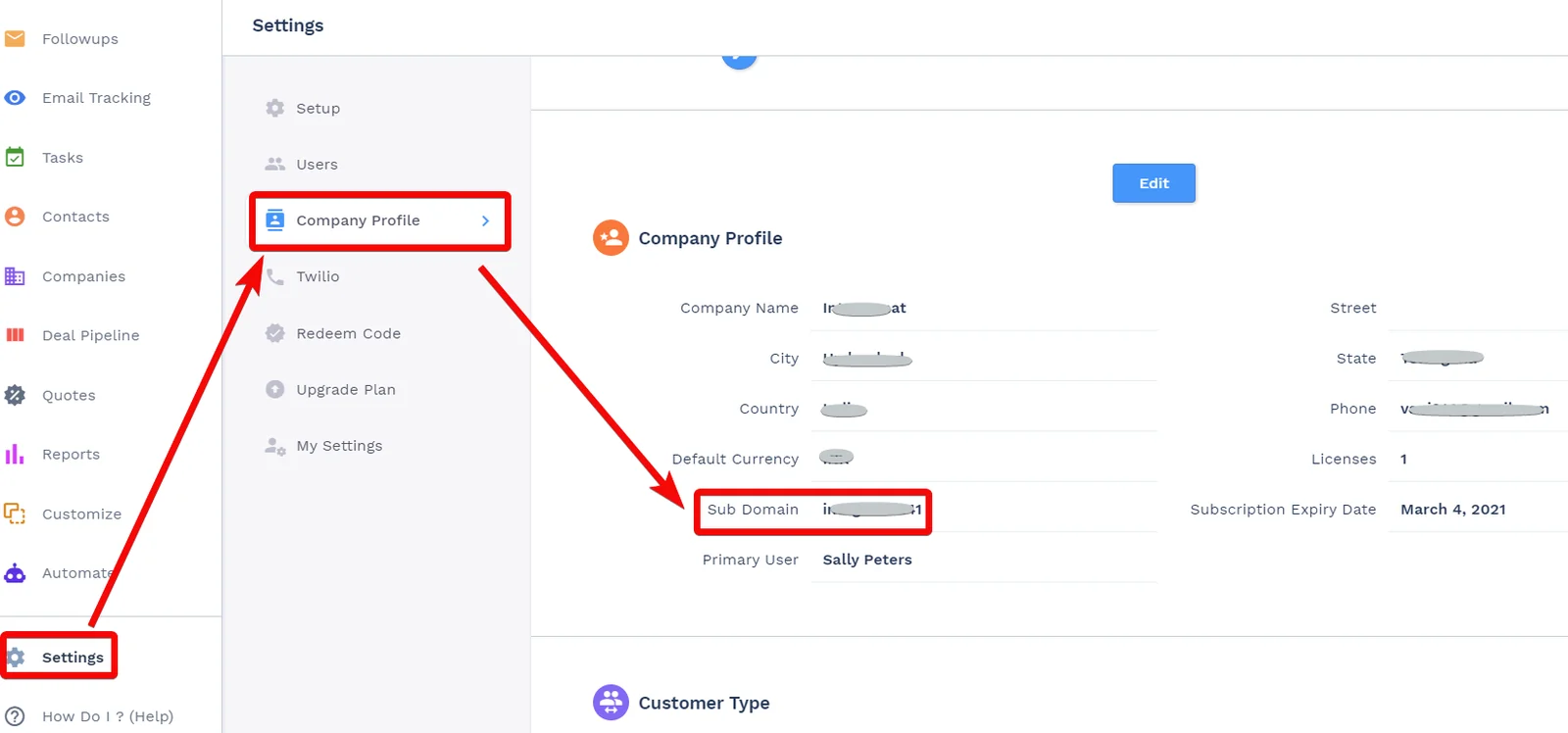
In the Subdomain field, enter the subdomain details. You can find the subdomain at Settings > Company Profile.
-
In the API Key field, enter the API key copied in step 3, and click Continue.
The connection has been established.
Companies
Watch New Company
Triggers when a new company has been created.
Connection
Establish a connection to your CompanyHub account.
Limit
Set the maximum number of companies Boost.space Integrator should return during one scenario execution cycle.
Search Companies
Searches for companies.
Connection
Establish a connection to your CompanyHub account.
Search by Keyword
Enter a keyword or a phrase to search the companies that match the specified query.
Limit
Set the maximum number of companies Boost.space Integrator should return during one scenario execution cycle.
Get a Company
Retrieves details of a company specified by ID.
Connection
Establish a connection to your CompanyHub account.
Company ID
Select the Company ID whose details you want to retrieve.
Create a Company
Creates a new company.
Connection
Establish a connection to your CompanyHub account.
Name
Enter the company name.
Description
Enter the details of the company.
Phone
Enter the company’s phone number.
Website
Enter the company’s website URL address.
Billing Street
Enter the company’s billing address street name.
Billing City
Enter the billing address city name.
Billing State
Enter the billing address state name.
Billing Country
Enter the billing address country name.
Billing Postal Code
Enter the billing address postal code.
Shipping Street
Enter the company’s shipping address street name.
Shipping City
Enter the shipping address city name.
Shipping State
Enter the shipping address state name.
Shipping Country
Enter the shipping address country name.
Shipping Postal Code
Enter the shipping address postal code.
Update a Company
Updates a company specified by ID.
Connection
Establish a connection to your CompanyHub account.
Company ID
Select the Company ID whose details you want to update.
Name
Enter the company name.
Description
Enter the details of the company.
Phone
Enter the company’s phone number.
Website
Enter the company’s website URL address.
Billing Street
Enter the company’s billing address street name.
Billing City
Enter the billing address city name.
Billing State
Enter the billing address state name.
Billing Country
Enter the billing address country name.
Billing Postal Code
Enter the billing address postal code.
Shipping Street
Enter the company’s shipping address street name.
Shipping City
Enter the shipping address city name.
Shipping State
Enter the shipping address state name.
Shipping Country
Enter the shipping address country name.
Shipping Postal Code
Enter the shipping address postal code.
Delete a Company
Deletes a company specified by ID.
Connection
Establish a connection to your CompanyHub account.
Company ID
Select the Company ID you want to delete.
Contacts
Watch New Contact
Triggers when a new contact has been created.
Connection
Establish a connection to your CompanyHub account.
Limit
Set the maximum number of contacts Boost.space Integrator should return during one scenario execution cycle.
Search Contacts
Searches for contacts.
Connection
Establish a connection to your CompanyHub account.
Search by Keyword
Enter a keyword or a phrase to search the contacts that match the specified query.
Limit
Set the maximum number of contacts Boost.space Integrator should return during one scenario execution cycle.
Get a Contact
Retrieves details of a contact specified by ID.
Connection
Establish a connection to your CompanyHub account.
Contact ID
Select the Contact ID whose details you want to retrieve.
Create a Contact
Creates a new contact.
Connection
Establish a connection to your CompanyHub account.
Name
Enter the contact’s name.
First Name
Enter the contact’s first name.
Last Name
Enter the contact’s last name.
Email Address
Enter the contact’s email address.
Company
Enter the contact’s company name.
Phone Number
Enter the contact’s phone number.
Description
Enter the contact’s details.
Source
Select the source from where the contact has subscribed.
Next Follow Up Date
Enter the date to reach out to the contact.
Has Opted Out of Emails
Select whether the contact has opted out of all the emails.
Enter the contact’s Twitter link.
Enter the contact’s LinkedIn profile link.
Google Plus
Enter the contact’s Google Plus account details.
Enter the contact’s Facebook account details.
Skype
Enter the contact’s skype ID.
Street
Enter the contact’s street name.
City
Enter the contact’s city name.
State
Enter the contact’s state name.
Country
Enter the contact’s country name.
Postal Code
Enter the contact’s area postal code.
Update a Contact
Updates a contact specified by ID.
Connection
Establish a connection to your CompanyHub account.
Contact ID
Select the Contact ID whose details you want to update.
Name
Enter the contact’s name.
First Name
Enter the contact’s first name.
Last Name
Enter the contact’s last name.
Email Address
Enter the contact’s email address.
Company
Enter the contact’s company name.
Phone Number
Enter the contact’s phone number.
Description
Enter the contact’s details.
Source
Select the source from where the contact has subscribed.
Next Follow Up Date
Enter the date to reach out to the contact.
Has Opted Out of Emails
Select whether the contact has opted out of all the emails.
Enter the contact’s Twitter link.
Enter the contact’s LinkedIn profile link.
Google Plus
Enter the contact’s Google Plus account details.
Enter the contact’s Facebook account details.
Skype
Enter the contact’s skype ID.
Street
Enter the contact’s street name.
City
Enter the contact’s city name.
State
Enter the contact’s state name.
Country
Enter the contact’s country name.
Postal Code
Enter the contact’s area postal code.
Delete a Contact
Deletes a contact specified by ID.
Connection
Establish a connection to your CompanyHub account.
Contact ID
Select the Contact ID you want to delete.
Deals
Watch New Deal
Triggers when a new deal has been created.
Connection
Establish a connection to your CompanyHub account.
Limit
Set the maximum number of deals Boost.space Integrator should return during one scenario execution cycle.
Search Deals
Searches for deals.
Connection
Establish a connection to your CompanyHub account.
Search by Keyword
Enter a keyword or a phrase to search for the deals that match the specified query.
Limit
Set the maximum number of deals Boost.space Integrator should return during one scenario execution cycle.
Get a Deal
Retrieves details of a deal specified by ID.
Connection
Establish a connection to your CompanyHub account.
Deal ID
Select the Deal ID whose details you want to retrieve.
Create a Deal
Creates a new deal.
Connection
Establish a connection to your CompanyHub account.
Name
Enter a name for the deal.
Deal Stage
Select the deal status:
-
Prospecting
-
Qualification
-
Discussion
-
Proposal
-
Review
-
Closed Won
-
Closed Lost
Company
Select the company to which the deal belongs to.
Contact
Select the contact associated with the deal.
Amount
Enter the deal amount. The currency in the account settings is considered.
Close Date
Enter the date on which the deal is expected to close. See the list of supported date and time formats.
Update a Deal
Updates a deal specified by ID.
Connection
Establish a connection to your CompanyHub account.
Deal ID
Select the Deal ID whose details you want to update.
Name
Enter a name for the deal.
Deal Stage
Select the deal status:
-
Prospecting
-
Qualification
-
Discussion
-
Proposal
-
Review
-
Closed Won
-
Closed Lost
Company
Select the company to which the deal belongs to.
Contact
Select the contact associated with the deal.
Amount
Enter the deal amount. The currency in the account settings is considered.
Close Date
Enter the date on which the deal is expected to close. See the list of supported date and time formats.
Delete a Deal
Deletes a deal specified by ID.
Connection
Establish a connection to your CompanyHub account.
Deal ID
Select the Deal ID you want to delete.
Quotes
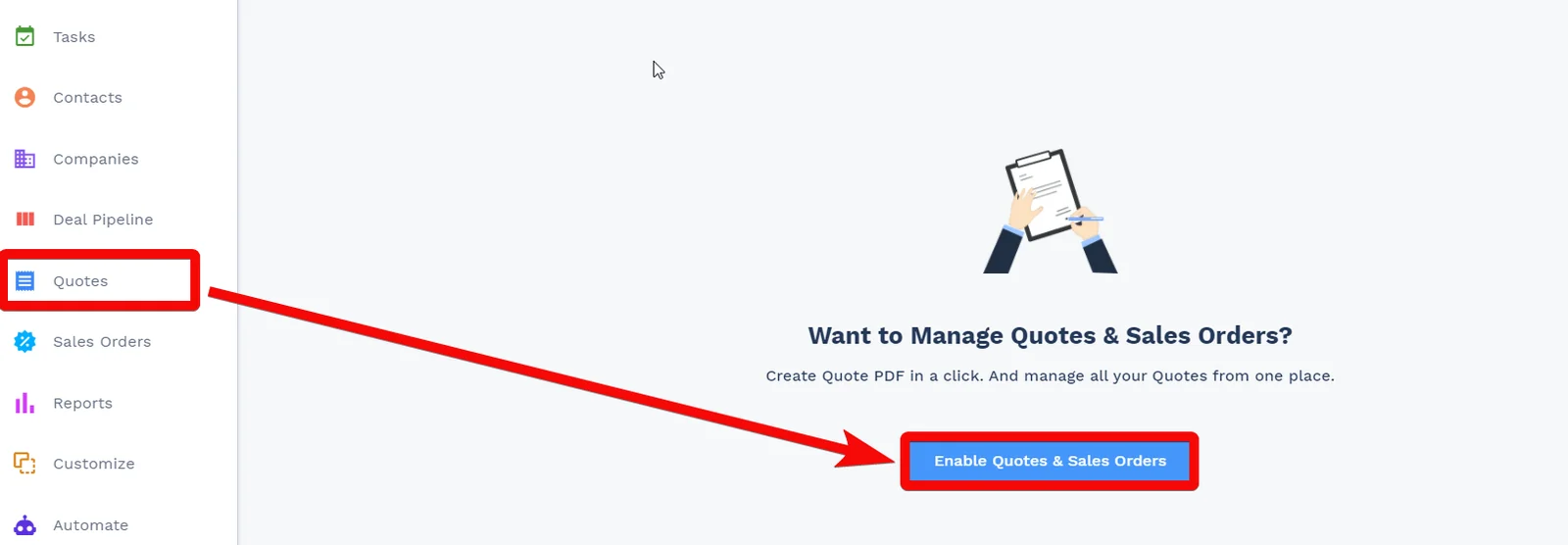
If you receive the Table does not exist error for any of the Quote modules, log in to your CompanyHub account, navigate to the Quotes section, and click Enable Quotes & Sales Orders.
Watch New Quote
Triggers when a quote has been created.
Connection
Establish a connection to your CompanyHub account.
Limit
Set the maximum number of quotes Boost.space Integrator should return during one scenario execution cycle.
Search Quote
Searches for quotes.
Connection
Establish a connection to your CompanyHub account.
Search by Keyword
Enter a keyword or a phrase to search for the quotes that match the specified query.
Limit
Set the maximum number of quotes Boost.space Integrator should return during one scenario execution cycle.
Get a Quote
Retrieves details of a quote specified by ID.
Connection
Establish a connection to your CompanyHub account.
Quote ID
Select the Quote ID whose details you want to retrieve.
Create a Quote
Creates a new quote.
Connection
Establish a connection to your CompanyHub account.
Bill to Name
Enter the customer name to whom you want to bill the quote.
Status
Select the quote status:
-
Draft
-
Presented
-
In Review
-
Accepted
-
Rejected
Company ID
Select the Company ID associated with the quote.
Contact ID
Select the Contact ID associated with the quote.
Deal ID
Select the Deal ID to which the quote belongs.
Quote Date
Enter the date on which the quote is created. See the list of supported date and time formats.
Expires On
Enter the date when the quote expires. See the list of supported date and time formats.
Delivery Method
Select the delivery method applicable for the items in the quote:
-
Ship
-
Download
Billing Street Address
Enter the billing address for the quote. Enter the street name.
Billing City
Enter the city name.
Billing State
Enter the state name.
Billing Country
Enter the country name.
Billing Postal Code
Enter the area postal code.
Ship to Name
Enter the contact person’s name in the shipping address for the quote.
Shipping Street
Enter the billing address for the quote. Enter the street name.
Shipping City
Enter the city name.
Shipping State
Enter the state name.
Shipping Country
Enter the country name.
Shipping Postal Code
Enter the area postal code.
Discount Type
Select the discount type applicable to the quote.
Discount
Enter the discount as a number in percents. For example, 15 for 15%.
Quote Product
Add the products to the quote:
Product ID
Select the product ID you want to add to the quote.
Quantity
Enter the number of products to add to the quote.
Price List ID
Select the price list ID applicable for the products.
Description
Enter the details of the product.
Sales Price
Enter the product sale price amount.
Net Sales Price
Enter the total sale price amount.
Update a Quote
Updates a quote specified by ID.
Connection
Establish a connection to your CompanyHub account.
Quote ID
Select the Quote ID whose details you want to update.
Bill to Name
Enter the customer name to whom you want to bill the quote.
Status
Select the quote status:
-
Draft
-
Presented
-
In Review
-
Accepted
-
Rejected
Company ID
Select the Company ID associated with the quote.
Contact ID
Select the Contact ID associated with the quote.
Deal ID
Select the Deal ID to which the quote belongs to.
Quote Date
Enter the date on which the quote is created. See the list of supported date and time formats.
Expires On
Enter the date when the quote expires. See the list of supported date and time formats.
Delivery Method
Select the delivery method applicable for the items in the quote:
-
Ship
-
Download
Billing Street Address
Enter the billing address for the quote. Enter the street name.
Billing City
Enter the city name.
Billing State
Enter the state name.
Billing Country
Enter the country name.
Billing Postal Code
Enter the area postal code.
Ship to Name
Enter the contact person’s name in the shipping address for the quote.
Shipping Street
Enter the billing address for the quote. Enter the street name.
Shipping City
Enter the city name.
Shipping State
Enter the state name.
Shipping Country
Enter the country name.
Shipping Postal Code
Enter the area postal code.
Discount Type
Select the discount type applicable to the quote.
Discount
Enter the discount as a number in percents. For example, 15 for 15%.
Quote Product
Add the products to the quote:
Product ID
Select the product ID you want to add to the quote.
Quantity
Enter the number of products to add to the quote.
Price List ID
Select the price list ID applicable for the products.
Description
Enter the details of the product.
Sales Price
Enter the product sale price amount.
Net Sales Price
Enter the total sale price amount.
Delete a Quote
Deletes a quote specified by ID.
Connection
Establish a connection to your CompanyHub account.
Quote ID
Select the Quote ID you want to delete.
Quote Products
Watch New Quote Product
Triggers when a new quote product has been created.
Connection
Establish a connection to your CompanyHub account.
Limit
Set the maximum number of quote products Boost.space Integrator should return during one scenario execution cycle.
Search Quote Products
Searches for a quote product.
Connection
Establish a connection to your CompanyHub account.
Search by Keyword
Enter a keyword or a phrase to search the quote products that match the specified query.
Limit
Set the maximum number of quote products Boost.space Integrator should return during one scenario execution cycle.
Get a Quote Product
Retrieves the details of a quote product specified by ID.
Connection
Establish a connection to your CompanyHub account.
Quote Product ID
Select the Quote Product ID whose details you want to retrieve.
Add a Product on a Quote
Adds a selected product on a quote specified by ID.
Connection
Establish a connection to your CompanyHub account.
Quote ID
Select the Quote ID to which you want to add a product.
Product ID
Select the Product ID you want to add to the quote.
Quantity
Enter the number of the products to add to the product.
Price List ID
Select the Price List ID applicable to the product.
Description
Enter the details of the product.
Sales Price
Enter the product’s sales price.
Net Sales Price
Enter the total product’s sales price.
Discount Type
Select the product’s applicable discount type:
-
Percent
-
Amount
Discount
Enter the discount as a number in percentage. For example, 15 for 15%.
Discount Amount
Enter the applicable discount amount for the products.
Tax
Select the tax type applicable for the quote. For example, VAT.
Tax Amount
Enter the tax amount applicable to the quote.
Product Sub Total
Enter the sub-total amount applicable for the products.
Product Total
Enter the product total amount.
Update a Quote Product
Updates a quote product specified by ID.
Connection
Establish a connection to your CompanyHub account.
Quote ID
Select the Quote ID to which you want to add a product.
Product ID
Select the Product ID you want to add to the quote.
Quantity
Enter the number of the products to add to the product.
Price List ID
Select the Price List ID applicable to the product.
Description
Enter the details of the product.
Sales Price
Enter the product’s sales price.
Net Sales Price
Enter the total product’s sales price.
Discount Type
Select the product’s applicable discount type:
-
Percent
-
Amount
Discount
Enter the discount as a number in percentage. For example, 15 for 15%.
Discount Amount
Enter the applicable discount amount for the products.
Tax
Select the tax type applicable for the quote. For example, VAT.
Tax Amount
Enter the tax amount applicable to the quote.
Product Sub Total
Enter the sub-total amount applicable for the products.
Product Total
Enter the product total amount.
Delete a Quote Product
Deletes a selected product of a quote specified by ID.
Connection
Establish a connection to your CompanyHub account.
Quote Product ID
Select the Quote Product ID you want to delete.
Sales Orders
Watch New Sales Order
Triggers when a new sales order has been created.
Connection
Establish a connection to your CompanyHub account.
Limit
Set the maximum number of sale orders Boost.space Integrator should return during one scenario execution cycle.
Search Sales Order
Searches for sales orders.
Connection
Establish a connection to your CompanyHub account.
Search by Keyword
Enter a keyword or a phrase to search the sale orders that match the specified query.
Limit
Set the maximum number of companies Boost.space Integrator should return during one scenario execution cycle.
Get a Sales Order
Retrieves details of a sales order specified by ID.
Connection
Establish a connection to your CompanyHub account.
Sales Order ID
Select the Sales Order ID whose details you want to retrieve.
Create a Sales Order
Creates a new sales order.
Connection
Establish a connection to your CompanyHub account.
Subject
Enter the subject line for the new sale order.
Status
Select the sales order status:
-
Draft
-
Delivered
-
Active
-
Canceled
Bill to Name
Enter the customer name to whom the sales order belongs to.
Company ID
Select the Company ID associated with the sales order.
Contact ID
Select the Contact ID associated with the sales order.
Deal ID
Select the Deal ID associated with the sales order.
Quote ID
Select the Quote ID associated with the sales order.
Issue Date
Enter the Date associated with the sales order.
Shipping Date
Enter the date the sales order should be shipped.
Notes
Enter any additional information about the sales order you would like to mention internally.
Billing Street
Enter the company’s billing address street name to mention in the sales order.
Billing City
Enter the billing address city name.
Billing State
Enter the billing address state name.
Billing Country
Enter the billing address country name.
Billing Postal Code
Enter the billing address country name.
Ship to Name
Enter the contact person’s name at the shipping address to add to the sales order.
Shipping Street
Enter the company’s shipping address street name to mention in the sales order.
Shipping City
Enter the shipping address city name.
Shipping State
Enter the shipping address state name.
Shipping Country
Enter the shipping address country name.
Shipping Postal Code
Enter the shipping address area postal code.
Discount Type
Select the discount type applicable to the sales order.
Discount
Enter the discount as a number in percents. For example, 15 for 15%.
Update a Sales Order
Updates a sales order specified by ID.
Connection
Establish a connection to your CompanyHub account.
Sales Order ID
Select the Sales Order ID whose details you want to update.
Subject
Enter the subject line for the new sale order.
Status
Select the sales order status:
-
Draft
-
Delivered
-
Active
-
Canceled
Bill to Name
Enter the customer name to whom the sales order belongs to.
Company ID
Select the Company ID associated with the sales order.
Contact ID
Select the Contact ID associated with the sales order.
Deal ID
Select the Deal ID associated with the sales order.
Quote ID
Select the Quote ID associated with the sales order.
Issue Date
Enter the Date associated with the sales order.
Shipping Date
Enter the date the sales order should be shipped.
Notes
Enter any additional information about the sales order you would like to mention internally.
Billing Street
Enter the company’s billing address street name to mention in the sales order.
Billing City
Enter the billing address city name.
Billing State
Enter the billing address state name.
Billing Country
Enter the billing address country name.
Billing Postal Code
Enter the billing address country name.
Ship to Name
Enter the contact person’s name at the shipping address to add to the sales order.
Shipping Street
Enter the company’s shipping address street name to mention in the sales order.
Shipping City
Enter the shipping address city name.
Shipping State
Enter the shipping address state name.
Shipping Country
Enter the shipping address country name.
Shipping Postal Code
Enter the shipping address area postal code.
Discount Type
Select the discount type applicable to the sales order.
Discount
Enter the discount as a number in percents. For example, 15 for 15%.
Delete a Sales Order
Deletes a sales order specified by ID.
Connection
Establish a connection to your CompanyHub account.
Company ID
Select the Sales Order ID you want to delete.
Sales Order Products
Watch New Sales Order Products
Triggers when a new sales order product has been created.
Connection
Establish a connection to your CompanyHub account.
Limit
Set the maximum number of sale order products Boost.space Integrator should return during one scenario execution cycle.
Search Sales Orders Products
Searches for sales order products.
Connection
Establish a connection to your CompanyHub account.
Search by Keyword
Enter a keyword or a phrase to search the companies that match the specified query.
Limit
Set the maximum number of companies Boost.space Integrator should return during one scenario execution cycle.
Get a Sales Order Product
Retrieves details of a sales order product specified by ID.
Connection
Establish a connection to your CompanyHub account.
Company ID
Select the Company ID whose details you want to retrieve.
Add a Product to a Sales Order
Adds a selected product on a sales order product specified by ID.
Connection
Establish a connection to your CompanyHub account.
Sales Order ID
Select the Sales Order ID to which you want to add a product.
Product ID
Select the Product ID you want to add to the sales order.
Quantity
Enter the number of the products to add to the sales order.
Price List ID
Select the Price List ID applicable to the product.
Description
Enter the details of the product.
Sales Price
Enter the product’s sales price.
Net Sales Price
Enter the total product’s sales price.
Discount Type
Select the product’s applicable discount type:
-
Percent
-
Amount
Discount
Enter the discount as a number in percentage. For example, 15 for 15%.
Discount Amount
Enter the applicable discount amount for the products.
Tax
Select the tax type applicable for the product. For example, VAT.
Tax Amount
Enter the tax amount applicable to the product.
Product Sub Total
Enter the sub-total amount applicable for the products.
Product Total
Enter the product total amount to add to the sales order.
Update a Sales Order Product
Updates a sales order product specified by ID.
Connection
Establish a connection to your CompanyHub account.
Sales Order Product ID
Select the Sales Order Product ID whose details you want to update.
Sales Order ID
Select the Sales Order ID for the product.
Quantity
Enter the number of the products to add to the sales order.
Price List ID
Select the Price List ID applicable to the product.
Description
Enter the details of the product.
Sales Price
Enter the product’s sales price.
Net Sales Price
Enter the total product’s sales price.
Discount Type
Select the product’s applicable discount type:
-
Percent
-
Amount
Discount
Enter the discount as a number in percentage. For example, 15 for 15%.
Discount Amount
Enter the applicable discount amount for the products.
Tax
Select the tax type applicable for the product. For example, VAT.
Tax Amount
Enter the tax amount applicable to the product.
Product Sub Total
Enter the sub-total amount applicable for the products.
Product Total
Enter the product total amount to add to the sales order.
Delete a Sales Order Product
Deletes a sales order product specified by ID.
Connection
Establish a connection to your CompanyHub account.
Company ID
Select the Company ID whose details you want to retrieve.
Records
Watch New Record
Triggers when a new record on a specified table has been created.
Connection
Establish a connection to your CompanyHub account.
Limit
Set the maximum number of new records Boost.space Integrator should return during one scenario execution cycle.
Search Record
Searches for records in a table specified by name.
Connection
Establish a connection to your CompanyHub account.
Search by Keyword
Enter a keyword or a phrase to search the companies that match the specified query.
Limit
Set the maximum number of companies Boost.space Integrator should return during one scenario execution cycle.
Get a Record
Retrieves details of a record of a specific table specified by ID.
Connection
Establish a connection to your CompanyHub account.
Company ID
Select the Company ID whose details you want to retrieve.
Create a Record
Creates a record in a table specified by name.
Connection
Establish a connection to your CompanyHub account.
Table Name
Enter the table name in which you want to add a new record.
Fields
Add the custom fields and their values to the table. See Custom Fields Documentation.
Update a Record
Updates a record in a table specified by name.
Connection
Establish a connection to your CompanyHub account.
Table Name
Enter the table name whose record you want to update.
Record ID
Enter the Record ID whose details you want to update.
Fields
Add the custom fields and their values to the table. See Custom Fields Documentation.
Delete a Record
Deletes a record of a specific table specified by ID.
Connection
Establish a connection to your CompanyHub account.
Company ID
Select the Company ID whose details you want to retrieve.
Other
Make an API Call
Performs an arbitrary API call.
Connection
Establish a connection to your CompanyHub account.
URL
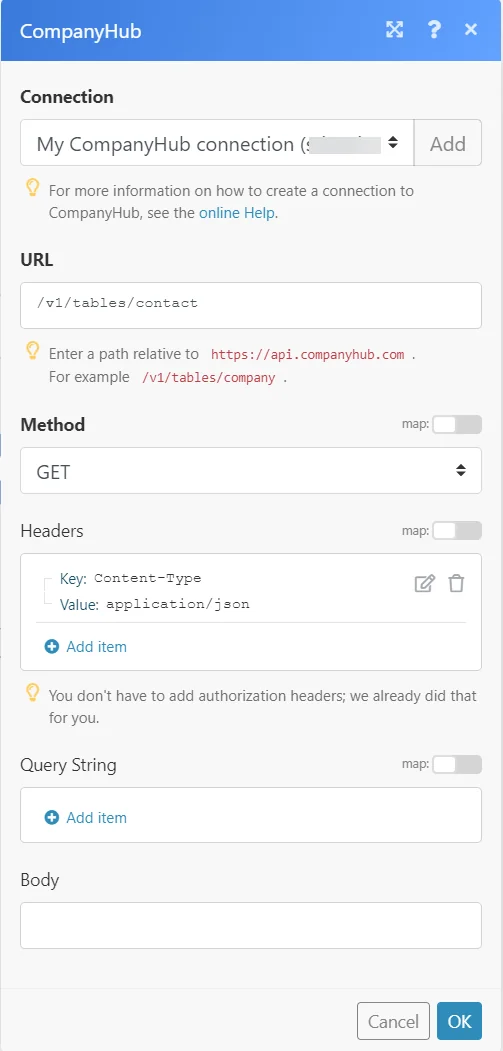
Enter a path relative to https://api.companyhub.com/. For example: /v1/table/company
For the list of available endpoints, refer to the CompanyHub API Documentation.
Method
Select the HTTP method you want to use:
GET
to retrieve information for an entry.
POST
to create a new entry.
PUT
to update/replace an existing entry.
PATCH
to make a partial entry update.
DELETE
to delete an entry.
Headers
Enter the desired request headers. You don’t have to add authorization headers; we already did that for you.
Query String
Enter the request query string.
Body
Enter the body content for your API call.
Example of Use – List Tasks
The following API call returns all the contacts from your CompanyHub account:
URL:/v1/table/contact
Method:GET
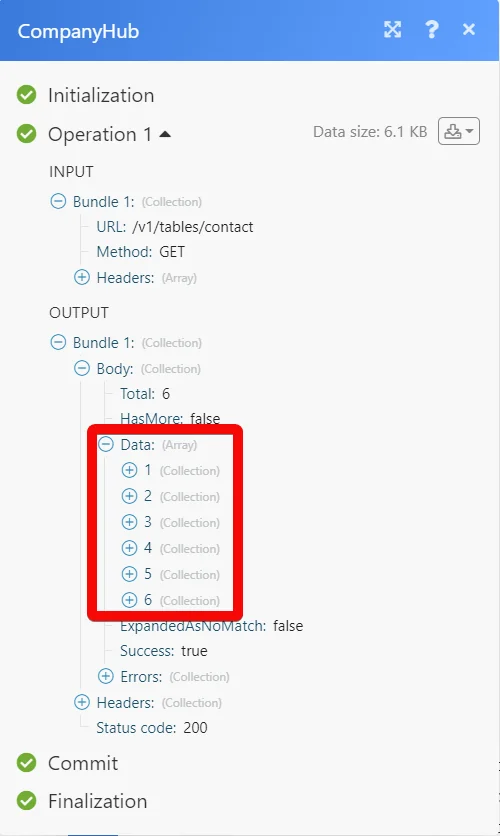
Matches of the search can be found in the module’s Output under Bundle > Body > data.
In our example, 6 contacts were returned:
Legacy article, imported from the original Boost.space knowledge base (/knowledge-base/applications/crm-and-sales-tools/companyhub/).

